
Acer Chromebook 11
Updated on

Note: This product has been discontinued and reached its Auto Update Expiration date in September 2021. It no longer receives Chrome OS updates or security patches. The information below is kept for historical reference.
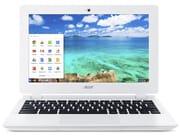
Acer introduced the Chromebook 11 CB3-111 series at IFA 2014 as a replacement for the incredibly popular C720 series. The C720 line dominated Chromebook sales throughout 2013, and Acer aimed to continue that momentum with this budget-focused successor. At launch prices between $169 and $199, the CB3-111 targeted students, educators, and anyone seeking an affordable entry point into Chrome OS.
The CB3-111 runs on Intel’s Baytrail-M platform with a Celeron N2830 processor paired with 2GB of DDR3L RAM. This combination handles basic Chrome OS tasks adequately (web browsing, document editing, and media streaming all work smoothly) though multitasking with numerous tabs can feel sluggish. The 16GB eMMC storage provides modest local capacity, encouraging users to rely on cloud storage for larger files.
Acer shipped the CB3-111 in several SKUs during its production run from late 2014 through early 2016, including the CB3-111-C670 and CB3-111-C8UB built around the N2830, and a later CB3-111-C4HT refresh with the slightly faster Intel Celeron N2840 (clocked to 2.58 GHz on burst). All of these variants shared the same 11.6-inch chassis, the same 36 Wh battery, the same fanless thermal design, and the same 2 GB of soldered RAM. Schools and education resellers bought the CB3-111 in volume during the 2015 back-to-school cycle, often alongside the Acer C720 it succeeded, and many of those fleet units stayed in classrooms until the Auto Update Expiration in September 2021 finally retired them from active service.
Pros and Cons
| Pros | Cons |
|---|---|
| Completely silent fanless operation | Cheap-feeling white plastic construction |
| Impressive 9+ hour battery life for typical use | Low screen brightness (208 cd/m²) limits outdoor visibility |
| Fast 9-second boot time | Only 2GB RAM restricts heavy multitasking |
| Lightweight at 1.25kg (2.75 lbs) | No backlit keyboard |
| Surprisingly good speakers for the size | TN panel with narrow viewing angles |
| Excellent value at original $169-199 pricing | Storage non-upgradeable |
Related Videos
Acer Chromebook 11 Comparison Chart
 Acer Chromebook 11 | Acer Chromebook 11 | Acer Chromebook 11 | |
| Price | List Price: $199.99 Amazon Prices: | List Price: $169.99 Amazon Prices: | List Price: $199.99 Amazon Prices: |
| Model number | CB3-111-C8UB / NX.MQNAA.008 | CB3-111-C670 / NX.MQNAA.001 | CB3-111-C4HT / NX.MQNAA.011 |
| Performance Rating | 1.8 | 1.8 | 1.9 |
| Chromebook Plus | No | No | No |
| Processor | Dual-core 2.16 Ghz (max 2.41 Ghz) Intel Celeron N2830 | Dual-core 2.16 Ghz (max 2.41 Ghz) Intel Celeron N2830 | Dual-core 2.16 Ghz (max 2.58 Ghz) Intel Celeron N2840 |
| RAM | 2 GB | 2 GB | 2 GB |
| Internal Storage | 16 GB | 16 GB | 16 GB |
| Screen Size | 11.6" | 11.6" | 11.6" |
| Screen Resolution | 1366x768 | 1366x768 | 1366x768 |
| Screen Type | LED | LED | LED |
| Touch Screen | No | No | No |
| Stylus / Pen | No Stylus Support | No Stylus Support | No Stylus Support |
| Dimensions width x length x thickness | 11.8 x 8 x 0.73 inches (299.72 x 203.2 x 18.54 mm) | 11.8 x 8 x 0.73 inches (299.72 x 203.2 x 18.54 mm) | 11.8 x 8 x 0.73 inches (299.72 x 203.2 x 18.54 mm) |
| Weight | 2.65 lbs (1.2 kg) | 2.4 lbs (1.09 kg) | 2.65 lbs (1.2 kg) |
| Backlit Keyboard | No | No | No |
| Webcam | No Webcam | No Webcam | No Webcam |
| WiFi | 802.11ac MIMO | 802.11ac MIMO | 802.11ac MIMO |
| Bluetooth | Bluetooth 4.0 | Bluetooth 4.0 | Bluetooth 4.0 |
| Ethernet | No | No | No |
| Cellular Modem | No | No | No |
| HDMI | Full-Size HDMI | Full-Size HDMI | Full-Size HDMI |
| USB Ports | 1 USB 2.0, 1 USB 3 | 1 USB 2.0, 1 USB 3 | 1 USB 2.0, 1 USB 3 |
| Thunderbolt Ports | No | No | No |
| Card Reader | SD | SD | SD |
| Battery | 3 cell, 3220 mAh, Lithium-ion | 3 cell, 3220 mAh, Lithium-ion | 3 cell, 3220 mAh, Lithium-ion |
| Battery Life | 8.5 hours | 8.5 hours | 8.5 hours |
| Fanless | Yes | Yes | Yes |
| Auto Update Expiration Date | September, 2021 | September, 2021 | September, 2021 |
Related Chromebooks
-
 Acer Chromebook 311 (AMD)The Acer Chromebook 311 combines an 11.6-inch ComfyView screen, robust AMD processing, and 10-hour…
 -
 Acer Chromebook 311 (CO731)The Acer Chromebook 311 (CO731) delivers fanless, silent operation in a compact 11.6-inch package,…
 -
 ASUS Chromebook C203XAThe ASUS Chromebook C203XA shines with military-grade durability, an 11.6-inch anti-glare HD…
 -
 Lenovo Flex 3 ChromebookThe Lenovo Flex 3 Chromebook hits the sweet spot with its 11.6-inch IPS touchscreen, 4GB RAM, and…
 -
 Dell Chromebook 3120A rugged and affordable 11.6-inch Chromebook with Intel N100 processor, available in clamshell and…
 -
 Lenovo Chromebook 3 11"The Lenovo Chromebook 3 is a sub-$220 11.6-inch ChromeOS laptop with a Celeron N4020, 4GB of RAM,…
Design and Build Quality
The CB3-111’s white plastic chassis keeps weight down to just 1.25kg (2.75 lbs), making it easy to toss in a backpack without much thought. The build feels utilitarian rather than premium. NotebookCheck’s testing noted the plastics have a somewhat hollow sound when tapped, though after three weeks of use the unit remained “strong, well-assembled and scratch and smudge free.” The compact 299 x 202 x 18.7mm dimensions fit comfortably on small desks and airplane tray tables.
Acer’s keyboard provides good tactile feedback with adequate key travel. Users report the typing experience rivals some larger laptops, making it suitable for extended writing sessions despite the compact form factor. The trackpad responds reliably, though like most budget Chromebooks of this era, it lacks the glass-smooth feel of premium alternatives.
Display
The 11.6-inch TN panel with 1366x768 resolution serves basic productivity needs but won’t impress anyone accustomed to better screens. NotebookCheck measured brightness at just 208 cd/m² with a black level of 0.38, adequate for indoor use but struggling in bright environments. Viewing angles are notably narrow; colors wash out quickly when viewing from off-center positions. For a device primarily intended for document work and web browsing, the display suffices, but video enthusiasts and photo editors should look elsewhere.
Performance
The Intel Celeron N2830 processor clocks between 2.16-2.41 GHz across its two cores. This Baytrail-M chip delivers exactly what budget Chromebook buyers expect: responsive performance for typical Chrome OS tasks, with noticeable slowdowns when pushing beyond basic use cases. NotebookCheck observed the applications menu takes over one second to respond, and loading large Google Drive documents can test patience. For checking email, browsing social media, and light document work, however, the performance proves acceptable.
The 16GB eMMC storage achieves around 21,000 operations per second, respectable for the class. Boot times clock in at approximately 9 seconds from cold start to user login, showcasing Chrome OS’s efficiency even on modest hardware.
Battery Life
Battery performance stands as one of the CB3-111’s genuine strengths. The 36Wh battery consistently delivers strong results across NotebookCheck’s three runtime tests: NotebookCheck’s testing recorded 9.2 hours of offline word processing, 9 hours 28 minutes of WiFi surfing, and 6 hours 34 minutes of 1080p H.264 video playback. Real-world use typically falls between these figures depending on screen brightness and workload intensity. The fanless design contributes to excellent power efficiency, drawing just 2.1-6.8W at idle and 8.6-9.4W under load.
Thermal Performance and Noise
The complete absence of a fan means the CB3-111 operates in total silence. There’s no whir, no hum: just quiet computing. This makes the Chromebook particularly well-suited for library use, classrooms, or anywhere noise disruption matters. The fanless design also benefits thermal performance surprisingly well; NotebookCheck measured a maximum chassis temperature of just 32.7°C (91°F) under load, meaning it stays comfortable on the lap.
Audio
Despite the budget positioning, the CB3-111’s speakers punch well above their weight class. NotebookCheck described them as “stupid good: uncomfortably loud and clear for a computer this size.” For casual video watching or video calls, the audio output exceeds expectations. Of course, serious music listening still benefits from headphones connected via the combo audio jack.
Connectivity
Port selection covers the basics without excess. You get one USB 2.0 and one USB 3.0 port, a full-size HDMI output for external displays, and a full-size SD card slot for storage expansion or photo transfer. The USB 3.0 port could also support a USB Ethernet adapter for wired networking. The lack of USB-C reflects the 2014 design timeframe. Wi-Fi 5 (802.11ac MIMO) and Bluetooth 4.0 handle wireless connectivity, providing solid performance for the era though lacking the range and speed improvements of modern Wi-Fi 6 standards.
Reviewer Insights
NotebookCheck
NotebookCheck published a thorough review of the CB3-111 in November 2014 and awarded the device a 78% rating, concluding that “the CB3-111 appears to be the bargain of the bunch” against the other budget Chromebooks in their test pool. The reviewer’s broader summary praised the value proposition: “The Acer CB3-111 is one of the cheapest laptops available and it does a good job of being clean, stable and efficient within 2GB of RAM and 16GB of storage.”
Their lab measurements form the backbone of the spec claims on this page: 208 cd/m² peak display brightness, 0.38 cd/m² black level, 9.2 hours of offline word processing, 9 hours 28 minutes of WiFi surfing, 6 hours 34 minutes of 1080p H.264 video playback, idle power draw between 2.1 W and 6.8 W, and a maximum chassis temperature of just 32.7°C (91°F) under sustained load. The reviewer’s main criticisms centered on the display’s limited brightness for outdoor use and the right spacebar area’s occasional unresponsiveness. Overall, they recommended the CB3-111 for “compact, affordable browsing-focused computing” while acknowledging its limitations for users needing more power or a better screen.
Owner-reported experience
In the years since launch, the CB3-111 picked up a consistent set of owner-side comments that line up with the lab review. Buyers tended to be happy with the boot time, the silence, and the all-day battery; the most common complaints were the 2 GB RAM ceiling, the dim TN panel, and (later in the device’s life) the fact that 16 GB of eMMC storage filled up quickly once Chrome OS itself, the Linux container, and a few Android apps were installed. The keyboard drew mixed feedback: students and casual writers found it comfortable for the size, while longer-form typists noticed the shallow travel after an hour or two. None of this contradicts the review verdict; it just describes how a “fine for the price” 2014 budget Chromebook ages into a “fine for offline schoolwork” 2026 hand-me-down.
Owner Maintenance Resources
Five years past the AUE date, the most common reasons a CB3-111 stops working are mechanical, not software: a swollen battery that no longer holds a charge, a cracked screen on a unit that was carried in a school backpack for years, or a worn-out hinge on a heavily opened lid. The repair videos linked above (battery replacement and screen replacement, both from Screen Surgeons) walk through the two repairs an owner is most likely to need on a CB3-111 that has aged out of warranty. Acer’s service manual for the CB3-111 documents the same disassembly path; the keyboard deck lifts after a row of screws around the perimeter, and the 36 Wh internal battery is held to the lower case by a few tabs and a single ribbon connector. None of this is technically difficult, but the white plastic chassis does scratch easily, so a plastic pry tool beats a screwdriver pried in at the seam.
For software-side extension, two paths are common. The first is Chrome OS Flex, Google’s own continuation of CloudReady, which targets older x86 hardware and is the closest “still feels like a Chromebook” option for a post-AUE CB3-111. The second is a lightweight Linux distribution loaded through developer mode and SeaBIOS; the CB3-111 has solid mainline Linux driver support thanks to its Bay Trail platform, and a minimal Xfce or LXQt desktop will run noticeably faster than the final Chrome OS build that shipped to the device.
Who Should Consider This Chromebook
In its era, the CB3-111 made sense for students needing a lightweight note-taking machine, parents seeking a kid-proof web browser for homework, or anyone wanting a secondary device for couch browsing. The silent operation and long battery life proved especially valuable in educational settings.
Today, with the Auto Update Expiration passed in September 2021, the CB3-111 no longer receives security updates from Google. This makes it unsuitable for tasks involving sensitive data, online banking, or accounts you care about protecting. However, some use cases remain viable: offline document work, media playback, or as a dedicated terminal for specific purposes where security concerns don’t apply. Running alternative operating systems like CloudReady (now Chrome OS Flex) or Linux distributions can extend the hardware’s useful life for technically inclined users.
For those seeking a similar budget-friendly Chromebook experience with current security updates, see our Chromebook comparison chart to find current options, or check our guide to the best budget Chromebooks for updated recommendations.
Frequently Asked Questions
Is the Acer Chromebook 11 CB3-111 still supported?
No. The CB3-111 reached its Auto Update Expiration date in September 2021 and no longer receives Chrome OS updates or security patches from Google. It still boots and runs the last build that was pushed to the device, but it should not be used for online banking, password-protected accounts, or anything else that depends on current security fixes.
Can the RAM or storage be upgraded on the CB3-111?
No. The 2 GB of DDR3L RAM is soldered to the motherboard, and the 16 GB eMMC storage is also soldered. Every CB3-111 ships with the same 2 GB / 16 GB configuration, and the only practical way to expand storage is the full-size SD card slot or external USB drives.
What processor came in the CB3-111?
Most CB3-111 SKUs shipped with the Intel Celeron N2830, a dual-core Bay Trail-M chip clocked between 2.16 and 2.41 GHz. A later refresh SKU (CB3-111-C4HT) shipped with the slightly faster Intel Celeron N2840, which raised the burst clock to 2.58 GHz. Both processors are fanless, integrated graphics, and limited to the same 2 GB RAM ceiling.
How long does the battery last on a CB3-111?
On a healthy original 36 Wh battery, NotebookCheck measured 9.2 hours of offline word processing, 9 hours 28 minutes of WiFi surfing, and 6 hours 34 minutes of 1080p H.264 video playback. Real-world battery life on a 10-plus-year-old unit will be lower; cells that have been through a decade of charge cycles often hold 50 to 70 percent of their original capacity. If a CB3-111 only runs for two or three hours on a charge, the battery is the most likely cause, and the battery replacement video on this page covers the swap end-to-end.
Can I install Linux or Chrome OS Flex on the CB3-111?
Yes. The CB3-111 is a common target for post-AUE software extension. Chrome OS Flex is the closest “still feels like a Chromebook” option and is officially supported by Google for older x86 hardware. A lightweight Linux distribution (Xfce, LXQt, or similar) installed through developer mode and SeaBIOS is the other common path; the Bay Trail platform has good mainline Linux driver support, and a minimal desktop will run faster than the final Chrome OS build that shipped on the device.
What is the difference between the CB3-111 and the C720?
The CB3-111 was Acer’s 2014 successor to the C720. The biggest differences are the move to a fanless Bay Trail Celeron (N2830/N2840), a refreshed white plastic chassis with rounder edges, and the addition of 802.11ac WiFi. The C720 used the older Haswell Celeron 2955U (or Core i3 in higher trims), shipped with a small fan, and had user-upgradeable M.2 SATA storage; the CB3-111 traded that storage upgradeability for silent operation and lower idle power.
Where can I still buy a new Acer Chromebook 11 CB3-111?
You cannot buy a new CB3-111 from Acer or any major retailer. The product was discontinued years ago, and Starry Hope no longer publishes affiliate buy links for it because the only remaining Amazon listings are refurbished or used. The original $169 to $199 list price on this page is kept as a historical spec-reference for owners researching the model. For a current budget Chromebook with active Chrome OS updates, see the best budget Chromebooks guide.