
Acer Chromebook 317
Updated on

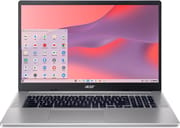
The Acer Chromebook 317 is a unique addition to the Chromebook family, boasting the title of the world’s first Chromebook with a 17.3-inch screen. This supersized Chromebook, made of plastic and weighing 5.29 pounds, offers a range of features, including an Intel Celeron N4500 processor, 4GB of RAM, and up to 128GB of storage. It’s equipped with dual USB-C and A ports, a headset jack, a micro SD card slot, and a Kensington lock port. The large screen size is advantageous for productivity tasks, such as spreadsheets and multitasking, and watching movies and videos. However, its size may question its portability.
| Pros | Cons |
|---|---|
| Large 17.3-inch full HD IPS screen | Size may limit portability |
| Reasonable weight considering its size | Average battery life |
| Large, comfortable keyboard with a full number pad | Plastic build with a bit of flex |
| Solid and responsive trackpad | No HDMI port |
| Decent upward-facing speakers | Lack of backlit keyboard |
| Supports Wi-Fi 6 | Slow processor for heavy tasks |
Related Videos
Acer Chromebook 317 Comparison Chart
 Acer Chromebook 317 | Acer Chromebook 317 | |
| Price | List Price: $349.99 Amazon Prices: | List Price: $299.99 Amazon Prices: Loading prices... |
| Model number | CB317-1H-C6RK / NX.AQ2AA.00A | CB317-1H-C41X / NX.AQ2AA.004 |
| Performance Rating | 3.1 | 3.1 |
| Chromebook Plus | No | No |
| Processor | Dual-core 1.10 Ghz (max 2.80 Ghz) Intel Celeron Processor N4500 | Dual-core 1.10 Ghz (max 2.80 Ghz) Intel Celeron Processor N4500 |
| RAM | 4 GB | 4 GB |
| Internal Storage | 128 GB eMMC | 32 GB eMMC |
| Screen Size | 17.3" | 17.3" |
| Screen Resolution | 1920x1080 | 1920x1080 |
| Screen Type | IPS | IPS |
| Touch Screen | No | No |
| Stylus / Pen | No Stylus Support | No Stylus Support |
| Dimensions width x length x thickness | 15.8 x 10.5 x 0.89 inches (401.32 x 266.7 x 22.61 mm) | 15.8 x 10.5 x 0.89 inches (401.32 x 266.7 x 22.61 mm) |
| Weight | 5.29 lbs (2.4 kg) | 5.29 lbs (2.4 kg) |
| Backlit Keyboard | No | No |
| Webcam | 720p HD | 720p HD |
| WiFi | Wi-Fi 6 (802.11ax) | Wi-Fi 6 (802.11ax) |
| Bluetooth | Bluetooth 5.0 | Bluetooth 5.0 |
| Ethernet | No | No |
| Cellular Modem | No | No |
| HDMI | No HDMI | No HDMI |
| USB Ports | 2 USB 3, 2 USB-C USB-C Supports DisplayPort, charging | 2 USB 3, 2 USB-C USB-C Supports DisplayPort, charging |
| Thunderbolt Ports | No | No |
| Card Reader | microSD Card Reader | microSD Card Reader |
| Battery | 3 cell, Li-ion | 3 cell, Li-ion |
| Battery Life | 10.0 hours | 10.0 hours |
| Fanless | No | No |
| Auto Update Expiration Date | June, 2031 | June, 2031 |
Related Chromebooks
-
 Acer Gateway Chromebook 311Compact, efficient, and budget-friendly, the Acer Gateway Chromebook 311 offers 10-hour battery…
 -
 Acer Chromebook 314 (CB314-4H/4HT)A budget-friendly 14-inch Chromebook with Intel Alder Lake-N processors, WiFi 6E, and software…
 -
 ASUS Chromebook C424The ASUS Chromebook C424 boasts a crisp 14-inch FHD anti-glare display, durable spill-resistant…
 -
 HP Chromebook 14a (ne Series)The HP Chromebook 14a (ne Series) is a budget-friendly 14-inch notebook powered by the Intel…
 -
 Lenovo 3i ChromebookThe Lenovo 3i Chromebook offers a large 15.6-inch anti-glare FHD display with a numeric keypad,…
 -
 Lenovo IdeaPad 3i ChromebookA budget-friendly 15.6" Chromebook featuring a Full HD display, Intel Celeron N4500 processor, and…
The Acer Chromebook 317’s large screen is a standout feature, providing ample space for productivity tasks and an immersive experience for media consumption. The large keyboard has well-spaced keys and a full number pad, providing a comfortable typing experience. The trackpad is also large, solid, and responsive for a model in this price range.
Despite its size, the Acer Chromebook 317 is portable and has over 9 hours of battery life. It supports most modern Wi-Fi protocols, including the latest Wi-Fi 6. However, it lacks an HDMI port, so you’ll need a dongle to plug it into your TV. It also has no Ethernet port, but you can add a wired connection using a USB Ethernet adapter. The audio is functional but lacks bass and mid-range sounds, suggesting using a sound bar or Bluetooth speaker for a richer sound experience. Users interested in music production on a Chromebook will want external speakers or headphones, though the large screen is a genuine asset for working with browser-based DAWs.
Reviewer Insights on the Acer Chromebook 317
For Reviewed, David Murphy tested the exact configuration this page covers: the CB317-1H with an Intel Celeron N4500 and 4GB of LPDDR4X. His lab numbers fill in what the spec sheet leaves out. The 17.3-inch IPS panel measured 237 nits at maximum brightness, which he framed as ordinary: “At maximum settings, it’s as bright as most other Chromebooks we’ve tested at 237 nits.” In Reviewed’s looping web-browsing battery test the 317 ran “six hours and 41 minutes,” short of the marketing figure yet, as Murphy noted, respectable for a screen this large. The chassis also stayed cool, with the underside never topping 36 C (96.8 F) on the most strenuous test.
On performance, the benchmarks track where this chip sits: PassMark rates the dual-core N4500 at roughly 1,807, near the floor of current Chromebook silicon. Reviewed found the 317 “up to 20 percent slower on single-core benchmarks and up to 50 percent slower on multi-core benchmarks” than the pricier Chromebook Spin 514 and Galaxy Chromebook 2, while still concluding it was “sufficient” for browsing and document work. Murphy’s read on the keyboard was lukewarm: the keys “have a very shallow travel depth,” and he flagged “the omission of a keyboard backlight.” His one-line summary of the whole machine was “It’s all size, little style.”
MergeDroid reached similar conclusions in his video review, working from a non-touch N4500 unit. He described the 317 as feeling like “a regular Chromebook or laptop has just been super sized,” with “a fully plastic build with a bit of flex” weighing 4.74 pounds. He rated the trackpad well for the price: “The trackpad is really large as you can see an impressively solid and responsive for a model in this price bracket.” He could not find an official brightness figure but estimated the panel sits “certainly under 300” nits, which squares with Reviewed’s measured 237. His battery experience matched the lab result more than the marketing claim: “battery life is okay but I’m having to charge it most days… largely due to the big screen.”
Dave Taylor, reviewing a touchscreen N4500 model on his channel, opened by calling it “a beast of a chromebook.” He liked the panel (“it’s just this big bright screen that is actually really fun”) but caught on the off-center typing position the number pad forces, saying you “really have to look and orient your fingers in the exactly right place.” He kept returning to one omission: “I don’t understand why acer didn’t include that hdmi port that seems like such a logical thing to include.” Taylor was blunt that “it is a slow processor and there’s not much ram for the operating system to work with,” while still recommending it as a low-cost second machine “if you need a second computer, if you have a teenager who is just really hard on devices, or if you just want to have a spare device sitting there so that you can watch TV in bed.”
It is worth knowing what the step-up trim buys, because it changes the performance story. Android Police’s Matthew Sholtz reviewed the CB317-1HT, the touchscreen refresh that swaps in a quad-core Pentium Silver N6000 (PassMark around 2,955) and 8GB of RAM for roughly $100 more. He found the faster chip handled ChromeOS smoothly: “I could barely tell the difference between the passively cooled N6000 in the Chromebook 317 and the actively cooled i3 in my Galaxy Chromebook 2,” logging a Speedometer 2.0 of 77.1, a Jetstream2 of 95.666, and a MotionMark 1.1 of 220.84. That trim also adds a backlit keyboard the base model lacks. The big screen still taxes the battery, though, as Sholtz had to “plug in at around six hours,” and he wanted more from the display, calling it “a bit too dim for my taste.” Build feel was the same across trims, sturdy but plainly plastic: “even though the plastic is sturdy, it’s still plastic.”
On support life, Google’s published Auto Update Expiration schedule lists the Chromebook 317 (CB317-1H/CB317-1HT) through June 2031, so a unit bought today still has years of ChromeOS feature and security updates ahead. That long runway is a real part of the value here: it stretches the cost of an already inexpensive machine across several more school years or seasons of couch-and-kitchen use.
Customer Reviews of the Acer Chromebook 317
Across 7 ratings on Amazon, the Acer Chromebook 317 averages 5 stars, with every rating landing in the five-star bucket. That is a small sample, so treat it as early owner sentiment rather than a broad consensus. The recurring theme across the written reviews is the large 17-inch screen and the value at this price point. Tammy B., a verified buyer who bought two, wrote “Love the 17” screen and I find that learning the Chromebook operating system is pretty easy to learn and is much better than Microsoft which I have been used to.” Another verified buyer, DJS, kept it brief: “Love the larger screen and battery life.”
Longtime Chromebook owners also flag the longer support window as a reason to buy. Steve D, a verified purchaser upgrading from an older Acer, noted it “is faster than my old Acer and has a bolder screen and all the newest Google updates” and pointed to the update deadline as a selling point: “The end of life is 2031 I believe too. It should last to then and longer.” None of the seven reviewers reported a problem, though with only three written reviews there is not enough feedback yet to surface common complaints. Read more owner reviews on Amazon.
Who is the Acer Chromebook 317 For?
The Acer Chromebook 317 is a good fit for users who don’t need to travel much with their computer and would benefit from a larger keyboard and trackpad. It also suits those who don’t have a desk setup with external monitors and peripherals, making the 17.3-inch large screen a real asset.
However, users needing a portable device for on-the-go tasks or heavy computing power might want to look elsewhere. The lack of an HDMI port could also be a dealbreaker for users who wish to connect their laptop to a TV or external monitor without keeping track of an adapter. Despite these limitations, the Acer Chromebook 317 offers a unique combination of features at a competitive price.
To see how the Acer Chromebook 317 stacks up against other models, visit our Chromebook Comparison Chart where you can sort and filter by screen size, specs, and price.
Frequently Asked Questions about Acer Chromebook 317
Q: How big is the Acer Chromebook 317’s screen?
A: The Acer Chromebook 317 features a large 17.3-inch screen. This is the first Chromebook to sport such a large screen size, making it unique in the market.
Q: What kind of processor does the Acer Chromebook 317 have?
A: The Acer Chromebook 317 is powered by an Intel Celeron N4500 processor. Other variants are also available.
Q: Does the Acer Chromebook 317 have a touchscreen?
A: No, the Acer Chromebook 317 does not have a touchscreen. Its large 17.3-inch screen is a standard IPS display. However, Acer has made a touchscreen version of the 317.
Q: What kind of storage does the Acer Chromebook 317 have?
A: The Acer Chromebook 317 comes with up to 128GB of eMMC storage. This type of storage is common in Chromebooks and is sufficient for most users’ needs.
Q: How long does the battery last on the Acer Chromebook 317?
A: The Acer Chromebook 317 has up to 10 hours of battery life. That is a long run time for a screen this large, which typically consumes more power.
Q: Does the Acer Chromebook 317 have a backlit keyboard?
A: No, the Acer Chromebook 317 does not have a backlit keyboard. However, it does feature a full number pad, which is a bonus for those who frequently work with numbers.
Q: Can I use the Acer Chromebook 317 for gaming?
A: The Acer Chromebook 317 is capable of handling light gaming. However, due to its Intel Celeron N4500 processor and 4GB of RAM, it might not be suitable for more demanding games.
Q: What kind of ports does the Acer Chromebook 317 have?
A: The Acer Chromebook 317 has two USB-C ports, two USB 3.0 ports, and a microSD card reader. However, it does not have an HDMI port.
Q: How much does the Acer Chromebook 317 weigh?
A: Despite its large size, the Acer Chromebook 317 weighs a reasonable 5.29 pounds. This makes it fairly portable for a laptop of its size.
Q: Is the Acer Chromebook 317 suitable for travel?
A: While the Acer Chromebook 317 is not overly heavy, its large size might make it less suitable for frequent travel. However, its long battery life and range of connectivity options suit those who need a portable device for light tasks.