
ASUS Chromebook CX22NA
Updated on

Note: This Chromebook has been discontinued and no longer receives Chrome OS updates. Its Auto Update Expiration date was June 2024.
The ASUS Chromebook CX22NA was a budget 11.6-inch laptop from the ASUS C223/CX22 product family. This variant shipped with 16GB of eMMC storage, which put it below the 32GB C223NA model on price. Built around the Intel Celeron N3350 processor, it aimed at students and casual users who needed web browsing, document editing, and video streaming. The fanless design meant silent operation, and at 2.2 pounds it was easy to carry all day.
| Pros | Cons |
|---|---|
| Light at 2.2 pounds | TN display with poor viewing angles |
| Silent fanless operation | Processor struggles with more than a handful of tabs |
| 7-8 hours of real-world battery life | Only 16GB storage fills up quickly |
| Dual USB-C ports with charging support | No touchscreen or convertible functionality |
| 45W USB-C fast charging | Mushy keyboard with noticeable deck flex |
| WiFi 5 and Bluetooth 4.2 | Past its Auto Update Expiration date |
Related Videos
ASUS Chromebook CX22NA Comparison Chart
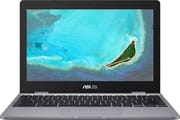 ASUS Chromebook CX22NA | |
| Price | List Price: $189.00 Amazon Prices: |
| Model number | CX22NA-BCLN4 |
| Performance Rating | 2.8 |
| Chromebook Plus | No |
| Processor | Dual-core 1.10 Ghz (max 2.40 Ghz) Intel Celeron N3350 |
| RAM | 4 GB |
| Internal Storage | 16 GB eMMC |
| Screen Size | 11.6" |
| Screen Resolution | 1366x768 |
| Screen Type | LED-backlit anti-glare |
| Touch Screen | No |
| Stylus / Pen | No Stylus Support |
| Dimensions width x length x thickness | 11.3 x 7.8 x 0.7 inches (287.02 x 198.12 x 17.78 mm) |
| Weight | 2.2 lbs (1 kg) |
| Backlit Keyboard | No |
| Webcam | HD |
| WiFi | 802.11 b/g/n/ac (2x2) |
| Bluetooth | Bluetooth 4.2 |
| Ethernet | No |
| Cellular Modem | No |
| HDMI | No HDMI |
| USB Ports | 1 USB 3, 2 USB-C USB 3.1 Type-C Gen 1 with display and power delivery |
| Thunderbolt Ports | No |
| Card Reader | microSD Card Reader |
| Battery | 2 cell, 38 Whrs, Li-ion |
| Battery Life | 10.0 hours |
| Fanless | Yes |
| Auto Update Expiration Date | June, 2024 |
Related Chromebooks
-
 ASUS Chromebook C203XAThe ASUS Chromebook C203XA is a rugged 11.6-inch education laptop with a MediaTek MT8173C, an…
 -
 ASUS Chromebook C423The ASUS Chromebook C423 pairs a 14-inch 1366x768 display with a dual-core Celeron N3350, 4GB of…
 -
 Acer Chromebook 311 (AMD)The Acer Chromebook 311 (CB311-10H) is an 11.6-inch ChromeOS laptop on an AMD A4-9120C with 4GB of…
 -
 Acer Chromebook Spin 11 CP311The Acer Chromebook Spin 11 combines functionality and portability with its 11.6-inch touch IPS…
 -
 Lenovo Flex 3 ChromebookThe Lenovo Flex 3 Chromebook hits the sweet spot with its 11.6-inch IPS touchscreen, 4GB RAM, and…
 -
 Dell Chromebook 3120The Dell Chromebook 3120 is a fanless 11.6-inch education Chromebook with an Intel N100, sold in…
Basic web work on a Celeron N3350
The Intel Celeron N3350 is a dual-core processor introduced in 2016, with a base clock of 1.1 GHz and burst speeds reaching 2.4 GHz. It was designed for power efficiency rather than raw performance. Android Police’s testing found the C223 series “quick to boot, and as long as you stick to only a handful of Chrome tabs, it’s not a bad experience.” Pushing beyond five or six tabs caused noticeable slowdowns.
Beebom’s review ran Speedometer 2.0 and recorded a score of 24.1 points. While modest by laptop standards, this was acceptable for Chrome OS, which manages resources efficiently compared to Windows. The reviewer noted that “the Chromebook kept everything in memory, which is pretty impressive given it has only 4GB of RAM.” The fanless thermal design let the N3350 run silent.
Gaming and demanding Android apps were beyond this hardware. Beebom noted that titles like Asphalt 9 were “unplayable” on this hardware. Even simpler tasks occasionally caused the system to freeze during intensive multitasking.
The screen is the weak spot in a light chassis
The 11.6-inch panel runs at 1366x768 behind an LED-backlit anti-glare finish, and its roughly 200 nits of brightness worked indoors. TN panel technology suffers from poor viewing angles, though. Android Police’s review described the display as “easily the worst part about the C223” and noted that colors shifted dramatically when viewing from even modest angles.
Beebom found a color cast as well: “The display has this slight bluish tinge that makes all the content on the screen look cooler.” That cast and the narrow viewing angles ruled out color-sensitive work and made it awkward to share the screen with someone sitting alongside.
The chassis design fared better than the display. At 2.2 pounds and 11.3 x 7.8 x 0.7 inches, it fits the ultraportable class. The plastic construction felt sturdy for the price, and ASUS marketed the device as capable of surviving 4-foot drops. However, Android Police noted a visible ripple effect on the display when the laptop was moved, which indicated some flex in the chassis. The keyboard has a mushy key feel, and the deck flexes during longer typing sessions.
Sixteen gigabytes runs out without a microSD card
Chrome OS itself consumes several gigabytes of the 16GB eMMC, which leaves limited space for downloaded files, Android apps, and offline content. Buyers who needed more room were better served by the 32GB C223NA model, or could expand through the microSD card slot, which supported cards up to 2TB. The eMMC storage was soldered to the motherboard and not user-upgradeable, so the capacity chosen at purchase was final.
The 16GB configuration was manageable for cloud applications and streaming. Google Docs, Gmail, YouTube, and similar web apps consumed minimal local storage. Heavy Android app use or offline media downloads exhausted the space quickly.
Two USB-C ports, one Type-A, and a 38Wh battery
Two USB-C ports (USB 3.1 Gen 1) handled both 45W charging and display output, while a single USB Type-A 3.0 port took legacy peripherals like mice, flash drives, or a USB ethernet adapter. The microSD card slot carried the storage expansion the 16GB internal capacity needed. Wireless came from 802.11ac WiFi and Bluetooth 4.2.
The 38Wh two-cell lithium-ion battery delivered 7-8 hours of mixed real-world usage. Android Police’s testing achieved 8-9 hours depending on screen brightness and workload. Beebom reported consistent all-day performance and praised the fast charging capability.
Reviewer Insights
The C223/CX22 series was reviewed in 2018 and again in 2021.
Android Police
Corbin Davenport’s review, titled “A step backwards,” argued that while previous ASUS Chromebooks had earned strong reputations, the C223 series made too many compromises to hit its price point. The TN display drew particular criticism as “easily the worst part” of the device. However, the reviewer acknowledged that for users with modest requirements who stuck to “only a handful of Chrome tabs,” the experience was acceptable. Battery life of 8-9 hours was praised as a strength.
Beebom
Arjun Sha’s 2021 review provided perspective on the C223 as a budget option for students attending online classes. The testing found excellent memory management despite only 4GB of RAM, but also highlighted the aging processor. The reviewer recommended it over budget Windows laptops for beginners, praising the simplicity of Chrome OS and the device’s overall value. The review cautioned that heavy multitasking and gaming were beyond the hardware’s capabilities.
Newer ASUS models took over after the 2024 update cutoff
ASUS built this variant around the already-dated Celeron N3350 processor and a 16GB storage tier to reach a low price while keeping acceptable margins. That suited price-conscious students and casual users who needed basic web functionality and little else.
The June 2024 Auto Update Expiration date has passed, so the machine is no longer a sensible choice for active use. Newer Chromebooks like the ASUS CX1 series and Chromebook CX14 offer better performance, larger storage options, and years of remaining software support.
The Chromebook Comparison Chart covers specs side by side across the full catalog.
Frequently Asked Questions
Q: Is the ASUS Chromebook CX22NA still usable in 2026?
A: While the CX22NA can still power on and run basic tasks, it stopped receiving Chrome OS updates in June 2024. This means no security patches, no new features, and potentially incompatible websites as web standards evolve. Using it for sensitive activities like online banking is not recommended.
Q: What is the difference between the CX22NA and C223NA?
A: The CX22NA and C223NA are variants of the same product line and share the same hardware apart from storage: the CX22NA ships with 16GB eMMC storage, while the C223NA offers 32GB. The naming difference largely reflects regional marketing variations.
Q: Can I upgrade the storage in the ASUS Chromebook CX22NA?
A: The 16GB eMMC storage is soldered to the motherboard and cannot be upgraded. However, you can expand storage using a microSD card (up to 2TB supported) for files, media, and some Android apps.
Q: How long does the ASUS Chromebook CX22NA battery last?
A: Real-world battery life is 7-9 hours depending on usage and screen brightness. ASUS rated the battery at up to 10 hours under ideal conditions. The 38Wh battery supports 45W USB-C fast charging.
Q: Why is the ASUS Chromebook CX22NA display criticized in reviews?
A: It uses a TN (Twisted Nematic) panel rather than an IPS display, so colors and contrast shift when viewed from the side. Android Police also noted a visible ripple effect when the laptop was moved, and Beebom noted a bluish color tinge.
Q: Was the ASUS Chromebook CX22NA good for students?
A: Yes, during its supported lifespan. It handled Google Docs, web research, and video calls, and the 2.2-pound weight, long battery life, and silent fanless operation fit classroom use. The 16GB storage limited Android app installation and offline content storage.