
Lenovo 300e Chromebook 2nd Gen

Starry Hope Rating
3.5

Updated on

Lenovo 300e Chromebook 2nd Gen lifestyle

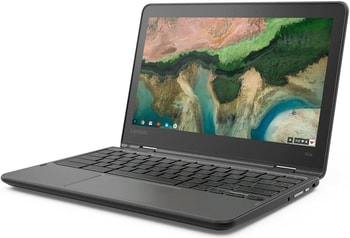
Lenovo released the 300e Chromebook 2nd Gen in 2019 as a classroom machine, built around an 11.6-inch IPS touchscreen, an Intel Celeron N4020, a spill-resistant keyboard, and a chassis designed to withstand drops. A 360-degree hinge folds it into tablet mode, and Lenovo rated the battery at 10 hours. The company stopped selling it, though the model stays in service across many school districts and receives Chrome OS updates through June 2029.

ProsCons
Rugged, drop-resistant design survives classroom abuseTouchpad responsiveness is sluggish according to reviewers
Spill-resistant keyboard handles up to 330ml of liquidRAM is soldered and cannot be upgraded
Dual USB-C ports with charging on either sideLimited 32GB storage in base configurations
Lenovo rates the battery at 10 hoursNo keyboard backlight for working in dim environments
Fanless design ensures completely silent operationHD resolution (1366x768) looks dated compared to newer models
360-degree hinge enables tent, stand, and tablet modesPlastic construction attracts fingerprints and smudges

Related Videos

Lenovo 300e Chromebook 2nd Gen Comparison Chart

Lenovo 300e Chromebook 2nd Gen
Lenovo 300e Chromebook 2nd Gen

Lenovo 300e Chromebook 2nd Gen

Lenovo 300e Chromebook 2nd Gen

Lenovo 300e Chromebook 2nd Gen

Lenovo 300e Chromebook 2nd Gen

Lenovo 300e Chromebook 2nd Gen

Lenovo 300e Chromebook 2nd Gen

Price

List Price: $319.00

Amazon Prices:

Check Price on Amazon

List Price: $369.00

Amazon Prices:

Check Price on Amazon

List Price: $439.00

Amazon Prices:

Check Price on Amazon

List Price: $369.00

Amazon Prices:

Check Price on Amazon

Model number82CE0000US81MB004UUS81MB0061US81MB0066US
Performance Rating2.33.15.43.1
Chromebook PlusNoNoNoNo
ProcessorDual-core 1.60 Ghz (max 2.40 Ghz)
AMD A4-9120C APU with Radeon R4 Graphics
Dual-core 1.10 Ghz (max 2.80 Ghz)
Intel Celeron Processor N4020
Quad-core 1.10 Ghz (max 2.60 Ghz)
Intel Celeron Processor N4120
Dual-core 1.10 Ghz (max 2.80 Ghz)
Intel Celeron Processor N4020
RAM4 GB4 GB8 GB4 GB
Internal Storage32 GB eMMC32 GB eMMC64 GB eMMC32 GB eMMC
Screen Size11.6"11.6"11.6"11.6"
Screen Resolution1366x7681366x7681366x7681366x768
Screen TypeIPSIPSIPSIPS
Touch ScreenYesYesYesYes
Stylus / PenNo Stylus SupportNo Stylus SupportNo Stylus SupportNo Stylus Support
Dimensions
width x length x thickness
11.4 x 8 x 0.8 inches
(289.56 x 203.2 x 20.32 mm)
11.4 x 8 x 0.8 inches
(289.56 x 203.2 x 20.32 mm)
11.4 x 8 x 0.8 inches
(289.56 x 203.2 x 20.32 mm)
11.4 x 8 x 0.8 inches
(289.56 x 203.2 x 20.32 mm)
Weight2.7 lbs (1.23 kg)2.7 lbs (1.23 kg)2.7 lbs (1.23 kg)2.7 lbs (1.23 kg)
Backlit KeyboardNoNoNoNo
Webcam720p HD720p HD720p HD720p HD
WiFi802.11ac (2x2)802.11ac (2x2)802.11ac (2x2)802.11ac (2x2)
BluetoothBluetooth 4.2Bluetooth 4.2Bluetooth 4.2Bluetooth 4.2
EthernetNoNoNoNo
Cellular ModemNoNoNoNo
HDMINo HDMINo HDMINo HDMINo HDMI
USB Ports2 USB 3, 2 USB-C
(with power delivery and DisplayPort)
2 USB 3, 2 USB-C
(with power delivery and DisplayPort)
2 USB 3, 2 USB-C
(with power delivery and DisplayPort)
2 USB 3, 2 USB-C
(with power delivery and DisplayPort)
Thunderbolt PortsNoNoNoNo
Card ReadermicroSD Card ReadermicroSD Card ReadermicroSD Card ReadermicroSD Card Reader
Battery3 cell, 42 WHr, Lithium-ion3 cell, 42 WHr, Lithium-ion3 cell, 42 WHr, Lithium-ion3 cell, 42 WHr, Lithium-ion
Battery Life10.0 hours10.0 hours10.0 hours10.0 hours
FanlessYesYesYesYes
Auto Update
Expiration Date
June, 2029June, 2029June, 2029June, 2029

Related Chromebooks

Build, performance, and display

Connectivity infographic for the Lenovo 300e Chromebook 2nd Gen

The Lenovo 300e Chromebook 2nd Gen was built for schools. Rubberized edges and reinforced corners protected it in drops from heights up to 29.5 inches, and the spill-resistant keyboard could survive accidents involving up to 330ml of liquid. At 2.7 pounds it was light enough for students to carry between classes.

The Intel Celeron N4020 was adequate for typical educational workloads. The dual-core chip handled Google Docs, web browsing with a moderate number of tabs, and video streaming without major issues, but intensive multitasking or Android apps from the Play Store exposed its limits. The fanless thermal design ran silent, which mattered in a quiet classroom or library. LaptopMedia’s teardown confirmed the presence of a large heat spreader that kept temperatures in check without any active cooling noise.

The display was an 11.6-inch IPS touchscreen at 1366x768, paired with a 720p webcam. Brightness topped out at around 250 nits, enough for indoor use but challenging in bright sunlight. Both USB-C ports carried charging and DisplayPort output, and either one took a USB ethernet adapter for wired networking.

Reviewer Insights

Lenovo 300e Chromebook 2nd Gen performance tier

LaptopMedia’s Perspective

LaptopMedia’s teardown video gets inside the 300e by removing nine Phillips head screws. “Unfortunately, the memory is soldered to the motherboard,” the reviewer says, so RAM upgrades are impossible. The 42Wh battery is replaceable. They call the fanless cooling a “completely silent setup,” describing “no fan but only a large heat spreader on the CPU.”

NotAHacker22’s Student Review

NotAHacker22’s review covers a school-issued 300e that beat the reviewer’s low expectations. “After using it for a week or two, I’m actually pretty impressed,” they say, praising the build quality as “top-notch” and the 2-in-1 design with USB-C charging available on both sides of the device. The touchpad is the exception. “One of the ultimate downsides to this is the touchpad… it’s not very responsive.”

Android Central’s Assessment

Ara Wagoner’s review at Android Central rates the device 4.5 out of 5 stars, calling it “A school Chromebook you should bring home.” The review praises the typing experience specifically: “Typing on the 300e feels great, especially for a sub-$300 Chromebook: the keys have a good travel distance, don’t feel too mushy, and typing on one for hours and hours doesn’t wear out my hands.” Wagoner appreciates that Lenovo took the C330’s proven formula and added rubber bumpers, drop resistance, and a spill-resistant keyboard while maintaining the overall quality. The main criticisms focus on the device’s tendency to attract fingerprints and the limited 32GB storage in base configurations.

Matty’s Battery Testing

Matty’s review puts battery life at 5-6 hours with typical student workloads, against the 10 hours Lenovo advertises. They summarize: “For school-related purposes… this is like a good seven out of ten.” The review acknowledges the device’s strengths as a portable, lightweight machine for basic tasks while noting it struggles with demanding workloads or heavy multitasking.

Rugged, slow, and supported until 2029

The rugged construction, spill-resistant keyboard, and fanless design of the Lenovo 300e Chromebook 2nd Gen held up to daily student use. The Intel Celeron N4020 processor was slow and the 32GB base storage was tight, but both were reasonable compromises at list prices that ran from $319 to $439.

The 300e 2nd Gen followed the education Chromebook pattern of its time, favoring durability and manageability over raw performance. Chrome OS updates continue through June 2029, so those units have several years of supported life left.

If you already own a 300e 2nd Gen, it still handles web browsing, document editing, and video streaming. The 360-degree hinge covers note-taking and media, and either USB-C port charges the machine. For a new purchase, a current Chromebook gives you a better display and a faster processor for the money. If you want a durable option for young users, see our guide to the best Chromebooks for kids.

Frequently Asked Questions

Can I upgrade the RAM on the Lenovo 300e Chromebook 2nd Gen?

No. The RAM is soldered directly to the motherboard, as LaptopMedia’s teardown confirmed. The only way to get more memory is to buy an 8GB configuration from the start.

How rugged is the Lenovo 300e Chromebook 2nd Gen?

Rubberized edges and reinforced corners handle drops from 29.5 inches, and the spill-resistant keyboard takes up to 330ml of liquid.

What is the actual battery life of the Lenovo 300e Chromebook 2nd Gen?

Lenovo advertises 10 hours. Reviewers report 5-8 hours depending on usage. Android Central achieved close to the claimed 10 hours with light usage, while Matty’s student testing showed 5-6 hours with typical school workloads. The battery is 42Wh.

Does the Lenovo 300e Chromebook 2nd Gen support stylus input?

No. There is no dedicated stylus or pen digitizer support, though the touchscreen responds to basic capacitive styluses the way any touchscreen does. The 360-degree hinge folds it into tablet mode for touch input.

When does the Lenovo 300e Chromebook 2nd Gen stop receiving updates?

It receives automatic updates until June 2029. That covers several more years of security patches and Chrome OS feature updates.

Is the Lenovo 300e Chromebook 2nd Gen still worth using?

If you own one, it remains functional for basic tasks and keeps receiving Chrome OS updates through June 2029. For a new purchase, a current Chromebook offers a better display, a faster processor, and more storage at similar price points; our Chromebook comparison chart lists what is available now. The 300e’s performance and 1366x768 display feel dated.