
KAMRUI GK3 Plus Mini PC
Updated on

The KAMRUI GK3 Plus Mini PC is a compact, budget-friendly desktop solution powered by the Intel Processor N95. With a focus on efficiency and space-saving design, this Mini PC runs Windows 11 and is equipped with Intel UHD Graphics, making it suitable for everyday computing tasks. It offers a variety of connectivity options, including dual HDMI ports, gigabit Ethernet, and multiple USB ports, though it lacks a USB-C connection. The device also supports Wi-Fi 5 and Bluetooth 4.2 for wireless connectivity. Its small form factor, measuring just 5.1 inches in width and length and a thickness of 1.96 inches, allows for easy placement in any work environment, and it even comes with a VESA mount for added convenience.
Pros and Cons of the KAMRUI GK3 Plus Mini PC
| Pros | Cons |
|---|---|
| Compact and lightweight design | No USB-C port |
| Energy-efficient Intel N95 processor | Single-channel RAM |
| Pre-installed with Windows 11 | Outdated Wi-Fi 5 and Bluetooth 4.2 |
| Supports additional 2.5-inch drive for storage expansion | May struggle with high-performance tasks |
| VESA mount included for versatile placement | Limited gaming and emulation capabilities |
Related Videos
KAMRUI GK3 Plus Mini PC Comparison Chart
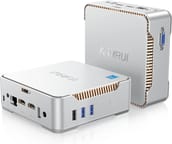 KAMRUI GK3 Plus Mini PC | KAMRUI GK3 Plus Mini PC | KAMRUI GK3 Plus Mini PC | KAMRUI GK3 Plus Mini PC | |
| Price | List Price: $299.95 Amazon Prices: | List Price: $329.99 Amazon Prices: | List Price: $219.99 Amazon Prices: | List Price: $179.99 Amazon Prices: |
| Version | 16GB/512GB/Intel N95 | 16GB/1TB/Intel N95 | 16GB/512GB/Intel N97 | 8GB/256GB/Intel N97 |
| Performance Rating | 4.9 | 4.9 | 5.0 | 4.3 |
| Operating System | Windows 11 | Windows 11 | Windows 11 | Windows 11 |
| Processor | Quad-core 3.40 Ghz (max 3.40 Ghz) Intel Processor N95 | Quad-core 3.40 Ghz (max 3.40 Ghz) Intel Processor N95 | Quad-core 3.60 Ghz (max 3.60 Ghz) Intel Processor N97 | Quad-core 3.60 Ghz (max 3.60 Ghz) Intel Processor N97 |
| GPU | Integrated Intel UHD Graphics | Integrated Intel UHD Graphics | Integrated Intel UHD Graphics | Integrated Intel UHD Graphics |
| RAM | 16 GB | 16 GB | 16 GB | 8 GB |
| Internal Storage | 512 GB | 1 TB | 512 GB | 256 GB |
| Dimensions width x length x thickness | 5.1 x 5.1 x 1.96 inches (129.54 x 129.54 x 49.78 mm) | 5.1 x 5.1 x 1.96 inches (129.54 x 129.54 x 49.78 mm) | 5.1 x 5.1 x 1.96 inches (129.54 x 129.54 x 49.78 mm) | 5.1 x 5.1 x 1.96 inches (129.54 x 129.54 x 49.78 mm) |
| Weight | 0.84 lbs (0.38 kg) | 0.84 lbs (0.38 kg) | 0.84 lbs (0.38 kg) | 0.84 lbs (0.38 kg) |
| WiFi | Wi-Fi 5 (802.11ac) | Wi-Fi 5 (802.11ac) | Wi-Fi 5 (802.11ac) | Wi-Fi 5 (802.11ac) |
| Bluetooth | Bluetooth 4.2 | Bluetooth 4.2 | Bluetooth 4.2 | Bluetooth 4.2 |
| Ethernet | 1 Ethernet port at 1 Gbps | 1 Ethernet port at 1 Gbps | 1 Ethernet port at 1 Gbps | 1 Ethernet port at 1 Gbps |
| HDMI | 2 Full-Size HDMI Ports | 2 Full-Size HDMI Ports | 2 Full-Size HDMI Ports | 2 Full-Size HDMI Ports |
| DisplayPort | No DisplayPort | No DisplayPort | No DisplayPort | No DisplayPort |
| VGA | 1 VGA Port | 1 VGA Port | 1 VGA Port | 1 VGA Port |
| USB Ports | 2 USB 2.0, 2 USB 3 | 2 USB 2.0, 2 USB 3 | 2 USB 2.0, 2 USB 3 | 2 USB 2.0, 2 USB 3 |
| Thunderbolt Ports | No | No | No | No |
| OCuLink | No | No | No | No |
| Internal SATA Ports | 1 SATA port, includes 2.5" drive bay | 1 SATA port, includes 2.5" drive bay | 1 SATA port, includes 2.5" drive bay | 1 SATA port, includes 2.5" drive bay |
| Card Reader | No Card Reader | No Card Reader | No Card Reader | No Card Reader |
| Headphone Jack | combo | combo | combo | combo |
| Fanless | No | No | No | No |
| VESA Mount | Yes | Yes | Yes | Yes |
| In the Box | VESA mount, HDMI cable, power adapter | VESA mount, HDMI cable, power adapter | VESA mount, HDMI cable, power adapter | VESA mount, HDMI cable, power adapter |
| Expandability | -- | -- | -- | -- |
Related Mini PCs
-
 KAMRUI AK1 Pro Mini PCThe KAMRUI AK1 Pro is a budget Intel Celeron N5105 mini PC with 12GB of DDR4, a 256GB M.2 SATA SSD,…
 -
 KAMRUI AK2 Plus Mini PCThe KAMRUI AK2 Plus Mini PC packs an Intel N100 processor, 16GB DDR4, and a 512GB SSD into a…
 -
 ACEMAGIC Vista V1The ACEMAGIC Vista V1 is an ultra-budget mini PC sold in several Intel configs (N95, N97, and…
 -
 ACEMAGICIAN T8 PlusThe ACEMAGICIAN T8 Plus is a compact mini PC for multi-display setups, with triple 4K HDMI output,…
 -
 Beelink EQ12 Mini PCThe Beelink EQ12 is a budget Intel N100 mini PC with dual 2.5GbE LAN, up to 16GB DDR5, an M.2 NVMe…
 -
 Beelink MINI S12 ProThe Beelink MINI S12 Pro is a budget Intel N100 mini PC with up to 16GB of DDR4, a 512GB NVMe SSD,…
Detailed Features of the KAMRUI GK3 Plus Mini PC
The KAMRUI GK3 Plus Mini PC is tailored for users who require a reliable yet affordable computing solution. At its core, the Intel Processor N95 balances performance and power consumption, with a PassMark CPU Mark of 5,400, indicating its capability to handle general computing tasks efficiently. The Mini PC comes with 16GB of DDR4 RAM, which operates in single-channel mode, and a 512GB M.2 SATA SSD, providing ample space for applications and files.
Despite its budget-friendly nature, the GK3 Plus does not compromise on connectivity. It features two USB 3 ports, two USB 2 ports, dual HDMI 2 ports for multi-display setups, and a rare VGA port for legacy display devices. Including a gigabit LAN port ensures stable wired internet connections, while the Wi-Fi 5 and Bluetooth 4.2 offer wireless connectivity options.
The Mini PC’s practical design has a simple plastic exterior and a non-intrusive blue LED light. It is built with a fan cooling system to manage temperatures effectively, especially at stock power settings. For users who need more storage, the GK3 Plus provides the flexibility to add a 2.5-inch drive, enhancing its overall utility.
Reviewer Insights on the KAMRUI GK3 Plus
Three independent reviewers have put the GK3 Plus through its paces, and between them they cover both processor options: the base Intel N95 and the slightly quicker N97. Two of the three logged real numbers (power draw, temperatures, and synthetic benchmarks), so the picture below is grounded in measured data rather than impressions alone.
Robtech’s Analysis
Robtech reviewed the Intel N95 model (the 8GB/256GB unit, which he bought from Geekbuying for $160) and is the one reviewer who metered the box at the wall. At idle he measured 10 watts of draw, and at stock settings it peaked around 26 watts, a figure he placed “on the lower end of the scale” for N95 minis. The N95 ships with its long-duration power limit set to 15 watts and the short-duration limit inactive; at those defaults the cooler held the CPU to 79C, which he called “far from a problem.” Raising the BIOS power limit to 30 watts changed that: temperatures climbed until “we almost hit 100c,” and both idle and load fan noise rose, making it “pretty clear why they went for the lower power limit.”
On raw speed he found the N95 underwhelming in single-core, roughly six percent ahead of the previous generation’s budget Pentium but about fifteen percent behind the Morefine M8, which runs the same chip; raising the power limit “didn’t make any difference” to the single-core result. Multi-core scaled a little better, landing about four percent ahead of that Pentium and, once the power limit was lifted, nearly matching a Beelink Mini S12. For gaming he reported that League of Legends “plays fine” while he would not run an esports title such as Valorant on the N95. The pre-installed Kim Tigo M.2 SATA SSD arrived with Windows 11 Pro, and he confirmed Ubuntu boots straight off a USB stick. His verdict was that, kept at stock, the GK3 Plus is “an okay box for the price” with no major issues. Watch Robtech’s review.
DB Tech’s Perspective
DB Tech looked at the N95 model in its 16GB/512GB configuration, a review unit KAMRUI supplied with no editorial say. He did not meter power or log temperatures himself, so his analysis is comparative and spec-based rather than benchmarked. His most concrete data point is that the N95, with four cores, four threads, and a 3.4GHz boost, lands “on par with the i5 7300HQ when we take a look at CPU Mark and single thread ratings from CPU benchmark.com,” a laptop chip that is several years older and rated at 45 watts against the N95’s 15. He noted the N95’s base frequency is only 100MHz, so at idle “it’s literally just sipping power from the wall,” and that 16GB is the most memory the N95 supports, running in single-channel mode because the board has one slot.
On the hardware itself, DB Tech pointed out the single 40mm fan on the underside, the dated Wi-Fi 5 and Bluetooth 4.2 radios, and the missing USB-C port (his main complaint on a 2023 design). He hit a codec snag playing some local media during testing, but praised the chip’s Intel QuickSync support for transcoding, which in his view makes the box “a much better deal than you may find on the Raspberry Pi market” as a low-power Plex or Docker host. The full review is on DB Tech’s channel.
Tek Syndicate
Tek Syndicate tested the step-up Intel N97 configuration (16GB/512GB) and is the only reviewer of the three to publish synthetic benchmark scores. In Geekbench the N97 returned a single-core score of 1258 and a multi-core score of 2936. He ran two GPU-heavy passes on the UHD integrated graphics: Unigine Valley scored 678 (16.2 FPS average, 10.3 FPS minimum) and Unigine Superposition scored 925 (6.93 FPS average, 5.91 minimum), results he summed up by repeating that the box is “not for 3D gaming.” The bundled M.2 SSD measured about 1,633 MB/s read and 1,430 MB/s write, which he pegged at roughly “three times faster than a regular SATA drive.”
On real games he found newer pixel-art and 2D titles such as Full Void ran fine, the 2.5D Metroidvania Awaken Astral Blade was “mostly playable” at 720p though not perfectly smooth, while a heavier 3D game like Redout “does not play very well.” He kept noise and heat qualitative (no meter), saying the box “doesn’t generate a lot of heat” and “doesn’t make a lot of noise,” and he liked that it ships with a compact wall-wart adapter rather than a brick the size of the PC. His bottom line: “it does exactly what it’s supposed to do at a price that I think is very fair.” Watch Tek Syndicate’s review.
Putting the numbers in context
The three reviews line up: the GK3 Plus is a quiet, cool, low-wattage box whose ceiling is set by the Alder Lake-N silicon inside it. PassMark scores the N95 at 5,400 and the step-up N97 at 5,791, both quad-core parts with four threads, so the gap between the two configurations is modest and neither is built for demanding 3D work. In 2026 those figures sit at the entry level of the desktop CPU range, which is why every reviewer converged on the same roles: web browsing, media playback, older or lightweight games, and low-power home-server duty. None of the three measured a fan-noise figure in decibels, so the “quiet” verdict is consistent but qualitative.
Customer Reviews of the KAMRUI GK3 Plus Mini PC
Owner feedback gathered while the GK3 Plus was on sale leaned heavily positive, with most happy owners describing a quiet, compact budget machine for everyday work, school, and streaming rather than heavy gaming. LBeamer, a verified buyer who set it up as a kids’ schoolwork computer, wrote that with 16GB RAM “it runs Google Classroom, Zoom, web browsing, and streaming smoothly. It stays quiet.” Steve Prime, also a verified purchaser, runs his as a 24/7 Linux server and reported “It is running 24/7 now, very quiet, using only a few watts of power,” adding that KAMRUI support helped him reformat the drive for Ubuntu.
The negative reviews were mostly about reliability, not value. Verified buyer Bunnie left one star over a hardware problem, writing “Hardware Failure pc constantly restarting even when no apps were installed” and reporting frozen applications and maxed-out memory. If you can still find one secondhand, weigh that report against the larger pool of owners who found it stable. (These owner reviews were captured while the GK3 Plus was actively listed on Amazon; the listing has since been retired and no current Amazon page tracks this model, so the live star aggregate can no longer be confirmed.)
Conclusion: Who Should Consider the KAMRUI GK3 Plus Mini PC?
The KAMRUI GK3 Plus Mini PC is an ideal choice for users seeking a compact, energy-efficient desktop that can handle everyday tasks such as web browsing, document editing, and media consumption. Its small footprint and VESA mount capability make it a great fit for space-constrained environments or for those who prefer a minimalist setup. However, users with more demanding computing needs, such as gaming or intensive multitasking, might want to explore more powerful alternatives like the KAMRUI AM21.
For those who are interested in comparing the KAMRUI GK3 Plus with other Mini PCs, Starry Hope’s Mini PC Comparison Tool provides a comprehensive platform to evaluate different options.
Frequently Asked Questions
What operating system does the KAMRUI GK3 Plus Mini PC come with?
The KAMRUI GK3 Plus Mini PC comes pre-installed with Windows 11 Pro, providing a modern and secure operating environment right out of the box.
Can I upgrade the RAM on the KAMRUI GK3 Plus Mini PC?
Yes, the KAMRUI GK3 Plus Mini PC supports RAM upgrades. It has a single DDR4 memory slot, allowing you to replace the existing RAM module with a larger capacity one if needed.
Does the KAMRUI GK3 Plus Mini PC support additional storage?
Absolutely. In addition to the 512GB NVMe M.2 boot drive, there’s space for an additional 2.5-inch drive, giving you the flexibility to expand your storage capacity.
What type of processor is included in the KAMRUI GK3 Plus Mini PC?
The mini PC is powered by an Intel Processor N95, which is a quad-core processor with a base speed of 3.40 GHz. It’s designed for efficiency and is capable of handling everyday computing tasks.
Is the KAMRUI GK3 Plus Mini PC fanless?
No, the KAMRUI GK3 Plus Mini PC is not fanless. It includes a cooling fan to ensure the system remains at a stable temperature during operation.
What are the connectivity options available on the KAMRUI GK3 Plus Mini PC?
The GK3 Plus offers a variety of connectivity options, including Wi-Fi 5, Bluetooth 4.2, gigabit Ethernet, dual HDMI ports, two USB 2.0 ports, two USB 3.0 ports, and a VGA port. However, it does not include a USB-C or Thunderbolt port.
Can I mount the KAMRUI GK3 Plus Mini PC behind a monitor?
Yes, the KAMRUI GK3 Plus Mini PC comes with a VESA mount, allowing you to attach it to the back of a monitor for a clean and space-saving setup.
Is it possible to install Linux on the KAMRUI GK3 Plus Mini PC?
While the GK3 Plus comes with Windows 11 Pro, it is capable of running Linux distributions as well. Users have reported successfully running Ubuntu from a USB stick, but be aware that installing Linux may require some technical know-how, especially if you’re looking to dual-boot with Windows.
What graphics capabilities does the KAMRUI GK3 Plus Mini PC have?
The mini PC is equipped with Intel UHD Graphics, which is integrated into the CPU. This setup is suitable for basic graphic tasks, such as video streaming and light photo editing, but it may not be adequate for intensive gaming or professional graphic work.
Does the KAMRUI GK3 Plus Mini PC come with any accessories?
Yes, the mini PC includes a VESA mount, an HDMI cable, and a power adapter in the box, providing everything you need to get started right away.