
ASUS Chromebook CX15
Updated on

The ASUS Chromebook CX15 represents exceptional value in the budget Chromebook market, offering a spacious 15.6-inch Full HD display and full-size keyboard with numeric keypad at a price that undercuts most competitors. Powered by Intel’s Celeron N4500 processor and featuring up to 8GB of RAM with 128GB of eMMC storage, this Chromebook is designed for students, remote workers, and anyone who needs a reliable device for web browsing, document editing, and video streaming. The MIL-STD 810H military-grade durability certification means it can handle the bumps and scrapes of daily life, while the slim 0.79-inch profile and 3.51-pound weight make it genuinely portable despite the large screen. With modern connectivity features including WiFi 6 and Bluetooth 5.4, plus Chrome OS automatic updates guaranteed through June 2031, the CX15 offers worry-free computing for years to come.
Pros and Cons of the ASUS Chromebook CX15
| Pros | Cons |
|---|---|
| Exceptional value at under $250 for the 8GB model | Small touchpad relative to screen size |
| Large 15.6-inch Full HD anti-glare display | No keyboard backlight |
| Full-size keyboard with comfortable numeric keypad | Only one USB-A port limits peripheral options |
| MIL-STD 810H military-grade durability | 720p webcam produces mediocre video quality |
| Up to 11 hours of real-world battery life | Performance can lag with many browser tabs open |
| Modern WiFi 6 and Bluetooth 5.4 connectivity | Plastic construction feels basic despite solid build |
Related Videos
ASUS Chromebook CX15 Comparison Chart
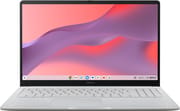 ASUS Chromebook CX15 | |
| Price | List Price: $239.00 Amazon Prices: Loading prices... |
| Model number | --- |
| Performance Rating | 4.5 |
| Chromebook Plus | No |
| Processor | Dual-core 1.10 Ghz (max 2.80 Ghz) Intel Celeron Processor N4500 |
| RAM | 8 GB |
| Internal Storage | 128 GB eMMC |
| Screen Size | 15.6" |
| Screen Resolution | 1920x1080 |
| Screen Type | FHD Anti-Glare NanoEdge IPS |
| Touch Screen | No |
| Stylus / Pen | No Stylus Support |
| Dimensions width x length x thickness | 14.15 x 9.14 x 0.79 inches (359.41 x 232.16 x 20.07 mm) |
| Weight | 3.51 lbs (1.6 kg) |
| Backlit Keyboard | No |
| Webcam | 720p |
| WiFi | Wi-Fi 6 (802.11ax) |
| Bluetooth | Bluetooth 5.4 |
| Ethernet | No |
| Cellular Modem | No |
| HDMI | Full-Size HDMI |
| USB Ports | 1 USB 3, 1 USB-C |
| Thunderbolt Ports | No |
| Card Reader | microSD Card Reader |
| Battery | 42Wh |
| Battery Life | Up to 11 hours |
| Fanless | No |
| Auto Update Expiration Date | June, 2031 |
Related Chromebooks
-
 ASUS Chromebook CX1 (CX1500)The ASUS Chromebook CX1 (CX1500) boasts a full HD display, long-lasting battery, and peppy…
 -
 ASUS Chromebook Flip CM5 (CM5500)The ASUS Chromebook Flip CM5 features a Ryzen 5 CPU, 8GB RAM, and a versatile 15.6-inch touch…
 -
 Acer Chromebook 315 (CB315-5H/5HT)A budget-friendly 15.6-inch Chromebook with Intel N100 processor, FHD IPS display, WiFi 6E, and…
 -
 Lenovo 3i ChromebookThe Lenovo 3i Chromebook offers a large 15.6-inch anti-glare FHD display with a numeric keypad,…
 -
 Lenovo IdeaPad 3i ChromebookA budget-friendly 15.6" Chromebook featuring a Full HD display, Intel Celeron N4500 processor, and…
 -
 Acer Chromebook 15 315The Acer Chromebook 15 315 combines a comfortable 15.6'' ComfyView display and fanless design for…
Detailed Insights into the ASUS Chromebook CX15
The ASUS Chromebook CX15 embraces a straightforward design philosophy that prioritizes functionality over flash. The chassis is constructed entirely of plastic, but ASUS has engineered it to meet MIL-STD 810H military durability standards, meaning it can withstand drops, vibrations, and temperature extremes that would damage lesser laptops. At just 14.15 inches wide and 0.79 inches thick, the form factor is remarkably compact for a 15.6-inch laptop, and the 3.51-pound weight keeps it portable enough for daily commutes. The NanoEdge display bezels maximize the screen-to-body ratio at 87%, giving you more usable screen real estate in a smaller overall footprint. Available in Pure Grey and other color options including Fabric Blue and Misty Green, the CX15 offers some personality despite its budget positioning.
Under the hood, the Intel Celeron N4500 dual-core processor delivers adequate performance for Chrome OS’s lightweight requirements. With a base clock of 1.1 GHz that can boost to 2.8 GHz when needed, the N4500 handles web browsing, Google Docs, video streaming, and even light Android apps without breaking a sweat. The 8GB RAM configuration available on this model provides noticeably better multitasking headroom compared to the base 4GB variant that many reviewers tested. The 128GB eMMC storage offers class-leading capacity for a budget Chromebook, giving you plenty of room for offline files and Android apps. For demanding tasks like 3D gaming, you’d want to lean on cloud gaming services like GeForce Now rather than local processing power.
Connectivity options on the CX15 hit the essentials without going overboard. The left side houses one USB-C 3.2 Gen 1 port (which also handles charging via the included 45W adapter), one USB-A 3.2 Gen 1 port, a full-size HDMI 1.4 output for external displays, and a 3.5mm headphone/microphone combo jack. A microSD card reader provides expandable storage options. WiFi 6 (802.11ax) with 2x2 antenna configuration ensures fast, reliable wireless performance, while Bluetooth 5.4 support means modern wireless accessories connect seamlessly. The absence of Ethernet is expected at this price point, though you can add wired networking with a USB Ethernet adapter if needed. The single USB-A port may frustrate users who want to connect multiple peripherals simultaneously.
Reviewer Insights on the ASUS Chromebook CX15
Matthew S. Smith’s Perspective
Matt On Tech reviewed the CX15 at its $160 sale price and came away impressed by the value proposition, even while acknowledging its limitations. He praised the keyboard extensively, noting “you could easily spend five or six hundred dollars on another laptop and end up with something that doesn’t really feel much more premium than the ASUS Chromebook CX15.” The tactile feedback and layout earned high marks for comfortable all-day typing. However, he described it as “the minimum viable laptop” he would recommend, best suited for users who primarily rely on phones or tablets and only occasionally need a larger screen with a proper keyboard. His testing of the 4GB RAM variant revealed performance slowdowns when opening many browser tabs, though basic web browsing and email worked smoothly.
ShortCircuit’s Perspective
ShortCircuit compared the CX15 directly against the more expensive ASUS Chromebook Plus, ultimately finding both devices excellent for their intended purposes. The review highlighted the CX15’s durability, with the host joking “you can let your kids get their grubby hands all over this thing and it’s gonna be fine.” The full-size keyboard with numeric keypad earned praise for productivity tasks, and the speakers impressed with better-than-expected audio quality. The 60Hz 1080p display was deemed “perfectly serviceable” for work tasks, though the team noted that the entry-level 4GB RAM configuration can cause slight delays when switching between Chrome tabs.
finderBinder’s Perspective
finderBinder offered an enthusiastic overview of the 8GB configuration, declaring that “the ASUS Chromebook CX15 is definitely worth considering” for students, professionals, and general users alike. Their review emphasized the military-grade durability certification and the smooth Chrome OS experience, noting that “Chromebooks are known for efficient energy usage, and this ASUS model doesn’t disappoint.” The channel highlighted the WiFi 6 and Bluetooth 5.4 connectivity as modern features that set the CX15 apart from older budget options.
Written Review Consensus
Professional reviews from major publications align closely with YouTuber findings. PC World awarded 3.5 out of 5 stars, praising the “full workday battery life” of 11 hours in their testing while criticizing the “smallest touchpad on any 15-inch 2025 laptop.” TechRadar gave 4 out of 5 stars, emphasizing the “good keyboard quality” and “great display” as standout features at the price. Tom’s Guide also awarded 4 out of 5 stars, calling it a laptop that “nails the basics at an affordable price.”
Customer Reviews of the ASUS Chromebook CX15
With a 4.3-star rating from over 526 Amazon customer reviews, the ASUS Chromebook CX15 has earned a strong reputation among everyday users. Customers consistently praise the value proposition, with many highlighting how the large screen and comfortable keyboard exceed expectations at this price point. The build quality receives positive mentions despite the plastic construction, with several reviewers noting that the device feels sturdier than its budget positioning suggests. Battery life frequently earns five-star comments, with users reporting they can work or stream content for a full day without reaching for the charger.
Common criticisms center on performance limitations, particularly for users who upgraded from faster machines. Several reviewers note that the 4GB RAM models struggle with heavy multitasking, though those who purchased the 8GB configuration report smoother experiences. The touchpad receives mixed feedback, with some users finding it adequate while others prefer to connect an external mouse. A few reviews mention the webcam quality as disappointing for video calls, recommending an external webcam for professional meetings.
Conclusion
The ASUS Chromebook CX15 excels as a budget-friendly option for users who prioritize screen size, keyboard comfort, and all-day battery life over raw performance or premium materials. Students will appreciate the durability certification and generous storage for offline work, while remote workers will benefit from the comfortable typing experience and adequate display for document editing and video conferences. The 8GB RAM configuration represented by this listing offers meaningfully better multitasking capability than the base 4GB model that most reviewers tested, making it worth the modest price premium for users who tend to keep multiple tabs and apps open.
Those seeking maximum performance, gaming capability, or a premium build should look elsewhere, but for the CX15’s target audience, few Chromebooks deliver this combination of features at such an aggressive price point. The June 2031 auto-update expiration date means you’ll receive Chrome OS updates and security patches for years to come, ensuring long-term value from your purchase. For those looking to compare options, Starry Hope’s Chromebook Comparison Chart provides a valuable resource for evaluating alternatives in every price category.
Frequently Asked Questions
How long will the ASUS Chromebook CX15 receive Chrome OS updates?
Google has confirmed the ASUS Chromebook CX15 (model CX1505CKA) will receive automatic Chrome OS updates through June 2031. This means you’ll get security patches, new features, and system updates for approximately six years from the 2025 model’s release, ensuring long-term value and protection from security vulnerabilities.
Can the ASUS Chromebook CX15 run Android apps?
Yes, the ASUS Chromebook CX15 fully supports Android apps from the Google Play Store. You can download and run popular apps like Microsoft Office, Spotify, Netflix, and games designed for Android devices. The 8GB RAM configuration provides smoother performance when running Android apps alongside Chrome browser tabs.
Is the ASUS Chromebook CX15 good for students?
The ASUS Chromebook CX15 is an excellent choice for students thanks to its affordable price, durable MIL-STD 810H construction, and all-day 11-hour battery life. The full-size keyboard with numeric keypad makes essay writing and math assignments comfortable, while the 128GB storage provides ample space for offline files. The large 15.6-inch screen reduces eye strain during long study sessions.
Does the ASUS Chromebook CX15 have a touchscreen?
No, the ASUS Chromebook CX15 does not have a touchscreen. The 15.6-inch display is a traditional non-touch panel with an anti-glare coating. If you need touch input, ASUS offers other Chromebook models with touchscreen capability, though they typically cost more.
What ports does the ASUS Chromebook CX15 have?
The ASUS Chromebook CX15 includes one USB-C 3.2 Gen 1 port (which also handles charging), one USB-A 3.2 Gen 1 port, a full-size HDMI 1.4 output for connecting external monitors, a 3.5mm headphone/microphone combo jack, and a microSD card slot for expandable storage. All ports are located on the left side of the device.
How much does the ASUS Chromebook CX15 weigh?
The ASUS Chromebook CX15 weighs 3.51 pounds (approximately 1.59 kg), which is relatively light for a 15.6-inch laptop. Combined with its slim 0.79-inch thickness, it’s portable enough for daily commutes and travel despite the large screen size.
Can I play games on the ASUS Chromebook CX15?
The ASUS Chromebook CX15 can run casual Android games from the Play Store and browser-based games without issues. However, the Intel Celeron N4500 processor isn’t designed for demanding 3D games. For more intensive gaming, cloud gaming services like NVIDIA GeForce Now or Xbox Cloud Gaming work well over the Chromebook’s WiFi 6 connection, streaming games from powerful remote servers.