
HP Chromebook 14a (Intel N100)
Updated on

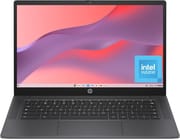
The HP Chromebook 14a with Intel N100 processor is an Amazon-exclusive Chromebook that prioritizes the fundamentals over flashy features. At prices ranging from $174.50 for the base 4GB model to $228.99 for the 8GB variant, this Chromebook targets students, casual users, and anyone seeking a reliable everyday laptop. HP has focused on getting the input devices right, with a keyboard and trackpad that punch well above their weight class. The trade-off comes in the form of a basic HD display, but for those who value typing comfort and long battery life over screen quality, this budget Chromebook delivers solid value.
Pros and Cons of the HP Chromebook 14a (Intel N100)
| Pros | Cons |
|---|---|
| Excellent keyboard with satisfying clickiness | 1366x768 TN panel with limited viewing angles |
| High-quality trackpad with smooth surface | Low brightness at 250 nits |
| Surprisingly good upward-firing speakers | Colors appear washed out on display |
| Up to 12 hours of battery life | Base model limited to 4GB RAM and 64GB storage |
| Fast charging: 0-50% in 45 minutes | No keyboard backlighting |
| Intel N100 outperforms typical budget processors | No HDMI port |
Related Videos
HP Chromebook 14a (Intel N100) Comparison Chart
 HP Chromebook 14a (Intel N100) | HP Chromebook 14a (Intel N100) | |
| Price | List Price: $174.50 Amazon Prices: Loading prices... | List Price: $228.99 Amazon Prices: Loading prices... |
| Model number | 14a-nf0019nr | 14a-nf0099nr |
| Performance Rating | 3.5 | 4.8 |
| Chromebook Plus | No | No |
| Processor | Quad-core 3.40 Ghz (max 3.40 Ghz) Intel Processor N100 | Quad-core 3.40 Ghz (max 3.40 Ghz) Intel Processor N100 |
| RAM | 4 GB | 8 GB |
| Internal Storage | 64 GB eMMC | 128 GB UFS |
| Screen Size | 14" | 14" |
| Screen Resolution | 1366x768 | 1366x768 |
| Screen Type | TN | TN |
| Touch Screen | No | No |
| Stylus / Pen | No Stylus Support | No Stylus Support |
| Dimensions width x length x thickness | 12.82 x 8.48 x 0.72 inches (325.63 x 215.39 x 18.29 mm) | 12.82 x 8.48 x 0.72 inches (325.63 x 215.39 x 18.29 mm) |
| Weight | 3.2 lbs (1.45 kg) | 3.2 lbs (1.45 kg) |
| Backlit Keyboard | No | No |
| Webcam | 720p HD | 720p HD |
| WiFi | Wi-Fi 6E (802.11ax) | Wi-Fi 6E (802.11ax) |
| Bluetooth | Bluetooth 5.3 | Bluetooth 5.3 |
| Ethernet | No | No |
| Cellular Modem | No | No |
| HDMI | No HDMI | No HDMI |
| USB Ports | 1 USB 3, 1 USB-C USB-C supports Power Delivery and DisplayPort | 1 USB 3, 1 USB-C USB-C supports Power Delivery and DisplayPort |
| Thunderbolt Ports | No | No |
| Card Reader | No Card Reader | No Card Reader |
| Battery | No Battery | No Battery |
| Battery Life | 12 hours | 12 hours |
| Fanless | No | No |
| Auto Update Expiration Date | June, 2033 | June, 2033 |
Related Chromebooks
-
 HP Chromebook 14 G7The HP Chromebook 14 G7 packs a 14-inch anti-glare WLED screen, Wi-Fi 6, a 720p HD webcam, and…
 -
 HP Chromebook 14a (ne Series)The HP Chromebook 14a (ne Series) is a budget-friendly 14-inch notebook powered by the Intel…
 -
 Samsung Galaxy Chromebook Go 14"The Samsung Galaxy Chromebook Go offers LTE connectivity, military-grade durability, and a…
 -
 Acer Chromebook 314The Acer Chromebook 314 combines a crisp 1920x1080 IPS display with a robust 12.5-hour battery life…
 -
 Acer Chromebook 314 (CB314-4H/4HT)A budget-friendly 14-inch Chromebook with Intel Alder Lake-N processors, WiFi 6E, and software…
 -
 ASUS Chromebook C424The ASUS Chromebook C424 boasts a crisp 14-inch FHD anti-glare display, durable spill-resistant…
Detailed Insights into the HP Chromebook 14a (Intel N100)
HP has crafted the Chromebook 14a with a unique textured plastic design that feels premium despite its budget positioning. The Chalkboard Gray and Glacier Silver color options both feature a grippy, fingerprint-resistant finish that sets this device apart from the typical smooth plastic found on budget Chromebooks. At 3.2 pounds and measuring 12.82 x 8.48 x 0.72 inches, the laptop strikes a good balance between portability and durability. HP has also committed to sustainability, incorporating ocean-bound plastic and post-consumer recycled materials into the construction, earning EPEAT Gold certification and ENERGY STAR compliance.
The Intel Processor N100 represents a meaningful step up from the Celeron chips commonly found in this price range. This 4-core processor handles everyday Chrome OS tasks with ease, from web browsing and document editing to streaming video content. The Intel UHD Graphics can even manage 4K video streaming, though gaming is limited to casual titles. The 8GB LPDDR5 RAM variant offers noticeably smoother multitasking, especially when juggling multiple browser tabs and Android apps, while the 128GB UFS storage provides faster read and write speeds compared to the base model’s eMMC.
Connectivity options are adequate for a budget Chromebook, with Wi-Fi 6E support ensuring future-proof wireless performance. The single USB-C port handles charging, display output, and data transfer, while a USB-A 3.0 port provides legacy peripheral compatibility. The lack of HDMI might disappoint users who frequently connect to external displays, though the USB-C port does support DisplayPort alternate mode for those with compatible adapters. There is also no built-in Ethernet, but a USB Ethernet adapter can provide wired connectivity through the USB-A port.
Reviewer Insights on the HP Chromebook 14a (Intel N100)
Chrome Unboxed’s Perspective
Robby Payne from Chrome Unboxed provided an extensive hands-on look at the HP Chromebook 14a in his 2025 review. He consistently praised the keyboard as genuinely enjoyable to type on, noting that HP has maintained their reputation for quality input devices even at this budget price point. The trackpad earned similar praise for its size, responsiveness, and satisfying click mechanism. However, Payne was notably critical of the display, calling it “a major compromise” that pairs excellent input devices with a screen that simply cannot keep up.
Payne found the upward-firing speakers to be a pleasant surprise, delivering audio quality suitable for video calls, casual media consumption, and even browser-based music production. The 720p webcam impressed with its dynamic range and sharpness, performing better than expected for a budget device. His verdict was nuanced: “At its $389.99 retail price, it’s difficult to recommend, but if this device drops by $50 or even $100, the value proposition changes dramatically. For under $300, a Chromebook with this great of a keyboard, trackpad, and speaker setup becomes a very compelling option, even with that screen.”
Customer Reviews of the HP Chromebook 14a (Intel N100)
Amazon customers have responded favorably to the HP Chromebook 14a, with the 8GB model earning a 4.3-star rating from over 250 reviews and the 4GB variant achieving 4.4 stars from 93 reviews. Buyers consistently praise the value proposition, noting that the Chromebook handles everyday tasks smoothly and the build quality exceeds expectations for the price. The keyboard comfort and long battery life receive particular appreciation from students and remote workers.
Common concerns center around the display quality, with multiple reviewers wishing for a brighter, higher-resolution screen. The base 4GB model also draws criticism for its limited RAM, with users recommending the 8GB variant for anyone planning to keep multiple tabs open. Storage capacity is another point of discussion, as the 64GB base configuration can fill up quickly for users who download many Android apps or store files locally.
Conclusion
The HP Chromebook 14a with Intel N100 processor succeeds as a budget Chromebook by nailing the fundamentals that matter most during daily use. The keyboard, trackpad, and speakers all deliver experiences that typically require spending significantly more, while the Intel N100 processor provides responsive performance for Chrome OS workflows. The 8GB/128GB variant at $228.99 represents the sweet spot, offering enough RAM and storage for comfortable long-term use without breaking the bank.
This Chromebook is ideal for students, casual home users, and anyone who values typing comfort over display quality. The Chrome OS update support through June 2033 ensures nearly eight years of security updates and feature improvements from purchase. However, users who prioritize screen quality for media consumption or creative work should look elsewhere, as the 1366x768 TN panel is this device’s most significant limitation. For those looking to compare options, Starry Hope’s Chromebook Comparison Chart provides a valuable resource for finding the right balance of features and price.
Frequently Asked Questions
How long will the HP Chromebook 14a receive Chrome OS updates?
The HP Chromebook 14a with Intel N100 processor will receive Chrome OS updates through June 2033. This Auto Update Expiration (AUE) date means you’ll get security patches, bug fixes, and new features for approximately eight years from the 2025 release.
What’s the difference between the 4GB and 8GB RAM versions?
The 4GB model ($174.50) is suitable for basic web browsing and light tasks with a few tabs open. The 8GB model ($228.99) offers noticeably smoother performance with multiple browser tabs, Android apps, and Linux applications running simultaneously. The 8GB version also includes 128GB UFS storage instead of 64GB eMMC, providing both more capacity and faster speeds.
Does the HP Chromebook 14a have a touchscreen?
No, the HP Chromebook 14a features a standard non-touch 14-inch display with 1366x768 HD resolution. If you need touch capability, consider HP’s Chromebook x360 lineup or similar convertible models.
Can I connect the HP Chromebook 14a to an external monitor?
Yes, the USB-C port supports DisplayPort output for connecting to external displays. However, there’s no built-in HDMI port, so you’ll need a USB-C to HDMI adapter or a USB-C monitor for direct connections. The USB-C port also handles charging and data transfer.
Is the HP Chromebook 14a good for students?
Yes, the HP Chromebook 14a is well-suited for students thanks to its excellent keyboard for typing essays, 12-hour battery life for full school days, fast charging, and lightweight design at 3.2 pounds. The 8GB model is recommended for students who work with many browser tabs, Google Workspace apps, and educational software simultaneously.
Does the HP Chromebook 14a support Android and Linux apps?
Yes, the HP Chromebook 14a fully supports both Android apps from the Google Play Store and Linux applications through Chrome OS’s built-in Linux (Crostini) feature. This expands your software options beyond web apps to include productivity tools, media applications, and development environments.
How does the Intel N100 processor compare to Celeron chips?
The Intel Processor N100 significantly outperforms the Celeron N4000 and N4020 chips commonly found in budget Chromebooks. With a CPU Mark score of 5643 compared to around 1500-2000 for older Celerons, the N100 delivers noticeably snappier performance for web browsing, video playback, and multitasking while maintaining excellent power efficiency.