
Lenovo IdeaPad 3i Chromebook
Updated on

The Lenovo IdeaPad 3i Chromebook delivers a solid budget computing experience with its spacious 15.6-inch Full HD display and Intel Celeron N4500 processor. This laptop targets students, casual users, and anyone who needs a reliable machine for web browsing, document editing, and light productivity tasks. With a rated battery life of up to 10 hours, you can work through an entire school day or handle a long flight without reaching for the charger. The inclusion of a full-size keyboard with number pad makes this Chromebook particularly useful for anyone who frequently works with spreadsheets or data entry.
Pros and Cons of the Lenovo IdeaPad 3i Chromebook
| Pros | Cons |
|---|---|
| Large 15.6-inch Full HD display | TN panel with limited viewing angles |
| 10-hour battery life for all-day use | No backlit keyboard |
| Full-size keyboard with number pad | Plastic build quality |
| WiFi 6 and Bluetooth 5.2 connectivity | Celeron processor struggles with heavy multitasking |
| Privacy shutter on 720p webcam | Limited 64GB base storage |
| Affordable price point | Trackpad quality could be better |
Related Videos
Lenovo IdeaPad 3i Chromebook Comparison Chart
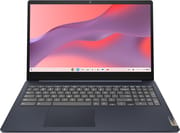 Lenovo IdeaPad 3i Chromebook | Lenovo IdeaPad 3i Chromebook | |
| Price | List Price: $249.00 Amazon Prices: Loading prices... Best Buy: Loading price... | List Price: $449.00 Amazon Prices: Loading prices... Best Buy: Loading price... |
| Model number | --- | --- |
| Performance Rating | 3.1 | 4.5 |
| Chromebook Plus | No | No |
| Processor | Dual-core 1.10 Ghz (max 2.80 Ghz) Intel Celeron Processor N4500 | Dual-core 1.10 Ghz (max 2.80 Ghz) Intel Celeron Processor N4500 |
| RAM | 4 GB | 8 GB |
| Internal Storage | 192 GB eMMC | 64 GB eMMC |
| Screen Size | 15.6" | 15.6" |
| Screen Resolution | 1920x1080 | 1920x1080 |
| Screen Type | TN | TN |
| Touch Screen | No | No |
| Stylus / Pen | No Stylus Support | No Stylus Support |
| Dimensions width x length x thickness | 14.27 x 9.99 x 0.78 inches (362.46 x 253.75 x 19.81 mm) | 14.27 x 9.99 x 0.78 inches (362.46 x 253.75 x 19.81 mm) |
| Weight | 3.96 lbs (1.8 kg) | 3.96 lbs (1.8 kg) |
| Backlit Keyboard | No | No |
| Webcam | 720p | 720p |
| WiFi | Wi-Fi 6 (802.11ax) | Wi-Fi 6 (802.11ax) |
| Bluetooth | Bluetooth 5.2 | Bluetooth 5.2 |
| Ethernet | No | No |
| Cellular Modem | No | No |
| HDMI | Full-Size HDMI | Full-Size HDMI |
| USB Ports | 2 USB 3, 1 USB-C USB-C supports charging and display output | 2 USB 3, 1 USB-C USB-C supports charging and display output |
| Thunderbolt Ports | No | No |
| Card Reader | microSD Card Reader | microSD Card Reader |
| Battery | 47Wh, Li-Polymer | 47Wh, Li-Polymer |
| Battery Life | 10.0 hours | 10.0 hours |
| Fanless | No | No |
| Auto Update Expiration Date | June, 2030 | June, 2030 |
Related Chromebooks
-
 Lenovo 3i ChromebookThe Lenovo 3i Chromebook offers a large 15.6-inch anti-glare FHD display with a numeric keypad,…
 -
 ASUS Chromebook CX1 (CX1500)The ASUS Chromebook CX1 (CX1500) boasts a full HD display, long-lasting battery, and peppy…
 -
 HP Chromebook 15 (15a-na2)The HP Chromebook 15a-na2 delivers a spacious 15.6-inch screen with a full numeric keypad at an…
 -
 Lenovo Chromebook 3 11"Get to know the Lenovo Chromebook 3: lightweight, affordable, and designed for basic tasks. It…
 -
 Samsung Chromebook 4+The Samsung Chromebook 4+ offers a vivid 15.6" FHD LED display, 10.5 hours of battery life, fanless…
 -
 Acer Chromebook 315 (CB315-5H/5HT)A budget-friendly 15.6-inch Chromebook with Intel N100 processor, FHD IPS display, WiFi 6E, and…
Detailed Insights into the Lenovo IdeaPad 3i Chromebook
The build quality of the IdeaPad 3i is typical for its price point, featuring an all-plastic construction that feels reasonably sturdy despite not being premium. The laptop measures 14.27 x 9.99 x 0.78 inches and weighs approximately 4 pounds, making it portable enough for daily commutes while still offering a comfortable screen size for extended use. The Arctic Grey and Abyss Blue color options give buyers some choice in aesthetics, and the overall design is clean and professional looking without drawing unnecessary attention.
Performance on the Lenovo IdeaPad 3i is best suited for basic tasks. The Intel Celeron N4500 processor handles web browsing, Google Docs, and streaming video without issue, but you will notice slowdowns when opening many browser tabs simultaneously or attempting more demanding Android apps. The 8GB RAM variant provides noticeably smoother multitasking compared to the 4GB model, so if your budget allows, the extra memory is worth considering. For typical student workloads like research papers, online classes, and email, this Chromebook gets the job done reliably. Students using school-managed devices should also be aware of what monitoring software can see on their Chromebooks.
Connectivity options on the IdeaPad 3i are surprisingly generous for a budget device. You get two USB-A 3.2 ports, one USB-C port that supports both charging and display output, a full-size HDMI 1.4 port for external monitors, and a microSD card reader for storage expansion. The WiFi 6 support ensures fast wireless performance, and Bluetooth 5.2 allows you to connect wireless peripherals and earbuds without issues. Reviewers have noted that the USB-C port can drive an external display, which is useful for presentations or setting up a larger workspace at home.
Reviewer Insights on the Lenovo IdeaPad 3i Chromebook
MergeDroid’s Perspective
MergeDroid provides a thorough hands-on review of the 2023 IdeaPad 3i Chromebook, noting that “as you’d expect at this price point, it’s an all plastic build, but it feels solid enough.” The reviewer appreciated the keyboard quality and the inclusion of a number pad, which is uncommon on budget laptops. They specifically praised the speakers being located on the keyboard deck rather than the bottom, and highlighted the privacy shutter on the webcam as a nice security feature.
The main criticism from MergeDroid centered on the display, stating “the display on this Lenovo is where the compromise comes.” The TN panel offers washed-out colors and poor viewing angles, which is the most significant trade-off for the low price. Despite this, the reviewer seemed satisfied with the overall package, particularly noting that the build quality exceeded that of similarly priced Asus Chromebooks they had tested. They also demonstrated the USB-C port’s ability to support dual monitor setups, adding value for users who want a more desktop-like experience.
Jhon Bihn’s Perspective
Jhon Bihn focuses on the practical aspects of daily use, emphasizing that “this Chromebook is great for watching videos, web browsing, and you know like light tasks.” The reviewer praises the 10-hour battery life as one of the standout features, making it ideal for students who need a laptop that lasts through a full day of classes. The lightweight design at 3.5 pounds combined with the Energy Star rating makes it an environmentally conscious choice.
However, Jhon Bihn clearly sets expectations for the target audience, noting “definitely not for a power user or video editor or multiple browser tabs open.” The reviewer found the TN panel’s viewing angles problematic unless you view it straight on, and the lack of keyboard backlighting makes it less ideal for working in dim environments. Despite these limitations, the overall verdict is positive for anyone seeking a budget-friendly student laptop that handles the basics well.
Customer Reviews of the Lenovo IdeaPad 3i Chromebook
Amazon customers have given the Lenovo IdeaPad 3i Chromebook a solid 4.3 out of 5 stars based on over 1,600 reviews, indicating general satisfaction with the product. Many reviewers praise the value proposition, noting that the laptop delivers reliable performance for everyday tasks at a price that fits student budgets. The 15.6-inch screen size is frequently mentioned as a positive, with buyers appreciating the larger display for extended reading and video watching sessions.
Common criticisms in customer reviews align with what professional reviewers noted: the TN display has limited viewing angles, and the Celeron processor can feel sluggish when pushed with multiple tabs or heavier workloads. Some users mention that the 64GB storage fills up quickly if you install many Android apps, making the microSD card slot essential for additional storage. The 4GB RAM variant receives more complaints about performance compared to the 8GB model, suggesting the upgrade is worthwhile for smoother operation.
Overall, customers seem to understand what they are getting at this price point. The consensus is that for web browsing, document work, streaming, and basic productivity, the IdeaPad 3i Chromebook performs admirably. Those who expected more demanding capabilities were disappointed, while those who purchased it for school or casual home use express satisfaction with their investment.
Conclusion
The Lenovo IdeaPad 3i Chromebook represents a sensible choice for students, families, and anyone who needs an affordable laptop for basic computing tasks. The 15.6-inch Full HD display provides comfortable screen real estate, the 10-hour battery life means you can leave the charger at home, and the full-size keyboard with number pad adds genuine productivity value. At its affordable price point for the 8GB model, it offers compelling value for anyone whose computing needs center around web browsing, Google Workspace, and light entertainment.
However, this is not the right Chromebook for power users or anyone who needs to run demanding applications. The TN display compromises on color accuracy and viewing angles, and the Celeron processor will struggle with heavy multitasking. If you need better display quality or more processing power, you should consider stepping up to a Chromebook Plus model or a device with an Intel Core processor. For those looking to compare options across the Chromebook market, Starry Hope’s Chromebook Comparison Chart provides a valuable resource for finding the right balance of features and price for your specific needs.
Frequently Asked Questions
How long will the Lenovo IdeaPad 3i Chromebook receive Chrome OS updates?
The Lenovo IdeaPad 3i Chromebook will receive automatic Chrome OS updates through June 2030. This Auto Update Expiration (AUE) date means you will get security patches, new features, and bug fixes for several more years, making it a solid long-term investment for basic computing needs.
Can I connect an external monitor to the Lenovo IdeaPad 3i Chromebook?
Yes, the Lenovo IdeaPad 3i Chromebook offers two ways to connect external displays. You can use the built-in HDMI 1.4 port for a direct connection, or use the USB-C port which supports display output. Reviewers have confirmed that dual monitor setups work well with this Chromebook.
Is the 4GB or 8GB RAM version better for students?
The 8GB RAM version is recommended for students who will have multiple tabs open while researching or attending online classes. The 4GB model works for basic browsing and single-task work, but you may notice slowdowns with heavier workloads. The 8GB variant is competitively priced, making it excellent value.
Does the Lenovo IdeaPad 3i Chromebook have a backlit keyboard?
No, the Lenovo IdeaPad 3i Chromebook does not have a backlit keyboard. This is one of the cost-saving measures at this price point. If you frequently work in low-light environments, you may want to consider a different model with backlighting or use an external desk lamp.
Can I expand the storage on the Lenovo IdeaPad 3i Chromebook?
Yes, the Lenovo IdeaPad 3i Chromebook includes a microSD card reader for storage expansion. Since the internal eMMC storage is not upgradeable, many users add a microSD card for additional space for downloads, Android apps, and offline files. One variant even comes bundled with a 128GB SD card already installed.
Is the Lenovo IdeaPad 3i Chromebook good for video calls and online classes?
The Lenovo IdeaPad 3i Chromebook handles video calls and online classes adequately with its 720p webcam and built-in microphone. The webcam includes a privacy shutter for security when not in use. While the camera quality is not exceptional, it is sufficient for Google Meet, Zoom, and other video conferencing applications commonly used in education.
How does the battery life compare to other Chromebooks?
The Lenovo IdeaPad 3i Chromebook offers up to 10 hours of battery life from its 47Wh battery, which is competitive with other Chromebooks in its class. This all-day battery performance means students can typically get through a full school day without needing to charge, and casual users can enjoy extended sessions away from an outlet.