
Micro-breaks vs. rest breaks (the basic idea)
Two break lengths do most of the work. A micro-break is a short pause every few minutes: 20 to 30 seconds, just long enough to drop your hands off the keyboard, roll your shoulders, and let your eyes focus on something across the room. A rest break is longer, usually 5 to 10 minutes every 30 to 60 minutes, where you actually stand up, walk somewhere, and stop looking at a screen. Most of the Linux apps below configure both, with sensible defaults out of the box. The point is not to follow the timer slavishly; it is to interrupt the trance that puts your body in pain.
The other rule worth knowing is the 20-20-20 rule from the American Optometric Association: every 20 minutes, look at something at least 20 feet away for at least 20 seconds. It is the lowest-effort thing you can do for digital eye strain, and Safe Eyes in particular is built around it.
Workrave: the classic RSI tool
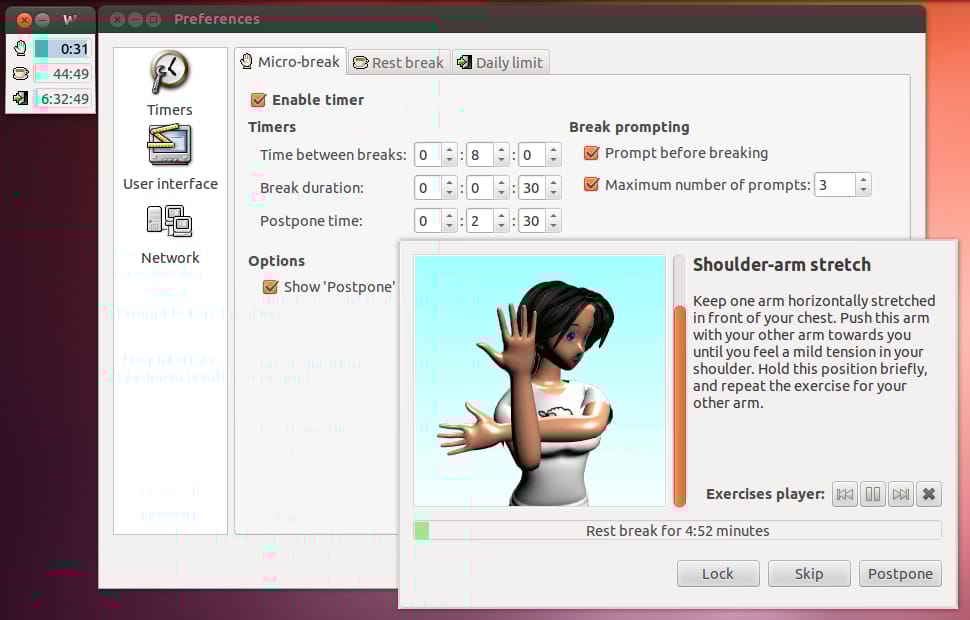
Workrave has been around since 2001 and is still actively maintained: version 1.10.54 shipped in October 2025, with a 1.11 release candidate following in November. It is the most exhaustive of the four. Workrave watches your keyboard and mouse activity, prompts a micro-pause every few minutes, a longer rest break on a separate schedule, and enforces a daily limit if you set one. It tracks statistics over days and weeks so you can see how often you actually take the breaks you tell it to schedule.
The defaults are conservative: a 30 second micro-pause every 3 minutes, a 10 minute rest break every 45 minutes. You can tune every interval, postpone a break, or skip one outright if you are mid-thought. The break window includes a small animated figure doing stretches, which is dated charm in 2026 but still useful as a visual cue.
Install on Ubuntu 24.04 (Workrave is in the universe repository at version 1.10.52):
sudo apt install workraveWho it is for: anyone who wants the deepest control over break scheduling and a daily computer-time cap. The UI is busier than the modern alternatives, but the tradeoff is that you can configure essentially anything.
Stretchly: modern, cross-platform, sensible defaults
Stretchly is the one to install first if you do not already have a strong preference. It is a cross-platform Electron app from Jan Hovancik, BSD-2-Clause licensed, and at version 1.21.0 as of April 2026. It runs from the system tray and ships with defaults that match the standard advice: a 20 second mini break every 10 minutes, a 5 minute long break every 30 minutes.
What Stretchly does well is staying out of the way until it should not. Idle detection pauses the timer when you step away, so you do not return to a queue of “missed” breaks. It detects Do Not Disturb mode. Pre-break notifications give you a few seconds to finish a sentence before the break window appears. The interface for postponing or skipping a break is one click. The same app runs the same way on macOS and Windows, which matters if you switch machines.
Install on Ubuntu 24.04 via Flatpak (recommended):
flatpak install flathub net.hovancik.StretchlyIf you do not already have Flatpak set up, sudo apt install flatpak and then add Flathub once with flatpak remote-add --if-not-exists flathub https://flathub.org/repo/flathub.flatpakrepo. Stretchly is also available as an AppImage and a .deb from the project’s downloads page.
Who it is for: everyone who is not already opinionated about break software. Good defaults, low friction, cross-platform parity.
Safe Eyes: the eye-strain specialist
Safe Eyes takes a different angle. It is a Python application by Gobinath Loganathan focused specifically on eye strain and the kind of micro-RSI that comes from staring without blinking. When a break fires, Safe Eyes covers the full screen with a gentle overlay and optionally locks the keyboard so you cannot just keep typing through it. The break content includes guided eye exercises and stretches with simple animations, which is more directive than Workrave’s free-form approach. Multi-monitor setups are handled cleanly: the overlay appears on every connected display.
Ubuntu 24.04 ships Safe Eyes 2.1.5 in the universe repository. The official Safe Eyes PPA for Noble currently publishes the newer 3.5.0 series, so the PPA is the right path if you want the current Ubuntu 24.04 build.
Install on Ubuntu 24.04 from the official PPA:
sudo add-apt-repository ppa:safeeyes-team/safeeyes
sudo apt update
sudo apt install safeeyes
Alternatively, via Flatpak: flatpak install flathub io.github.slgobinath.SafeEyes. The Flatpak version has some plugin sandbox limitations called out on the project page; the PPA version is the fuller experience.
Who it is for: people whose main symptom is eye strain or who like being told exactly what to do during a break. The forced full-screen overlay also helps if you keep talking yourself out of breaks.
GNOME Pomodoro: a panel timer for GNOME users
GNOME Pomodoro is a different shape of tool. Instead of interrupting you on a steady cadence, it implements the Pomodoro Technique: 25 minutes of focused work followed by a 5 minute break, with a longer break after every fourth cycle. The timer lives in the GNOME Shell top panel; the break notifications take over the screen so you cannot ignore them.
Ubuntu 24.04 still ships the legacy gnome-shell-pomodoro package in the universe repository at version 0.25.1, which works on a stock GNOME desktop. If you want the newer Flatpak app with GNOME integration, Focus Timer 1.0 shipped in March 2026 and is at 1.1.2 as of late May 2026.
Install on Ubuntu 24.04 from the official repos:
sudo apt install gnome-shell-pomodoroOr, for the current Focus Timer rebuild via Flatpak:
flatpak install flathub io.github.focustimerhq.FocusTimerGNOME Pomodoro / Focus Timer expects a GNOME session. It will run under other desktops, but the panel integration is the whole point. If you are on KDE, XFCE, or Cinnamon, pick one of the other three apps.
Who it is for: GNOME users who already think in Pomodoro intervals, and anyone whose RSI risk is less about hand pauses and more about the fact that they will sit there for four hours without standing up. The 25/5 structure forces a regular cadence.
Comparison
| App | Style | Defaults | Install (Ubuntu 24.04) |
|---|---|---|---|
| Workrave | Configurable, classic RSI tool | 30s micro every 3m, 10m rest every 45m, daily limit | sudo apt install workrave |
| Stretchly | Modern, cross-platform, friendly | 20s mini every 10m, 5m long every 30m | flatpak install flathub net.hovancik.Stretchly |
| Safe Eyes | Eye-strain focus, full-screen overlay | Short break every 15m, long break every 30m, with exercises | sudo add-apt-repository ppa:safeeyes-team/safeeyes then sudo apt install safeeyes |
| GNOME Pomodoro | Panel timer, Pomodoro Technique | 25m work, 5m break, long break every 4 cycles | sudo apt install gnome-shell-pomodoro |
All four are free and open source, and all four can be exited without permission if you genuinely need to ship something. The difference is mostly about how loud they want to be and how much structure they impose.
How to actually use any of them
Install one. Use its defaults for a full week before you touch the settings. Almost everyone’s first instinct is to lengthen the work intervals and shorten the breaks, which is the exact opposite of what helps. If you find yourself dismissing every prompt, that is information: either the schedule is wrong for you, or you are pushing through pain you should not be pushing through. Tune the schedule once, not five times in one afternoon.
Pair the software with a couple of analog habits. Keep a water glass at the desk so a refill becomes the rest break. Put something at least 20 feet away that is interesting to look at (a window helps). If you are dealing with active wrist or shoulder pain, an app reminder is not a substitute for an ergonomic assessment of your chair, desk, and keyboard. The break reminder is the easy 20% that gets you most of the way; the rest is posture, position, and the willingness to actually stop.
I have used Workrave on and off for over a decade, originally on Ubuntu in 2013 and still on Linux in 2026. These days I run Stretchly because the defaults are good and the cross-platform parity matters when I switch machines, but the original advice has not changed: pick one, install it, take the breaks. Your wrists will thank you in ten years.
If you are setting up a new Linux machine, our guides on installing software in Ubuntu and checking your Ubuntu version cover the basics in more depth.


