
Beelink SER8
Updated on

The Beelink SER8 is a compact AMD mini PC built on the Ryzen 7 8845HS (8 cores, Radeon 780M graphics), with an 8745HS option at a lower price. Reviewers consistently praise how quiet it runs, thanks to a vapor-chamber cooler in an aluminum chassis. It suits everyday work, content creation, and 1080p light gaming.
Pros and Cons
| Pros | Cons |
|---|---|
| 8-core Ryzen 7 8845HS (or cheaper 8745HS) | No VESA mount |
| Near-silent under load (low-30s dBA) | Wi-Fi performance reviewers found weak |
| Aluminum chassis with vapor-chamber cooler | Bundled SSD slower than expected |
| USB4, HDMI 2.1, DisplayPort 1.4 (4K up to 144Hz) | Single 2.5GbE port; no SD reader |
| DDR5 to 64GB and a second M.2 slot | Realtek audio can be low after sleep (owner report) |
| Strong Linux support; 89ns memory latency | Priced at the high end for the class |
Related Videos
Beelink SER8 Comparison Chart
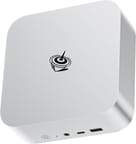
4 configurations
| Configuration | Processor | RAM | Performance | List price | Amazon price | Compare |
|---|---|---|---|---|---|---|
| 32GB/1TB/AMD Ryzen 7 8845HS | Ryzen 7 8845HS | 32 GB | 5.7 | $749.00 | Loading... | Details
|
| 32GB/1TB/AMD Ryzen 7 8745HS | Ryzen 7 8745HS | 32 GB | 5.7 | $859.00 | Loading... | Details
|
| 24GB/1TB/AMD Ryzen 7 8745HS | Ryzen 7 8745HS | 24 GB | 5.5 | $599.00 | Details
| |
| 24GB/1TB/AMD Ryzen 7 8845HS | Ryzen 7 8845HS | 24 GB | 5.5 | $799.00 | Loading... | Details
|
Specs shared by every configuration
| Operating System | Windows 11 Pro |
|---|---|
| GPU | Integrated AMD Radeon 780M |
| Internal Storage | 1 TB |
| Dimensions width x length x thickness | 5.31 x 5.31 x 1.76 inches (134.87 x 134.87 x 44.7 mm) |
| Weight | unknown |
| WiFi | Wi-Fi 6 (802.11ax) |
| Bluetooth | Bluetooth 5.2 |
| Ethernet | 1 Ethernet port at 2.5 Gbps |
| HDMI | 1 Full-Size HDMI Port |
| DisplayPort | 1 DisplayPort (DisplayPort 1.4 supports up to 144Hz at 4K) |
| VGA | No VGA Ports |
| USB Ports | 2 USB 2.0, 2 USB 3, 1 USB-C (1 USB4) USB-C is 4.0 and has Thunderbolt functionality |
| Thunderbolt Ports | 1 |
| OCuLink | No |
| Internal SATA Ports | No SATA ports |
| Card Reader | No Card Reader |
| Headphone Jack | combo |
| Fanless | No |
| VESA Mount | No |
| In the Box | Mini PC, Power Supply, User Manual |
| Expandability | Expandable to 64GB RAM and additional M.2 storage |
Related Mini PCs
-
 Beelink EQR6The Beelink EQR6 is a quiet, compact mini PC sold in several AMD configs (Ryzen 9 6900HX down to…
 -
 Beelink EQI13 PROThe Beelink EQI13 PRO pairs an Intel Core i7-13620H (10 cores, 16 threads) with 32GB of DDR4 and a…
 -
 ACEMAGICIAN AD08 Mini PCThe ACEMAGICIAN AD08 is a compact mini PC sold with Intel Core i9-11900H, i9-12900H, or i7-11700B…
 -
 ACEMAGIC AM08 Pro Mini PCThe ACEMAGIC AM08 Pro packs a Ryzen 9 6900HX, Radeon 680M, and 32GB of DDR5 into a small upright…
 -
 SOAYAN EXR1A bold departure from traditional mini PC design, the SOAYAN EXR1 disguises powerful computing…
 -
 AOOSTAR MACOThe AOOSTAR MACO is a 5.9-inch aluminum mini PC with OCuLink, two USB4 ports, two 2.5GbE ports and…
Specs and Cooling
The SER8 runs the 8-core Ryzen 7 8845HS (up to 5.1GHz) or the closely related 8745HS, both with Radeon 780M graphics, paired with 24GB or 32GB of DDR5 and a 1TB NVMe SSD; RAM goes to 64GB and there is a second M.2 slot. Ports cover USB4, USB 3.2, HDMI 2.1, DisplayPort 1.4 (4K at up to 144Hz), and a 2.5GbE jack, with Wi-Fi 6 and Bluetooth 5.2 for wireless.
The vapor-chamber cooler in an aluminum chassis holds performance under load while keeping noise in the low-30s dBA, near-silent by the standards of most mini PCs at this performance level.
What Reviewers Said
The slightly larger case allowed for better cooling and near-silent operation, wrote Mark Pickavance from TechRadar, who praised the Beelink SER8’s improved design and performance. Pickavance said “the enclosure’s engineering delivers styling and refinement that even Apple would admire,” and called the price “about $50 too high by our reckoning.”
ETA PRIME focused on gaming and cooling, noting that “their new cooling system is working out quite well for 65 watts.” He tested several games and found performance solid for a mini PC, summing it up as “a very snappy system.”
Lawrence Systems’ review on YouTube covered the SER8’s operating-system compatibility and its potential for AI work. “I was shocked at how well it worked right out of the box,” Lawrence said, and he praised the quiet operation and efficient heat dissipation, noting that “this thing is quiet” and “it seems to work well.”
Robtech singled out the noise levels, saying “this is finally a high-end Mini that is quiet enough for me,” and praised the rest: “performance is top-notch, and it doesn’t miss a beat.” His criticisms were the weak wireless and the missing VESA mount.
Mash IT valued the USB-C power delivery and said that “being able to use this little computer on your desk, full tilt, right beside you, yet hardly hear any sound, is an impressive feat.”
Sebastian Peak was impressed with the cooling system and low noise levels in PC Perspective’s YouTube review, noting, “32 dBA from about 18 inches away is excellent.” He praised the build quality, the components, and the competitive pricing, concluding, “overall, this is a very well realized mini PC. And I can’t really fault it for anything.”
On Level1Techs, Wendell framed the Ryzen 7 8845HS “Hawk Point” as an incremental step over the 7000 series, with most of the gain in NPU-based AI acceleration rather than raw CPU, and praised the SER8’s Linux support, upgradability, and low power: “15 watts power usage would idle a desktop. I mean, that’s, it’s hard to beat that.” He measured DDR5 memory latency at 89ns out of the box (well under 100ns) with extensive BIOS tuning options, and called the fan-noise profile the best of any mini PC he had tested, a low hum rather than a high-pitched whine. His one knock was the SSD, which he found underwhelming.
One Owner Report on Audio After Sleep
There are too few owner ratings on Amazon to draw a meaningful average, and the listing pools the 8845HS and 8745HS configurations together. A verified buyer named Alforno documented that the Realtek audio output can be very low after the machine wakes from sleep, that the usual fixes did not help, and that a reboot was the only reliable way to restore normal volume.
The pick when quiet matters most
The SER8 makes the most sense if quiet matters to you. It is a fast 8845HS box with 24GB or 32GB of DDR5, a 1TB NVMe SSD, USB4, triple-display output, and near-silent cooling in a solid aluminum case. It is a strong fit for a quiet home office or living-room desktop, light gaming and esports, content creation, and Linux use. If local AI is part of your plan, our guide to which Gemma model a mini PC can run maps a box like this to the right model size. Gamers cross-shopping it against Valve’s upcoming console can read our take on whether to wait for the Steam Machine or buy a mini PC now.
Look elsewhere if you need high-end AAA gaming, more than one Ethernet port, an SD reader, a VESA mount, or fully fanless silence. The other things to weigh are the price (TechRadar called it about $50 too high) and the weak Wi-Fi. A box like the SER8 also makes a capable base for an offline AI survival computer. To compare it with other models, use Starry Hope’s Mini PC Comparison Chart.