
Blackview MP80 (N95)
Updated on

The Blackview MP80 runs Windows 11 Pro on an Intel Processor N95, a quad-core chip that tops out at 3.40 GHz and carries integrated Intel UHD Graphics. It ships with 12GB or 16GB of DDR5 RAM and a 256GB or 512GB M.2 SSD. The case measures 3.45 inches wide, 3.45 inches long, and 1.45 inches thick. Connectivity covers Wi-Fi 5, Bluetooth 4.2, dual Gigabit Ethernet, and three HDMI outputs for multi-display setups, plus three USB 3.0 ports for peripherals. There is no USB-C port and no Thunderbolt support.
Quiet and frugal, with soldered RAM and a SATA-only M.2 slot
| Pros | Cons |
|---|---|
| 3.45-inch square case with a VESA mount in the box | No USB-C or Thunderbolt ports |
| Windows 11 Pro activates and updates without driver hunting | RAM is soldered and cannot be changed |
| Drives three independent 4K UHD displays | One M.2 slot, no second drive bay or 2.5-inch SATA slot |
| Dual Gigabit Ethernet and three USB 3.0 ports | Blackview does not support Linux |
| Quiet fan and 8.5 to 9.0 watts at idle | SATA SSD rather than faster NVMe |
Related Videos
Blackview MP80 (N95) Comparison Chart
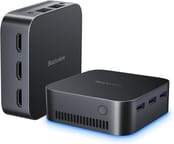 Blackview MP80 (N95) | Blackview MP80 (N95) | |
| Price | List Price: $239.99 Amazon Prices: | List Price: $299.99 Amazon Prices: |
| Version | N95/12GB/256GB | N95/16GB/512GB |
| Performance Rating | 2.8 | 3.1 |
| Operating System | Windows 11 Pro | Windows 11 Pro |
| Processor | Quad-core 3.40 Ghz (max 3.40 Ghz) Intel Processor N95 | Quad-core 3.40 Ghz (max 3.40 Ghz) Intel Processor N95 |
| GPU | Integrated Intel UHD Graphics | Integrated Intel UHD Graphics |
| RAM | 12 GB | 16 GB |
| Internal Storage | 256 GB | 512 GB |
| Dimensions width x length x thickness | 3.45 x 3.45 x 1.45 inches (87.63 x 87.63 x 36.83 mm) | 3.45 x 3.45 x 1.45 inches (87.63 x 87.63 x 36.83 mm) |
| Weight | unknown | unknown |
| WiFi | Wi-Fi 5 (802.11ac) | Wi-Fi 5 (802.11ac) |
| Bluetooth | Bluetooth 4.2 | Bluetooth 4.2 |
| Ethernet | 2 Ethernet ports at 1 Gbps | 2 Ethernet ports at 1 Gbps |
| HDMI | 3 Full-Size HDMI Ports | 3 Full-Size HDMI Ports |
| DisplayPort | No DisplayPort | No DisplayPort |
| VGA | No VGA Ports | No VGA Ports |
| USB Ports | 3 USB 3 | 3 USB 3 |
| Thunderbolt Ports | No | No |
| OCuLink | No | No |
| Internal SATA Ports | No SATA ports | No SATA ports |
| Card Reader | No Card Reader | No Card Reader |
| Headphone Jack | combo | combo |
| Fanless | No | No |
| VESA Mount | Yes | Yes |
| In the Box | 1x HDMI Cable, 1x Power Adapter, 1x Mini PC MP80, 1x User Manual, 1x VESA Mount with Screws | 1x HDMI Cable, 1x Power Adapter, 1x Mini PC MP80, 1x User Manual, 1x VESA Mount with Screws |
| Expandability | -- | -- |
Related Mini PCs
-
 Blackview MP20 (Ryzen 3 3300U)A palm-sized Windows 11 Pro mini PC for office work or a Kodi or Plex media center. It runs a 2019…
 -
 Blackview MP50 (Ryzen 5 3500U)A 3.9-inch square office box from Blackview built on AMD's 2019 Ryzen 5 3500U, sold on Amazon with…
 -
 ACEMAGIC Vista V1The ACEMAGIC Vista V1 is an ultra-budget mini PC sold in several Intel configs (N95, N97, and…
 -
 ACEMAGICIAN T8 PlusThe ACEMAGICIAN T8 Plus is a compact mini PC for multi-display setups, with triple 4K HDMI output,…
 -
 Beelink MINI S12 ProThe Beelink MINI S12 Pro is a budget Intel N100 mini PC with up to 16GB of DDR4, a 512GB NVMe SSD,…
 -
 Beelink MINI S12The Beelink MINI S12 is a compact, low-power Intel N95 mini PC with dual 4K HDMI, four USB 3.2…
Three HDMI outputs and dual Ethernet in a 3.45-inch case
The Intel Processor N95 covers web browsing, document editing, and media playback rather than heavy work, which is why the machine lands as a home office desktop or a media center. The 12GB or 16GB of DDR5 RAM is soldered to the board, so the configuration you buy is the one you keep, and the 256GB or 512GB M.2 SSD occupies the single M.2 slot.
Three HDMI ports carry 4K UHD output for detailed work or entertainment. The two Gigabit Ethernet ports suit network roles under Windows; CNX Software advises against the MP80 for pfSense or Linux for now, since Blackview does not support Linux.
The cooling system keeps the machine quiet, and its low power draw makes it cheap to leave running around the clock. A VESA mount and screws ship in the box, so the unit can hang off the back of a monitor instead of sitting on the desk.
Reviewer Insights
The MP80 is built on Intel’s entry-level Processor N95, a quad-core Alder Lake-N part that launched in early 2023 and carries a PassMark CPU Mark of 5,283. By 2026 that places it at the bottom of the small-core stack: the N97 (about 5,791), N100 (about 5,305), and the newer N150 (about 5,343) that anchors most current budget mini PCs all sit above it, though the raw CPU gap to the N100 and N150 is modest. The reviews below were published in 2023. Three of the four tested the N95 model; one of The Gadgeteer reviews used the slightly faster N97 variant.
CNX Software (Jean-Luc Aufranc)
CNX Software ran a full Windows 11 Pro benchmark suite on the N95 with 16GB of LPDDR5 and the 512GB M.2 SATA SSD in its Part 2 review (translated from Suthinee Kerdkaew’s original by Jean-Luc Aufranc). CrystalDiskMark put the internal SATA SSD at 558.59 MB/s sequential read and 514.77 MB/s sequential write, which the review calls acceptable for a SATA SSD but quite a bit slower than systems with NVMe storage. The CPU and platform results landed at 3,196 in PCMark 10, 1,038 in 3DMark Fire Strike, and 913 single-core and 2,673 multi-core in Cinebench R23. CNX also recorded the PassMark PerformanceTest 11 overall rating at 1,286 with a CPU Mark of 4,649, both below the N100-based Beelink EQ12 it tested earlier. The review puts much of that gap down to the slower SATA storage, and notes the MP80 ran at a 28C ambient temperature against 15.7C for the EQ12, where throttling is more likely.
On the practical side, CNX measured all three USB ports as 5 Gbps USB 3.0 (about 459 MB/s through an external SSD enclosure), confirmed the three HDMI outputs drive three independent displays, and saw 4K YouTube play smoothly (only 2 dropped frames out of 35,790 after about 20 minutes) and 8K hold up better than expected (29 dropped out of 72,145). The review measured gigabit Ethernet at 948 to 950 Mbps via iperf3 and Wi-Fi 5 at 261 Mbps up and 312 Mbps down against a 433 Mbps link. Thermals peaked at 78C during Fire Strike, fan noise sat at 46 to 48 dBA idle and 48 to 50 dBA under load (measured 5cm from the case, against a 39.5 to 40 dBA room floor), and wall-socket power draw ran 8.5 to 9.0 watts at idle, 11.0 to 13.5 watts during 4K video, and 17.0 to 22.5 watts under load. The one hard failure was Linux: CNX could not get Ubuntu 22.04 to install GRUB, and Blackview’s support told them plainly, “we don’t support Linux system yet, sorry, you can skip this test.” Aufranc’s recommendation is to skip the MP80 if you intend to run anything other than Windows 11.
TechMishka (Tech4All)
TechMishka frames the MP80 as a Windows 11 Pro box for about $200 and walks through a teardown that confirms the main upgrade limits: the RAM is soldered, there is a single M.2 slot with no second drive bay and no 2.5-inch SATA slot, and the M.2 Wi-Fi module is one of the few parts you could replace. He flags the storage as a Netac M.2 drive using QLC NAND rather than TLC, and shows write speed dropping after a few minutes at maximum load, which he calls excusable for a budget drive of this size. On performance he calls the N95 (at 15W TDP) roughly comparable to a 6th or 8th generation Core i5 for everyday work, fine for web browsing and light photo or audio editing and even basic 1080p Premiere Pro edits, but likely to struggle with graphics-heavy, high-resolution work. He confirms CS:GO is playable at 1080p with moderate settings while ruling out modern AAA titles, and praises the unit as a quiet 4K multimedia and home-server box that dropped no frames in YouTube 4K. He lists no USB-C, no Thunderbolt, cheap QLC storage, and weak upgradability as his gripes, plus Wi-Fi throughput he clocked at a modest 30 Mbps and wished were faster. TechMishka notes he ran Cinebench and CPU and RAM stress tests and read the results as in line with what the N95 platform should deliver, but he does not read out the individual scores.
The Gadgeteer (Kenneth Woodham)
Writing for The Gadgeteer, Kenneth Woodham set up the MP80 (N95, 16GB, 512GB) as a dedicated workstation for his laser engravers, running Laserpecker Design Space and Lightburn without trouble. He praises the connectivity, writing, “This thing has 3 HDMI ports for 3 monitor support and 4k UHD graphics,” though he could not test 4K output for lack of a 4K monitor and ran his displays at 1080p. Setup, he says, “is just any other Windows PC,” and he confirms the Windows 11 Pro license activated and updated cleanly with no driver hunting. Woodham ran the Userbenchmark tool but did not publish the numeric scores, describing the outcome only qualitatively: the MP80 fared poorly as a gaming machine but did well in the desktop category. He did report Wi-Fi trouble at first, with download throughput stuck at 4 to 5 (in his words, MBps) before a later Windows update lifted it to 35 to 40. He also ran RetroArch successfully (GameCube and PSP titles played well, with Xbox 360 and GameCube USB controllers working), did light photo editing, and dual-booted Zorin Linux without issue, a milder Linux outcome than CNX’s failed Ubuntu attempt. His verdict was warm enough that under “what I’d change” he simply wrote “Nothing.”
The Gadgeteer (David Sheneman), N97 variant
In a second Gadgeteer review, David Sheneman tested the MP80 built around the slightly quicker Intel N97 (up to 3.6 GHz) rather than the N95 on this page, so his figures read as a sibling reference rather than N95 results. He measured Cinebench R23 at 953 single-core and 2,877 multi-core, a little above CNX’s N95 run, and the SATA SSD at 412 MB/s read and 353 MB/s write. He ran the box as a Plex server and reported ripping DVDs at roughly twice playback speed, called the fan quiet with only warm (not hot) exhaust, and confirmed each of the three HDMI ports output 4K60 to his one 4K TV. He also ran a ProPresenter presentation across all three HDMI outputs and reported smooth video playback. Both Ethernet ports and Wi-Fi each reached his 200/200 Mb/s fiber internet speed, though he notes he had no tool to confirm full gigabit. He could not change the Windows display language off UK English, hit a minor printer-driver snag, and wanted at least one USB-C port. Sheneman did not test gaming himself, instead pointing back to Woodham’s RetroArch results.
A quiet Windows-only box for desk work and media
The 3.45-inch footprint suits a small office or a living room where desk space is short, and the machine is light enough to carry to a presentation. Blackview does not support Linux, and the N95 stops short of modern gaming and intensive video editing, so buyers who need any of that should look at other hardware. The Starry Hope Mini PC Comparison App puts the specs next to other mini PCs.
Frequently Asked Questions
What operating system does the Blackview MP80 Mini PC run?
It ships with Windows 11 Pro pre-installed, and Kenneth Woodham found the license activated and updated with no driver hunting.
Can I upgrade the RAM on the Blackview MP80?
No. The LPDDR5 RAM is soldered to the motherboard, so the 12GB and 16GB builds stay at those amounts for life.
Does the Blackview MP80 support multiple displays?
Three HDMI ports drive three independent displays, which CNX Software confirmed on the N95 model.
What type of storage does the Blackview MP80 Mini PC have?
A 256GB or 512GB M.2 SATA SSD, sitting in the machine’s single M.2 slot. Being SATA rather than NVMe, it tops out well short of what a modern NVMe drive reaches.
Is the Blackview MP80 good for gaming?
Not for modern titles. The N95 and its integrated Intel UHD Graphics handle retro emulation and CS:GO at 1080p on moderate settings, but demanding AAA games are beyond them.
What connectivity options are available on the Blackview MP80?
Wi-Fi 5, Bluetooth 4.2, two Gigabit Ethernet ports, and three USB 3.0 ports. There is no USB Type-C port and no Thunderbolt support.
Can I use the Blackview MP80 as a media server?
David Sheneman used his N97 unit as a Plex server and said it did a great job, ripping DVDs at about twice the movie’s speed. On the N95 model, CNX Software saw 4K YouTube drop only 2 frames out of 35,790.
Does the Blackview MP80 come with a VESA mount?
A VESA mount and its screws are in the box, so the unit can be attached behind a monitor for a space-saving setup.
Can I install Linux on the Blackview MP80 Mini PC?
Blackview does not support Linux on this machine. CNX Software could not get Ubuntu 22.04 to install GRUB, though Kenneth Woodham dual-booted Zorin Linux without trouble.
What is included in the box with the Blackview MP80 Mini PC?
The package includes 1x HDMI Cable, 1x Power Adapter, 1x Mini PC MP80, 1x User Manual, and 1x VESA Mount with Screws.