
CyberGeek Nano J1
Updated on

The CyberGeek Nano J1 is a compact Mini PC designed to cater to everyday computing needs. Powered by the Intel Celeron Processor N5095, this Mini PC offers a base frequency of 2.00 GHz and can boost up to 2.90 GHz. It is equipped with integrated Intel UHD Graphics, capable of supporting 4K resolution, making it a suitable option for home theater setups. The Nano J1 has a substantial 16 GB of DDR4 RAM and a 1 TB M.2 NVMe SSD, providing ample storage and memory for smooth multitasking. Its small form factor, measuring 4.88 x 4.39 x 1.67 inches and weighing 1.76 pounds, is designed to be discreet and space-saving. The device also features dual-band Wi-Fi, Bluetooth 4.2, and a 2.5 Gbps Ethernet port for reliable connectivity.
| Pros | Cons |
|---|---|
| Compact and lightweight design | Not intended for gaming |
| 4K resolution support | Performance may falter under heavy load |
| Windows 11 Pro pre-installed | Needs BIOS tweaks for optimization |
| Dual HDMI outputs for multi-monitor | Lacks support for 2.5-inch drive |
| Upgradeable RAM and storage | Limited internal airflow |
Related Videos
CyberGeek Nano J1 Comparison Chart
 CyberGeek Nano J1 | CyberGeek Nano J1 | CyberGeek Nano J1 | |
| Price | List Price: $164.99 Amazon Prices: Loading prices... | List Price: $209.99 Amazon Prices: | List Price: $176.99 Amazon Prices: |
| Version | 8GB/512GB/Intel N5095A | 16GB/1TB/Intel N5095A | 16GB/256GB/Intel N5095A |
| Performance Rating | 4.1 | 4.8 | 4.8 |
| Operating System | Windows 11 Pro | Windows 11 Pro | Windows 11 Pro |
| Processor | Quad-core 2.00 Ghz (max 2.90 Ghz) Intel Celeron Processor N5095 | Quad-core 2.00 Ghz (max 2.90 Ghz) Intel Celeron Processor N5095 | Quad-core 2.00 Ghz (max 2.90 Ghz) Intel Celeron Processor N5095 |
| GPU | Integrated Intel UHD Graphics | Integrated Intel UHD Graphics | Integrated Intel UHD Graphics |
| RAM | 8 GB | 16 GB | 16 GB |
| Internal Storage | 512 GB | 1 TB | 256 GB |
| Dimensions width x length x thickness | 4.88 x 4.39 x 1.67 inches (123.95 x 111.51 x 42.42 mm) | 4.88 x 4.39 x 1.67 inches (123.95 x 111.51 x 42.42 mm) | 4.88 x 4.39 x 1.67 inches (123.95 x 111.51 x 42.42 mm) |
| Weight | 1.76 lbs (0.8 kg) | 1.76 lbs (0.8 kg) | 1.76 lbs (0.8 kg) |
| WiFi | Wi-Fi 5 (802.11ac) | Wi-Fi 5 (802.11ac) | Wi-Fi 5 (802.11ac) |
| Bluetooth | Bluetooth 4.2 | Bluetooth 4.2 | Bluetooth 4.2 |
| Ethernet | 1 Ethernet port at 2.5 Gbps | 1 Ethernet port at 2.5 Gbps | 1 Ethernet port at 2.5 Gbps |
| HDMI | 2 Full-Size HDMI Ports | 2 Full-Size HDMI Ports | 2 Full-Size HDMI Ports |
| DisplayPort | No DisplayPort | No DisplayPort | No DisplayPort |
| VGA | No VGA Ports | No VGA Ports | No VGA Ports |
| USB Ports | 4 USB 3, 1 USB-C | 4 USB 3, 1 USB-C | 4 USB 3, 1 USB-C |
| Thunderbolt Ports | No | No | No |
| OCuLink | No | No | No |
| Internal SATA Ports | No SATA ports | No SATA ports | No SATA ports |
| Card Reader | microSD Card Reader | microSD Card Reader | microSD Card Reader |
| Headphone Jack | combo | combo | combo |
| Fanless | No | No | No |
| VESA Mount | Yes | Yes | Yes |
| In the Box | Mini PC, power adapter, VESA mount, rubber feet, screws, quick start guide | Mini PC, power adapter, VESA mount, rubber feet, screws, quick start guide | Mini PC, power adapter, VESA mount, rubber feet, screws, quick start guide |
| Expandability | RAM and storage can be upgraded, Wi-Fi card replaceable, no support for 2.5-inch drive despite space in case | RAM and storage can be upgraded, Wi-Fi card replaceable, no support for 2.5-inch drive despite space in case | RAM and storage can be upgraded, Wi-Fi card replaceable, no support for 2.5-inch drive despite space in case |
Related Mini PCs
-
 CyberGeek Nano A1The CyberGeek Nano A1 packs impressive power in a compact form with its Windows 11 Pro OS, Wi-Fi 6,…
 -
 Bmax B2 PowerThe Bmax B2 Power delivers budget-friendly computing in an ultra-compact package. With its Intel…
 -
 Bmax B3 ProThe Bmax B3 Pro is a budget-friendly mini PC powered by the Intel Celeron N5095 processor, offering…
 -
 PELADN WI-4With Windows 11 Pro, a compact 4.88” x 4.4” build, and VESA mount compatibility, the PELADN WI-4…
 -
 Beelink Mini SThe Beelink Mini S Mini PC packs a punch with its Intel Celeron quad-core processor, dual 4K HDMI…
 -
 CHUWI HeroBox (2023)The CHUWI HeroBox mini PC runs Windows 11 with LPDDR5 RAM, WiFi 6, and Bluetooth 5.2. It supports…
Detailed Insights into the CyberGeek Nano J1
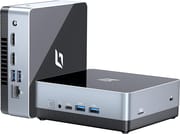
The CyberGeek Nano J1 stands out for its sleek and durable build, featuring a metal case with a plastic bottom and rubber feet for stability. It is also VESA mount compatible, allowing easy attachment behind a monitor to save desk space. The front panel is thoughtfully designed with a power button, audio jack, USB-C port, and two USB 3.0 ports for convenient access. The side panel houses a micro SD card slot and a Kensington lock port, while the back panel includes additional USB ports and HDMI outputs for dual monitor setups.
In terms of performance, the Nano J1 is tailored for users who require a reliable machine for multimedia consumption, web browsing, and light office tasks. Its Intel Celeron N5095 processor, while not the fastest on the market, is sufficient for everyday applications and can handle multiple tasks without significant lag. Including 16 GB of DDR4 RAM is a notable feature, as it allows for better multitasking capabilities compared to many other Mini PCs in its class.
The CyberGeek Nano J1 offers a degree of expandability for users with specific needs. The RAM and storage can be upgraded if needed, and the Wi-Fi card is replaceable, providing some future-proofing. However, it’s important to note that while there is space for a 2.5-inch drive, the necessary connector must be provided, which could be a limitation for users looking to expand their storage capacity. Despite these considerations, the Nano J1 is a solid choice for users seeking a compact, capable, cost-effective computing solution.
Reviewer Insights on the CyberGeek Nano J1
A note on the silicon before the reviews: the Nano J1 runs an Intel Celeron N5095A, an 11th-gen Jasper Lake quad-core (four cores, four threads, 4MB cache, 2.0 GHz base and 2.9 GHz boost). In our processor reference it carries a PassMark multi-thread score of about 4,106. For 2026 context, the chips that now anchor the budget mini PC shelf score meaningfully higher: the Intel N100 lands near 5,643 and the newer N150 near 5,478, so both sit roughly a third ahead of the Nano J1’s Jasper Lake part. That gap is the backdrop the two hands-on reviewers below ran into when they pushed the machine.
T is for Tech’s Perspective
Andrew at T is for Tech ran the only synthetic CPU numbers we found for this model. On Geekbench he recorded a single-core score of 484 and a multi-core score of 1437, which he framed as “going to be on the lower end, you know, the budget PC range.” He also ran UserBenchmark, where the tool rated the machine’s gaming and workstation potential a “tree trunk” and its desktop potential a “yacht,” and he flagged a “very high background CPU use of 38” percent that he could not account for after killing the visible processes.
On thermals and noise he reported no measured figures but gave a clear qualitative read: under load “the fan did come on, but you know, it’s not that loud,” and he “didn’t really seem to think it was thermal throttling or anything.” He did watch the CPU spike “even some points getting to 100” percent just from clicking around and opening apps, his concrete illustration of the four-core ceiling. Storage and memory drew his only real disappointment: he said “the hard drive was performing below expectations” and that the Micron memory also read low, speculating he “might have to check the BIOS” for a dual-channel DDR config issue. He confirmed smooth 4K YouTube playback, called the anodized-feeling metal case “really nice,” and closed that the Nano J1 “does offer some pretty good value, depending on your use case,” explicitly not as a gaming rig but as a light desktop, media, or home-lab box.
CareyHolzman’s Analysis
Repair-channel veteran CareyHolzman is the source for measured storage performance. Running CrystalDiskMark on the unit’s drive, he hit a sequential read of 889.1 MB/s, which he reckoned was only about 50 percent faster than SATA (he pegged SATA at roughly 550 MB/s) and, more bluntly, “one of the slowest NVMe drives I’ve ever seen.” He identified the drive itself as a name-brand Western Digital PC SN530 NVMe, the RAM as Micron DDR4-3200 in two 4GB sticks running dual channel, the Wi-Fi as an Intel 802.11ac (Wi-Fi 5) card, Bluetooth as 4.2, and the wired networking as Realtek 2.5-gigabit Ethernet that he verified negotiating at 2500 Mbps (“I’m impressed, I did not expect that”). He pegged the N5095 as a “four core 15 watt processor” that boosts to 2.9 GHz.
His sharpest cautions were practical rather than benchmarked. He hit a Realtek driver fault that repeatedly connected and disconnected the Ethernet link, fixable by pulling the current driver from Realtek’s site. He found the shipped Windows 11 Pro image misconfigured: it arrived on the dated 21H2 build, fought him through the 22H2 upgrade, and left automatic updates locked behind a “your organization has chosen to control updates” policy, leading him to recommend a clean install. On cooling he noted the fan and vents sit only on the bottom with “no airflow whatsoever” over the storage and memory area, so a hotter aftermarket SSD “could potentially get too hot and start the throttle.” He also confirmed the case has space for a 2.5-inch drive but no connector to use it, and that the company runs a US (New Hampshire) LLC for support. His verdict was value-forward: at roughly $120, “it’d be hard pressed to complain about what you’re getting,” provided buyers treat it as the light-duty machine it is.
Both reviewers land in the same place. The Nano J1 is a quiet, well-built, genuinely cheap light-desktop, media, and home-lab box, not a performance or gaming machine. Its weak spots are concrete and consistent across the two: a slow NVMe drive, a four-core CPU that pegs at 100 percent under modest multitasking, a Wi-Fi 5 and Bluetooth 4.2 radio stack that already trailed current standards at launch, and a factory Windows image worth wiping. As of 2026 the Jasper Lake chip sits below the current N100/N150 budget baseline, so the value case rests on price rather than speed.
Customer Reviews of the CyberGeek Nano J1
Across 26 ratings on Amazon, the CyberGeek Nano J1 averages 4.2 stars. The bulk of the feedback is positive (72 percent of ratings are five stars), but there is a real negative tail: 13 percent leave two stars and 7 percent leave one, so it is worth reading past the headline number. Owners who like it describe a quick, quiet, space-saving machine that mounts behind a monitor and handles everyday browsing, media, and light work. A verified buyer named owen wrote, “From the quick start-up, to how quiet it is, stays cool, and being space saving, it’s tremendous.” Several reviewers also called out the easy VESA mounting and good port selection, and one used it specifically as a Linux box.
The recurring complaint, and the reason for those lower stars, is the fan. Will, in a four-star review, titled his writeup around it and put it bluntly: “The fan on this little guy is NOISY!” He attributes the noise to an air intake on the underside that sits only a couple of millimeters off the desk, starving the fan for air. Reliability shows up in the worst reviews too: a one-star reviewer, Monica Potter, wrote, “The computer keeps crashing every time I try to use it.” So the picture is a capable, well-priced mini PC that most owners are happy with, tempered by genuine reports of fan noise and, in a few cases, stability problems.
Read more owner reviews on Amazon.
Conclusion: Is the CyberGeek Nano J1 Right for You?
The CyberGeek Nano J1 Mini PC is a compact and versatile solution for users seeking a budget-friendly computer for everyday tasks. Its Intel Celeron N5095 processor, coupled with options for RAM and storage configurations, makes it suitable for light desktop applications, media consumption, and office work. With its dual 4K HDMI support, the Nano J1 could be an excellent addition to a home theater setup or for users requiring a dual-monitor configuration.
However, users with more demanding computing needs, such as gaming or intensive graphic design, might find the Nano J1’s performance needing improvement. The device is not designed for high-end tasks, and users in these categories should consider more powerful alternatives. Additionally, while the Nano J1 offers upgradeability, significant enhancements bring the cost closer to higher-end systems, which may already include the desired performance.
For those who prioritize a small form factor and have moderate computing needs, the CyberGeek Nano J1 is a cost-effective and efficient option. Its pre-installed Windows 11 Pro adds value, although some users may prefer to perform a clean install to ensure they’re starting with the most up-to-date and correctly configured system.
In summary, the CyberGeek Nano J1 is well-suited for users looking for an affordable, entry-level Mini PC for everyday use, media playback, and light productivity tasks. Those with more intensive computing requirements or seeking a gaming-capable machine should explore more robust alternatives. For a comprehensive comparison of Mini PCs and to find the one that best fits your needs, consider using Starry Hope’s Mini PC Comparison Chart.
Frequently Asked Questions
Can the CyberGeek Nano J1 handle 4K video playback?
Yes, the CyberGeek Nano J1 is equipped with Intel UHD Graphics, which supports 4K UHD resolution, making it capable of smoothly handling 4K video playback.
What operating system comes pre-installed on the Nano J1?
The CyberGeek Nano J1 comes with Windows 11 Pro pre-installed.
Can upgrading the RAM and storage on the Nano J1?
The CyberGeek Nano J1 allows for upgrades to RAM and storage. It has an M.2 SATA port for SSD upgrades and supports additional DDR4 RAM.
Does the Nano J1 support dual monitors?
Yes, the Nano J1 supports dual monitors through its two HDMI outputs, allowing you to extend your display across multiple screens.
What kind of wireless connectivity does the Nano J1 offer?
The Nano J1 features dual Wi-Fi, supporting both 2.4 and 5 GHz networks, and also includes Bluetooth 4.2 for additional wireless connectivity options.
Can I mount the Nano J1 behind a monitor?
Yes, the Nano J1 includes a VESA mount, which you can use to attach the mini PC behind a compatible monitor for a clean and space-saving setup.
Is the Nano J1 suitable for gaming?
The Nano J1 is not designed for gaming, especially for modern, resource-intensive games. It is more suited for multimedia, browsing, office tasks, and light desktop use.
Does the Nano J1 come with any cooling system?
The Nano J1 is not fanless; it has an internal cooling system to maintain optimal operating temperatures.
Are there any known issues with the Ethernet connectivity on the Nano J1?
Some users have reported connectivity issues with the 2.5 gigabit Ethernet port, which can typically be resolved by updating the driver from Realtek’s website.
What is included in the box with the CyberGeek Nano J1?
When you purchase the Nano J1, you’ll receive the Mini PC itself, a power adapter, a VESA mount, rubber feet, screws for the mount, and a quick start guide.