
DreamQuest Pro Mini PC
Updated on

The DreamQuest Pro Mini PC is a budget desktop built around Intel’s N95, sold here in 16GB/512GB and 32GB/1TB configurations running Windows 11 Pro. It is small (5.45 inches square, 1.53 inches tall) with an aluminum shell and a tempered-glass top. Connectivity covers dual Gigabit Ethernet, three HDMI outputs for multi-display setups, four USB 3.0 ports, Wi-Fi 5, Bluetooth 4.2, and a 2.5-inch SATA bay alongside the M.2 slot for extra storage.
This listing now ships the Intel N95, but the two video reviews below tested the earlier N5105 build of the same chassis. The build, cooling, and noise notes carry across; the performance figures belong to whichever chip each reviewer ran. The closest measured data for the current N95 config comes from a written LinuxLinks test, summarized further down.
| Pros | Cons |
|---|---|
| Very low power draw (LinuxLinks measured ~7.8W idle) | RAM is soldered; choose capacity at purchase |
| Dual Gigabit Ethernet and three HDMI outputs | Runs hot under sustained load (reviewers and owners) |
| 2.5-inch SATA bay plus M.2 for added storage | M.2 slot is SATA B-key only, no NVMe support |
| Quiet in normal use | Some units shipped with first-boot software issues |
| Capable of 4K video playback and light emulation | N95 integrated graphics rule out modern gaming |
Related Videos
DreamQuest Pro Mini PC Comparison Chart
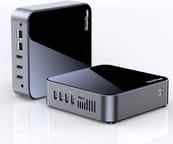 DreamQuest Pro Mini PC | DreamQuest Pro Mini PC | |
| Price | List Price: $199.99 Amazon Prices: | List Price: $299.99 Amazon Prices: |
| Version | 16GB/512GB/Intel N95 | 32GB/1TB/Intel N95 |
| Performance Rating | 3.1 | 3.5 |
| Operating System | Windows 11 Pro | Windows 11 Pro |
| Processor | Quad-core 3.40 Ghz (max 3.40 Ghz) Intel Processor N95 | Quad-core 3.40 Ghz (max 3.40 Ghz) Intel Processor N95 |
| GPU | Integrated Intel UHD Graphics | Integrated Intel UHD Graphics |
| RAM | 16 GB | 32 GB |
| Internal Storage | 512 GB | 1 TB |
| Dimensions width x length x thickness | 5.45 x 5.45 x 1.53 inches (138.43 x 138.43 x 38.86 mm) | 5.45 x 5.45 x 1.53 inches (138.43 x 138.43 x 38.86 mm) |
| Weight | unknown | unknown |
| WiFi | Wi-Fi 5 (802.11ac) | Wi-Fi 5 (802.11ac) |
| Bluetooth | Bluetooth 4.2 | Bluetooth 4.2 |
| Ethernet | 2 Ethernet ports at 1 Gbps | 2 Ethernet ports at 1 Gbps |
| HDMI | 3 Full-Size HDMI Ports | 3 Full-Size HDMI Ports |
| DisplayPort | No DisplayPort | No DisplayPort |
| VGA | No VGA Ports | No VGA Ports |
| USB Ports | 4 USB 3 | 4 USB 3 |
| Thunderbolt Ports | No | No |
| OCuLink | No | No |
| Internal SATA Ports | 1 SATA port, includes 2.5" drive bay (Takes a 2.5-inch SATA SSD or hard drive) | 1 SATA port, includes 2.5" drive bay (Takes a 2.5-inch SATA SSD or hard drive) |
| Card Reader | microSD Card Reader | microSD Card Reader |
| Headphone Jack | combo | combo |
| Fanless | No | No |
| VESA Mount | Yes | Yes |
| In the Box | Mini PC, VESA mount, HDMI cable, Power adapter, User Manual | Mini PC, VESA mount, HDMI cable, Power adapter, User Manual |
| Expandability | Room for a 2.5-inch SATA drive up to 2TB | Room for a 2.5-inch SATA drive up to 2TB |
Related Mini PCs
-
 DreamQuest Pro PlusThe DreamQuest Pro Plus is a budget Intel N100 mini PC with DDR4 (up to 32GB), two M.2 SSD slots…
 -
 Bmax B4 Plus 2025 (Intel N95)The 2025 Bmax B4 Plus is a palm-sized Windows 11 Pro desktop with an Intel N95, 12GB of soldered…
 -
 Bmax B4 PlusThe BMAX B4 Plus is an Intel N100 mini PC with a 2.5-inch SATA drive bay next to its M.2 slot, so a…
 -
 BOSGAME B100The BOSGAME B100 is a budget Intel N100 mini PC with 16GB of DDR4, a 512GB NVMe SSD, dual HDMI plus…
 -
 BOSGAME B95The BOSGAME B95 is a low-cost Intel N95 mini PC with 16GB of DDR4, a 512GB M.2 SSD, 2.5Gb Ethernet,…
 -
 CyberGeek Nano A1The CyberGeek Nano A1 is a compact Intel N100 mini PC with Windows 11 Pro, Wi-Fi 6, dual HDMI 4K…
Reviewer Insights
GregglesTV’s Take (N5105 model)
GregglesTV reviewed the 8GB / 256GB N5105 version and priced it “less than 250 bucks,” noting it dropped “as low as 234 bucks delivered” once Amazon’s 20 percent coupon was applied. He liked how little software shipped on it (“it almost comes with nothing pre-installed, which I love”), finding little more than the Edge browser and a preinstalled security suite out of the box. On a 4K monitor he confirmed the desktop running at 3840 by 2160 and played both a 4K30 and a 4K60 YouTube clip over Wi-Fi with, in his words, no issues, adding that the built-in speakers “actually sound pretty good.” He read the wireless as dual-band 2.4 and 5 GHz rated up to 600 Mbps with Bluetooth 4.2, and held the unit to his microphone to demonstrate that the fan is audible but “not, like, overwhelmingly loud.” His verdict was that the box is “for someone that wants to do basic tasks that you do every single day,” with light gaming only and nothing heavier. Watch GregglesTV’s review here.
SJM4306’s Teardown and Emulation Test (N5105 model)
SJM4306 tested the 16GB / 512GB N5105 unit and went further on numbers. He read the bundled power adapter as “12 volts at 3 amps, so that’s, like, what, 36 watts,” and flagged that both the power cord (about five feet) and HDMI cable (under three feet) run short. Opening the case, he found the RAM hard-soldered, an Intel 7265 dual-band AC Wi-Fi card, and an M.2 2242 SATA slot (“it only supports B key… so it’s not going to support NVMes”) next to a full-size 2.5-inch SATA bay mounted on the bottom, which he preferred to the top-mounted bay on a rival unit that “cooked that drive.” He also noticed the factory thermal paste did not fully cover the die, so he added more before reassembly.
Running emulators with Task Manager on screen, he logged the CPU holding about 2.73 GHz at roughly 65 to 71 percent load during PS2 emulation (Silent Hill 2 and Final Fantasy 12) while RAM use sat near 4 GB. PS3 emulation (Persona 5) pushed the CPU to 100 percent and RAM past 7 GB, which he called “almost borderline playable.” His read was that “what’s keeping this system back is the thermals”: after an hour it was “not, like, super hot to the touch” but “decently pretty toasty,” though the fan stayed “really, really quiet… way quieter than all the other desktop mini Nook-style PCs” he had tested until heavy load ramped it up. He scored the hardware “an 8 out of 10” and the software “a 5 out of 10,” docking the latter for a blue screen and a locked factory test account on first boot. Watch SJM4306’s review here.
LinuxLinks on the Current N95 Build
For the Intel N95, 32GB DDR4, 1TB M.2 SSD build, the closest measured test is Steve Emms’s DreamQuest N95 series at LinuxLinks (August 2024), run on Ubuntu 24.04 with the Phoronix Test Suite. His unit drew about 7.8 watts headless at idle and roughly 13.5 watts under light desktop use, the lowest in a four-machine field that included an Intel NUC 13 Pro (i7-1360P) and two desktops. Under an all-core stress test the N95’s four E-cores held 2700 MHz in balanced or performance mode, dropping to 1500 MHz in power-saver. In the kernel-build and FLAC-encode benchmarks it ran “fairly close” to a 35W HP i5-6500T, which led him to call it a sensible low-power home server or desktop “given that for most of the time its 4 cores will not be maxed out.” It “uses the least power” of the group but is “significantly slower than any of the other machines,” with the NUC “more than 4 times faster” in many tests. His specific unit shipped with a 1TB KingDian M.2 2280 SATA SSD, SATA rather than NVMe, as SJM4306 also found inside the N5105 model.
The N95 Handles Web, Office, and 4K Video, Not Modern Gaming
The DreamQuest Pro is an Intel N95-class budget box. The N95 is a 2023 Alder Lake-N part with four cores, four threads (no hyperthreading), a 15W TDP, and Intel UHD Graphics 710. Its PassMark multi-thread score is 5,283, about 30 percent higher than the N5105 (about 4,066) that GregglesTV and SJM4306 tested, so the current model is a modest step up from those videos rather than a different class of machine. The thermals and soldered RAM the reviewers flagged still apply, so size the memory to your needs at purchase.
Customer Reviews
Across 51 ratings on Amazon, the DreamQuest Pro Mini PC averages 3.9 stars, and the spread is wide: 56% of reviewers gave it five stars while 15% gave it one. The favorable reviews come from owners using it for light, everyday tasks. Richard, a verified buyer, bought it “because I needed a low cost system to use just for home use (web browsing, watching videos, general usage, MS Word documents and 4k video resolution)” and reported the Intel UHD graphics “works great with my 28 inch 4K monitor.” Another verified buyer, Perry Siefferman, found 4K playback stuttered until he switched Windows from balanced to High Performance mode, after which “it runs 4k 60hz flawlessly now.” The Mick (verified) called it a “great little workhorse” after some setup updates, and Jett Ford, who bought two, praised both the units and the customer service.
Heat and longevity are the two recurring complaints. Francisco Ramirez, a verified one-star reviewer, described a unit that “RUNS HOT TO THE TOUCH AFTER 35 MINUTES” with a constantly running noisy fan, shutting down or restarting after under an hour of use. Skillmaker left a five-star title that nonetheless reads “Lifespan Limited. Stopped working after 11 months.” Jerry L. (verified, two stars) said his now “freezes at random” handling only email and YouTube. Even some positive reviewers flagged the heat: one verified buyer noted “this tiny module runs pretty warm and I don’t know if this will eventually affect the performance or life of the mini pc.”
Read more owner reviews on Amazon.
An always-on home server or a one-person light desktop
Buy the DreamQuest Pro as an always-on home server or as a light desktop for one person. A 7.8-watt headless idle draw and dual Gigabit Ethernet suit both jobs. If you want more headroom, the DreamQuest Pro Plus steps up the specs; to weigh it against other models, use Starry Hope’s Mini PC Comparison chart.
Frequently Asked Questions
Can the DreamQuest Pro drive multiple monitors?
Yes. It has three HDMI outputs for a triple-display setup. GregglesTV confirmed 4K output, running the desktop at 3840x2160 and playing 4K30 and 4K60 YouTube clips without issue on the N5105 build.
What processor does the DreamQuest Pro use, and how fast is it?
The current listing uses the Intel N95, a quad-core (4-thread) Alder Lake-N chip with a PassMark multi-thread score of 5,283. The two video reviews tested the earlier N5105 (about 4,066), so treat their performance numbers as a slightly slower build of the same machine.
Can I upgrade the RAM or storage?
The RAM is soldered, so pick the capacity you need at purchase. Storage is expandable, though SJM4306’s teardown found the M.2 slot is SATA B-key only (“it’s not going to support NVMes”). A 2.5-inch SATA bay takes an SSD up to 2TB.
Is the DreamQuest Pro good for gaming?
Only lightly. The N95’s Intel UHD Graphics handle older and classic titles and run retro emulation (SJM4306 reached “almost borderline playable” PS3 emulation on the N5105), but modern AAA games are out of reach.
Does the DreamQuest Pro run hot or loud?
It is quiet in normal use (SJM4306 called the fan “way quieter than” rival mini PCs until heavy load), but heat is the recurring complaint. SJM4306 said “what’s keeping this system back is the thermals,” and several Amazon owners reported units running hot and, in some cases, becoming unstable.
What operating system and accessories does it come with?
It ships with Windows 11 Pro, plus a VESA mount, an HDMI cable, a power adapter, and a manual. SJM4306 hit a first-boot blue screen and found a factory test account left on the unit, so a clean reinstall is advisable.