
GEEKOM A7
Updated on

The GEEKOM A7 is a 0.5-liter mini PC built on AMD’s Ryzen 9 7940HS, an 8-core, 16-thread chip that boosts to 5.2 GHz, with Radeon 780M graphics. It takes up to 64GB of dual-channel DDR5-5600 SO-DIMM memory and a single PCIe 4.0 NVMe SSD, and adds the connectivity most minis this size skip: Wi-Fi 6E, USB4, dual HDMI, 2.5GbE, and a full-size SD reader, in an anodized aluminum case measuring 4.61 x 4.41 x 1.34 inches and weighing about a pound.
This page covers the A7 specifically, not the similarly-specced GEEKOM AE7. GEEKOM has since refreshed the line as the A7 2026 Edition, a 0.47-liter revision of the same aluminum design that steps down to a six-core Ryzen 5. The two Ryzen 5 options sit further apart than their model numbers suggest: the 7545U is Zen 4 on 4nm with Radeon 740M graphics, while the 7535HS is Zen 3+ on 6nm with the older Radeon 660M. The 2026 configurations also add a VESA mount, which the original A7 did not ship with. The ports are otherwise unchanged. All three configurations are in the comparison chart below.
The refresh changed how memory ships, too. CNX Software’s teardown of the 7545U configuration found two SO-DIMM slots with only one populated, so it runs in single channel until you add a second module.
| Pros | Cons |
|---|---|
| 8-core Ryzen 9 7940HS, among the smallest minis to carry it | No VESA mount on the Ryzen 9 build; the 2026 Edition adds one |
| Dual SO-DIMM DDR5 (up to 64GB), user-upgradeable | One M.2 slot only, limited internal expansion |
| Wi-Fi 6E, USB4, dual HDMI, 2.5GbE, SD reader | Reviewers noted fan noise and thermal throttling under sustained load |
| Aluminum case, runs quiet for the size | Proper S3 sleep did not work in one reviewer’s testing |
| Ships with Windows 11 Pro and a compact 120W adapter | Current A7 listings step down to six-core Ryzen 5 processors |
| Drives an eGPU over USB4 and up to four displays | The 7545U configuration ships one SO-DIMM, so it runs single channel out of the box |
| 2026 Edition idles under 7W with a monitor attached | One reviewer hit intermittent Wi-Fi 6 driver dropouts, mostly resolved by rolling the driver back |
Related Videos
GEEKOM A7 Comparison Chart
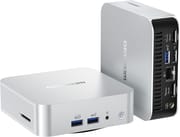 GEEKOM A7 | GEEKOM A7 | GEEKOM A7 | |
| Price | List Price: $779.00 Amazon Prices: | List Price: $649.00 Amazon Prices: Loading prices... | List Price: $549.00 Amazon Prices: Loading prices... |
| Version | 32GB/1TB/AMD Ryzen 9 7940HS | 16GB/500GB/AMD Ryzen 5 7545U (2026 Edition) | 16GB/1TB/AMD Ryzen 5 7535HS (2026 Edition) |
| Performance Rating | 9.3 | 7.2 | 6.9 |
| Operating System | Windows 11 Pro | Windows 11 Pro | Windows 11 Pro |
| Processor | Octa-core 4.00 Ghz (max 5.20 Ghz) AMD Ryzen 9 7940HS | Hexa-core 3.20 Ghz (max 4.90 Ghz) AMD Ryzen 5 7545U | Hexa-core 3.30 Ghz (max 4.55 Ghz) AMD Ryzen 5 7535HS |
| GPU | Integrated AMD Radeon 780M | Integrated AMD Radeon 740M | Integrated AMD Radeon 660M |
| RAM | 32 GB DDR5 SO-DIMM | 16 GB DDR5 SO-DIMM (One SO-DIMM fitted, second slot free) | 16 GB DDR5 SO-DIMM |
| Internal Storage | 1 TB NVMe SSD | 500 GB NVMe SSD | 1 TB NVMe SSD |
| Dimensions width x length x thickness | 4.61 x 4.41 x 1.34 inches (117.09 x 112.01 x 34.04 mm) | 4.43 x 4.41 x 1.46 inches (112.52 x 112.01 x 37.08 mm) | 4.43 x 4.41 x 1.46 inches (112.52 x 112.01 x 37.08 mm) |
| Weight | 0.99 lbs (0.45 kg) | 0.99 lbs (0.45 kg) | 0.99 lbs (0.45 kg) |
| WiFi | Wi-Fi 6E (802.11ax) | Wi-Fi 6E (802.11ax) | Wi-Fi 6E (802.11ax) |
| Bluetooth | Bluetooth 5.2 | Bluetooth 5.2 | Bluetooth 5.2 |
| Ethernet | 1 Ethernet port at 2.5 Gbps | 1 Ethernet port at 2.5 Gbps | 1 Ethernet port at 2.5 Gbps |
| HDMI | 2 Full-Size HDMI Ports | 2 Full-Size HDMI Ports | 2 Full-Size HDMI Ports |
| DisplayPort | No DisplayPort | No DisplayPort | No DisplayPort |
| VGA | No VGA Ports | No VGA Ports | No VGA Ports |
| USB Ports | 1 USB 2.0, 3 USB 3, 1 USB-C (1 USB4) | 1 USB 2.0, 3 USB 3, 2 USB-C (1 USB4) Rear USB4 at 40Gbps with DP Alt Mode, plus a 10Gbps USB-C | 1 USB 2.0, 3 USB 3, 2 USB-C (1 USB4) Rear USB4 at 40Gbps with DP Alt Mode, plus a 10Gbps USB-C |
| Thunderbolt Ports | No | No | No |
| OCuLink | No | No | No |
| Internal SATA Ports | No SATA ports | No SATA ports | No SATA ports |
| Card Reader | SD Card Reader | SD Card Reader | SD Card Reader |
| Headphone Jack | combo | combo | combo |
| Fanless | No | No | No |
| VESA Mount | No | Yes | Yes |
| In the Box | A7 Mini PC, HDMI Cable, Power Adapter, User Guide | A7 Mini PC, HDMI Cable, 120W Power Adapter, VESA Mount, User Guide | A7 Mini PC, HDMI Cable, 120W Power Adapter, VESA Mount, User Guide |
| Expandability | -- | -- | -- |
Related Mini PCs
-
 GEEKOM XT12 ProThe GEEKOM XT12 Pro is a compact aluminum mini PC with an Intel Core i9-12900H (or i7-12650H), 32GB…
 -
 GEEKOM IT1 MegaCompact yet powerful, the GEEKOM IT1 Mega boasts up to 64GB DDR5 RAM, dual M.2 storage slots, Intel…
 -
 ACEMAGICIAN AD08 Mini PCThe ACEMAGICIAN AD08 is a compact mini PC sold with Intel Core i9-11900H, i9-12900H, or i7-11700B…
 -
 ACEMAGIC AM08 Pro Mini PCThe ACEMAGIC AM08 Pro packs a Ryzen 9 6900HX, Radeon 680M, and 32GB of DDR5 into a sub-9-inch…
 -
 Beelink EQR6The Beelink EQR6 is a quiet, compact mini PC sold in several AMD configs (Ryzen 9 6900HX down to…
 -
 Beelink SER8The Beelink SER8 is a compact AMD mini PC with the Ryzen 7 8845HS (or 8745HS), Radeon 780M…
How the A7 performs
The Ryzen 9 7940HS is an 8-core, 16-thread chip, and in this chassis reviewers measured Cinebench R23 multi-core around 15,000 (Tek Syndicate 15,218, Britec09 15,368) and 3DMark Time Spy at 3,335 (ETA Prime). The Radeon 780M handles 1080p gaming within integrated-GPU limits: ETA Prime averaged 102 FPS in Modern Warfare 3 and 66 FPS in Cyberpunk 2077 at 1080p low with FSR on performance, while Robtech found Valorant holding above 200 FPS at 1080p and GTA V still short of a solid 60. Britec09 benchmarked the bundled ACE-branded NVMe drive at 4,885 MB/s read and 4,692 MB/s write, though Robtech rated the same drive “an okay performer nothing exceptional” and “still far off saturating the Gen 4 spec in sequential reads.”
The tradeoff is thermals and firmware. Running Tekken 8 in Performance mode, Robtech watched the CPU reach 100C with the memory climbing above 80C before the frame rate tanked, and pointed out there is no cooling for the RAM; switching to the default BIOS mode held up over a 30-minute session. Power runs from roughly 8W at idle, which ETA Prime and Robtech measured independently, to the 73W ETA Prime drew maxing out the CPU and GPU together. On the upside it is quiet, which Robtech called “one of the quieter units out there.” Two recurring complaints: there is no VESA mount, and proper S3 sleep did not work in Robtech’s testing (“proper sleep mode doesn’t work”), a firmware quirk he suggested a BIOS update might fix.
The 2026 Edition is a materially slower machine wearing the same name, and CNX Software’s four-way comparison table puts numbers on the gap. Its Ryzen 5 7545U unit scored 9,578 in Cinebench R23 multi-core against 15,291 for the Ryzen 9 A7 in the same table, 19,144 in PassMark CPU Mark against 30,720, and 2,893 in 3DMark Fire Strike against 7,895. Single-core barely moved (1,724 against 1,813), so the refresh feels similar in a browser or an office app and gives up most of its ground in anything threaded or graphical. Storage is the one place it does not: the bundled Kingston NVMe drive read 5,430 MB/s sequentially. YouTube played back smoothly at 4K30, 4K60 and 8K30 in Firefox, and stuttered noticeably at 8K60.
It still runs hot, but neither reviewer caught it throttling. CNX recorded a peak of 88.8C in Fire Strike and 90.2C during a Cinebench R23 multi-core run with no thermal throttling reported either time, at a 28 to 29C ambient, and measured 39.0 to 39.5 dBA at idle rising to 47.0 to 53.4 dBA in Fire Strike with the meter 5 cm above the case (the room itself read 36.6 to 37.1 dBA). Igor’s Lab, measuring from 40 cm, logged 33.4 dBA at idle and 41.1 dBA under load with a maximum CPU temperature of 85.2C. Idle power is the standout: CNX measured 4.2 to 6.8W and Igor’s Lab 4.8W with a monitor attached.
Reviewer Insights
The first five reviews cover the 2024 Ryzen 9 build. CNX Software and Igor’s Lab, at the end, tested the 2026 Edition.
ETA Prime
ETA Prime called it “definitely one of the smallest Ryzen 9 powered mini PCs on the market” and “really, really quick,” adding that “Geekom has really come a long way when it comes to their overall mini PC design.” His 1080p testing showed about 102 FPS in Modern Warfare 3 and 66 in Cyberpunk 2077, and he noted the system idles near 8W and can attach an external GPU over the USB4 port.
Robtech
Robtech called the anodized aluminium alloy case premium and said “its styling is definitely inspired by a Mac Mini,” then ran the games at 1080p and 1440p: Valorant held above 200 FPS at 1080p, while GTA V was “still not a solid 60 fps at 1080p.” He praised the acoustics, calling it “one of the quieter units out there,” but was direct about the flaws: in Performance mode the CPU hit 100C with the memory above 80C, “there’s no cooling for the RAM,” there is no VESA mount, and “proper sleep mode doesn’t work.”
Tek Syndicate
Tek Syndicate opened with “I cannot believe how small it is” and was won over by the gaming, saying the gap between Intel’s UHD graphics and “the AMD Radeon 780M is night and day.” He measured 69.7 FPS in Unigine Valley on high and Cinebench R23 multi-core at 15,218, summing it up as “this little machine is of the devil. I didn’t expect that.”
Tech Notice
Tech Notice framed the A7 against the Apple Mac Mini and concluded “it’s not just smaller, it’s better almost at every single way” on raw CPU, while acknowledging the Mac keeps an edge in video editing “because of the media engines.” He reported the gap in percentages rather than raw scores, putting the M2 Mac Mini 28% and 34% behind in Geekbench 6 single and multi-core, and noted the fans are audible compared to the silent Mac.
Britec09
Britec09 leaned on cooling and value, calling the A7 “probably one of the best cooling mini PCs on the market” and “probably one of the most powerful out there on the market today in 2024.” He logged Cinebench R23 multi-core at 15,368 with “no thermal throttling whatsoever,” measured the NVMe drive at 4,885 MB/s read, and said the machine would be “great for plex servers” and capable of 4K video editing.
CNX Software
CNX Software ran the 2026 Edition through a three-part test in June 2026: a teardown and first boot, a Windows 11 Pro benchmark run, and an Ubuntu 26.04 pass. The English articles carry Jean-Luc Aufranc’s byline and are a translation, with added insights, of Suthinee Kerdkaew’s original review for CNX Software Thailand. The teardown is where the memory finding came from: the review had “access to the motherboard featuring two SODIMM RAM slots, but fitted with only one, meaning single-channel memory which may impact performance of graphics and AI tasks.” That prediction held up in the benchmarks, where the machine “performs fairly well against peers, except for 3D graphics as shown in 3DMark Fire Strike and Unigine Heaven 4.0 benchmarks, which may have been impacted by using a single SO-DIMM memory (single channel),” with the note that “Adding an extra SO-DIMM module might help here.”
On the generational change the review was direct: “The first obvious remark is that the GEEKOM A7 2026 Edition is a downgrade from the GEEKOM A7 (2024 Edition), which should not be surprising considering we went from a Ryzen 9 to a Ryzen 5.” Otherwise the port complement did its job. The USB4 port carried an external GPU (“Nonetheless, the USB4 port on the GEEKOM A7 works fine with an eGPU”), and the box “supports up to four independent displays via two HDMI 2.0 ports, and the USB4 and USB 3.2 Type-C ports with DisplayPort Alt mode.” One small quirk turned up in the front-panel USB implementation: “All ports work as advertised, but the 10 Gbps ports on the front panel appear to be slightly slower (read speed), possibly because they are implemented through a USB hub.” Under Ubuntu 26.04 three 7-Zip passes averaged 41,830 MIPS, which “points to stable performance and no obvious thermal throttling.” One thing the refresh did add: “The VESA mount was not included in the previous generation A7 model, so that part is new.”
The biggest problem was wireless, and CNX Software named it as such: “While Wi-Fi 6 was super fast with Gigabit speeds measured using iperf3, the driver would stop working from time to time, requiring a reboot.” Rolling the driver back and refitting the module inside the case made it “mostly” go away, but the review still called it “a concern, especially since the root cause of the issue is unknown, and it may be specific to our sample,” and summed up: “This was the main issue we had with the mini PC.”
Igor’s Lab
Tim Kutzner’s seven-page test of the 7545U configuration reached an “Okay” rating, a verdict he tied explicitly to what the machine cost in Germany at publication rather than to the hardware. On the chip he wrote that it, “released in Q2 2023, is no longer a performance marvel, but it is entirely sufficient for normal desktop use and one or another 3D application.” Efficiency impressed him more than speed did: “4.8 watts at idle under Windows 11 while a monitor is connected is truly respectable.”
His closing warning is the useful one for anyone choosing between the two 2026 configurations. He objected to the naming on the grounds that it hides how far apart they sit, since “the differences are considerable: Zen 4 vs Zen 3+, 4nm vs 6nm, Radeon 740M vs Radeon 660M,” and finished with “However, I would rather avoid the variant with the 7535HS.” GEEKOM supplied his review sample with no obligation to publish, which the article states on its final page.
Who should consider the A7?
The A7 fits anyone who wants a Ryzen 9 desktop in about half a liter: developers, creators who can use the SD reader and USB4, and casual gamers who stick to 1080p. The connectivity (USB4, dual HDMI, 2.5GbE, Wi-Fi 6E) and the upgradeable DDR5 are the draws, and it stays quiet for its size.
Skip it if you need sustained full-load performance without thermal throttling, or reliable S3 sleep out of the box. Anyone tied to macOS apps will still prefer a Mac Mini, even though reviewers found the A7 competitive on raw CPU. GEEKOM’s current A7 storefront lists only the six-core 2026 Edition configurations, which add the VESA mount the original lacked. If you want the same Ryzen 9 7940HS and Radeon 780M in a current GEEKOM model, the GEEKOM A7 Max is the closest successor, though its chassis is larger. To compare other options, see Starry Hope’s Mini PC Comparison Tool.
If the 2026 Edition is what you are looking at, treat the two configurations as different machines. The 7545U is the newer architecture with the faster graphics, and it is the one both reviewers above tested; Igor’s Lab said outright that he would avoid the 7535HS build. Whichever you pick, budget for a second SO-DIMM. The 7545U unit CNX Software opened shipped with one module and gave up most of its graphics ground to single-channel memory, and the second slot is free. Worth knowing before you order: the same review hit a Wi-Fi 6 driver that dropped out intermittently until the driver was rolled back, and could not rule out that its sample was the problem. Buy it for an efficient always-on desktop, a four-display office setup, or a low-draw home server; do not buy it expecting the 2024 machine’s threaded performance under a familiar name.
Frequently Asked Questions
What operating system does the GEEKOM A7 come with?
The GEEKOM A7 comes pre-installed with Windows 11 Pro, offering advanced features and security options.
Can I upgrade the RAM on the GEEKOM A7?
Yes. Every A7 has two SODIMM slots and takes up to 64GB of DDR5. Note that the 2026 Edition unit CNX Software opened arrived with only one module installed, so adding a second stick both raises capacity and switches it to dual channel.
What is the difference between the A7 2026 Edition’s Ryzen 5 7545U and Ryzen 5 7535HS?
They are different generations despite the similar model numbers. The 7545U is a Zen 4 part built on 4nm with Radeon 740M graphics; the 7535HS is Zen 3+ on 6nm with the older Radeon 660M. Both are six-core, twelve-thread chips. Reviewers tested the 7545U configuration, and Igor’s Lab recommended against the 7535HS build.
Does the GEEKOM A7 have Wi-Fi and Bluetooth capabilities?
Yes. The GEEKOM A7 has Wi-Fi 6E and Bluetooth 5.2.
What type of storage does the GEEKOM A7 use?
The GEEKOM A7 uses a high-speed M.2 NVMe SSD for quick boot times and responsive application loading.
Can I connect multiple monitors to the GEEKOM A7?
The GEEKOM A7 can support up to four displays through its HDMI and USB4 ports.
Is the GEEKOM A7 fanless?
No, the GEEKOM A7 is not fanless. It has an efficient cooling system to manage the powerful components within its compact form factor.
Does the GEEKOM A7 support VESA mounting?
The original Ryzen 9 7940HS build does not ship with a VESA mount, though its small size lets it fit comfortably in most spaces. The A7 2026 Edition configurations include a VESA bracket in the box.
What ports are available on the GEEKOM A7?
The GEEKOM A7 offers USB 3.2, USB-C, HDMI 2.0, a 2.5Gb Ethernet port, and an SD card reader for additional storage options.
Can I use an external GPU with the GEEKOM A7?
You can connect an external GPU via the USB4 port to enhance the GEEKOM A7’s graphics performance for demanding tasks or gaming.
What is included in the box with the GEEKOM A7?
The GEEKOM A7 package includes the Mini PC itself, an HDMI cable, a power adapter, and a user guide to get you started right away.