
GMKtec Nucbox K2
Updated on

The GMKtec Nucbox K2 is a compact AMD mini PC built around the Ryzen 7 7735HS (8 cores, 16 threads) with integrated Radeon 680M graphics. It takes DDR5 to 64GB across two SO-DIMM slots and ships with a 1TB M.2 NVMe SSD, with a single Gen 4 slot you can swap up to 2TB. It runs Windows 11 Pro (Linux works too) and drives up to three displays through its dual HDMI 2.0 ports and a USB-C output. Networking is 2.5GbE, Wi-Fi 6, and Bluetooth 5.2. As the two reviews below note, the early units shipped single-channel, which holds the 680M back a bit; later units moved to dual-channel memory.
Pros and Cons of the GMKtec Nucbox K2
| Pros | Cons |
|---|---|
| 8-core Ryzen 7 7735HS with Radeon 680M | Single M.2 slot; no extra storage bay |
| USB4, dual HDMI 2.0, 2.5GbE, Wi-Fi 6 | Early units shipped single-channel, slowing the 680M |
| DDR5 to 64GB over two SO-DIMM slots | No M.2 heatsink; the SSD can run warm under load |
| Up to three displays (dual HDMI plus USB-C) | No BIOS memory overclocking |
| Easy to open; VESA mount in the box | Fan gets audible at higher power modes |
| Strong 1080p gaming and emulation for the size | Bundled SSD is a slower Gen 3 drive |
Related Videos
GMKtec Nucbox K2 Comparison Chart
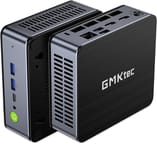 GMKtec Nucbox K2 | |
| Price | List Price: $579.99 Amazon Prices: |
| Version | 32GB/1T/Ryzen 7 7735HS |
| Performance Rating | 8.5 |
| Operating System | Windows 11 Pro |
| Processor | Octa-core 3.20 Ghz (max 4.75 Ghz) AMD Ryzen 7 7735HS |
| GPU | Integrated AMD Radeon 680M |
| RAM | 32 GB |
| Internal Storage | 1 TB |
| Dimensions width x length x thickness | 4.41 x 4.84 x 1.7 inches (112.01 x 122.94 x 43.18 mm) |
| Weight | 0.93 lbs (0.42 kg) |
| WiFi | Wi-Fi 6 (802.11ax) |
| Bluetooth | Bluetooth 5.2 |
| Ethernet | 1 Ethernet port at 2.5 Gbps |
| HDMI | 2 Full-Size HDMI Ports |
| DisplayPort | No DisplayPort |
| VGA | No VGA Ports |
| USB Ports | 4 USB 3, 1 USB 4, 1 USB-C USB-C supports power delivery and DisplayPort |
| Thunderbolt Ports | No |
| OCuLink | No |
| Internal SATA Ports | No SATA ports |
| Card Reader | No Card Reader |
| Headphone Jack | combo |
| Fanless | No |
| VESA Mount | Yes |
| In the Box | Mini PC, power adapter, VESA mount with screws, HDMI cable, user manual |
| Expandability | RAM and SSD can be upgraded, supports up to 64GB RAM and 2TB PCle 4.0 M.2 NVMe SSD, No additional storage expansion |
Related Mini PCs
-
 GMKtec NucBox K3 ProThe GMKtec NucBox K3 Pro pairs a 10-core Intel Core i7-12650H with 24GB of soldered LPDDR5 and a…
 -
 GMKtec Nucbox K6The GMKtec Nucbox K6 Mini PC delivers an exceptional balance of size and power with a Ryzen 7…
 -
 Beelink EQR7The Beelink EQR7 combines AMD Ryzen 7 7735U power with a unique built-in PSU design, dual Gigabit…
 -
 Beelink SER5 MAX (Ryzen 7 7735HS)The Beelink SER5 MAX pairs an 8-core Ryzen 7 7735HS and Radeon 680M graphics with 24GB of LPDDR5,…
 -
 BOSGAME M4The BOSGAME M4 packs AMD Ryzen 7 8745HS power into a compact 5-inch chassis with features like…
 -
 MINISFORUM M1-1295The MINISFORUM M1-1295 packs a desktop-class Intel Core i9-12950HX processor into a compact…
Detailed Information about the GMKtec Nucbox K2
The Ryzen 7 7735HS is an 8-core, 16-thread chip on a 6nm process, and its Radeon 680M graphics are strong for an integrated GPU, handling 1080p gaming and emulation that lower-end discrete cards used to be needed for. Memory is DDR5 to 64GB across two SO-DIMM slots, and storage is a single M.2 NVMe slot (a 1TB drive ships; the Gen 4 slot takes up to 2TB). One caveat the reviewers raise: there is no heatsink on the M.2 drive, so it can run warm under sustained load.
For ports the K2 has a USB4 port, four USB 3.2 (10Gbps), dual HDMI 2.0, a USB-C output, a 2.5GbE jack, and a combo audio jack, with Wi-Fi 6 and Bluetooth 5.2. Between the two HDMI and the USB-C it drives up to three displays. It is easy to open for the RAM and SSD upgrades, and a VESA mount is in the box.
Reviewer Insights on the GMKtec Nucbox K2 Mini PC
Two trusted channels reviewed this exact K2 (7735HS), and both rated it good value for the graphics performance.
Robtech
Robtech called the 7735HS and Radeon 680M “some of the fastest you’ll find” for mini PCs and liked how it opens up: “Opening it is surprisingly nice and easy.” His test unit was single-channel, and he credited GMKtec for moving to dual sticks of DDR5 in later units to lift the graphics. He found multicore performance slightly behind some rivals but the graphics consistent with no throttling, and recommended the default 35W mode to keep heat and fan noise down. His verdict: “the best choice I’ve reviewed so far” for a lower-priced 680M mini PC.
Madlittlepixel
Madlittlepixel called it a “speedy little beast” and “very snappy.” His unit was a 32GB (dual-channel, two 16GB sticks) / 1TB configuration, which he liked for the port selection and wireless. On emulation it ran PlayStation 2 and Wii U well but struggled with Xbox and Xbox 360. He concluded it performs above expectations for its size and intended use.
Conclusion
The Nucbox K2 is a good-value 7735HS box for productivity, media, multi-monitor work, and 1080p gaming or emulation, with the 680M doing real work for an integrated GPU and easy RAM and SSD upgrades behind a VESA mount. The two reviewers both landed on solid graphics performance for the price.
A few things to weigh. If you can find a later dual-channel unit, the 680M performs noticeably better than the early single-channel ones; the single drive slot and the un-cooled M.2 are the main hardware limits; and it is not for high-end gaming, where an external GPU or a dedicated card wins. For a newer option in the same line, the Nucbox K6 steps up to a Ryzen 7 7840HS with Radeon 780M graphics. To compare it with other models, use Starry Hope’s Mini PC Comparison Chart.
Frequently Asked Questions
Can I upgrade the RAM and storage on the GMKtec Nucbox K2?
Yes, the GMKtec Nucbox K2 supports upgrades. It accommodates up to 64GB of DDR5 RAM, and the M.2 NVMe SSD can be upgraded to a maximum of 2TB. The Mini PC has two SO-DIMM slots for RAM, but there’s no memory overclocking available in the BIOS.
Does the Nucbox K2 come with a pre-installed operating system?
The Nucbox K2 comes with Windows 11 Pro pre-installed and also supports Linux if you prefer an alternative operating system.
What kind of graphics performance can I expect from the Nucbox K2?
The Nucbox K2 features integrated AMD Radeon 680M graphics, offering strong Mini PC performance. While it may not match a high-end gaming desktop, it can run many games and is suitable for general multimedia use.
How many displays can the Nucbox K2 support?
The Nucbox K2 can support up to three displays using its two HDMI 2.0 ports and the USB Type-C port, which supports DisplayPort 1.4 functions.
What are the connectivity options available on the Nucbox K2?
The Nucbox K2 has Bluetooth 5.2, Wi-Fi 6, a 2.5Gbps Ethernet port, four USB 3.2 ports, a USB-C port, and a USB4 port that supports power delivery and DisplayPort.
Is the Nucbox K2 fanless?
No, the Nucbox K2 is not fanless. It has a cooling fan to manage the temperature, especially when the device is under load.
Can I mount the Nucbox K2 behind a monitor?
Yes, the Nucbox K2 comes with a VESA mount and screws, allowing you to attach it to the back of a monitor for a clean and space-saving setup.
Are there any concerns about the M.2 drive’s cooling?
Some reviews have noted that the lack of cooling on the M.2 drive can result in high temperatures under load. However, there have been no widespread reports of thermal throttling affecting performance.
Is the Nucbox K2 suitable for gaming?
The Nucbox K2 can handle many modern games, especially indie and less demanding titles. You may need to adjust the settings for more graphically intensive games for optimal performance.
Does the Nucbox K2 have any bloatware or unnecessary apps?
Customers have appreciated the absence of bloatware and unnecessary apps on the Nucbox K2, contributing to its speedy performance right out of the box.