
GMKtec Nucbox K6
Updated on

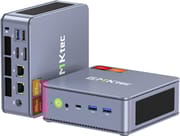
The GMKtec Nucbox K6 is a powerful Mini PC that packs a punch with AMD’s Ryzen 7 7840HS processor, featuring eight cores and 16 threads for top-notch performance. This compact machine is a powerhouse, ideal for users who need a balance between size and power. It boasts the AMD Radeon 780M integrated graphics and supports a triple 4K display setup. Pre-installed with Windows 11 Pro and offering up to 64GB of DDR5 RAM, the Nucbox K6 is well-suited for home and office use. Its expandability includes dual M.2 2280 PCIe 4.0 slots, allowing for substantial storage upgrades. The Nucbox K6 is a stylish and mighty computing solution with its sleek design and new color options.
| Pros | Cons |
|---|---|
| Powerful AMD Ryzen 7 7840HS processor | Plastic case not as premium as metal |
| Up to 64GB DDR5 RAM and dual M.2 SSD slots | Noticeable fan noise under heavy load |
| Windows 11 Pro pre-installed | Lacks HDMI 2.1 for 4K at 144Hz |
| Multiple ports including USB 4.0 Type-C and dual 2.5Gb LAN | Advanced BIOS options could be improved |
| Capable of triple 4K display setup |
Related Videos
GMKtec Nucbox K6 Comparison Chart
 GMKtec Nucbox K6 | GMKtec Nucbox K6 | |
| Price | List Price: $569.99 Amazon Prices: | List Price: $749.99 Amazon Prices: |
| Version | 32GB/1TB/Ryzen 7 7840HS/Space Blue | 32GB/1TB/Ryzen 7 7840HS/Grey |
| Performance Rating | 9.0 | 9.0 |
| Operating System | Windows 11 Pro | Windows 11 Pro |
| Processor | Octa-core 3.80 Ghz (max 5.10 Ghz) AMD Ryzen 7 7840HS | Octa-core 3.80 Ghz (max 5.10 Ghz) AMD Ryzen 7 7840HS |
| GPU | Integrated AMD Radeon 780M | Integrated AMD Radeon 780M |
| RAM | 32 GB | 32 GB |
| Internal Storage | 1 TB | 1 TB |
| Dimensions width x length x thickness | 5 x 5 x 2 inches (127 x 127 x 50.8 mm) | 5 x 5 x 2 inches (127 x 127 x 50.8 mm) |
| Weight | 1.17 lbs (0.53 kg) | 1.17 lbs (0.53 kg) |
| WiFi | Wi-Fi 6E (802.11ax) | Wi-Fi 6E (802.11ax) |
| Bluetooth | Bluetooth 5.2 | Bluetooth 5.2 |
| Ethernet | 2 Ethernet ports at 2.5 Gbps | 2 Ethernet ports at 2.5 Gbps |
| HDMI | 1 Full-Size HDMI Port | 1 Full-Size HDMI Port |
| DisplayPort | 1 DisplayPort | 1 DisplayPort |
| VGA | No VGA Ports | No VGA Ports |
| USB Ports | 1 USB 2.0, 3 USB 3, 1 USB 4, 1 USB-C (USB 4.0 Type-C with 40Gbps speed and DisplayPort | 1 USB 2.0, 3 USB 3, 1 USB 4, 1 USB-C (USB 4.0 Type-C with 40Gbps speed and DisplayPort |
| Thunderbolt Ports | No | No |
| OCuLink | No | No |
| Internal SATA Ports | No SATA ports | No SATA ports |
| Card Reader | No Card Reader | No Card Reader |
| Headphone Jack | combo | combo |
| Fanless | No | No |
| VESA Mount | Yes | Yes |
| In the Box | GMKtec Mini PC, VESA Bracket, Screw Kit, Power Adapter (19V/6.32A), HDMI Cable, User Manual | GMKtec Mini PC, VESA Bracket, Screw Kit, Power Adapter (19V/6.32A), HDMI Cable, User Manual |
| Expandability | Supports up to 64GB DDR5 RAM, dual M.2 SSD slots for storage expansion | Supports up to 64GB DDR5 RAM, dual M.2 SSD slots for storage expansion |
Related Mini PCs
-
 GMKtec Nucbox K2The GMKtec Nucbox K2 is a compact AMD Ryzen 7 7735HS mini PC with Radeon 680M graphics, DDR5 to…
 -
 GMKtec NucBox K3 ProThe GMKtec NucBox K3 Pro pairs a 10-core Intel Core i7-12650H with 24GB of soldered LPDDR5 and a…
 -
 Beelink EQR7The Beelink EQR7 combines AMD Ryzen 7 7735U power with a unique built-in PSU design, dual Gigabit…
 -
 Beelink SER5 MAX (Ryzen 7 7735HS)The Beelink SER5 MAX pairs an 8-core Ryzen 7 7735HS and Radeon 680M graphics with 24GB of LPDDR5,…
 -
 BOSGAME M4The BOSGAME M4 packs AMD Ryzen 7 8745HS power into a compact 5-inch chassis with features like…
 -
 MINISFORUM M1-1295The MINISFORUM M1-1295 packs a desktop-class Intel Core i9-12950HX processor into a compact…
Detailed Analysis of the GMKtec Nucbox K6
The GMKtec Nucbox K6 Mini PC distinguishes itself with its robust specifications and sleek design. It leverages the latest DDR5 RAM technology for faster data processing and improved power efficiency. The dual M.2 2280 PCIe 4.0 slots provide a notable advantage for users needing extensive storage or those who wish to connect an external GPU for gaming or graphic-intensive tasks.
Connectivity is a strong suit for the Nucbox K6, featuring a USB 4.0 Type-C port with 40Gbps speed and DisplayPort functionality. This allows for high-speed data transfers and the connection of cutting-edge peripherals. The dual Realtek 2.5Gb LAN ports ensure reliable networking, though their practicality may vary by user.
The Nucbox K6’s design is functional and appealing, with the Steel Blue color adding sophistication. The plastic case, selected for enhanced Wi-Fi and Bluetooth signal reception, is a practical choice, even if some users might prefer the premium feel of metal.
Performance-wise, the Nucbox K6 is equipped to handle demanding applications and multitasking with ease, thanks to the AMD Ryzen 7 7840HS processor. The AMD Radeon 780M graphics deliver a commendable visual experience, particularly when powering multiple 4K displays.
The GMKtec Nucbox K6 is an excellent choice for users seeking a Mini PC that excels in portability and performance. It’s a device that can manage various tasks efficiently while maintaining a small footprint. The K6 uses standard DDR5 SODIMM slots rather than soldered memory, so upgrading to 64GB later is straightforward; if you want to understand why that distinction matters before buying, the soldered RAM guide lays it out clearly.
Reviewer Insights on the GMKtec NucBox K6
Four reviewers put the NucBox K6 through its paces, and all four tested the same AMD Ryzen 7 7840HS, so the power, thermal, and frame-rate numbers below line up closely. Each figure is reported as that reviewer measured it on the unit in hand.
ETA Prime: power scaling and benchmark numbers
ETA Prime is the most thorough on what the chip does at different power limits. Out of the box the K6’s package power settled at 54W under a combined CPU and GPU stress, and he noted it “stay[s] like this all day cooling system is handling it just fine.” Using the x86 tuning utility he stepped through the Eco, Balanced, Performance, and Extreme presets, with Performance landing around 65W and Extreme reaching 70W. In Extreme mode Geekbench 6 returned 2,465 single-core and 12,774 multi-core (the run itself never pulled more than about 63W), 3DMark Fire Strike scored 7,972, which he called “about 200 points more than most of these other mini PCs that I test with this same chip,” and Time Spy hit 3,347, just shy of the roughly 3,400 he had ever pulled from an RDNA3 iGPU on a 7940HS.
His 1080p gaming runs in Extreme mode showed where the Radeon 780M lands: Forza Horizon 5 averaged 116 FPS on medium with vsync at 120, Cyberpunk 2077 averaged about 79 FPS on low with FSR performance, Shadow of the Tomb Raider managed 77 FPS on low (falling to about 62 on medium), God of War averaged 68 FPS with FSR performance, and Mortal Kombat 1 held a steady 60 FPS at 900p with FSR balanced. On a kilowatt meter at the wall in Extreme mode he logged about 14W at idle, 71W average while gaming, and a 93W maximum.
Robtech: head to head with the Beelink SER7
Robtech’s review benchmarks the K6 against a Beelink SER7 running the same 7840HS. In single-core Cinebench the K6 came in 3% behind the SER7 at the default Balance mode and edged ahead once switched to Performance; multi-core ran almost 4% behind at default and about 1% ahead with the power limit raised; video encoding favored the K6 by 1% in Balance and 3% in Performance, and the integrated-graphics test was within the margin of error. On the 780M he then ran 4K against 1080p: Dota 2 held just over 100 FPS at 4K versus 155 at 1080p, Valorant dropped under 100 FPS at 4K versus over 200 at 1080p, and GTA V “still can’t be played at 4k on integrated Graphics at a good frame rate.” Plugging an RTX 3070 eGPU into the USB4 port let him run Starfield at 4K with DLSS.
On thermals and acoustics he measured the CPU peaking at 87C at default and into the low 90s in maximum performance, idle power slightly higher than the SER7 but a maximum draw about 10W lower at default. Fan noise was higher than the SER7 at both idle and load; he was blunt that “it’s not a quiet mini and it is one of the noisier ones under load.” The Lexar 1TB Gen4 drive ran “above gen 3 speeds” but was not the fastest he had tested. He still rated the K6 a clear step up from previous models thanks to the added SSD and RAM cooling and the tool-included, easy-open design, with the plastic midsection and fan noise his main reservations.
Team Pandory: power at the wall and the K4 comparison
Team Pandory’s review of the 32GB/1TB Steel Blue unit (which they clocked at 530g, “one of gmk Tech’s heaviest mini PCS”) is the most useful on real-world power and noise. The BIOS exposes a Quiet 45W and a Performance 65W limit. At the wall the K6 idled around 9W and was “completely silent,” pulled about 59W in Tekken 8, and about 67W in Cyberpunk 2077. Their 1080p gaming came in at roughly 70 FPS in Counter-Strike 2 on high, a steady 60 FPS in Forza Horizon 5 on high, and around 40 FPS in Cyberpunk 2077 on medium (rising into the high 60s with FSR set to ultra performance). The teardown showed two sticks of Crucial DDR5 and a 1TB Lexar NM7A1 (the OEM version of the NM710).
Their headline finding was thermal: against the older NucBox K4 (a 7940HS), the K6 ran with “temperatures dropping from 10 to 20°,” and where the K4 starts to thermal-throttle the K6 holds. The downsides they flagged were a lackluster BIOS with no fan-profile control and no HDMI 2.1 for 4K above 120Hz. Asked which of the two to buy, their answer was “hands down the k6.”
TechMishka: the 780M versus a discrete card
TechMishka framed the K6 around its graphics, noting the Radeon 780M can match or beat a discrete GTX 1650 while the whole mini PC stays under the roughly 70W that the 1650 alone needs. Counter-Strike 2 was “super smooth” even at 4K, and he found the machine handled 4K video footage well enough to consider it a backup editing station. His unit shipped with a value “Mason semi” NVMe rather than the usual Lexar, which he said performed “much better than expected especially concerning consistency,” and the MediaTek Wi-Fi 6E adapter neared 70 MB/s on his home network, “among the fastest adapters I’ve seen on a Mini PC.” Connecting an RTX 2060 eGPU over USB4 was, in his words, “not that much quicker than the embedded 780m.” His reservations were the plastic case and the absence of OCuLink and USB-C power delivery.
Where the 7840HS lands for a 2026 buyer
The Ryzen 7 7840HS is a 2023-era Zen4 mobile chip: eight cores, sixteen threads, with a PassMark multi-thread score around 28,870 and the Radeon 780M (RDNA3, 12 compute units) that was the strongest integrated mobile graphics of its generation. That is still a genuinely capable all-rounder in 2026 for everyday Windows, multi-monitor productivity, 4K video playback, and the 1080p gaming and emulation these reviewers demonstrated. Newer Ryzen AI 300 chips now pull ahead on both CPU and iGPU, so buy the K6 as an upgradeable 1080p performer rather than a bleeding-edge machine.
Customer Reviews of the GMKtec Nucbox K6
Across 963 ratings on Amazon, the GMKtec Nucbox K6 averages 4.5 stars, with 79% of buyers leaving five stars and 11% four. The recurring praise is the same set of points: a small footprint, strong performance for the size, and how easy the case is to open for adding RAM or a second NVMe drive. Bill, a verified buyer who replaced an aging Intel NUC, called out the “small footprint, supports 3 monitors, option to upgrade/replace components as needed with 2 user-serviceable slots for both m.2 drives ram.” A verified buyer writing as Filtered listed the “Sturdy build (metal casing, hard plastic top and bottom)” and that it is “Very easy to open to upgrade RAM and/or NVMe SSD” among the things they liked.
It is not all positive, and the lower-star reviews point at real issues rather than vague gripes. The same Filtered review flags heat on the stock thermal paste, noting temperatures “can reach 91c on “Performance” mode,” and that the RGB fan on top is static and cannot be turned off, a complaint other owners echo. The bluntest negative comes from a verified buyer, Raltar, whose unit shipped with a non-new SSD: “out of the box I noticed that the 1TB SSD that was included in this GMKtek K6 mini PC had logged about 86 hours of usage in SMART, as well as over 8TB written and 7TB read.” That appears to be a one-off rather than a pattern, but the 7% one-star share in the distribution is worth keeping in mind before you buy.
Conclusion
The GMKtec Nucbox K6 is a formidable Mini PC, offering strong performance with its AMD Ryzen 7 7840HS processor and AMD Radeon 780M graphics. It’s well-suited for various tasks, from daily productivity to intensive applications like video editing and gaming. With support for up to 64GB DDR5 RAM and dual M.2 SSD slots, it provides system expansion and customization flexibility.
However, there may be better choices than the Nucbox K6 for everyone. Those sensitive to fan noise or preferring a metal case might find these aspects less appealing. The absence of HDMI 2.1 could also be a dealbreaker for users seeking the highest display resolutions and refresh rates.
For those who prioritize CPU and GPU performance, value an easy-to-open design, and can overlook fan noise and a plastic build, the GMKtec Nucbox K6 is an excellent choice. Conversely, users desiring quieter operation, a metal chassis, or the latest HDMI standard should consider other options. For a broader look at where the K6 sits against competing machines, the mid-tier mini PC comparison covers the 7840HS generation alongside newer alternatives.
To compare the GMKtec Nucbox K6 with other Mini PCs and find the best fit for your needs, use Starry Hope’s Mini PC Comparison App.
Frequently Asked Questions
What operating system comes pre-installed on the GMKtec Nucbox K6?
The GMKtec Nucbox K6 has Windows 11 Pro pre-installed on all configurations except the barebones version.
Can the GMKtec Nucbox K6 support multiple monitors?
The Nucbox K6 can support up to three 4K displays using its HDMI 2.0, DisplayPort 1.4, and USB 4.0 Type-C ports.
Is the RAM and storage expandable on the GMKtec Nucbox K6?
Definitely! The Nucbox K6 supports up to 64GB of DDR5 RAM and features dual M.2 2280 PCIe 4.0 slots for storage expansion, allowing up to 4TB (2TB*2).
Does the GMKtec Nucbox K6 have a fanless design?
No, the Nucbox K6 does not have a fanless design. It includes a cooling system with fans for memory and storage components to maintain optimal performance.
What type of ports are available on the GMKtec Nucbox K6?
The Nucbox K6 offers various ports, including USB 4.0 Type-C with 40Gbps speed, USB 3.2 Gen 2, USB 2.0, DisplayPort 1.4, HDMI 2.0, dual Realtek 2.5Gb LAN ports, and a combo headphone jack.
Can I use an eGPU with the GMKtec Nucbox K6?
The Nucbox K6’s USB 4.0 Type-C port supports an eGPU, enhancing gaming performance and graphics capabilities.
Can I mount the GMKtec Nucbox K6 behind a monitor?
Yes, the Nucbox K6 includes a VESA mount in the box, making it easy to attach to the back of a compatible monitor.
What comes in the box with the GMKtec Nucbox K6?
The Nucbox K6 package includes: The GMKtec Mini PC, A VESA Bracket, A Screw Kit, A Power Adapter (19V/6.32A), An HDMI Cable, A User Manual.
Is there an option for a barebones version of the GMKtec Nucbox K6?
Yes, a barebones version is available for those who prefer to install their own memory, storage, and operating system.