
GMKtec NucBox K7 Plus
Updated on

The GMKtec NucBox K7 Plus is a compact Mini PC designed for users seeking a balance between performance and size. Equipped with an Intel Core i7-13620H processor, the K7 Plus boasts 10 cores and 16 threads, delivering excellent performance for multitasking and demanding applications. It also features integrated Intel UHD Graphics, suitable for multimedia and everyday display tasks rather than serious gaming. The Mini PC supports up to 32GB of DDR5 memory and 1TB of NVMe storage, ensuring swift data access and ample space for files and applications. With its wide array of connectivity options, including USB 4, dual 2.5 gigabit LAN, and Wi-Fi 6, the NucBox K7 Plus caters to diverse peripheral and network requirements. Pre-installed with Windows 11 Pro, it is ready to tackle professional and personal computing needs immediately.
| Pros | Cons |
|---|---|
| Powerful Intel Core i7-13620H CPU | Plastic case may feel less premium |
| Dual M.2 Gen 4 NVMe slots | Higher noise levels in performance mode |
| Up to 32GB DDR5 memory and 2TB storage | Secure Boot and TPM 2.0 issues with some games |
| Variety of ports including USB 4 and dual LAN | Included drive is Gen 3, not Gen 4 NVMe |
| Supports Wi-Fi 6 and Bluetooth 5.2 | |
| Pre-installed Windows 11 Pro | |
| Expandable with eGPU via USB 4 port |
Related Videos
GMKtec NucBox K7 Plus Comparison Chart
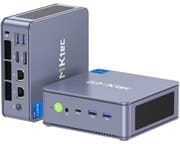 GMKtec NucBox K7 Plus | GMKtec NucBox K7 Plus | |
| Price | List Price: $679.99 Amazon Prices: | List Price: $629.98 Amazon Prices: |
| Version | 32GB/2TB/Intel i7-13620H | 32GB/1TB/Intel i7-13620H |
| Performance Rating | 8.6 | 8.6 |
| Operating System | Windows 11 Pro | Windows 11 Pro |
| Processor | Deca-core 3.60 Ghz (max 4.90 Ghz) Intel Core i7-13620H | Deca-core 3.60 Ghz (max 4.90 Ghz) Intel Core i7-13620H |
| GPU | Integrated Intel UHD Graphics | Integrated Intel UHD Graphics |
| RAM | 32 GB | 32 GB |
| Internal Storage | 2 TB | 1 TB |
| Dimensions width x length x thickness | 5.03 x 5 x 1.9 inches (127.76 x 127 x 48.26 mm) | 5.03 x 5 x 1.9 inches (127.76 x 127 x 48.26 mm) |
| Weight | 1.14 lbs (0.52 kg) | 1.14 lbs (0.52 kg) |
| WiFi | Wi-Fi 6 (802.11ax) | Wi-Fi 6 (802.11ax) |
| Bluetooth | Bluetooth 5.2 | Bluetooth 5.2 |
| Ethernet | 2 Ethernet ports at 2.5 Gbps | 2 Ethernet ports at 2.5 Gbps |
| HDMI | 1 Full-Size HDMI Port | 1 Full-Size HDMI Port |
| DisplayPort | 1 DisplayPort | 1 DisplayPort |
| VGA | No VGA Ports | No VGA Ports |
| USB Ports | 4 USB 3, 1 USB 4, 1 USB-C (USB-C 4 provides DisplayPort) | 4 USB 3, 1 USB 4, 1 USB-C (USB-C 4 provides DisplayPort) |
| Thunderbolt Ports | No | No |
| OCuLink | No | No |
| Internal SATA Ports | No SATA ports | No SATA ports |
| Card Reader | No Card Reader | No Card Reader |
| Headphone Jack | combo | combo |
| Fanless | No | No |
| VESA Mount | Yes | Yes |
| In the Box | Nucbox K7 Mini PC, Power Supply & Cable, HDMI Cable, VESA Mount with Screws, User Manual | Nucbox K7 Mini PC, Power Supply & Cable, HDMI Cable, VESA Mount with Screws, User Manual |
| Expandability | Two M.2 Gen 4 NVMe slots, USB 4 port for eGPU | Two M.2 Gen 4 NVMe slots, USB 4 port for eGPU |
Related Mini PCs
-
 GMKtec Nucbox K2The GMKtec Nucbox K2 is a compact AMD Ryzen 7 7735HS mini PC with Radeon 680M graphics, DDR5 to…
 -
 GMKtec NucBox K3 ProThe GMKtec NucBox K3 Pro pairs a 10-core Intel Core i7-12650H with 24GB of soldered LPDDR5 and a…
 -
 Beelink EQR7The Beelink EQR7 combines AMD Ryzen 7 7735U power with a unique built-in PSU design, dual Gigabit…
 -
 Beelink SER5 MAX (Ryzen 7 7735HS)The Beelink SER5 MAX pairs an 8-core Ryzen 7 7735HS and Radeon 680M graphics with 24GB of LPDDR5,…
 -
 BOSGAME M4The BOSGAME M4 packs AMD Ryzen 7 8745HS power into a compact 5-inch chassis with features like…
 -
 MINISFORUM M1-1295The MINISFORUM M1-1295 packs a desktop-class Intel Core i9-12950HX processor into a compact…
Detailed Information about the GMKtec NucBox K7 Plus
The GMKtec NucBox K7 Plus is not just about raw performance; it’s also about convenience and user experience. The device comes with a comprehensive accessory kit, including a power supply, HDMI cable, VESA mount, and even easy opening and upgrading tools. This level of user-friendliness extends to its internal design, where two M.2 Gen 4 NVMe slots are available for storage expansion, one of which comes with a pre-installed heatsink.
Cooling is a critical aspect of any Mini PC, and the NucBox K7 Plus includes a dedicated fan and heatsink to manage the thermal output of the NVMe drive. While the fan ensures that the components remain cool under load, it does contribute to higher noise levels, especially when the Mini PC is in performance mode. However, users can choose quieter operation by selecting the appropriate power mode. Buyers weighing silence against sustained performance will find a useful framework in Starry Hope’s fanless vs active cooling guide.
The NucBox K7 Plus’s design is compact, with dimensions of 5.03 inches in width, 5 inches in length, and 1.9 inches in thickness, and it weighs just over a pound. This makes it an ideal choice for environments where space is at a premium, such as small home offices or living rooms. The included VESA mount also allows the Mini PC to be attached to the back of a monitor, further conserving desk space. Despite its small size, the K7 Plus does not skimp on connectivity, offering a range of ports typically found on larger desktops.
Reviewer Insights on the GMKtec NucBox K7
The K7 ships with two different Raptor Lake chips, and that shapes the review landscape. The base NucBox K7 uses the Intel Core i5-13500H (4 performance cores plus 8 efficiency cores, 12 cores and 16 threads); the K7 Plus that this page tracks uses the Intel Core i7-13620H (6 performance cores plus 4 efficiency cores, 10 cores and 16 threads, up to 4.9 GHz). The one substantial independent review of the line is Robtech’s, and it tested the i5-13500H on the exact same chassis the Plus uses, so its build, port, cooling, and acoustic findings carry straight over while its CPU and graphics numbers belong to the i5. The i7-13620H Plus itself has drawn only manufacturer marketing and short spec-announcement write-ups, plus one public benchmark submission; no outlet has published independent power, thermal, or acoustic measurements of the i7 configuration. Every figure below is reported as its source measured or stated it, and the variant each number applies to is called out.
Robtech: the i5-13500H on the shared K7 chassis
Robtech reviewed the i5-13500H version of the K7 and preferred the “space blue” color of the three on offer. He flagged the move to an all-plastic shell as a step down from the metal midsection of the GMK Tech M3, though he judged the plastic itself solid apart from a removable top lid that creaks. He liked that the box ships with a VESA mount, a screwdriver, and a plastic prying tool, calling it “one of the few minis including the tools to actually open it up,” and walked the port layout: a front USB4 40Gbps port and dual 10Gbps USB 3 alongside more USB 3, DisplayPort 1.4, HDMI 2.0, and dual Intel 2.5GbE on the back, with Wi-Fi 6 and Bluetooth handled by an Intel AX201 module. The review unit carried 32GB of DDR5-4800 and a 1TB drive with a heatsink, and he noted the two M.2 slots are Gen4 but the included drive is only Gen3.
His benchmark commentary is all framed as a generational delta against the previous i5-12500H mini, not as absolute scores. Single-core was flat (“not even a 1% increase over the previous gen”), while multi-core rose about 21 percent in the default Balance mode and close to 28 percent in Performance mode; video encoding gained 16 to 17 percent, and the Iris Xe graphics picked up about 15 percent in DX11 and 14 percent in DX12. He recommended Intel minis like this one over AMD for video work specifically, crediting Quick Sync hardware decoding for responsive 4K timeline scrubbing. On the i5’s Iris Xe at 1080p he measured League of Legends over 200 FPS, Counter-Strike 2 in an 80 to 100 FPS range on low, and Dota 2 mostly above 120, while Forza Horizon 5 “doesn’t hold up too well” and Breath of the Wild via Wii U emulation ran close to 60 FPS. Valorant would not launch because of its Secure Boot and TPM 2.0 requirement, an issue he raised with GMKtec during the review and reported was being fixed in a BIOS update. He also demonstrated the USB4 port driving an RTX 3070 eGPU for 4K gaming.
On power, heat, and noise Robtech reported relative impressions rather than wattage or decibel readings: idle power “came back with the same result as the previous generation mini,” peak draw was in the same ballpark (slightly higher in Performance mode), CPU temperature sat “around the middle” for a mid-range mini with “performance mode only added an extra degree,” and the NVMe heatsink plus fan kept the drive cool. His main reservation was acoustic: “noise levels are on the higher side,” and Performance mode pushes them higher still, so the quiet BIOS mode is the trade-off for keeping it calm. His verdict on the i5 was that it is “one of the highest mid-tier minis,” with the headline that “the i5-13500H manages to beat the i7s from the previous generation in most metrics.”
What the i7-13620H actually scores
Independent reviewers have not benchmarked the i7-13620H Plus, but a public Geekbench 6 result for a “GMKtec NucBox K7 PLUS” gives a verifiable data point for the exact chip this page covers. Uploaded in June 2024 on the Balanced power plan with 32GB of DDR5-4788, the run records a 2,560 single-core and 11,531 multi-core score, with the i7-13620H boosting to about 4.69 GHz and Geekbench confirming the 6-plus-4 core layout and Raptor Lake codename. That single submission is one user’s machine rather than a controlled review bench, so treat it as indicative rather than definitive; it does, however, line up with the i7-13620H landing modestly ahead of the i5-13500H on lightly threaded work thanks to its two extra performance cores and higher clocks.
Where the i7-13620H lands for a 2026 buyer
The Core i7-13620H is a 2023-era Raptor Lake-H mobile chip with a PassMark multi-thread score around 24,800. That is still a competent everyday and productivity engine in 2026: it handles multi-monitor office work, 4K playback, and code with ease. Graphics are the catch, though: the i7-13620H ships with Intel UHD Graphics, a step below the Iris Xe in the i5-13500H that Robtech tested and well behind the Radeon 780M and newer Arc and Ryzen AI iGPUs, so esports and anything more demanding really want the eGPU route over USB4. Buyers cross-shopping current silicon should know newer Core Ultra and Ryzen AI 300 chips pull ahead on both graphics and on-chip AI acceleration, which this generation lacks; the K7 Plus makes the most sense as a tool-friendly, dual-NVMe, upgradeable productivity box rather than a gaming or AI-first machine.
Customer Reviews of the GMKtec NucBox K7 Plus
Across 65 ratings on Amazon, the GMKtec NucBox K7 Plus averages 4.8 stars, with 84 percent of reviewers leaving five stars and no one-star or two-star ratings. Owners mostly bought it as a small, quiet replacement for an aging desktop and use it for office work, home use, and light multitasking rather than heavy gaming. Several point to the 32GB of RAM, the 1TB NVMe SSD, and the spare M.2 slot as reasons it had room to grow with them. Edward J. Janeczek, a verified buyer, installed a second 1TB SSD himself and wrote that “The build quality is good, noting that even the case screws had threadlocker applied.” Another verified owner, VINBERDON, who runs an office that needs dual LAN, said it handles “3 different browsers each with 20 or so tabs open, web development, graphic editing, etc. It takes it all and never chokes.”
The reviews are not all about raw speed; a recurring thread is GMKtec’s support after something went wrong. A verified buyer named Glen titled his review “Excellent computer. Excellent service. Worth ten stars!” after a Windows failure roughly 14 months in, and credited the company for sending “a COMPLETE response with instructions and links for reinstalling the original OS.” Owners named Ann and others describe similar back-and-forth that ended in a replacement or a fix. The clearest negative note is fan noise: verified reviewer Volkan Toz, running it as a home server, titled his review “Fan sesi yüksek” (Turkish for “fan noise is high”) and built a vented enclosure for it, so a few buyers may find it louder than they expect. Read more owner reviews on Amazon.
Conclusion
The GMKtec NucBox K7 Plus is a powerful Mini PC, suitable for users requiring a compact yet robust computing solution. With its Intel Core i7-13620H processor, integrated Intel UHD Graphics, and support for up to 32GB of DDR5 memory, it caters to a range of productivity tasks, including hardware-accelerated video editing. Including dual M.2 Gen 4 NVMe slots and an array of modern ports, including USB 4, further enhances its appeal for future-proof connectivity and storage expansion options. A box this capable also makes a solid base for an offline AI survival computer.
However, users who prioritize a silent operation may find the noise levels in performance mode intrusive. Additionally, the all-plastic case, while solid, may not appeal to those who prefer the premium feel of a metal chassis. Alternatives might be more appropriate for users with less intensive computing needs or those on a tighter budget.
For professionals in multimedia work, the GMKtec NucBox K7 Plus is a compelling choice, offering significant multi-core performance improvements and smooth video editing capabilities. The integrated UHD graphics handle only the lightest esports and older titles, so more demanding games will require an external GPU over the USB4 port. Overall, the NucBox K7 Plus is a strong performer in the mid-tier Mini PC market, balancing performance, expandability, and compact form factor.
For a broader comparison of Mini PCs and to find the most suitable option for your specific needs, consider using Starry Hope’s Mini PC Comparison Chart.
Frequently Asked Questions
Can the GMKtec NucBox K7 Plus support an external GPU (eGPU)?
Yes, the GMKtec NucBox K7 Plus features a USB 4 port that can connect an eGPU, allowing for a significant boost in graphics performance.
What type of RAM does the NucBox K7 Plus use?
The NucBox K7 Plus utilizes DDR5 SO-DIMM memory, known for its high speed and efficiency.
Does the NucBox K7 Plus come with Wi-Fi and Bluetooth capabilities?
The NucBox K7 Plus has Wi-Fi 6 and Bluetooth 5.2, ensuring fast and reliable wireless connectivity.
How many storage options are available in the NucBox K7 Plus?
The NucBox K7 Plus has two M.2 2280 NVMe slots for storage expansion, allowing users to increase storage capacity as needed.
Is the operating system pre-installed on the NucBox K7 Plus?
Windows 11 Pro comes pre-installed on all configurations of the NucBox K7 Plus, except for the barebones version, which requires users to provide their memory, storage, and operating system.
What are the dimensions and weight of the NucBox K7 Plus?
The NucBox K7 Plus measures 5.03 inches in width, 5 inches in length, and 1.9 inches in thickness, with a weight of approximately 1.14 pounds, making it compact and portable.
Does the NucBox K7 Plus have a fanless design?
No, the NucBox K7 Plus is not fanless. It includes a cooling system with a fan to ensure optimal performance and prevent overheating.
Can I mount the NucBox K7 Plus behind a monitor?
Yes, the NucBox K7 Plus supports VESA mounting, allowing you to attach it to the back of a monitor for a clean and space-saving setup.
What kind of power supply does the NucBox K7 Plus use?
The NucBox K7 Plus comes with a 120-watt power supply, which is smaller than average for a mini PC, contributing to its compact design.
Is the case of the NucBox K7 Plus made of metal or plastic?
The case of the NucBox K7 Plus is made of plastic, which is a departure from the metal middle section found in the previous GMK Tech M3 model. However, the quality of the plastic is solid, with the exception of the top lid, which may creak slightly.