
GMKtec NucBox M2
Updated on

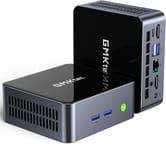
The GMKtec NucBox M2 is a compact computer designed for users who need a small form factor coupled with decent performance. It’s powered by an Intel Core i7-11390H processor capable of speeds up to 5.00 GHz. With Windows 11 Pro pre-installed, the NucBox M2 ensures users can access Microsoft’s latest features and security updates. This Mini PC also has a 1TB NVMe drive for rapid storage access and supports dual-channel DDR4 SODIMM RAM, although it arrives with one stick installed.
Measuring just 4.48 inches wide, 4.17 inches long, and 1.67 inches thick, the NucBox M2 offers a small footprint without sacrificing connectivity. It features USB 3.2, HDMI, an audio jack, 2.5GB Ethernet LAN, and USB-C with DisplayPort capabilities. A VESA mount is included, allowing for a tidy, space-saving installation behind a monitor.
| Pros | Cons |
|---|---|
| High-speed Intel Core i7-11390H processor | Integrated Intel Iris Xe Graphics limits gaming potential |
| Ultra-compact and lightweight | Single-channel memory out-of-the-box |
| Windows 11 Pro pre-installed | May require an external GPU for intensive graphics tasks |
| Swift 1TB NVMe storage | Absence of Thunderbolt port |
| Versatile connectivity options | Potential for fan noise under heavy load |
| Silent fan operation at low workloads | |
| Includes VESA mount for convenient setup |
Related Videos
GMKtec NucBox M2 Comparison Chart
 GMKtec NucBox M2 | GMKtec NucBox M2 | |
| Price | List Price: $599.99 Amazon Prices: | List Price: $639.99 Amazon Prices: |
| Version | 16GB/1TB/Intel Core i7-11390H | 32GB/1TB/Intel Core i7-11390H |
| Performance Rating | 5.7 | 6.4 |
| Operating System | Windows 11 Pro | Windows 11 Pro |
| Processor | Quad-core 2.90 Ghz (max 5.00 Ghz) Intel Core i7-11390H | Quad-core 2.90 Ghz (max 5.00 Ghz) Intel Core i7-11390H |
| GPU | Integrated Intel Iris Xe Graphics | Integrated Intel Iris Xe Graphics |
| RAM | 16 GB | 32 GB |
| Internal Storage | 1 TB | 1 TB |
| Dimensions width x length x thickness | 4.48 x 4.17 x 1.67 inches (113.79 x 105.92 x 42.42 mm) | 4.48 x 4.17 x 1.67 inches (113.79 x 105.92 x 42.42 mm) |
| Weight | unknown | unknown |
| WiFi | Wi-Fi 6 (802.11ax) | Wi-Fi 6 (802.11ax) |
| Bluetooth | Bluetooth 5.2 | Bluetooth 5.2 |
| Ethernet | 1 Ethernet port at 2.5 Gbps | 1 Ethernet port at 2.5 Gbps |
| HDMI | 2 Full-Size HDMI Ports | 2 Full-Size HDMI Ports |
| DisplayPort | USB-C supports DisplayPort | USB-C supports DisplayPort |
| VGA | No VGA Ports | No VGA Ports |
| USB Ports | 1 USB 2.0, 3 USB 3, 1 USB-C (USB-C supports DisplayPort and data transfer) | 1 USB 2.0, 3 USB 3, 1 USB-C (USB-C supports DisplayPort and data transfer) |
| Thunderbolt Ports | No | No |
| OCuLink | No | No |
| Internal SATA Ports | No SATA ports | No SATA ports |
| Card Reader | No Card Reader | No Card Reader |
| Headphone Jack | combo | combo |
| Fanless | No | No |
| VESA Mount | Yes | Yes |
| In the Box | Mini PC, Power adapter, VESA mount, HDMI cable, Manual | Mini PC, Power adapter, VESA mount, HDMI cable, Manual |
| Expandability | Supports addition of an M.2 SATA drive | Supports addition of an M.2 SATA drive |
Related Mini PCs
-
 GMKtec NucBox M6The GMKtec NucBox M6 offers impressive performance with its AMD Ryzen 5 6600H processor and Radeon…
 -
 GMKtec M8The GMKtec M8 is a compact mini PC featuring AMD's Ryzen 5 PRO 6650H processor with OCuLink support…
 -
 ACEMAGICIAN AM06 Pro Mini PCThe ACEMAGICIAN AM06 Pro is a compact AMD Ryzen mini PC (Ryzen 7 5700U, 5800U, or Ryzen 5 7430U)…
 -
 Beelink SER3The Beelink SER3 pairs an AMD Ryzen 7 3750H (Radeon Vega 10) with dual 4K HDMI output and extensive…
 -
 Beelink SER5 (5500U)The Beelink SER5 (5500U) is a budget-friendly mini PC powered by the AMD Ryzen 5 5500U processor.…
 -
 BOSGAME P4 UltraA compact Ryzen 7 7730U mini PC with dual 2.5GbE LAN, Wi-Fi 6E, two PCIe 3.0 M.2 slots, and a…
Detailed Insights into the GMKtec NucBox M2
The GMKtec NucBox M2 Mini PC distinguishes itself with its Intel Core i7-11390H processor, a significant draw for those requiring high-speed computing in a compact unit. This processor’s peak speed of 5.00 GHz caters to intensive applications and multitasking.
The 1TB NVMe drive offers substantial space and swift data retrieval, enhancing the system’s responsiveness. While the NucBox M2 is configured with single-channel memory, its support for dual-channel memory allows for potential performance boosts with an additional RAM stick.
The NucBox M2 features USB 3.2 and USB-C ports for peripheral compatibility, HDMI and 2.5GB Ethernet LAN for display and networking, and WiFi 6 and Bluetooth 5.2 for wireless connections. The device’s cooling system deserves praise for its silent fan, which operates quietly except when handling demanding tasks. The Mini PC’s design allows easy component upgrades, a boon for enthusiasts.
Reviewer Insights on the GMKtec NucBox M2 Mini PC
Team Pandory’s review on YouTube showcases the GMKtec NucBox M2 as an “emulation beast,” thanks to its powerful Intel i7 11390H processor capable of achieving up to 5GHz. They note that “this M2 has a quad-core i7 processor, with a max speed of 5GHz. That is pretty good,” underscoring its impressive performance.
Windows 11 Pro comes pre-installed and activates upon internet connection, streamlining the setup process. The 1TB NVMe drive delivers fast storage speeds, and although the system is ready for dual-channel memory, it comes with only one RAM stick. Team Pandory notes, “So now with dual channel memory, we get a higher and much more stable frame rate.”
The Intel GPU is a limiting factor for GPU-intensive tasks, with performance in games like Grand Theft Auto V not substantially better than the N100 chipset. An external GPU is suggested for those needing more graphical power.
The silent fan operation and the ease of upgrading the internals are praised. Team Pandory recommends the NucBox M2 for emulation and general computing tasks, hoping for future models to come with dual-channel memory and an additional NVMe slot. Their full review is on Team Pandory’s YouTube channel.
A hands-on review from the TECH Genius YouTube channel walks through the same i7-11390H configuration with 16GB of RAM and a 512GB SSD. Running a Cinebench multi-core stress test, the reviewer noted that the fan stayed quiet and often did not spin up at all, while CPU temperatures climbed into the high 90s and briefly to around 110C, which he judged acceptable (“not too hot”) rather than alarming. He then drove two monitors and ran Adobe Photoshop without trouble, coming away pleased with the everyday performance. The full review is on TECH Genius’ YouTube channel.
Both reviewers came away seeing the NucBox M2 as a capable, compact machine for everyday computing and emulation, with Team Pandory flagging the integrated GPU and single-stick memory as the main areas it could improve.
Customer Reviews of the GMKtec NucBox M2
Owner feedback on the NucBox M2 skews positive, with the recurring praise being that it packs a lot of speed into a tiny enclosure and sets up quickly with Windows 11 Pro pre-installed. Mike M., a verified buyer, wrote “For something so small, it’s got a lot of power and speed,” and noted it drove three displays without issue. Several owners also call out the value and easy setup, and one verified buyer, Ben, described a power supply failing after about two months but the manufacturer replacing the unit and reimbursing his return shipping.
The criticism is worth naming. Nicholas L., a verified buyer who rated it four stars, cautioned that the CPU is not built for heavy loads and that “Under heavy loads you will hear the fan. Can get loud at times.” Another verified buyer, robv14000, praised the speed at first but reported the machine became unusable after a Windows update and complained that the documentation was unclear and that the manufacturer did not reply when he tried to contact them about adding an SSD. Treat it as a fast, compact value pick for light to moderate work rather than a gaming or heavy-duty machine.
Conclusion
The GMKtec NucBox M2 Mini PC is an excellent option for users who value a compact design without sacrificing processing power. The Intel Core i7-11390H processor and 1TB NVMe drive make it adept at handling various tasks, including demanding emulation. It suits users needing a quiet, powerful machine for digital audio workstations or multitasking.
However, the integrated Intel Iris Xe Graphics may disappoint users with high-end gaming or video editing needs, whom a Mini PC might better serve with a dedicated GPU or an external GPU solution. If you need integrated Radeon graphics, consider the GMKtec Nucbox M5 Plus as an alternative. The single-stick RAM configuration is another consideration for those looking to optimize performance.
For emulation, general computing, and pre-installed Windows 11 Pro convenience, the NucBox M2 is a solid choice. Users can compare Mini PCs using Starry Hope’s Mini PC Comparison App for alternatives or more budget-friendly options.
Frequently Asked Questions
What operating system does the GMKtec NucBox M2 come with?
The NucBox M2 is pre-installed with Windows 11 Pro, which activates once you connect to the internet.
Can I upgrade the RAM on the GMKtec NucBox M2?
You can enhance the NucBox M2’s performance by adding a second stick of DDR4 SODIMM RAM to use its dual-channel memory support.
Does the GMKtec NucBox M2 have a fan, and is it noisy?
The NucBox M2 includes a fan that remains silent during light use and activates as needed, generally maintaining a quiet operation.
What type of storage does the GMKtec NucBox M2 use, and can it be expanded?
It uses a 1TB NVMe drive and can be expanded with an additional M.2 SATA drive for increased storage capacity.
What kind of graphics does the GMKtec NucBox M2 have?
It features integrated Intel Iris Xe Graphics, which is suitable for everyday tasks and emulation but less for modern gaming or video editing.
Can the GMKtec NucBox M2 handle dual displays?
The NucBox M2 can manage dual displays through its HDMI ports and USB-C port, which also supports DisplayPort.
What are the connectivity options available on the GMKtec NucBox M2?
The NucBox M2 offers WiFi 6, Bluetooth 5.2, 2.5GB Ethernet LAN, USB 3.2, HDMI, and a USB-C port that supports DisplayPort and data transfer.
Is the GMKtec NucBox M2 suitable for gaming?
The NucBox M2 can handle emulation and less demanding games well, but for more modern games, consider using an external GPU for enhanced performance.
Does the GMKtec NucBox M2 come with a VESA mount?
A VESA mount is included, enabling you to attach the mini PC to a monitor for a streamlined setup.
What is included in the box with the GMKtec NucBox M2?
Inside the box, you’ll find the Mini PC, a power adapter, a VESA mount, an HDMI cable, and a manual.