
KAMRUI AK2 Plus Mini PC
Updated on

The KAMRUI AK2 Plus Mini PC is a 5.5-inch-square desktop built around Intel’s N100, sold with 16GB of DDR4, a 512GB SSD, and Windows 11 Pro preinstalled. Two HDMI 2.0 outputs drive a pair of 4K displays, and the bundled VESA mount lets the 0.8-pound box sit behind a monitor instead of on the desk. Inside there is one M.2 slot and a free 2.5-inch SATA bay, so storage can grow later without replacing the machine. It is built for office work and web browsing.
Pros and cons
| Pros | Cons |
|---|---|
| 5.5-inch square footprint at 0.8 lb | No USB-C connectivity |
| 16GB of DDR4 on both configurations | Two USB 3.0 and two USB 2.0 ports, and that is all |
| Dual HDMI 2.0 ports for 4K displays | PlayStation 2 and Wii U emulation fall below playable frame rates |
| VESA mount adapter included | Single-channel RAM configuration |
| Pre-installed Windows 11 Pro | Wi-Fi 5 and Bluetooth 4.2 are a generation behind |
| Intel N100 rated at a 6W base power draw | Internal M.2 slot not easily accessible |
Related Videos
KAMRUI AK2 Plus Mini PC Comparison Chart
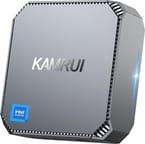 KAMRUI AK2 Plus Mini PC | KAMRUI AK2 Plus Mini PC | |
| Price | List Price: $219.99 Amazon Prices: | List Price: $279.99 Amazon Prices: |
| Version | 16GB/512GB/Intel N100 | 16GB/1TB/Intel N100 |
| Performance Rating | 4.9 | 4.9 |
| Operating System | Windows 11 Pro | Windows 11 Pro |
| Processor | Quad-core 3.40 Ghz (max 3.40 Ghz) Intel Processor N100 | Quad-core 3.40 Ghz (max 3.40 Ghz) Intel Processor N100 |
| GPU | Integrated Intel UHD Graphics | Integrated Intel UHD Graphics |
| RAM | 16 GB | 16 GB |
| Internal Storage | 512 GB | 1 TB |
| Dimensions width x length x thickness | 5.5 x 5.5 x 1.85 inches (139.7 x 139.7 x 46.99 mm) | 5.5 x 5.5 x 1.85 inches (139.7 x 139.7 x 46.99 mm) |
| Weight | 0.8 lbs (0.36 kg) | 0.8 lbs (0.36 kg) |
| WiFi | Wi-Fi 5 (802.11ac) | Wi-Fi 5 (802.11ac) |
| Bluetooth | Bluetooth 4.2 | Bluetooth 4.2 |
| Ethernet | 1 Ethernet port at 1 Gbps | 1 Ethernet port at 1 Gbps |
| HDMI | 2 Full-Size HDMI Ports | 2 Full-Size HDMI Ports |
| DisplayPort | No DisplayPort | No DisplayPort |
| VGA | No VGA Ports | No VGA Ports |
| USB Ports | 2 USB 2.0, 2 USB 3 | 2 USB 2.0, 2 USB 3 |
| Thunderbolt Ports | No | No |
| OCuLink | No | No |
| Internal SATA Ports | 1 SATA port, includes 2.5" drive bay (Supports adding a 2.5-inch SSD or HDD) | 1 SATA port, includes 2.5" drive bay (Supports adding a 2.5-inch SSD or HDD) |
| Card Reader | No Card Reader | No Card Reader |
| Headphone Jack | combo | combo |
| Fanless | No | No |
| VESA Mount | Yes | Yes |
| In the Box | 1 x N100 AK2 PLUS Mini PC, 1 x Power Adapter, 1 x VESA Mount with Screws, 1 x HDMI cable, 1 x User Manual | 1 x N100 AK2 PLUS Mini PC, 1 x Power Adapter, 1 x VESA Mount with Screws, 1 x HDMI cable, 1 x User Manual |
| Expandability | Supports additional 2.5" SATA HDD/SSD | Supports additional 2.5" SATA HDD/SSD |
Related Mini PCs
-
 KAMRUI AK1PLUS (Intel N5030)The N5030 build of the KAMRUI AK1PLUS pairs a 2019 Pentium Silver chip with 12GB of soldered…
 -
 KAMRUI AK1 Pro Mini PCThe KAMRUI AK1 Pro is a budget Intel Celeron N5105 mini PC with 12GB of DDR4, a 256GB M.2 SATA SSD,…
 -
 ACEMAGIC Vista V1The ACEMAGIC Vista V1 is an ultra-budget mini PC sold in several Intel configs (N95, N97, and…
 -
 ACEMAGICIAN T8 PlusThe ACEMAGICIAN T8 Plus is a compact mini PC for multi-display setups, with triple 4K HDMI output,…
 -
 Beelink EQ12 Mini PCThe Beelink EQ12 is a budget Intel N100 mini PC with dual 2.5GbE LAN, up to 16GB DDR5, an M.2 NVMe…
 -
 Beelink MINI S12 ProThe Beelink MINI S12 Pro is a budget Intel N100 mini PC with up to 16GB of DDR4, a 512GB NVMe SSD,…
A 6W quad-core with one M.2 slot and a spare SATA bay
The Intel N100 here has four cores and four threads and clocks up to 3.40 GHz on a base power draw of 6W, which is what keeps the chassis small and the fan quiet most of the time. The 16GB of DDR4 arrives as one stick in single-channel mode, enough memory for a browser full of tabs and an office suite running alongside it. There is a single SODIMM slot, so the stick can be swapped but never paired.
Storage starts at a 512GB M.2 SSD and grows through a 2.5-inch SATA bay that ships empty, so a large mechanical drive or a second SSD can go in without disturbing the boot drive. Reaching the M.2 slot itself takes more disassembly than filling the SATA bay does, which makes the bay the easier upgrade of the two.
Wireless is Wi-Fi 5 and Bluetooth 4.2, both older standards than current mini PCs ship with, and a gigabit Ethernet port covers wired networking for anything that needs steadier throughput. No USB-C port appears anywhere on the chassis; peripherals connect through two USB 3.0 and two USB 2.0 ports. The two HDMI 2.0 outputs run a dual-monitor setup at 4K, and a combo headphone jack and VESA mounting holes round out the exterior.
Reviewer Insights
This box runs Intel’s Alder Lake N100, a quad-core, four-thread chip that launched in early 2023 with a 6W TDP and integrated UHD Graphics (24 execution units). Its PassMark multi-thread score sits around 5,643, entry-level territory that widened further once N150 parts arrived.
DB Tech: quiet at 100% load, and cheap enough for self-hosting
DB Tech’s review treats the machine as an economical home-lab box, and he opens with a disclosure: KAMRUI “did send me this however they did not send me any money,” and “they will not see this video anytime before you guys do.” On the bench he ran Cinebench R23 and recorded a multi-core score of 1,611 points, with the processor idling at a base clock of “0.8 gigahertz so like 800 megahertz.” He corrected the chip’s rating on camera to “a six watt Max TDP” and pointed out that the 16GB of DDR4 is a single SODIMM running single-channel, a configuration he would trade for two 8GB sticks to get faster dual-channel speeds. He also notes the kinship with other rebadged versions of the same chassis, including the KAMRUI AK1 Plus.
Running Cinebench R23 with the CPU at 100%, he reported the machine “is very very quiet and it is barely warm to the touch,” quieter than the Minisforum PC on his desk, which led him to call the cooling “more than adequate.” For under $200, with an N100, 16GB of RAM, and a free 2.5-inch SATA bay, he called it “a great entry level way to get into self-hosting,” for example a Proxmox cluster or a Plex server leaning on the N100’s Quick Sync video.
Joey’s Retro Handhelds: emulation tops out at Nintendo 64 and PlayStation 1
Joey from Joey’s Retro Handhelds approached the machine as a gaming experiment and benchmarked it before playing anything. He logged a Geekbench 6 CPU single-core score of “about 700,” a multi-core score of “about 1200,” and a GPU compute score “right around 2700,” plus a 3DMark result of “about a 347 which is normal for this processor.” He repeatedly flagged the “cap of 6 watts” as the limiting factor.
His emulation results track that ceiling. Wii U (Mario Kart 8) ran at “a 40-ish 34 FPS but it’s not exactly playable”; Nintendo 3DS (Fantasy Life) got “pretty close to a 60 frame rate”; GameCube (F-Zero on Dolphin) sat “mostly in the 30s to 40s”; PlayStation 1 (Driver, Crash Bandicoot) ran “really well there’s no concern no issue”; and PlayStation 2 (God of War) “didn’t run well at all.” He pegged the realistic top end “at Nintendo 64 and PlayStation one,” roughly the class of a T618 handheld chip, and watched indies like Hades and Dead Cells dip well below 60 FPS. He also tried it as a workhorse, and found OBS encoding and Plex transcoding both unable to keep up. At roughly $150 on Amazon with the coupon then running, he rated it a good buy as “a Mini PC that can browse the internet,” and little more.
Jake Tech Reviews: ninth percentile in PassMark, with a SATA bay upgrade
Jake Tech Reviews confirmed the Alder Lake N100, 16GB, 512GB configuration and ran PassMark’s PerformanceTest, where the system landed an overall rating of “1108, it’s in the ninth percentile,” against a stated world average of 4,661. He installed a Crucial BX 2.5-inch SATA SSD in the expansion bay and noted the single 16GB stick is replaceable but single-channel, “so it’s not dual Channel.” For gaming he stuck to what the chip can do: basic titles such as Roblox and Minecraft plus cloud streaming, reporting that Halo over Xbox cloud gaming “actually runs pretty well” with “a little lag.” He framed the audience as budget, school, and office use, not “hardcore gaming.”
Mark Pickavance for TechRadar: weak graphics and a SATA drive in the M.2 slot
Mark Pickavance reviewed the NiPoGi-branded AK2 Plus for TechRadar, the same N100 / 16GB DDR4 / 512GB chassis sold under several names, and published a full benchmark table. Cinebench R23 returned 706 single-core and 1,682 multi-core (close to DB Tech’s 1,611), Geekbench 5 logged 854 single-core and 1,755 multi-core, and 3DMark scored 2,618 in Wild Life, 998 in Fire Strike, and 331 in Time Spy. PCMark 10’s Office test came in at 2,715, which Pickavance noted is “about 60% of what we’d typically expect from an NUC.”
The “UHD Graphics with only 24 Execution Units is very poor at just 750MHz, and many of the more challenging tests resulted in slideshows where the PC would take longer than a second to render a single frame.” On his review unit the M.2 drive turned out to be a SATA part (an NS512GSSD340), not NVMe, with CrystalDiskMark sequential reads of 560 MB/s and writes of 492 MB/s, which he called “good for SATA” but a fraction of NVMe speeds. He scored performance 2.5 out of 5 and suggested this class of hardware “would run Linux or ChromeOS Flex much better than it does Windows,” steering performance-minded buyers toward a “Beelink, Geekom or GMKtec alternative” instead.
Customer Reviews
Across 162 ratings on Amazon, the KAMRUI AK2 Plus Mini PC averages 4.5 stars, with about 74% of buyers leaving five stars and roughly 7% leaving one. Price is what the positive reviews keep returning to. Several owners describe an Intel N100 with 16GB of RAM handling everyday tasks (web browsing, email, YouTube, work-from-home over a VPN) faster than they expected for the price, and a few mention the small, quiet form factor fitting behind a monitor. Scott, a verified buyer, wrote “It’s really cool that we’re at a point in history where you can get such a capable computer for $150.” More technical owners report using it for homelab and virtualization work; a verified buyer posting as Lab-Ally C.E.O. ran Ubuntu in VirtualBox and “even fired up some docker containers on it,” and was “quite impressed” given the low cost. Multiple reviewers note it is not a gaming machine beyond retro or cloud gaming.
A verified buyer posting as Chihaya gave it one star after Wi-Fi and hardware trouble, reporting a first unit with an unstable connection and a replacement whose “fan failed in a few weeks,” and concluding “I have serious doubt to build quality and QC.” That is a single detailed complaint rather than a widespread pattern in this sample, but it points at unit-to-unit quality control and Wi-Fi reliability as the things to watch.
Read more owner reviews on Amazon.
An N100 desktop with a spare drive bay and no headroom
The N100 keeps a browser and an office suite moving at a low power budget and stalls under sustained CPU or GPU load. The empty 2.5-inch bay and the swappable SODIMM give the machine some life past its first configuration, though the 6W power ceiling never moves. The two builds differ only in storage: 512GB at a $219.99 list price, 1TB at $279.99.
Anyone who needs playable frame rates or a transcode pipeline that keeps up should price a machine a tier up. Rising DRAM prices have pushed N100 mini PCs higher across the board, so that gap costs less than it used to.
Starry Hope’s Mini PC comparison tool puts these specs beside the rest of the catalog.
Frequently Asked Questions
What operating system does the AK2 Plus come with?
Windows 11 Pro, preinstalled.
Can I upgrade the RAM on the AK2 Plus?
There is a single SODIMM slot with a 16GB DDR4 stick. It can be swapped, but not paired for dual-channel memory.
Does the AK2 Plus have USB-C ports?
No. Peripherals connect through two USB 3.0 ports and two USB 2.0 ports.
Can I add more storage to the AK2 Plus?
Yes. A 2.5” SATA HDD or SSD fits the internal bay alongside the M.2 drive.
Is the AK2 Plus suitable for gaming?
Modern and demanding titles are out of reach. Basic computing tasks and light gaming are what the hardware supports.
Does the AK2 Plus support dual monitors?
Yes, two HDMI ports drive a pair of 4K displays.
What wireless connectivity does the AK2 Plus have?
Wi-Fi 5 and Bluetooth 4.2.
What is included in the box?
The unit, a power adapter, a VESA mount with screws, an HDMI cable, and a user manual.