
MINIX Z100-Aero
Updated on

The MINIX Z100-Aero is an active-cooled mini PC built on the Intel N100 (Alder Lake-N), aimed at buyers who want a small, quiet Windows 11 Pro desktop for everyday work, media, and light gaming without paying for more chip than they need. This page covers its specs, what a hands-on reviewer found, and where it fits.
Key Specifications and Features
The Z100-Aero runs the quad-core Intel N100 (0.8GHz base, up to 3.4GHz) with integrated Intel UHD Graphics. Storage is a single M.2 PCIe 3.0 x4 NVMe slot, populated with 512GB and upgradable to 4TB, plus an included cable and rails for a 2.5-inch SATA drive. Memory is one DDR4 SO-DIMM slot (3200MHz) that takes up to 32GB.
Connectivity is Intel Wireless-AC 9560 Wi-Fi 5 (802.11ac) and Bluetooth 5.1, with two Ethernet ports (one 1G, one 2.5G). Video runs over HDMI and DisplayPort, both up to 4K at 60Hz, and the USB-C port also carries display out. The chassis measures 5” x 5” x 1.69” and runs off a 12V power adapter.
User Experience and Performance
The Z100-Aero ships with Windows 11 Pro 64-bit. In Robtech’s testing it handled the usual N100 workload without trouble: it played 4K 60fps YouTube without dropped frames and managed basic 1080p video editing.
For gaming and emulation, an N100 sets expectations low, and the Aero meets them. Robtech found Minecraft ran well enough and League of Legends held up at high detail, and it emulated older consoles such as PlayStation 2, GameCube, and Wii at 720p. This is a machine for light gaming and retro emulation, not current AAA titles.
Cooling is where the Aero stood out for Robtech: he reported low CPU temperatures and low fan noise even under load, which is the trade most active-cooled N100 boxes get wrong.
| Pros | Cons |
|---|---|
| Intel Alder Lake-N Quad-Core N100 | Accessing memory and storage requires removing screws |
| Supports up to 32GB DDR4 3200MHz RAM | Uses DDR4 RAM instead of faster DDR5 |
| Up to 4TB M.2 NVMe SSD storage | Included NVMe SSD limited to PCIe Gen 3 x1 speeds |
| Dual Ethernet ports (1G + 2.5G) | Plastic build instead of metal |
| Supports multiple 4K 60Hz displays via HDMI and DisplayPort | Higher price compared to some competitors |
| Full-function USB-C with Power Delivery and display output | Wi-Fi 5 (AC 9560) only; no Wi-Fi 6 |
Related Videos
MINIX Z100-Aero Comparison Chart
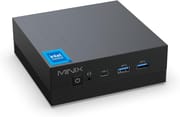 MINIX Z100-Aero | |
| Price | List Price: $249.90 Amazon Prices: |
| Version | 16GB/512GB/Intel N100 |
| Performance Rating | 4.9 |
| Operating System | Windows 11 Pro |
| Processor | Quad-core 3.40 Ghz (max 3.40 Ghz) Intel Processor N100 |
| GPU | Integrated Intel UHD Graphics |
| RAM | 16 GB |
| Internal Storage | 512 GB |
| Dimensions width x length x thickness | 5 x 5 x 1.69 inches (127 x 127 x 42.93 mm) |
| Weight | unknown |
| WiFi | Wi-Fi 5 (802.11ac) |
| Bluetooth | Bluetooth 5.1 |
| Ethernet | 2 Ethernet ports at 2.5 Gbps |
| HDMI | 1 Full-Size HDMI Port |
| DisplayPort | 1 DisplayPort |
| VGA | No VGA Ports |
| USB Ports | 4 USB 3, 1 USB-C (USB-C supports data transfer up to 5Gbps, video output up to 4K@60Hz) |
| Thunderbolt Ports | No |
| OCuLink | No |
| Internal SATA Ports | No SATA ports |
| Card Reader | No Card Reader |
| Headphone Jack | combo |
| Fanless | No |
| VESA Mount | Yes |
| In the Box | Mini PC, power adapter, VESA mount, HDMI Cable, screws and rails for 2.5 inch storage expansion, user guide |
| Expandability | Memory and storage are upgradeable |
Related Mini PCs
-
 Bmax B4 PlusThe BMAX B4 Plus Mini PC delivers Intel N100 performance with a unique 2.5-inch SATA expansion bay…
 -
 Bmax B4 UltraThe Bmax B4 Ultra is an ultra-compact mini PC featuring Intel's N150 processor, 12GB LPDDR5 RAM,…
 -
 BOSGAME B100The BOSGAME B100 is a budget Intel N100 mini PC with 16GB of DDR4, a 512GB NVMe SSD, dual HDMI plus…
 -
 BOSGAME B95The BOSGAME B95 is a low-cost Intel N95 mini PC with 16GB of DDR4, a 512GB M.2 SSD, 2.5Gb Ethernet,…
 -
 CyberGeek Nano A1The CyberGeek Nano A1 packs impressive power in a compact form with its Windows 11 Pro OS, Wi-Fi 6,…
 -
 DreamQuest Pro Mini PCThe DreamQuest Pro Mini PC is a budget Intel N95 box (16GB or 32GB RAM, 512GB or 1TB SSD) with dual…
What Reviewers Found
The one hands-on review of the Z100-Aero specifically (not the fanless Z100-0dB) is from Robtech, a trusted mini PC channel. His high point was the cooling: “I’m impressed by its cooler. Not only is the CPU temperature low, but fan noises as well.” He also rated the ports highly, saying the Aero “takes the N100 as far as it can go,” and singled out the “full-featured USB-C” that “supports power delivery and display,” with HDMI and DisplayPort each driving a 4K 60Hz screen.
His criticisms were fair for the price: the memory and storage compartments are awkward to get into, and the DDR4 memory (rather than the faster DDR5 some rivals use) costs a little graphics performance. He also felt that at this price MINIX could have included a better Wi-Fi chip than the Wi-Fi 5 AC 9560.
Availability and the Z150-Aero Successor
MINIX has refreshed this line: the Amazon listing that carried the N100 Z100-Aero now sells the Z150-Aero, built on the newer Intel N150 (an upgraded N100). Because that listing’s owner ratings now pool the N100 and N150 generations together, we are not quoting an aggregate star score or buyer reviews here, since they can no longer be tied cleanly to the N100 model this page documents. If you specifically want the N100 Z100-Aero, check the exact processor on any listing before buying; otherwise the N150 Z150-Aero is the current equivalent. For a completely silent option on the same N100 platform, see the fanless MINIX Z100-0dB.
Conclusion
The Z100-Aero is a sensible pick for a compact, quiet Windows desktop: home entertainment, light gaming and emulation, basic editing, and general productivity. Its strongest points are the cooling Robtech praised, the dual Ethernet (1G + 2.5G), and the 4K-capable HDMI and DisplayPort outputs. The two Ethernet ports and the N100’s low idle power also make it a reasonable base for a small home server running self-hosted services.
Look elsewhere if you want DDR5 memory, a metal build, or silence: the N100 here is fairly priced but not the cheapest, and a fan is a fan. For a truly silent box on the same N100 platform, the fanless MINIX Z100-0dB is the sibling to consider. To weigh it against other models, use Starry Hope’s Mini PC Comparison Chart.
Frequently Asked Questions
What processor does the MINIX Z100-Aero use?
The Z100-Aero is powered by the Intel® Alder Lake-N Quad-Core N100 processor, with a base frequency of 0.8GHz and a maximum turbo frequency of 3.4GHz.
How much RAM and storage can the mini PC support?
The Z100-Aero has a single DDR4 SO-DIMM slot that supports up to 32GB of RAM at 3200MHz. For storage, it can accommodate up to 512GB of M.2 PCIe 3.0 x4 NVMe SSD out of the box, possibly upgrading to a maximum of 4TB.
What connectivity options does the Z100-Aero offer?
The mini PC features dual Ethernet ports (1G + 2.5G), Intel Wireless-AC 9560 Wi-Fi 5 (802.11ac), and Bluetooth 5.1 for wireless connectivity. It also has four USB 3.2 Gen 1 Type-A ports, one USB 3.2 Gen 2 Type-C port with Power Delivery and display output, plus HDMI and DisplayPort, both up to 4K at 60Hz.
Can the MINIX Z100-Aero handle 4K displays?
Yes, the Z100-Aero supports 4K resolution at 60Hz through both its HDMI and DisplayPort outputs.
What operating system does the mini PC come with?
The MINIX Z100-Aero ships with Windows 11 Pro 64-bit pre-installed.
Is the Z100-Aero suitable for gaming?
It is not a dedicated gaming machine, but the integrated Intel UHD Graphics handle light gaming and emulation. In Robtech’s testing, Minecraft ran well and League of Legends held up at high detail, and it emulated older consoles like PlayStation 2, GameCube, and Wii at 720p.
How easy is it to upgrade the memory and storage?
Accessing the memory and storage compartments on the Z100-Aero requires removing screws and wrestling with the board, which some reviewers have noted as being less user-friendly than it could be.
What are the dimensions and weight of the mini PC?
The MINIX Z100-Aero measures 127x127x43mm (5”x5”x1.69”) and weighs approximately 2.8 pounds (1.27 kg).
Does the Z100-Aero have a VESA mount option?
Yes, the mini PC includes a VESA mount, allowing you to securely attach it to the back of a monitor or TV for a clutter-free setup.
What is included in the box?
The MINIX Z100-Aero comes with the mini PC itself, a power adapter, VESA mount, HDMI cable, screws and rails for 2.5-inch storage expansion, and a user guide.