

Listen to this article:
Google just dropped the biggest news in Chromebook history: ChromeOS and Android are officially merging into a single unified platform launching in 2026. The internal codename? Aluminium OS.
This isn’t a rumor anymore. At Qualcomm’s Snapdragon Summit in September 2025, Google’s Android Ecosystem President Sameer Samat confirmed the news directly: “We’re going to be combining ChromeOS and Android into a single platform.” And just this week, Google VP John Maletis clarified what this means for existing Chromebooks and Google’s support commitments.
Here’s what’s actually happening, why it matters, and whether your Chromebook will make the jump to this new Android-based future.
What Is Aluminium OS?
Aluminium OS is Google’s unified operating system that combines the best parts of Android and ChromeOS into a single platform. Instead of maintaining two separate desktop operating systems, Google is consolidating everything onto Android’s foundation.
Think of it as Android, but optimized for laptops and desktops. We’re not talking about running Android apps in a compatibility layer like Chromebooks do today. This is Android-native, with desktop capabilities like windowed multitasking, keyboard and mouse workflows, and multi-monitor support built in from the start.
The key architectural difference from ChromeOS? ChromeOS started as a web-first platform and added Android app support later. Aluminium OS starts with Android and builds desktop features on top. But for most users, this distinction matters less than you might think. Both platforms run Chrome, both run Android apps, both support web apps. The difference is what’s happening under the hood.
The Linux Kernel Changes: What’s Actually Different
Here’s where things get technical, but I’ll keep it simple. ChromeOS has always run on a Linux kernel, originally based on Ubuntu but switched to Gentoo Linux back in 2010. Android also runs on Linux, but uses a heavily modified Android Linux kernel optimized for mobile devices.
Google confirmed in 2025 that ChromeOS will switch from the traditional Linux kernel to the Android kernel. This is a massive architectural change that’s been happening gradually for years.
The first major signal came in March 2024 with ChromeOS 122, when Google replaced the BlueZ Bluetooth stack with Fluoride, Android’s native Bluetooth implementation. This project, called “Project Floss,” wasn’t just about fixing Bluetooth bugs. It was the opening move in a much larger integration strategy.
By sharing the Android kernel and framework, Google gets several advantages. Development resources can be shared across both platforms. New features launch simultaneously on phones and laptops. Security updates happen faster. And most importantly, Google only has to maintain one kernel instead of two completely separate stacks.
The technical stack for Aluminium OS reportedly includes a customized Linux Kernel 6.x with desktop hardware drivers and security hardening, a modified Android Framework 16/17 with desktop API extensions, and support for both ARM and x86 processors. That x86 support is particularly notable because Aluminium OS is expected to be the first mainline maintained x86 version of Android.
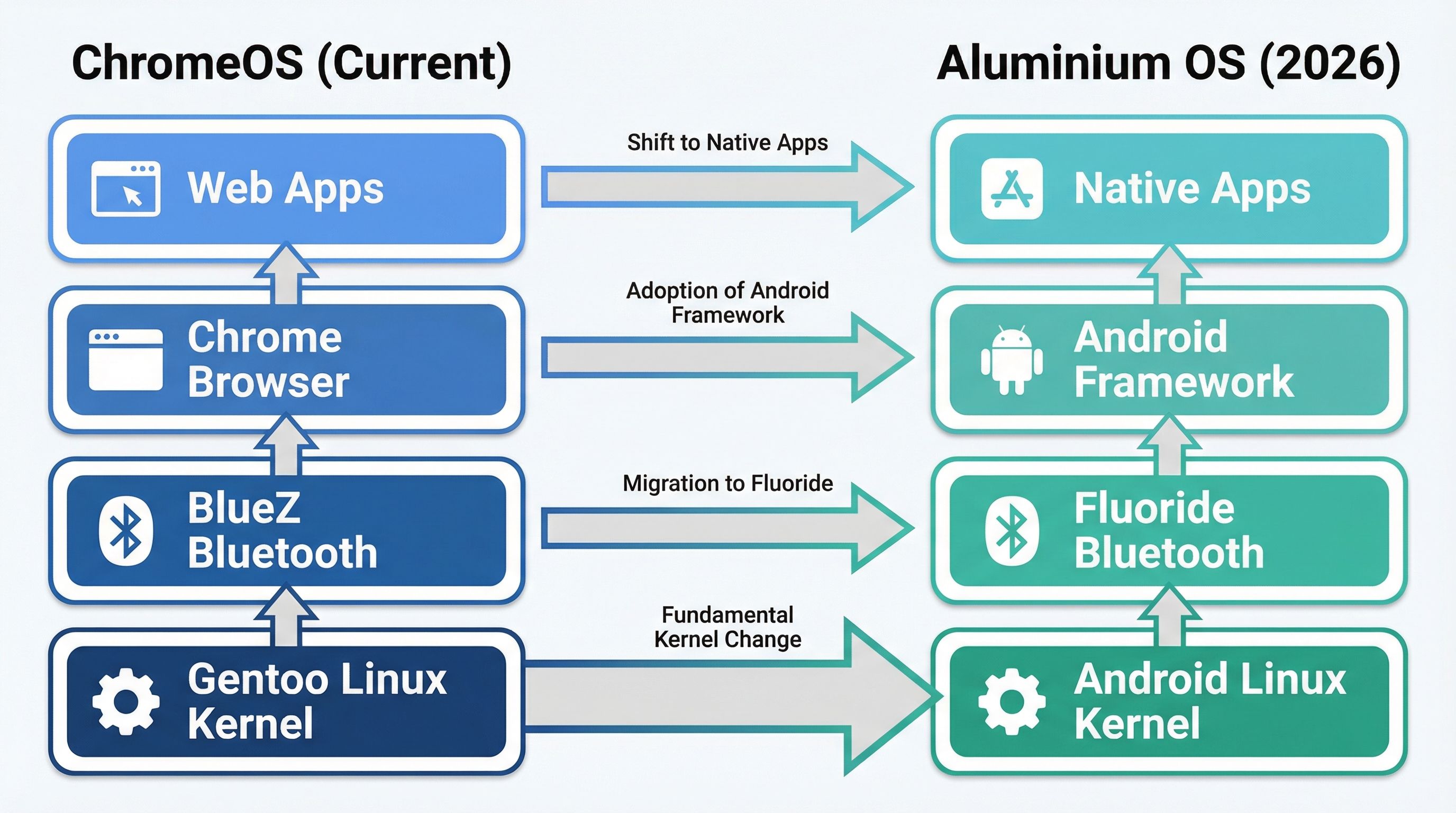
The diagram above shows the fundamental architectural shift. On the left, you see ChromeOS’s traditional stack built on the Gentoo Linux kernel. On the right, Aluminium OS rebuilds everything on Android’s foundation. This isn’t just swapping out one component. It’s changing the entire foundation of how these devices work.
Will Your Chromebook Get Aluminium OS?
Here’s the part that matters most: not every Chromebook will upgrade to Aluminium OS. Google VP John Maletis confirmed that older Chromebooks won’t migrate due to hardware limitations.
If you want to know whether your Chromebook might qualify, check if it has a processor newer than 2021 and at least 8GB of RAM. Google has been testing Aluminium OS on MediaTek Kompanio and Intel Alder Lake chips, which represents significantly more powerful hardware than typical budget Chromebooks.
The practical bottlenecks are things like 32GB eMMC storage, 4GB RAM configurations that were standard in early Chromebooks, and aging chipsets that lack modern driver support. Aluminium OS is built with AI at its core, leveraging CPUs, GPUs, and Neural Processing Units. If your device doesn’t have that modern hardware, it’s staying on ChromeOS.
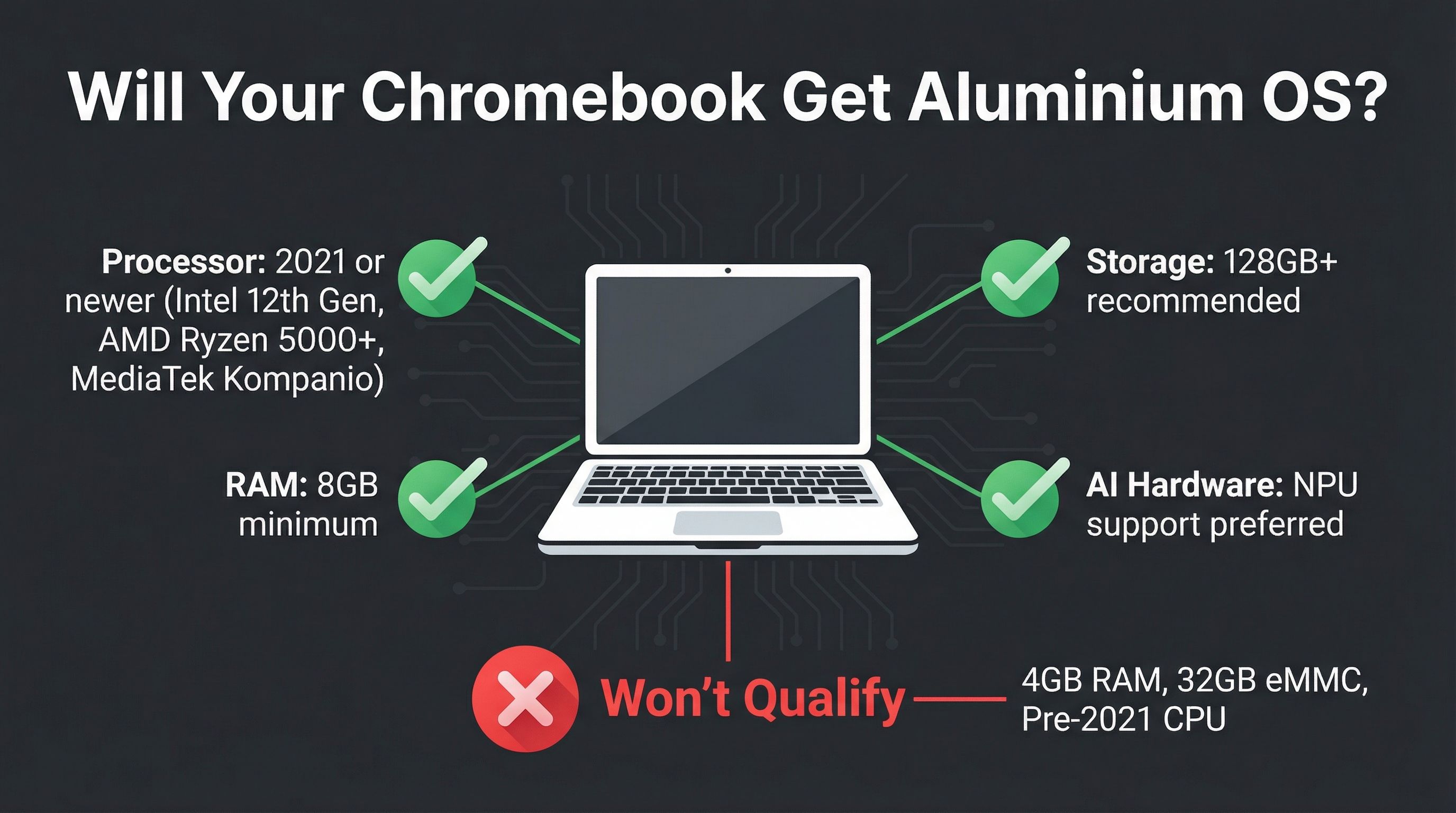
The visual above breaks down what you need. Green checkmarks show qualifying specs, red X marks show what won’t make the cut. If your Chromebook has 4GB of RAM and 32GB of eMMC storage, it’s not getting Aluminium OS no matter how new it is.
But here’s the good news: Google maintains its 10-year automatic update commitment regardless of which platform your device runs. Whether you get upgraded to Aluminium OS or stay on ChromeOS, you’ll receive the full 10 years of updates from your device’s launch date. That’s a huge relief for anyone who bought a Chromebook recently.
What Actually Changes for Users
Here’s the thing most people get wrong about this transition: the day-to-day user experience probably won’t feel dramatically different. Google isn’t blowing up ChromeOS and replacing it with something unrecognizable. They’re changing the foundation while keeping the interface largely familiar.
What you’ll notice is happening under the hood. ChromeOS already runs Android apps, already has windowed multitasking, already supports keyboards, mice, and external monitors. Aluminium OS takes those capabilities and makes them native instead of bolted on. Apps should run better because they’re not running through compatibility layers. Battery life might improve because the Android kernel is more optimized for power management. Updates should arrive faster because Google only maintains one platform instead of two.
The AI integration is where Google seems to be placing its biggest bet. Gemini, Google’s AI assistant, is reportedly baked into the core operating system with system-level features like on-device summarization, intelligent multitasking suggestions, and context-aware assistance. This goes beyond just having an AI chatbot you can open in a browser. It’s about AI understanding what you’re working on and helping proactively.
For developers and power users, Linux support should continue working. Android is built on the Linux kernel, so Linux-based development tools and workflows ought to carry over, though the implementation details will certainly change from how ChromeOS currently handles Linux containers through Crostini.
The Timeline: When Does This Actually Happen?
Google confirmed Aluminium OS will launch sometime in 2026, though whether that means the first or second half of the year remains unclear. The first official announcement or teaser is expected at Google I/O 2026 in May, with new devices potentially hitting the market in Q3 or Q4 2026.
Google is currently testing Aluminium OS on Android 16 builds, with the public release expected around the time of Android 17. Internal testing involves different performance tiers like “AL Mass Premium,” “AL Premium,” and “AL Entry,” indicating Google plans to support everything from budget devices to high-end workstations.

The timeline visual above shows how we got here and where we’re going. This transition started years ago with the Bluetooth stack migration in 2024, became official in September 2025, and will culminate with the first Aluminium OS devices launching later this year.
The transition won’t be instant. ChromeOS and Aluminium OS will coexist during a migration period, with ChromeOS continuing to receive updates for devices that don’t make the jump. How long this transition takes depends on hardware refresh cycles and how quickly manufacturers adopt the new platform.
Why Google Is Doing This
The market opportunity is enormous. The Chromebook market is projected to grow from $14.70 billion in 2025 to $42.85 billion by 2034, according to industry analysts. But Google has a problem: it’s competing against Windows and macOS with two different operating systems that don’t share resources efficiently.
By unifying on Android, Google gets to leverage the world’s most popular mobile operating system for desktop computing. That means millions of Android apps instantly work on laptops without compatibility layers or emulation. Developers only need to optimize their apps once for both phones and computers. And Google’s engineering teams can focus on one platform instead of maintaining two.
The competitive angle matters too. Apple’s M-series chips demonstrated the power of unified architectures when they brought iOS apps to macOS. Microsoft is pushing Windows on ARM with better battery life and mobile-like performance. Google needs a unified platform to compete, and Android is the obvious choice given its massive install base and mature ecosystem.
What Happens to ChromeOS?
ChromeOS isn’t dead. Google VP John Maletis was emphatic about this in a recent AMA with Chrome Unboxed: “ChromeOS isn’t going anywhere despite the shift to an Android-based tech stack called Aluminium OS.”
For millions of Chromebooks in schools, businesses, and homes that can’t upgrade to Aluminium OS due to hardware limitations, ChromeOS will continue receiving security updates and feature improvements for the full 10-year support window. This isn’t abandonware. It’s a parallel maintenance track for older hardware.
Think of it like how Apple supports older versions of iOS while pushing forward with new releases. Your Chromebook won’t suddenly stop working or lose support. It just won’t get the fancy new Aluminium OS features that require modern hardware.
Should You Wait to Buy a Chromebook?
Here’s my take: it depends on what you need right now.
If you need a laptop today for school or work, don’t wait. Current Chromebooks work great, and you’ll get 10 years of support regardless of whether they upgrade to Aluminium OS. A good Chromebook in 2026 will still be a good Chromebook in 2027, even if it’s running “old” ChromeOS.
If you want to future-proof for Aluminium OS, look for Chromebooks with at least 8GB of RAM, 128GB+ storage, and recent processors from Intel (12th gen or newer), AMD (Ryzen 5000 series or newer), or MediaTek (Kompanio series). These specs give you the best shot at qualifying for the upgrade when it arrives.
But frankly, I wouldn’t obsess over it. By the time Aluminium OS launches in late 2026, manufacturers will clearly market which devices support it. You’re not gambling in the dark. Just buy what works for your needs today and upgrade when you’re ready for the new platform.
What This Means Long-Term
This is the biggest architectural shift in Chromebook history. Google is changing the foundation from a Linux-based web-centric operating system to an Android-based desktop platform, though most users probably won’t notice much difference in their day-to-day experience.
For users, the benefits should be incremental improvements: better app performance, potentially longer battery life, and deeper AI integration through Gemini. For developers, it means one codebase for both mobile and desktop, which should accelerate app development for Chromebooks. For Google, it means a unified platform that leverages Android’s massive ecosystem to compete more effectively with Windows and macOS.
The transition will take time. Some Chromebooks won’t make the cut due to hardware limitations. Some workflows might need adjustment as the Linux container implementation changes. But Google’s 10-year support commitment means existing ChromeOS devices aren’t being abandoned. This is an evolution, not a revolution.
ChromeOS had a good run. It proved that web-based computing could work, that Linux could power consumer devices, and that you didn’t need Windows or macOS for everyday tasks. Aluminium OS takes those lessons and builds something new on top of the world’s most popular mobile operating system.
We’ll know a lot more at Google I/O 2026 in May. Until then, your Chromebook will keep working exactly as it does today, with the same 10-year support commitment Google has always promised. And when Aluminium OS arrives, we’ll finally see whether Google’s bet on unifying Android and ChromeOS pays off.


