
Bmax B3
Updated on

The Bmax B3 is a palm-sized Windows 11 Pro mini PC built around the Intel Celeron N5095. It ships with 8GB of DDR4 in a single stick and a 256GB M.2 SATA SSD, and memory goes to 16GB if you swap that stick out. Two HDMI outputs, two gigabit Ethernet ports, four USB-A ports and a USB-C port, a microSD reader, and a combo audio jack cover connections, and a 2.5-inch drive bay sits under the lid for a second disk. A VESA bracket is in the box, so the whole thing can hang off the back of a monitor.
| Pros | Cons |
|---|---|
| Two gigabit Ethernet ports hit 943 and 949 Mbits/sec together | A single 8GB DDR4-2133 stick runs in single-channel mode |
| Licensed Windows 11 Pro pre-installed | Wi-Fi 5 and Bluetooth 4.2, no Wi-Fi 6 |
| Fan measured 31 dBA under a sustained stress test | Uncommon 42mm M.2 SATA drive |
| 2.5-inch bay with the ribbon cable included | Review units stuck on Windows 11 build 21H2 |
| 4K 60Hz output over two HDMI ports | Extended mode broke the colors on one HDMI output |
| VESA bracket and mounting screws in the box | Fortnite crashed even at the lowest settings |
Related Videos
Bmax B3 Comparison Chart
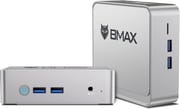 Bmax B3 | |
| Price | List Price: $129.99 Amazon Prices: |
| Version | 8GB/256GB/Intel N5095 |
| Performance Rating | 2.6 |
| Operating System | Windows 11 Pro |
| Processor | Quad-core 2.00 Ghz (max 2.90 Ghz) Intel Celeron Processor N5095 |
| GPU | Integrated Intel UHD Graphics |
| RAM | 8 GB |
| Internal Storage | 256 GB |
| Dimensions width x length x thickness | 4.9 x 4.4 x 1.7 inches (124.46 x 111.76 x 43.18 mm) |
| Weight | unknown |
| WiFi | Wi-Fi 5 (802.11ac) |
| Bluetooth | Bluetooth 4.2 |
| Ethernet | 2 Ethernet ports at 1 Gbps |
| HDMI | 2 Full-Size HDMI Ports |
| DisplayPort | No DisplayPort |
| VGA | No VGA Ports |
| USB Ports | 4 USB 3, 1 USB-C |
| Thunderbolt Ports | No |
| OCuLink | No |
| Internal SATA Ports | 1 SATA port, includes 2.5" drive bay (Includes SATA connector with ribbon cable for 2.5 inch drive) |
| Card Reader | microSD Card Reader |
| Headphone Jack | combo |
| Fanless | No |
| VESA Mount | Yes |
| In the Box | Bmax B3, HDMI cable, power adapter, mounting bracket and screws, user manual |
| Expandability | RAM expandable up to 16GB, 2.5" drive bay. |
Related Mini PCs
-
 Bmax B2 PowerThe Bmax B2 Power is a palm-sized mini PC with an Intel Celeron 5205U, 8GB of DDR4, a 256GB NVMe…
 -
 Bmax B3 ProThe Bmax B3 Pro is a budget mini PC with an Intel Celeron N5095, dual 4K HDMI outputs, WiFi 5, and…
 -
 BOSGAME E2 AirThe BOSGAME E2 Air is a budget desk box for office work and a multi-monitor setup. It pairs an AMD…
 -
 BOSGAME E2 PlusThe BOSGAME E2 Plus is a budget office mini PC built on the AMD Ryzen 5 3501U, a relabelled 2019…
 -
 CyberGeek Nano J1The CyberGeek Nano J1 is a budget mini PC with an Intel Celeron N5095A, 16GB of DDR4, a 1TB NVMe…
 -
 ORIGIMAGIC C3The ORIGIMAGIC C3 is a small office and signage box built on the Intel Core i3-5005U, a dual-core…
Two gigabit NICs and a lid that pops off
The Jasper Lake N5095 runs a 2.0 GHz base clock and boosts to 2.9 GHz, and its Intel UHD Graphics drive a maximum 4K resolution at 60Hz. The top cover detaches without tools, which is how you reach the memory, the M.2 drive, and the 2.5-inch bay; swapping the M.2 drive still takes a small screwdriver. Storage runs off a single M.2 SATA slot plus that bay, and BMAX supplies the ribbon cable a second drive needs.
An internal fan handles cooling, and the bundled VESA mount puts the box behind a monitor or on a wall. Wireless duties fall to dual-band Wi-Fi 5 and Bluetooth 4.2, while four USB-A ports and a USB-C port take external storage and peripherals. The two gigabit Ethernet ports suit anyone running pfSense, OPNsense, or a small home server that needs separate WAN and LAN interfaces.
Reviewer Insights
Three reviewers put the B3 (sold as the B3 Plus) through testing: CNX Software on Windows 11 with an Ubuntu stress test, and AKGamerTech and Scecko in hands-on use. Between them they cover the N5095’s sustained clocks, the throughput of both Ethernet ports at once, and how loud the all-plastic chassis gets.
CNX Software measured 2.8 GHz sustained and 31 dBA
Ian Morrison, who reviews as Linuxium for CNX Software, booted Ubuntu 22.04 and ran a sustained CPU stress test. He watched the N5095 hold an average of around 63 C with a peak of 64 C while the clock “flat-lined at 2800 MHz for the duration of the test.” The top of the case reached only about 27.3 C in a 14.7 C room, and the fan was, in his words, “hardly audible reaching 31 dBA on my sound meter next to the device during the test.” He found Windows benchmark scores slightly lower than comparable mini PCs with the same configuration and put that down to “PL 2” (the turbo power limit) being set at 25W rather than 30W. In his view the lower limit keeps the temperature down and the machine nearly silent, at a slight loss in performance.
Morrison also stress-tested the dual Ethernet. Connecting one port to his internet LAN and the other to his intranet LAN and running iperf3 across both at once, he saw no degradation, recording “a simultaneous download speed of 943 Mbits/sec and a simultaneous upload speed of 949 Mbits/sec,” which is essentially line-rate on both gigabit NICs together. Although BMAX lists every USB port as 3.0, he measured the front-middle Type-A and the Type-C as USB 3.1 (10 Gbit/s) with the rest at 5 Gbit/s, and the Type-C port also outputs video through Alternate Mode, which with the two HDMI ports gives support for triple 4K displays. He confirmed the unit shipped with a licensed copy of Windows 11 Pro version 21H2, though Windows Update reported it as up to date while the build stayed at 739 instead of the then-current 856. The limitations he listed were single-channel memory that “needs upgrading,” the 42mm SATA storage, which he noted is not commonly available in some parts of the world, and the lower turbo power limit. He put the as-tested price at “around $229 for the tested configuration of 8GB/256GB.”
AKGamerTech hit two HDMI problems on a 16GB unit
AKGamerTech’s “BMax B3 Mini PC (Unboxing + User experience)” covers a unit with 16GB of RAM in everyday use. He said it “only uses like 24 Watts from the wall,” which he compared to a phone charger, and in his testing it did not get hotter than 85 C and “wouldn’t overheat” or throttle. For light gaming he found Minecraft stable at 50 to 60 FPS once chunks were loaded, dropping toward 20 while streaming in new terrain; Fall Guys ran around 20 FPS with input lag he called unplayable; and Fortnite crashed even at the lowest settings. He ran into two separate HDMI problems. After he reinstalled Windows, the picture showed black bars at the sides and changing the resolution did not help. He first worked around it by running 4K, then found that dropping the refresh rate from 60 Hz to 30 Hz or lower and changing it back fixed it. Separately, with a capture card on one HDMI port and his monitor on the other, duplicate mode was fine but switching to extended mode “would break one of the HDMI colors.” He also noted the preinstalled Windows would not update from version 21H2. His verdict was that, bought for 130 euros, it is “a good Mini PC for its price” for web work and light games, and he suggested it might suit cloud gaming. In a closing extra, he mounted a second SSD inside the case.
Scecko found faster frames and storage than the older B1
Scecko’s “BMAX B1’s Big Brother B3 Mini PC: worth an extra $70?” frames the B3 as the upgrade from the older B1. He says outright he is “not really testing these and getting the numbers that people might want to see” and passes both boxes to another YouTuber, Jay, for proper benchmarking. He did run a like-for-like comparison. The same GameMaker Studio game that ran around 30 FPS on the B1 climbed to “well above 50” on the B3, “still not the 60 that I was hoping for” but, in his words, “much more playable,” and a repeat of his storage test showed the B3 with “three to four times as much throughput as the previous BMX computer.” On the 8GB/256GB unit, listed at $170 on Amazon when he bought it, he confirmed it runs Windows 11 Pro, showed the cover that pops off to reveal two RAM slots (only one 8GB stick fitted) and the 256GB SSD, found the small SATA connector and ribbon cable for a 2.5-inch drive in the box, and noted that the vents push out warm air while “the actual case doesn’t really feel hot at all.”
Five years on, the chip is the weakest part of the package
The Celeron N5095 is a Jasper Lake part Intel launched in 2021, and it predates the Alder Lake-N N100 that has since become the default budget mini PC processor. Its PassMark multi-thread score sits at roughly 4,004. That is enough for a browser, office apps, light media, signage, and the low-traffic router and home-server roles the dual Ethernet ports invite, but well behind the N100 and N150 machines that now sell for similar money and run faster on less power. What still argues for a B3 in 2026 is the pair of gigabit Ethernet ports, the 31 dBA fan noise CNX Software measured under load, and the licensed Windows 11 Pro key.
Customer Reviews
A verified buyer who travels for a remote job called it “perfect” for remote-desktop work and noted it “could easily be a small home theater PC or NFS or Backup device.” Another owner, Mike Lawson (not a verified purchase), reported running AlmaLinux 9 with Virtualmin on it and said it “has been running at safe temperature and been rock solid so far.”
Two low-star reviews are about reliability. A verified buyer named John titled his review “Dead on arrival” and wrote that he “tried on a working TV and a computer monitor” with “no response.” A second reviewer (unverified) said the unit “died after 8 months with memory errors.”
Best bought discounted, for the two Ethernet ports and the Pro license
It works as a sub-budget Windows 11 Pro desktop for web, email, document work, and light streaming, or as a kiosk and signage box tucked behind a screen. The dual gigabit Ethernet ports also suit a low-traffic pfSense or OPNsense router build, though anyone planning that should price-check the alternatives first.
Competition is the problem in 2026. Newer Intel N97, N100, and N150 mini PCs from brands like Beelink, GMKtec, and ACEMAGIC now sell at similar or only modestly higher prices, with faster CPUs and Wi-Fi 6 or Wi-Fi 6E radios. If your budget has any flex at all, those are usually the better buy. A discounted unit, the second Ethernet port, or the bundled Windows 11 Pro license are the reasons to pick it anyway.
The Mini PC Comparison chart lines the B3 up against current N100 and N150 boxes.
Frequently Asked Questions
What operating system does the Bmax B3 Mini PC come with?
Windows 11 Pro is pre-installed, and CNX Software confirmed the copy on its review unit was licensed.
Can I upgrade the RAM on the Bmax B3?
Yes. Memory goes up to 16GB, and the top cover pops off without tools to reach the stick.
Does the Bmax B3 have options for additional storage?
A SATA connector and ribbon cable for a 2.5-inch drive ship in the box, alongside the M.2 SSD.
What type of processor is in the Bmax B3?
An Intel Celeron Processor N5095, a quad-core Jasper Lake chip that runs up to 2.90 GHz. Full details are on the Intel website.
How many USB ports does the Bmax B3 have?
Five: four USB-A ports and one USB-C port. BMAX lists them all as USB 3.0, but CNX Software measured the USB-C port and the middle front USB-A port at 10 Gbit/s.
Can I connect the Bmax B3 to multiple displays?
Two HDMI ports drive two displays at once, mirrored or extended, and CNX Software found the USB-C port also outputs video, for up to three 4K displays. AKGamerTech saw colors break on one HDMI output after switching to extended mode.
Does the Bmax B3 support Wi-Fi and Bluetooth?
Yes. Wireless is dual-band Wi-Fi 5 with Bluetooth 4.2.
Is the Bmax B3 fanless?
No. An internal fan does the cooling, and CNX Software measured it at 31 dBA under a stress test.
What comes in the box with the Bmax B3 Mini PC?
The package includes the Bmax B3 Plus Mini PC, an HDMI cable, a power adapter, a mounting bracket with screws, and a user manual.
Can the Bmax B3 be mounted to the back of a monitor?
Yes. A VESA bracket and screws come in the box for mounting behind a monitor.