
GEEKOM Mini Air12
Updated on

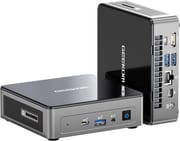
The GEEKOM Mini Air12 is a compact Windows 11 Pro mini PC for web browsing, document editing, and media playback, sold with one of three chips: a four-core Intel N100 or N150 paired with 16GB of DDR5, or a two-core Intel Pentium Gold 7505 paired with DDR4. Every build has two USB-C ports (one with DisplayPort), a mini DisplayPort, and an SD card reader in a VESA-mountable case, which the cheaper Air12 Lite lacks. None of the three chips is fast; this is a machine for light computing.
GEEKOM sells the 7505 builds as the Air12 2026 Edition, in three memory and storage configurations. The 7505 has two cores and four threads, boosts to 3.5 GHz, and carries 48 graphics execution units. The N100 has four cores and four threads at up to 3.4 GHz with 24 execution units, and the N150 has the same core count at up to 3.6 GHz. The N100 and N150 suit work that spreads across cores; the 7505 suits work that leans on one or two.
| Pros | Cons |
|---|---|
| Compact and lightweight design | Limited to light computing tasks |
| Low-power Intel chips (N100, N150 or Pentium Gold 7505) | Not suitable for gaming |
| User-upgradeable RAM (up to 32GB) | Single-channel memory on the N100 build |
| Wi-Fi 6 and Bluetooth 5.2 | No room for a 2.5-inch drive |
| Can drive up to three monitors, including 8K resolution | Locked BIOS with no advanced settings |
| Quiet operation and low power consumption | Performance may not be sufficient for heavy-duty tasks |
Related Videos
GEEKOM Mini Air12 Comparison Chart
 GEEKOM Mini Air12 | GEEKOM Mini Air12 | GEEKOM Mini Air12 | GEEKOM Mini Air12 | GEEKOM Mini Air12 | |
| Price | List Price: $449.00 Amazon Prices: Loading prices... | List Price: $319.00 Amazon Prices: Loading prices... | List Price: $429.00 Amazon Prices: Loading prices... | List Price: $429.00 Amazon Prices: Loading prices... | List Price: $499.00 Amazon Prices: |
| Version | 16GB/512GB/Intel N100 | 8GB/256GB/Intel Pentium Gold 7505 (2026 Edition) | 8GB/512GB/Intel Pentium Gold 7505 (2026 Edition) | 16GB/512GB/Intel Pentium Gold 7505 (2026 Edition) | 16GB/512GB/Intel N150 |
| Performance Rating | 3.1 | 2.6 | 2.6 | 3.0 | 3.1 |
| Operating System | Windows 11 Pro | Windows 11 Pro | Windows 11 Pro | Windows 11 Pro | Windows 11 Pro |
| Processor | Quad-core 3.40 Ghz (max 3.40 Ghz) Intel Processor N100 | Dual-core 2.00 Ghz (max 3.50 Ghz) Intel Pentium Gold 7505 | Dual-core 2.00 Ghz (max 3.50 Ghz) Intel Pentium Gold 7505 | Dual-core 2.00 Ghz (max 3.50 Ghz) Intel Pentium Gold 7505 | Quad-core 3.60 Ghz Intel Processor N150 |
| GPU | Integrated Intel UHD Graphics | Integrated Intel UHD Graphics | Integrated Intel UHD Graphics | Integrated Intel UHD Graphics | Integrated Intel UHD Graphics |
| RAM | 16 GB DDR5 SO-DIMM | 8 GB DDR4 SO-DIMM | 8 GB DDR4 SO-DIMM | 16 GB DDR4 SO-DIMM | 16 GB DDR5 SO-DIMM |
| Internal Storage | 512 GB NVMe | 256 GB SATA SSD | 512 GB SSD | 512 GB SSD | 512 GB SSD |
| Dimensions width x length x thickness | 4.6 x 4.4 x 1.35 inches (116.84 x 111.76 x 34.29 mm) | 4.6 x 4.4 x 1.35 inches (116.84 x 111.76 x 34.29 mm) | 4.6 x 4.4 x 1.35 inches (116.84 x 111.76 x 34.29 mm) | 4.6 x 4.4 x 1.35 inches (116.84 x 111.76 x 34.29 mm) | 4.6 x 4.4 x 1.35 inches (116.84 x 111.76 x 34.29 mm) |
| Weight | 1.1 lbs (0.5 kg) | 1 lbs (0.45 kg) | 1 lbs (0.45 kg) | 1 lbs (0.45 kg) | 1.1 lbs (0.5 kg) |
| WiFi | Wi-Fi 6 (802.11ax) | Wi-Fi 6 (802.11ax) | Wi-Fi 6 (802.11ax) | Wi-Fi 6 (802.11ax) | Wi-Fi 6 (802.11ax) |
| Bluetooth | Bluetooth 5.2 | Bluetooth 5.2 | Bluetooth 5.2 | Bluetooth 5.2 | Bluetooth 5.2 |
| Ethernet | 1 Ethernet port at 1 Gbps | 1 Ethernet port at 1 Gbps | 1 Ethernet port at 1 Gbps | 1 Ethernet port at 1 Gbps | 1 Ethernet port at 1 Gbps |
| HDMI | 1 Full-Size HDMI Port | 1 Full-Size HDMI Port | 1 Full-Size HDMI Port | 1 Full-Size HDMI Port | 1 Full-Size HDMI Port |
| DisplayPort | 1 DisplayPort (Mini DP1.4) | 1 DisplayPort (Mini DP1.4) | 1 DisplayPort (Mini DP1.4) | 1 DisplayPort (Mini DP1.4) | 1 DisplayPort (Mini DP1.4) |
| VGA | No VGA Ports | No VGA Ports | No VGA Ports | No VGA Ports | No VGA Ports |
| USB Ports | 3 USB 3, 2 USB-C TYPE-C with DP1.4 Alt Mode; another Type-C port is data only | 3 USB 3, 2 USB-C Rear USB-C has DP 1.4 Alt Mode; sources disagree on the front USB-C | 3 USB 3, 2 USB-C Rear USB-C has DP 1.4 Alt Mode; sources disagree on the front USB-C | 3 USB 3, 2 USB-C Rear USB-C has DP 1.4 Alt Mode; sources disagree on the front USB-C | 3 USB 3, 2 USB-C TYPE-C with DP1.4 Alt Mode; another Type-C port is data only |
| Thunderbolt Ports | No | No | No | No | No |
| OCuLink | No | No | No | No | No |
| Internal SATA Ports | No SATA ports | No SATA ports | No SATA ports | No SATA ports | No SATA ports |
| Card Reader | SD Card Reader | SD Card Reader | SD Card Reader | SD Card Reader | SD Card Reader |
| Headphone Jack | combo | combo | combo | combo | combo |
| Fanless | No | No | No | No | No |
| VESA Mount | Yes | Yes | Yes | Yes | Yes |
| In the Box | User Guide, Mini PC, Power Adapter, HDMI Cable, VESA Mount | User Guide, Mini PC, Power Adapter, HDMI Cable, VESA Mount | User Guide, Mini PC, Power Adapter, HDMI Cable, VESA Mount | User Guide, Mini PC, Power Adapter, HDMI Cable, VESA Mount | User Guide, Mini PC, Power Adapter, HDMI Cable, VESA Mount |
| Expandability | RAM up to 32GB, SSD up to 2TB | Up to 32GB DDR4 across two SODIMM slots, one M.2 2280 slot to 2TB | Up to 32GB DDR4 across two SODIMM slots, one M.2 2280 slot to 2TB | Up to 32GB DDR4 across two SODIMM slots, one M.2 2280 slot to 2TB | One M.2 2280 slot (SATA or PCIe) to 2TB |
Related Mini PCs
-
 GEEKOM Mini Air12 LiteThe GEEKOM Mini Air12 Lite is a budget Intel N100 mini PC with 8GB of DDR4 (upgradeable to 16GB), a…
 -
 Bmax B4 PlusThe BMAX B4 Plus is an Intel N100 mini PC with a 2.5-inch SATA drive bay next to its M.2 slot, so a…
 -
 Bmax B4 UltraThe Bmax B4 Ultra is an ultra-compact mini PC featuring Intel's N150 processor, 12GB LPDDR5 RAM,…
 -
 BOSGAME B100The BOSGAME B100 is a budget Intel N100 mini PC with 16GB of DDR4, a 512GB NVMe SSD, dual HDMI plus…
 -
 BOSGAME B95The BOSGAME B95 is a low-cost Intel N95 mini PC with 16GB of DDR4, a 512GB M.2 SSD, 2.5Gb Ethernet,…
 -
 CyberGeek Nano A1The CyberGeek Nano A1 is a compact Intel N100 mini PC with Windows 11 Pro, Wi-Fi 6, dual HDMI 4K…
Detailed features of the GEEKOM Mini Air12
The Air12’s connectivity is broad for the size: Wi-Fi 6, Bluetooth 5.2, three USB 3.2 ports, a USB-C with DisplayPort 1.4 Alt Mode (plus a second data-only USB-C), HDMI, a mini DisplayPort, Gigabit Ethernet, and an SD card reader. It drives up to three displays, one of them at 8K, which is unusual at this price.
The integrated Intel UHD graphics handle 4K video playback and light gaming, not modern titles. On the N100 configuration, RAM is a single DDR5 SODIMM slot (16GB stock, upgradeable to 32GB), and the M.2 slot takes an NVMe drive up to 2TB. The N150 configuration ships with 16GB of DDR5 SODIMM memory and a 512GB M.2 SSD, and its M.2 2280 slot takes a SATA or PCIe drive up to 2TB. The Pentium 7505 configurations use DDR4 instead, which GEEKOM lists to 32GB across two SODIMM slots, and their M.2 2280 bay accepts either a SATA or a PCIe drive. The included VESA mount tucks it behind a monitor, and the heat-sink-plus-fan cooling stays quiet under everyday load.
Reviewer Insights
Three of the four reviewers had the N100 build in hand and confirmed its spec on camera: Intel N100, 16GB of DDR5, an SD card reader, and USB-C. That spec set is what separates the regular Air12 from the cheaper Air12 Lite, which runs DDR4 and has no USB-C at all. The fourth had the Pentium Gold 7505 build that GEEKOM sells as the 2026 Edition. All four call it a low-power machine for light computing, and Tech Guy Beau and TechTablets both found it quiet.
Tech Guy Beau
Tech Guy Beau is the only one of the four with the Pentium Gold 7505 build, in its 8GB/256GB form, and he measured it at 8.3 watts from the wall at idle and 22 watts under full load. He counted three 10Gbps ports and two 20Gbps ports and said “This thing is absolutely jacked up with ports,” with no USB4 among them. Noise came in at 32.1 dB at idle and moved so little under load that he could not hear the difference. He added a spare 4GB stick to the stock 8GB to reach 12GB and dual channel, and found the drive it shipped with to be “just a standard SATA based M.2,” which he rated “totally snappy” for running the operating system and moving files. He defended the chip, calling it “only a two core, but it’s a modern two core” and saying “it’s still going to be capable.” On everyday use he said “you’re not going to be doing the heaviest computing, but you’re going to be fine.”
TechTablets
TechTablets said the Air12 “has an excellent build quality” but was clear it is for “light computing needs only.” He measured idle power low (“you’re looking at around 5 to 6 watts so it’s very light”) and peak around 22 to 23 watts under stress. In his gaming test, Counter-Strike 2 managed only 12 to 13 FPS even at the lowest preset. He also tried Manjaro with open-source drivers and ran into the machine not detecting the wireless card, so a Linux install is not a given here.
ETA Prime
ETA Prime called it a “nice little desktop” and said that “with a little bit of tweaking and tuning this could be a great little desktop replacement,” a verdict he reached only after raising the power limit from the stock 10 watts to 30 watts with ThrottleStop. He noted an idle draw around 5 watts and found it comfortable with 4K video playback and indie games, with AAA gaming out of scope.
TK Bay
TK Bay liked the value and flexibility, summing up that “this offers us a lot for what it’s asking for… it’s basically portable, but it’s also mountable,” and praised that the RAM and storage are user-replaceable. He said two 4K displays “should be no problem” for the system, ran a dual-display setup over USB-C that “worked really good,” and rated light gaming as just “okay.”
Customer Reviews of the GEEKOM Mini Air12
Buyer opinions on the Air12 sit at both ends. MJStarke, a verified purchaser writing in January 2026, said “this Air 12 Mini PC exceeded my expectations in just about every category,” described a setup that took nothing more than the supplied VESA backplate and three cables, and drew the scope line plainly: “This computer is only for email, WEB browsing and light productivity which it does very well, no video editing or gaming.”
The sharpest complaint comes from KEVIN R MORTON, a verified buyer who gave his Air12 one star in July 2024 after finding software he had not asked for on the drive it shipped with. He wrote that Windows Update was followed by “the mass of malware that installed from a hidden folder,” cleared it, swapped in a spare NVMe drive, and reinstalled Windows himself, and said he would not buy from the brand again. He was complimentary about the hardware underneath once he had done that, noting the name-brand Crucial memory inside and that he was “surprised by how well the Intel N100 processor is handling things.” One account is not a pattern, but it is worth a fresh Windows install and a malware scan on arrival if that matters to you.
Who the GEEKOM Mini Air12 Suits
The GEEKOM Mini Air12 fits buyers who want a small, quiet, low-power desktop for office work and media playback that can drive three monitors, one of them at 8K. Versus the cheaper Air12 Lite, the regular Air12 is the one to pick if you want USB-C or the SD card reader, or DDR5 on the N100 and N150 builds.
It is not for gaming beyond light or indie titles, or for demanding creative work; for that, step up to a Core-class box like the GEEKOM Mini IT12. To compare other options, see Starry Hope’s Mini PC Comparison Tool.
Frequently Asked Questions
Can the GEEKOM Mini Air12 support multiple monitors?
Yes, the GEEKOM Mini Air12 can support up to three monitors, including one at 8K 30Hz via a Type-C port with DisplayPort 1.4 Alt Mode.
What type of RAM does the GEEKOM Mini Air12 use?
The Intel N100 configuration uses a single DDR5 SODIMM slot and supports up to 32GB. The Intel N150 configuration ships with 16GB of DDR5 SODIMM memory. The Pentium Gold 7505 configurations sold as the Air12 2026 Edition use DDR4 SODIMM memory, which GEEKOM lists to 32GB across two slots.
Is the storage on the GEEKOM Mini Air12 upgradeable?
The N100 configuration ships with a 512GB M.2 NVMe SSD and the N150 configuration with a 512GB M.2 SSD. The Pentium Gold 7505 configurations ship with a 256GB or 512GB M.2 SSD, and the 8GB/256GB unit Tech Guy Beau opened had a SATA drive. The M.2 2280 slot takes a SATA or PCIe drive on those builds, and GEEKOM lists upgrades up to 2TB.
Does the GEEKOM Mini Air12 have Wi-Fi and Bluetooth capabilities?
Yes, the Mini Air12 has Wi-Fi 6 and Bluetooth 5.2.
Can I mount the GEEKOM Mini Air12 behind a monitor?
Yes, the Mini Air12 is VESA mount compatible, so you can attach it to the back of a monitor for a space-saving setup.
What operating system does the GEEKOM Mini Air12 run?
The Mini Air12 ships with Windows 11 Pro.
Is the GEEKOM Mini Air12 suitable for gaming?
The Mini Air12 is not designed for high-end gaming. It can handle light and indie games, but TechTablets measured only 12 to 13 FPS in Counter-Strike 2 at the lowest preset.
What are the dimensions and weight of the GEEKOM Mini Air12?
The Mini Air12 measures 4.6 inches in width, 4.4 inches in length, and 1.35 inches in thickness and weighs approximately 1.1 pounds.
What ports are available on the GEEKOM Mini Air12?
The Mini Air12’s ports include USB 3.2, USB Type-C with DisplayPort Alt Mode, HDMI 2.0, mini DisplayPort 1.4, an SD card reader, and Gigabit Ethernet.
Is the GEEKOM Mini Air12 fanless?
No, the Mini Air12 is not fanless. It uses a fan and a heat sink with copper heat pipes, and Tech Guy Beau measured 32.1 dB at idle on the Pentium Gold 7505 build.