
Acer Chromebook Spin 713
Updated on

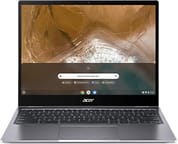
The Acer Chromebook Spin 713 (CP713-2W) earned widespread acclaim as a “flagship killer” when it launched, delivering premium features at a fraction of the cost of competitors like the Google Pixelbook Go. Built around Intel’s 10th Gen Core i5-10210U processor and featuring a stunning 13.5-inch 3:2 aspect ratio display, this convertible Chromebook quickly became a favorite among productivity-focused users who wanted high-end performance without the thousand-dollar price tag. The military-grade durability (MIL-STD 810G compliance) adds practical ruggedness that many premium Chromebooks lack, making it suitable for students, professionals, and anyone who needs a reliable workhorse.
| Pros | Cons |
|---|---|
| Outstanding 13.5” 3:2 display with 2256x1504 resolution and 450+ nits brightness | Speakers are notably weak and tinny with virtually no bass |
| Exceptional value at $629 - undercuts competitors by $200-400 | No fingerprint reader for quick biometric login |
| MIL-STD 810G durability rating (survives 4ft drops, 130lb pressure) | No included stylus despite USI support |
| Full-size HDMI port eliminates need for dongles | Some build quality “rough edges” vs ultra-premium devices |
| 10+ hours real-world battery life | Design is utilitarian rather than sleek |
| Fast NVMe storage and responsive performance | 720p webcam quality is mediocre |
Related Videos
Acer Chromebook Spin 713 Comparison Chart
 Acer Chromebook Spin 713 | Acer Chromebook Spin 713 | Acer Chromebook Spin 713 | |
| Price | List Price: $899.99 Amazon Prices: | List Price: $699.99 Amazon Prices: Loading prices... | List Price: $629.00 Amazon Prices: Loading prices... |
| Model number | CP713-2W-568T | CP713-2W-38P1 / NX.HQBAA.001 | CP713-2W-5874 |
| Performance Rating | 6.7 | 5.5 | 5.8 |
| Chromebook Plus | No | No | No |
| Processor | Quad-core 1.60 Ghz (max 4.20 Ghz) Intel Core i5-10210U Processor | Dual-core 2.10 Ghz (max 4.10 Ghz) Intel Core i3-10110U Processor | Quad-core 1.60 Ghz (max 4.20 Ghz) Intel Core i5-10210U Processor |
| RAM | 16 GB | 8 GB | 8 GB |
| Internal Storage | 256 GB NVMe SSD | 256 GB NVMe SSD | 128 GB NVMe SSD |
| Screen Size | 13.5" | 13.5" | 13.5" |
| Screen Resolution | 2256x1504 | 2256x1504 | 2256x1504 |
| Screen Type | IPS | IPS | IPS |
| Touch Screen | Yes | Yes | Yes |
| Stylus / Pen | Supported | Supported | Supported |
| Dimensions width x length x thickness | 11.8 x 9.3 x 0.66 inches (299.72 x 236.22 x 16.76 mm) | 11.8 x 9.3 x 0.66 inches (299.72 x 236.22 x 16.76 mm) | 11.8 x 9.3 x 0.66 inches (299.72 x 236.22 x 16.76 mm) |
| Weight | 3.2 lbs (1.45 kg) | 3.2 lbs (1.45 kg) | 3.2 lbs (1.45 kg) |
| Backlit Keyboard | Yes | Yes | Yes |
| Webcam | HD | HD | HD |
| WiFi | IEEE 802.11 a/b/g/n/ac/ax | IEEE 802.11 a/b/g/n/ac/ax | IEEE 802.11 a/b/g/n/ac/ax |
| Bluetooth | Bluetooth 5.0 | Bluetooth 5.0 | Bluetooth 5.0 |
| Ethernet | No | No | No |
| Cellular Modem | No | No | No |
| HDMI | Full-Size HDMI | Full-Size HDMI | Full-Size HDMI |
| USB Ports | 1 USB 3, 2 USB-C (Charging and DisplayPort over USB-C) | 1 USB 3, 2 USB-C (Charging and DisplayPort over USB-C) | 1 USB 3, 2 USB-C (Charging and DisplayPort over USB-C) |
| Thunderbolt Ports | No | No | No |
| Card Reader | microSD Card Reader | microSD Card Reader | microSD Card Reader |
| Battery | 3 cell, Lithium-ion | 3 cell, Lithium-ion | 3 cell, Lithium-ion |
| Battery Life | 10.0 hours | 10.0 hours | 10.0 hours |
| Fanless | No | No | No |
| Auto Update Expiration Date | June, 2028 | June, 2028 | June, 2028 |
Related Chromebooks
-
 Acer Chromebook Spin 314Meet the Acer Chromebook Spin 314: a budget-friendly powerhouse with a 14-inch responsive…
 -
 Lenovo IdeaPad Flex 5iThe Lenovo IdeaPad Flex 5i Chromebook, with its snappy 10th gen Intel CPU, vibrant 1080p…
 -
 Lenovo Flex 5 ChromebookThe Lenovo Flex 5 Chromebook shines with its 13.3-inch FHD touchscreen, sturdy 360 hinge for tablet…
 -
 Acer Chromebook Spin 513The Acer Chromebook Spin 513 offers a versatile 13.3-inch Full HD IPS touchscreen display, backlit…
 -
 ASUS Chromebook Flip CX5 (CX5400)Maximize productivity with the ASUS Chromebook Flip CX5, boasting a versatile touchscreen, backlit…
 -
 Acer Chromebook Spin 314 (2024)A 14-inch convertible Chromebook with a 16:10 WUXGA touch display, 360-degree hinge, and software…
Detailed Insights into the Acer Chromebook Spin 713

The Acer Chromebook Spin 713 represents a thoughtful evolution from its predecessor, the Spin 13, with approximately 50% smaller display bezels that allow for a more compact overall footprint while maintaining that productivity-friendly 13.5-inch screen size. The aluminum lid and bottom panel provide structural rigidity and a premium feel, though the plastic keyboard deck keeps weight manageable at 3.2 pounds. The MIL-STD 810G certification is not just marketing speak. This Chromebook is engineered to withstand drops from four feet onto a hard surface and can handle 130 pounds of downward pressure on the closed lid, making it genuinely suitable for the rigors of daily commutes, coffee shop work sessions, and classroom use.
The 360-degree convertible hinge operates smoothly and holds the display securely at any angle, whether you are using it in traditional laptop mode, tent mode for presentations, or fully folded as a tablet for note-taking with a USI stylus. One clever design detail that reviewers praised is the strategic placement of the power button between the volume rocker and USB-C ports on the side, which prevents accidental shutdowns when you are plugging in accessories. The backlit keyboard offers satisfying travel and tactile feedback that makes extended typing sessions comfortable, while the Gorilla Glass trackpad is large, responsive, and handles multi-finger gestures without issue. Chrome Unboxed’s Robby Payne described the trackpad as “as good as they get” in their in-depth review.
Port selection on the Spin 713 is genuinely impressive for a thin-and-light Chromebook of this era. You get a full-size HDMI Type-A port that eliminates the need for dongles when connecting to external displays, one USB 3.0 Type-A port for legacy peripherals, two USB-C ports supporting charging and DisplayPort output, a microSD card slot for expandable storage, and a combo audio jack. WiFi 6 and Bluetooth 5.0 ensure fast wireless connectivity, though there is no Ethernet port for those who need wired networking. A USB Ethernet adapter can fill that gap via the USB-A port. The lack of Thunderbolt is the main port-related compromise, but at this price point, that is an understandable tradeoff.
Reviewer Insights on the Acer Chromebook Spin 713

Chrome Unboxed’s Perspective
Robby Payne at Chrome Unboxed declared the Spin 713 his “favorite Chromebook of 2020” after extensive hands-on testing, calling it a “no-brainer” at its $629 price point. He was particularly effusive about the display, stating “I’d choose the Spin 713’s screen every single time” when comparing it to competitors. The 3:2 aspect ratio provides vertical real estate equivalent to a 15.6-inch 16:9 laptop, which transforms the productivity experience for tasks like document editing, spreadsheet work, and web browsing. He noted the brightness exceeds 400 nits with punchy colors and excellent viewing angles, making it usable outdoors in indirect sunlight.
However, Payne did not shy away from criticism. He described the speakers as “just plain awful - small, quiet, and tinny” and recommended headphones or external speakers for any media consumption. He also observed some rough edges in the build, including seams that do not quite line up perfectly and some sharp edges on the chassis. Despite these flaws, his conclusion was emphatic: “I honestly am not sure how others will compete at this point.”
Kevin Tofel’s Perspective
Kevin Tofel at About Chromebooks provided benchmark data showing the Spin 713 substantially outperforming the Pixelbook Go across all tests, with Octane 2.0 scores of 44,778 versus 26,822. He emphasized the value proposition, noting that a similar configuration of the older Spin 13 launched at $800-$900, meaning buyers are getting more for less with the newer model. His real-world battery testing yielded 8-9 hours of actual usage, which aligns closely with Acer’s 10-hour claim.
Tofel praised the larger trackpad compared to the previous generation and noted the thoughtful port placement that prevents accidental power-offs. His primary criticisms echoed other reviewers: no fingerprint reader (found on comparably priced competitors), unchanged speaker quality from the previous model, and no included stylus despite USI support. His verdict: “I don’t think you can buy a better Chrome OS laptop for $629.”
PCWorld’s Perspective
Ashley Biancuzzo at PCWorld awarded the device 4 out of 5 stars, calling the display “probably the best I’ve ever seen on a Chromebook.” Her battery life testing in the CrXPRT 2 benchmark yielded nearly 14 hours, with real-world usage closer to 10 hours. She described the keyboard and trackpad as “an absolute joy to use” and praised the aluminum chassis build quality. Her main criticisms focused on the utilitarian design aesthetic, lack of a webcam privacy shutter, and fan noise under heavier workloads. The glossy display finish can also create reflections in bright sunlight.
Customer Reviews of the Acer Chromebook Spin 713
Amazon customers have consistently praised the Acer Chromebook Spin 713 for its display quality and overall value, with the device maintaining strong ratings across both available variants. The 8GB/128GB configuration (CP713-2W-5874) currently holds a 4.1-star rating based on hundreds of reviews, with customers frequently highlighting the crisp 3:2 display as the standout feature for productivity work.
Common positive themes include the responsive performance for everyday tasks, the solid build quality that inspires confidence in durability, and the long battery life that often exceeds expectations. Multiple reviewers who upgraded from older Chromebooks note the significant improvement in display quality and overall snappiness. Students and professionals frequently mention how the 3:2 aspect ratio reduces scrolling and improves document visibility compared to traditional widescreen displays.
The most frequent criticisms align with professional reviews: the speakers receive near-universal complaints for being inadequate for video calls or media consumption without headphones. Some customers express disappointment at the lack of a fingerprint reader, particularly those coming from phones or other laptops with biometric login. A smaller subset of reviewers note that while build quality is good, it does not quite reach the premium feel of more expensive devices like Google’s own Pixelbook line. The June 2028 Auto Update Expiration date provides reassurance for long-term software support.
Conclusion
The Acer Chromebook Spin 713 (CP713-2W) represents an exceptional value proposition for anyone seeking a premium Chromebook experience without the premium price tag. The combination of a best-in-class 3:2 display, military-grade durability, fast 10th Gen Intel performance, and comprehensive port selection makes it suitable for students, professionals, and general productivity users alike. While the speakers are a genuine weakness and the design prioritizes function over flash, these are acceptable tradeoffs given the overall package and price point.
For users who primarily use headphones or external speakers and prioritize productivity over media consumption, the Spin 713 is an easy recommendation. The 8GB RAM configuration handles Chrome OS workloads effortlessly, including multiple browser tabs, Android apps, and Linux applications. If you can find one at a discounted price, it remains one of the best values in the Chromebook market, though buyers should also consider the 2021 refresh (CP713-3W) if Thunderbolt 4 connectivity is important to your workflow.
Frequently Asked Questions
Can I use a stylus with the Acer Chromebook Spin 713?
Yes, the Chromebook Spin 713 supports USI (Universal Stylus Initiative) styluses for drawing, note-taking, and navigation. However, no stylus is included in the box, so you will need to purchase one separately. Any USI-compatible stylus will work.
How long will the Acer Chromebook Spin 713 receive updates?
The CP713-2W model has an Auto Update Expiration (AUE) date of June 2028. This means it will receive Chrome OS updates, security patches, and new features until that date, providing approximately eight years of support from its original release.
Is the RAM or storage upgradeable on this Chromebook?
No, both the RAM and internal storage are soldered to the motherboard and cannot be upgraded after purchase. You should choose the configuration that meets your needs upfront. The microSD card slot can provide additional storage for files, but it will not be as fast as the internal NVMe SSD.
Can I connect external monitors to the Chromebook Spin 713?
Yes, you can connect external monitors via the built-in HDMI port or through either USB-C port using DisplayPort over USB-C. This allows for dual external monitor setups if needed. The HDMI port supports standard HDMI displays directly without adapters.
What is the difference between the Spin 713 (CP713-2W) and Spin 713 (CP713-3W)?
The CP713-2W (2020 model) features a 10th Gen Intel Core i5-10210U processor and USB-C 3.2 ports. The CP713-3W (2021 model) upgraded to an 11th Gen Intel processor and added Thunderbolt 4 support for faster data transfer and expanded docking options. Both share the same excellent 13.5-inch 3:2 display.
Is the Acer Chromebook Spin 713 good for students?
The Spin 713 is excellent for students due to its MIL-STD 810G military-grade durability, long battery life (8-10 hours), and productivity-focused 3:2 display that shows more content without scrolling. The convertible design allows tablet mode for note-taking with a USI stylus. The main consideration is the weak speakers, which may require headphones for video lectures.