
Acer Chromebook Spin 314 (2024)
Updated on

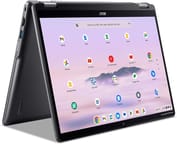
The Acer Chromebook Spin 314 (2024) is a 14-inch convertible built around a 16:10 WUXGA touchscreen and a choice of two Intel chips. The 360-degree hinge turns it into a laptop, a tent, a stand, or a tablet, which is why it lands with students and buyers watching the price. USI stylus support puts handwriting and sketching on the same panel used for typing notes and watching video. Chrome OS updates run through June 2033.
Strengths and Compromises
| Pros | Cons |
|---|---|
| Tall 16:10 aspect ratio display provides more vertical screen space | Display brightness limited to 250 nits struggles outdoors |
| Rigid plastic chassis that holds up to daily handling | Only one USB-C port limits charging flexibility |
| Smooth, responsive OceanGlass touchpad made from recycled materials | No microSD card slot for storage expansion |
| FHD webcam with privacy shutter on higher-spec models | Entry-level configuration has just 4GB RAM and eMMC storage |
| WiFi 6E and Bluetooth 5.2 for modern wireless connectivity | Not officially certified as Chromebook Plus despite meeting specs |
| Long software support through June 2033 | Heavy for a 14-inch convertible at 3.46 lbs |
Related Videos
Acer Chromebook Spin 314 (2024) Comparison Chart
4 configurations
| Configuration | Processor | RAM | Storage | Performance | List price | Amazon price | Compare |
|---|---|---|---|---|---|---|---|
| NX.KWHAA.002 | N200 | 4 GB | 64 GB eMMC | 3.0 | $429.99 | Loading... | Details
|
| NX.KWGAA.002 | Core i3-N305 | 8 GB | 128 GB SSD | 5.9 | $499.99 | Loading... | Details
|
| NX.KWGAA.003 | Core i3-N305 | 8 GB | 256 GB SSD | 5.9 | --- | Details
| |
| NX.JHNAA.003 | Core i3-N305 | 8 GB | 128 GB eMMC | 5.9 | $499.99 | Loading... | Details
|
Specs shared by every configuration
| Chromebook Plus | No |
|---|---|
| Screen Size | 14" |
| Screen Resolution | 1920x1200 |
| Screen Type | IPS |
| Touch Screen | Yes |
| Stylus / Pen | Supported |
| Dimensions width x length x thickness | 12.59 x 9.05 x 0.86 inches (319.79 x 229.87 x 21.84 mm) |
| Weight | 3.46 lbs (1.57 kg) |
| Backlit Keyboard | No |
| WiFi | Wi-Fi 6E (802.11ax) |
| Bluetooth | Bluetooth 5.2 |
| Ethernet | No |
| Cellular Modem | No |
| HDMI | Full-Size HDMI |
| USB Ports | 2 USB 3, 1 USB-C 1x USB-C 3.2 Gen 1 (DisplayPort, charging), 2x USB-A 3.2 Gen 1, 1x HDMI 1.4 |
| Thunderbolt Ports | No |
| Card Reader | No Card Reader |
| Battery | 53Wh, Li-ion |
| Battery Life | 10 hours |
| Fanless | No |
| Auto Update Expiration Date | June, 2033 |
Related Chromebooks
-
 Acer Chromebook Vero 514The Acer Chromebook Vero 514 blends sustainability with performance. Sporting a Full HD IPS…
 -
 ASUS Chromebook Vibe CX34 FlipThe ASUS Chromebook Vibe CX34 Flip is a cloud-gaming convertible Chromebook with a 12th Gen Intel…
 -
 Dell Latitude 3445 ChromebookThe Dell Latitude 3445 Chromebook is a 14-inch 16:10 business Chromebook sold with an AMD Ryzen 5…
 -
 Dell Latitude 5430 Chromebook 2-in-1The Dell Latitude 5430 Chromebook 2-in-1 is a 14-inch business convertible with 12th Gen Intel…
 -
 Acer Chromebook Spin 314The Acer Chromebook Spin 314 is a budget 14-inch convertible Chromebook with a 360-degree hinge, a…
 -
 ASUS Chromebook Plus CX34 (CX3402CVA)The ASUS Chromebook Plus CX34 (CX3402CVA) is a 14-inch Chromebook Plus for browser, Google…
One USB-C port, two chip tiers, and no card slot

The Acer Chromebook Spin 314 measures 12.59 x 9.05 x 0.86 inches and weighs 3.46 pounds, placing it on the heavier side for 14-inch convertibles. The chassis uses recycled plastics as part of Acer’s sustainability initiative, including an OceanGlass touchpad made from ocean-bound plastic. Despite the all-plastic construction, reviewers found the build quality solid and rigid, standing up well to everyday handling. Port selection includes two USB-A 3.2 Gen 1 ports, one USB-C 3.2 Gen 1 port that handles charging and DisplayPort output, an HDMI 1.4 port, a headphone jack, and a Kensington lock slot. There is no second USB-C port, and the microSD card slot that earlier generations carried is gone. Since the Spin 314 has no built-in Ethernet, users needing a wired connection can use a USB Ethernet adapter through one of the USB-A ports.
The base model ships with the Intel Processor N200, a 4-core chip that covers web browsing and document work. The Core i3-N305 configuration doubles that to 8 cores and pulls ahead on multitasking, handling Chrome tabs, Android apps, and light gaming without noticeable slowdowns. Both processor options share the same June 2033 Auto Update Expiration date. The higher-spec configurations pair the faster chip with 8GB of LPDDR5 RAM and either 128GB or 256GB of NVMe SSD storage, delivering noticeably snappier performance compared to the 4GB/64GB eMMC base model.
Wireless runs on WiFi 6E (802.11ax) and Bluetooth 5.2, which covers a home or campus network. The single USB-C port also takes the included 65W adapter, and that charger moves the battery from empty to 89% in about an hour according to reviewer testing. Battery life is rated at 10 hours, though video playback testing came in closer to 7 hours and 20 minutes. The upward-firing speakers with DTS audio produce decent volume for a Chromebook, though reviewers noted they perform better than the headphone jack output. The audio quality is adequate for video calls and casual listening, though anyone interested in music production on a Chromebook will want to connect external speakers or headphones for a better experience.
Reviewer Insights

Chrome Unboxed
The touchpad is “very smooth, and responsive to taps, gestures, and clicks,” according to Chrome Unboxed. The 16:10 aspect ratio display earned positive marks for productivity, though they noted the 250-nit brightness “is a bit disappointing” for outdoor use. Their testing showed the FHD webcam delivers quality suitable for video calls.
They called the missing microSD card slot a step backward from previous generations, stating “it’s a shame we no longer have the micro SD card slot in this generation.” Their battery testing showed 7 hours and 20 minutes of video playback, with fast charging reaching 89% in one hour. Chrome Unboxed found it a capable mid-range option with strong build quality and long software support.
Chrome Computing
The hardware rivals Chromebook Plus requirements even though Acer chose not to use that certification for this model line, Chrome Computing noted in a look at the 2024 model as an entry-level to mid-range convertible. The review praised the 256GB NVMe SSD option for responsiveness, calling out “whether you’ve got that processor or the n100 or the n200 you’re going to see Chrome OS updates all the way through to June 2033.”
Chrome Computing highlighted the OceanGlass touchpad as a sustainability win that doesn’t compromise on feel or responsiveness. They cautioned buyers about the base configuration with 4GB RAM and eMMC storage, noting these specs result in a noticeably slower experience compared to the upgraded models.
Tom’s Guide
According to Tom’s Guide, the Acer Chromebook Spin 314 serves as “a reliable 2-in-1 that’s perfect for students or anyone looking for a budget laptop.” They scored the device 3.5 out of 5 stars, praising its sturdy construction and comfortable keyboard while criticizing the dim display as the main weakness. Their testing unit featured the Intel N100 configuration, representing the lower-spec options available in some markets.
The review appreciated the wide variety of ports and 2-in-1 flexibility but noted mediocre performance compared to pricier alternatives. They summarized: “While its dim display is a disappointment, this is a solid convertible” for basic productivity needs.
Active cooling and hinge-braced ports inside the chassis
ChromebookParts.com ran a full teardown and liked the hardware choices. They pointed to genuine Gorilla Glass that shrugs off fingerprints, an enormous edge-to-edge touchpad, and a design where the hinges themselves wrap over and reinforce the side ports. Unusually for a budget Chromebook, the Spin 314 uses active cooling, which can help sustained performance but adds a thermal-paste step to any motherboard repair. Their one gripe was the display panel, whose back carries lots of tiny connectors that are fiddly to reseat.
Customer Reviews
Across 2 ratings on Amazon, the Acer Chromebook Spin 314 (2024) averages 3.2 stars, so the sample is too small to read much into the number. The two written reviews split sharply. A verified buyer named 2BGemmy gave it five stars and wrote, “I love everything about my Chromebook spin 314, it’s fast, clear and sharp display screen in any position, and the sound is really good. The touch screen is a keeper so easy to use.” That same reviewer flagged one practical drawback, noting the laptop is “a little heavy” and harder to grip than lighter machines they had owned, which matters if hand strength is a concern for you.
The one-star review is a fulfillment complaint rather than a verdict on the hardware. A verified buyer in the United Kingdom reported that the order arrived incomplete: “there was no usb type c,no ac adapter and no power cord,as specified in the offer.” That is a shipping or seller issue (missing accessories), not a fault with the Chromebook itself, but it is a real owner experience and pulls the average down. With only two reviews on file, treat both as anecdotes rather than a settled picture.
Read more owner reviews on Amazon.
Buy the i3-N305 build and accept the dim screen
The 360-degree hinge and Chrome OS updates through June 2033 are the reasons to buy. The rigid chassis and the tall 16:10 touchscreen hold up to a school year of note-taking and video calls, and the Core i3-N305 configurations with NVMe storage feel a step quicker than the 4GB eMMC base model. Pay the difference if the budget stretches.
The 250-nit panel is the limit, so anyone who works outdoors or beside a bright window should shop for a brighter display. Buyers who lean on external storage will miss the microSD card slot, and anyone who wants Chromebook Plus certification and its features should look at the Acer Chromebook Plus Spin 714 instead.
For those comparing options, see our Chromebook Comparison Chart to find the best match for your needs.
Frequently Asked Questions
What processor does the Acer Chromebook Spin 314 (2024) use?
Two. The base model uses the Intel Processor N200 with 4 cores and 4 threads, and higher configurations use the Intel Core i3-N305 with 8 cores and 8 threads for better multitasking. Both get Chrome OS updates through June 2033.
Can I upgrade the RAM or storage in the Chromebook Spin 314?
No. The memory and storage are soldered, and there is no microSD card slot to fall back on. Pick the configuration you want at purchase time; the 8GB RAM and NVMe SSD builds hold up best over the life of the machine.
What ports does the Acer Chromebook Spin 314 (2024) have?
One USB-C 3.2 Gen 1 port with DisplayPort output and charging support, two USB-A 3.2 Gen 1 ports, one HDMI 1.4 port, a 3.5mm headphone and microphone combo jack, and a Kensington lock slot. With a single USB-C port, you cannot charge and use a USB-C peripheral at the same time.
Is the Acer Chromebook Spin 314 a Chromebook Plus?
No. The CP314-2HN is not certified as a Chromebook Plus, even though the Core i3-N305 configurations with 8GB RAM meet the hardware requirements; Acer chose not to pursue the certification for this model line. For the Chromebook Plus features and optimizations, look at the Acer Chromebook Plus Spin 514 instead.
Does the Chromebook Spin 314 support a stylus?
Yes. Any USI (Universal Stylus Initiative) stylus works on the touchscreen for drawing and note-taking. The stylus is sold separately and is not in the box.
How long will the Chromebook Spin 314 receive updates?
The CP314-2H and CP314-2HN carry an Auto Update Expiration (AUE) date of June 2033. Google ships Chrome OS updates, security patches, and new features until that date on every processor configuration.
What’s included in the box with the Chromebook Spin 314?
The Chromebook itself, a 65W USB-C power adapter with power cord, and documentation. That 65W charger supports fast charging, taking the battery from 0% to roughly 89% in one hour. A stylus is not included and must be bought separately.