
Acer Chromebook Plus Spin 714
Updated on

The Acer Chromebook Plus Spin 714 is a 14-inch convertible built around the Intel Core Ultra 5 115U. Its 360-degree hinge moves the screen between laptop, tent, and tablet positions, and a garaged stylus stores and charges inside the chassis so it never needs its own battery. Acer rounded the rear corners on this generation, which makes the machine easier to hold once the screen folds flat. Thunderbolt 4, a 1440p webcam, and ChromeOS updates through June 2034 fill out a 2-in-1 aimed at professionals and students.
Pros and Cons
| Pros | Cons |
|---|---|
| Aluminum top and bottom panels with rounded rear corners | Keyboard deck feels like plastic under the aluminum shell |
| 1440p webcam with a physical privacy shutter | Both USB-C and Thunderbolt ports sit on the left side |
| Much larger Gorilla Glass trackpad than previous generations | No microSD card reader |
| Garaged USI stylus charges inside the chassis | Stylus cannot be pulled out once the screen is folded |
| ChromeOS updates through June 2034 | 8GB of soldered memory, no upgrade path |
| Thunderbolt 4 handles data, external displays, and 65W charging | No fingerprint reader on the US retail build |
Related Videos
Acer Chromebook Plus Spin 714 Comparison Chart
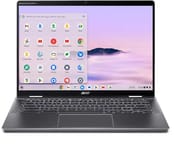 Acer Chromebook Plus Spin 714 | |
| Price | List Price: $699 Amazon Prices: Loading prices... Best Buy: Loading price... |
| Model number | CP714-1H-54UB |
| Performance Rating | 6.9 |
| Chromebook Plus | Yes |
| Processor | Octa-core 1.50 Ghz (max 4.20 Ghz) Intel Core Ultra 5 115U |
| RAM | 8 GB |
| Internal Storage | 256 GB NVMe SSD |
| Screen Size | 14" |
| Screen Resolution | 1920x1200 |
| Screen Type | IPS |
| Touch Screen | Yes |
| Stylus / Pen | Supported |
| Dimensions width x length x thickness | 12.35 x 8.84 x 0.71 inches (313.69 x 224.54 x 18.03 mm) |
| Weight | 3.21 lbs (1.46 kg) |
| Backlit Keyboard | Yes |
| Webcam | 1440p |
| WiFi | Wi-Fi 6E (802.11ax) |
| Bluetooth | Bluetooth 5.2 |
| Ethernet | No |
| Cellular Modem | No |
| HDMI | Full-Size HDMI |
| USB Ports | 1 USB 3, 2 USB-C 2x Thunderbolt 4 (USB-C with DisplayPort and 65W Power Delivery), 1x USB-A 3.2 Gen 1, HDMI 2.0 |
| Thunderbolt Ports | 2 |
| Card Reader | No Card Reader |
| Battery | Li-ion |
| Battery Life | 10 hours |
| Fanless | No |
| Auto Update Expiration Date | June, 2034 |
Related Chromebooks
-
 Acer Chromebook Spin 714The 2023 Acer Chromebook Plus Spin 714 (CP714-2WN) is a 14-inch convertible built on a 13th-gen…
 -
 Acer Chromebook Plus 514A 14-inch Chromebook Plus line sold in three board configurations: the AMD Ryzen 3 7320C CB514-3H,…
 -
 ASUS Chromebook Plus CX34 (CX3402CVA)The ASUS Chromebook Plus CX34 (CX3402CVA) is a 14-inch Chromebook Plus for browser, Google…
 -
 Lenovo IdeaPad Flex 5i Chromebook PlusThe Lenovo IdeaPad Flex 5i Chromebook Plus is a 14-inch convertible Chromebook Plus on Intel's Core…
 -
 HP Chromebook Plus x360 14cThe HP Chromebook Plus x360 14c is a Chromebook Plus convertible with a 12th Gen Intel Core…
 -
 Lenovo Chromebook Plus 2-in-1 14The Lenovo Chromebook Plus 2-in-1 14 is an aluminum 360-degree convertible with an Intel Core 3…
Aluminum panels, Thunderbolt 4, and a Core Ultra chip

The Spin 714 measures 12.35 x 8.84 x 0.71 inches and weighs 3.21 pounds, light enough for a daily commute and dense enough to feel solid. Aluminum forms the top and bottom panels, finished here in Steel Gray. Acer moved the speakers from above the keyboard to the sides, which freed room for a much larger Gorilla Glass trackpad that responds across its whole surface. The rounded rear corners take the sharp edge off tablet mode. Two Thunderbolt 4 USB-C ports and HDMI sit on the left edge, with a single USB-A 3.2 port on the right. There is no fingerprint reader on the US retail configuration (CP714-1H-54UB), so sign-in relies on a PIN, password, or a paired Android phone; Acer does list a fingerprint reader on some CP714-1HN configurations sold in other markets.
With 8 cores and 10 threads, the Intel Core Ultra 5 115U keeps up with heavy browser workloads with dozens of tabs open. Document editing, video conferencing, and light photo editing all sit well inside what the chip can do, and it has enough headroom for web-based music production through apps such as BandLab and Soundtrap. The integrated NPU powers Google’s Gemini features in ChromeOS for summarization and writing assistance. Gaming performance stays limited on ChromeOS, and demanding Android games such as Call of Duty Mobile struggled in MergeDroid testing. The PassMark score of approximately 12,771 places this processor in the premium Chromebook tier.
The wireless card supports WiFi 6E (802.11ax) and Bluetooth 5.2. The Thunderbolt 4 ports drive external displays, move data quickly, and accept 65W charging, though both living on one edge leaves less room to route cables. The HDMI 2.0 port connects a monitor without an adapter. Storage is a PCIe Gen 4 NVMe SSD, and the 256GB capacity pushes anyone with a large local file collection toward cloud storage.
Reviewer Insights

Chrome Unboxed’s Perspective
Chrome Unboxed praised the design refinements Acer made for 2024, highlighting that “it makes this whole device feel more approachable… those rounded corners… makes this more of an approachable tablet type device that feels so much more comfortable in the hand.” They tied the bigger trackpad to the speakers moving out to the sides of the keyboard.
The reviewer appreciated the keyboard quality, noting “no wiggle there. You’ve got backlighting obviously here that’s done the right way with nice dark keys.” The Quad HD webcam earned particular praise with the observation that “it looks really really good man that looks really really good. You get a privacy shutter at the top.” They concluded that “this is the type of iteration I love to see in high-end Chromebooks because if you’re going to ask somebody to pay 700 bucks for something you need to be thinking through those kind of things.”
MergeDroid’s Review
MergeDroid wanted more metal in the build, saying “I just wish the keyboard deck itself was aluminum too rather than what feels like plastic.” The shell around it fared better in his hands-on time, where “the full aluminium outer chassis has felt great every time I’ve picked it up.” The display earned praise for its 100% sRGB coverage and comfortable 16:10 aspect ratio for productivity work.
On the camera he said, “The Quad HD webcam at the top of the screen with its privacy slider has been a real step up.” He backed the purchase on update length, stating “with Chrome OS updates through to June 2034 I can fully get behind investing in a higher-end Chromebook like this.” His unit did fail to sleep correctly and crashed during the review period.
Comparison with Samsung Galaxy Chromebook Plus
In a head-to-head comparison video centered on the Samsung Galaxy Chromebook Plus, FishBee Productions sized that machine up against the Spin 714 at the same price point. On display the Samsung came out ahead, but the Acer held advantages in webcam quality, speaker placement, and Thunderbolt 4 support. Comparing the two panels, the reviewer observed that “Samsung definitely looks a little better [with its AMOLED display]… it’s a little brighter, has a little better viewing angles, makes the colors a little more vibrant.”
Touchscreen and fold-flat operation set the Acer apart from Samsung’s clamshell. Battery testing showed the Acer lasting approximately 8.5 hours against a shorter runtime from Samsung, where the AMOLED panel draws more power. The review noted “one advantage for Acer is it gets software updates for 10 years versus 8 years for Samsung.”
Accessibility options in the ChromeOS setup flow
As a visually impaired user, Ricky’s TechTalk walked through the out-of-box experience with spoken feedback and screen magnification available from the start. They noted “it’s essential to know that not everyone is going to use these settings, but it’s nice to have, especially for myself being visually impaired.”
The reviewer praised the backlit keyboard and overall portability at 1.37kg (approximately 3 lbs), calling it “lightweight and portable, so it’s only 1.37 kilos, meaning it’s easy enough to fit in any tech bag and won’t be too heavy.” One practical observation was that the large touchpad offers only “a 90% clickable area, so can’t quite click at the far top side of it.”
A convertible for video calls with updates into 2034
Laptop, tent, and tablet modes all come off the same hinge, so the Spin 714 fits people who switch postures during a workday. Thunderbolt 4 and the 1440p webcam suit professionals who spend hours on video calls and dock to external displays at a desk. ChromeOS updates through June 2034 give educational institutions and business fleets a long planning horizon on a single purchase.
Buyers who keep large libraries on local storage, or who want more than 8GB of RAM, should shop configurations with higher ceilings. Anyone who charges from whichever side is closer will find the left-only USB-C placement awkward at a desk, and the missing microSD reader leaves cloud storage as the overflow.
For those comparing options, see our Chromebook Comparison Chart.
Frequently Asked Questions
What processor does the Acer Chromebook Plus Spin 714 use?
The CP714-1H ships with the Intel Core Ultra 5 115U, which has 8 cores and 10 threads, a base clock of 1.5 GHz, and boost up to 4.2 GHz. An integrated NPU handles AI acceleration, and the chip scores approximately 12,771 on PassMark’s CPU benchmark, placing it in the premium Chromebook performance tier.
Can I upgrade the RAM in the Acer Chromebook Plus Spin 714?
No. The LPDDR5 memory is soldered and cannot be upgraded after purchase, and the model covered here carries 8GB. Pick a build with more memory at purchase time if you expect heavy multitasking.
What ports does the Acer Chromebook Plus Spin 714 have?
The left edge carries 2x Thunderbolt 4 USB-C ports with DisplayPort and 65W Power Delivery support, plus HDMI 2.0. The right edge has 1x USB-A 3.2 Gen 1 port. A 3.5mm combo audio jack rounds out the set, and there is no microSD card reader on this model.
When does the Acer Chromebook Plus Spin 714 stop receiving updates?
The CP714-1H has an Auto Update Expiration (AUE) date of June 2034, providing approximately 10 years of guaranteed ChromeOS updates including security patches and new features. That window covers long-term educational and enterprise deployments.
Does the Acer Chromebook Plus Spin 714 include a stylus?
Yes. A garaged USI stylus stores and charges inside the chassis and slides out from the rear corner. Pull it out before you rotate the screen, because reviewers mention it cannot be removed once the device is folded into tablet mode.
Is the Acer Chromebook Plus Spin 714 a Chromebook Plus device?
Yes. It carries Chromebook Plus certification, which requires a faster processor, at least 8GB of RAM, and 128GB or more of storage. Certified models also get Google Gemini integration, Magic Eraser in Google Photos, and enhanced video calling capabilities.
What is the webcam resolution on the Acer Chromebook Plus Spin 714?
The webcam runs at 1440p (QHD), roughly 3.7 megapixels, above the 720p and 1080p sensors laptops usually carry. It includes a physical privacy shutter and Acer’s TNR (Temporal Noise Reduction) processing, which cleans up the picture in lower light.