
Lenovo Chromebook Plus 2-in-1 14
Updated on

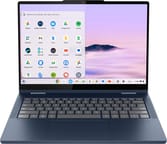
The Lenovo Chromebook Plus 2-in-1 14 is a 14-inch convertible Chromebook Plus with a 360-degree hinge, so it works as a laptop, tablet, tent, or stand. It runs the 8-core Intel Core 3 N355, which is enough for everyday productivity, streaming, and Android apps, and its main draw at this price is the aluminum chassis Lenovo carried over from the pricier Chromebook Plus 14. Lenovo also sells the same chassis as the plain Chromebook 2-in-1 (83LN001EUS) with an Intel N150, 4GB of RAM, and 128GB of storage; that build does not meet the Chromebook Plus spec. The 14-inch WUXGA touchscreen takes USI 2.0 stylus input, the webcam is 5MP, and ChromeOS updates run through June 2035.
Pros and cons
| Pros | Cons |
|---|---|
| Aluminum chassis with no flex in use | 300-nit display brightness (adequate indoors only) |
| 360-degree hinge for laptop, tablet, tent, and stand modes | No included stylus despite USI support |
| 5MP webcam with privacy shutter | UFS storage slower than NVMe SSD |
| WiFi 6E and Bluetooth 5.3 connectivity | 4GB or 8GB of LPDDR5, soldered and not upgradeable |
| MIL-STD-810H durability certification | IPS panel instead of OLED |
| ChromeOS updates through June 2035 | Speakers light on low end |
Related Videos
Lenovo Chromebook Plus 2-in-1 14 Comparison Chart
4 configurations
| Configuration | Processor | RAM | Storage | Performance | List price | Amazon price | Compare |
|---|---|---|---|---|---|---|---|
| 83LN0004US | Core 3 N355 | 8 GB | 128 GB UFS | 7.8 | $579 | Details
| |
| 83LN0005US | Core 3 N355 | 8 GB | 128 GB UFS | 7.8 | $640 | Details
| |
| Configuration 3 | Core 3 N355 | 8 GB | 256 GB UFS | 7.8 | --- | Loading... | Details
|
| 83LN001EUS | N150 | 4 GB | 128 GB UFS | 1.7 | --- | Loading... | Details
|
Specs shared by every configuration
| Screen Size | 14" |
|---|---|
| Screen Resolution | 1920x1200 |
| Screen Type | IPS |
| Touch Screen | Yes |
| Stylus / Pen | Supported |
| Dimensions width x length x thickness | 12.32 x 8.94 x 0.69 inches (312.93 x 227.08 x 17.53 mm) |
| Weight | 3.31 lbs (1.5 kg) |
| Backlit Keyboard | Yes |
| Webcam | 5MP |
| WiFi | Wi-Fi 6E (802.11ax) |
| Bluetooth | Bluetooth 5.3 |
| Ethernet | No |
| Cellular Modem | No |
| HDMI | Full-Size HDMI |
| USB Ports | 2 USB 3, 2 USB-C 2x USB-C with DisplayPort 1.4 and Power Delivery 3.0, 2x USB-A 3.2 Gen 1 |
| Thunderbolt Ports | No |
| Card Reader | microSD Card Reader |
| Battery | 50Wh, Li-ion |
| Fanless | No |
| Auto Update Expiration Date | June, 2035 |
Related Chromebooks
-
 Lenovo IdeaPad Flex 5i Chromebook PlusThe Lenovo IdeaPad Flex 5i Chromebook Plus is a 14-inch convertible Chromebook Plus on Intel's Core…
 -
 Acer Chromebook Plus 514A 14-inch Chromebook Plus line sold in three board configurations: the AMD Ryzen 3 7320C CB514-3H,…
 -
 HP Chromebook Plus x360 14cThe HP Chromebook Plus x360 14c is a Chromebook Plus convertible with a 12th Gen Intel Core…
 -
 Acer Chromebook Spin 714The 2023 Acer Chromebook Plus Spin 714 (CP714-2WN) is a 14-inch convertible built on a 13th-gen…
 -
 ASUS Chromebook Plus CX34 (CX3402CVA)The ASUS Chromebook Plus CX34 (CX3402CVA) is a 14-inch Chromebook Plus for browser, Google…
 -
 ASUS Chromebook Plus CM34 Flip (CM3401)The ASUS Chromebook Plus CM34 Flip is a 14-inch Chromebook Plus convertible with an AMD Ryzen 3…
An aluminum, MIL-STD-810H chassis around an 8-core N355

The Lenovo Chromebook Plus 2-in-1 14 measures about 12.3 x 8.9 x 0.7 inches and weighs about 3.3 pounds, which is reasonably portable for a 14-inch convertible. The aluminum construction gives a rigid chassis that shows no flex during use. Lenovo pairs that with MIL-STD-810H military-grade durability certification and a spill-resistant backlit keyboard, a combination that holds up in a backpack. The screen folds completely flat or tents for media viewing, and the 360-degree hinge stays stable in every position.
The Intel Core 3 N355 has 8 cores and 8 threads with boost clocks reaching 3.9GHz. This 2025-generation chip scores approximately 10,476 on PassMark, enough for multitasking across browser tabs, running Android apps, and light Linux development work. The Plus builds’ 8GB of LPDDR5 RAM covers typical workloads, though power users who frequently run Linux containers may want to consider higher-spec alternatives. Storage is 128GB or 256GB of UFS 2.2, depending on the version, quick enough for everyday use even if it does not match the NVMe SSD speeds in premium Chromebooks.
Wireless is WiFi 6E (802.11ax) for tri-band networking and Bluetooth 5.3 for peripherals. The port selection runs to 2 USB-C ports with DisplayPort 1.4 and Power Delivery 3.0 support, 2 USB-A 3.2 Gen 1 ports, a full-size HDMI port, and a microSD card reader. The dual USB-C ports handle charging, data transfer, and display output, so an external monitor works without a dock. A 3.5mm audio combo jack rounds out the selection.
Reviewer Insights

Chrome Unboxed: the build quality matches the pricier Plus 14
Robby Payne of Chrome Unboxed wrote that “the build quality is 100% there and if a less-expensive convertible version of the Lenovo Chromebook Plus 14 has been on your radar, worries about a flimsy build can be put on ice.” It shares the Plus 14’s scalloped bottom and boxy sides.
The review highlighted that despite the lower price point, Lenovo did not cut corners on materials or fit and finish. While the display is an IPS panel rather than OLED, the 300-nit brightness remains respectable for indoor use. Chrome Unboxed anticipates the convertible functionality and Intel Core 3 processor combination will deliver solid real-world performance based on the premium hardware foundation.
In their video hands-on, Chrome Unboxed singled out the port selection as the convertible’s biggest edge over the ARM clamshell, pairing a full-size HDMI and two USB-A ports with the dual USB-C. The trade-offs they flagged were that it is heavier than the clamshell and needs fans for its Intel Core 3 N355 (which still felt snappy in use), and the speakers are the weak spot, clean enough but light on low end.
Chrome Unboxed measured about 7 hours of battery and tied the verdict to price
Chrome Unboxed reviewed the convertible after a stretch of daily use and said “the build quality of this rivals literally anything in the entire Chromebook market” and called the port selection the one area where it “absolutely dunks on the clamshell version.” The speakers disappointed: “The audio, unfortunately, is the first major letdown.” Battery life fell short of the ARM competition, with the reviewer reporting “I was able to squeeze about 7 hours of real-world use out of it, but nowhere near the multi-day battery life we see on modern ARM Chromebooks like the Lenovo Chromebook Plus 14.” At the $579 MSRP the convertible “finds itself in a really tough spot” next to Lenovo’s own clamshell Plus 14 and the Acer Chromebook Plus Spin 514, while on a discount he said “I can easily recommend this device all day long.”
NotebookCheck: the family scales up to a Core 7 with 16GB
NotebookCheck’s announcement coverage detailed the broader Chromebook Plus 2-in-1 family, which includes configurations up to Intel Core 7 with 16GB RAM for those needing more power. The report emphasized the MIL-STD-810H certification and spill-resistant keyboard as practical durability features. NotebookCheck cited a 50Wh battery and a claimed 11 hours of battery life, in line with Lenovo’s own spec sheet of about 11 hours of 1080p video playback, and the Lenovo USI Pen 2 compatibility supports note-taking and creative work.
Customer Reviews
Across 20 ratings on Amazon, the Lenovo Chromebook Plus 2-in-1 14 averages 4.9 stars, with 87 percent leaving five stars and the rest four. That is still a small sample, so treat it as early impressions. Maya, a verified buyer, wrote that “the touch screen and compact style of this chrome makes up for any shortcoming.” Fazi, another verified buyer, titled a five-star review “a bit expensive but worth it!”
Roberto Matthews, a verified buyer, gave four stars and wrote “Didn’t realize it had chrome OS trying to get the hang of it,” so check that ChromeOS fits how you work before you order. Read more owner reviews on Amazon.
The build and the June 2035 AUE carry it past a dim screen
Aluminum, MIL-STD-810H testing, a backlit keyboard, and a full-size HDMI port are a lot of hardware for the price, and the AUE date of June 2035 means a machine bought now keeps getting ChromeOS updates for close to a decade. That makes it a sensible pick for students and educators who need one device for typing, touch, and stylus work.
The 300-nit IPS panel is fine indoors but too dim for bright rooms or outdoor use, and the speakers are light on low end (per Chrome Unboxed). Anyone who wants a brighter or OLED screen, or more performance, should look at a higher-tier Chromebook Plus. To compare this one with other models, use the Chromebook Comparison Chart.
Frequently Asked Questions
What processor does the Lenovo Chromebook Plus 2-in-1 14 use?
The Intel Core 3 N355 runs 8 cores and 8 threads, with a base clock of 1.7GHz and boost up to 3.9GHz. This 2025-generation processor scores approximately 10,476 on PassMark’s CPU benchmark, which covers everyday Chromebook work comfortably.
Can I upgrade the RAM in the Lenovo Chromebook Plus 2-in-1 14?
No. The LPDDR5 memory is soldered and cannot be upgraded after purchase. The Plus builds ship with 8GB, which is sufficient for browser tabs and Android apps; the N150 Chromebook 2-in-1 (83LN001EUS) has 4GB.
What ports does the Lenovo Chromebook Plus 2-in-1 14 have?
The 2 USB-C ports carry DisplayPort 1.4 and Power Delivery 3.0 support. Alongside them sit 2 USB-A 3.2 Gen 1 ports, a full-size HDMI port for external displays, a microSD card reader for storage expansion, and a 3.5mm audio combo jack for headphones or headsets.
Does the Lenovo Chromebook Plus 2-in-1 14 support stylus input?
Yes, USI 2.0 stylus input works for handwriting, note-taking, and drawing. The stylus is sold separately and not included in the box. The Lenovo USI Pen 2 is compatible, as are other USI 2.0 certified styluses.
How long will the Lenovo Chromebook Plus 2-in-1 14 receive updates?
Google has set the Auto Update Expiration date for June 2035, so ChromeOS updates, security patches, and new features keep arriving for approximately 10 years from release.
Is the Lenovo Chromebook Plus 2-in-1 14 a Chromebook Plus certified device?
Yes. Google’s Chromebook Plus certification sets a minimum processor tier, which the Intel Core 3 N355 meets, plus at least 8GB RAM, 128GB storage, a 1080p webcam, and access to AI-powered features, and the Core 3 N355 builds meet all of those. The N150 Chromebook 2-in-1 build (83LN001EUS) with 4GB is not Chromebook Plus certified.
What webcam does the Lenovo Chromebook Plus 2-in-1 14 have?
The webcam is 5MP with a physical privacy shutter, above the standard 1080p webcam resolution. That higher resolution delivers sharper video calls and supports the AI-enhanced video features that come with Chromebook Plus certification.
Does the Chromebook Plus 2-in-1 14 support Linux apps?
Yes, ChromeOS’s built-in Linux container runs a Debian-based development environment. You can install and run Linux applications there, such as VS Code or GIMP, that are not available through the Chrome Web Store or Google Play.