
Acer Chromebook Spin 714
Updated on

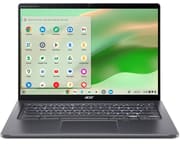
The 2023 Acer Chromebook Plus Spin 714 (model line CP714-2WN) is a 14-inch convertible aimed at people who want a Chromebook to handle real work, not just a browser. It carries the same aluminum chassis as the 2022 Spin 714, moves the internals to a 13th-gen Intel Core processor, and ships as a Chromebook Plus, so it clears Google’s higher hardware bar for features like local AI tools and on-device photo editing. Pricing spans a wide range across configurations, from a roughly $699 base model to a higher-end build near $999 that adds a sharper display and the garaged stylus.
Pros and Cons
| Pros | Cons |
|---|---|
| 16:10 14-inch touchscreen with extra vertical room | Storage is soldered and not upgradeable |
| 13th-gen Intel Core i5 (Core i7 on the top config) | No microSD card reader |
| Two Thunderbolt 4 ports plus full-size HDMI and USB-A | No ethernet port |
| Fast NVMe SSD instead of the cheaper eMMC many Chromebooks use | Garaged stylus dropped on the $699 base model |
| Quad HD (1440p) webcam with a privacy shutter | Base panel tops out near 340 nits |
| Chrome OS updates through June 2032 |
Related Videos
Acer Chromebook Spin 714 Comparison Chart
 Acer Chromebook Spin 714 | Acer Chromebook Spin 714 | Acer Chromebook Spin 714 | |
| Price | List Price: $1299.99 Amazon Prices: Loading prices... | List Price: $999.99 Amazon Prices: | List Price: $699.99 Amazon Prices: |
| Model number | CP714-2WN-57KJ / NX.KLBAA.003 | CP714-2WN-74R0 / NX.KQ5AA.001 | CP714-2W-56B2 / NX.KLAAA.001 |
| Performance Rating | 9.9 | 9.7 | 9.0 |
| Chromebook Plus | Yes | Yes | Yes |
| Processor | Deca-core 3.40 Ghz (max 4.60 Ghz) Intel Core i5-1335U | Deca-core 3.70 Ghz (max 5.00 Ghz) Intel Core i7-1355U | Deca-core 3.40 Ghz (max 4.60 Ghz) Intel Core i5-1335U |
| RAM | 16 GB | 8 GB | 8 GB |
| Internal Storage | 256 GB NVMe SSD | 256 GB NVMe SSD | 256 GB NVMe SSD |
| Screen Size | 14" | 14" | 14" |
| Screen Resolution | 1920x1200 | 2560x1600 | 1920x1200 |
| Screen Type | IPS | IPS | IPS |
| Touch Screen | Yes | Yes | Yes |
| Stylus / Pen | Supported | Supported | Supported |
| Dimensions width x length x thickness | 12.3 x 8.8 x 0.71 inches (312.42 x 223.52 x 18.03 mm) | 12.3 x 8.8 x 0.71 inches (312.42 x 223.52 x 18.03 mm) | 12.3 x 8.8 x 0.71 inches (312.42 x 223.52 x 18.03 mm) |
| Weight | 3.02 lbs (1.37 kg) | 3.02 lbs (1.37 kg) | 3.02 lbs (1.37 kg) |
| Backlit Keyboard | Yes | Yes | Yes |
| Webcam | 2k 2560x1440 | 2k 2560x1440 | 2k 2560x1440 |
| WiFi | Wi-Fi 6E (802.11ax) | Wi-Fi 6E (802.11ax) | Wi-Fi 6E (802.11ax) |
| Bluetooth | Bluetooth 5.2 | Bluetooth 5.2 | Bluetooth 5.2 |
| Ethernet | No | No | No |
| Cellular Modem | No | No | No |
| HDMI | Full-Size HDMI | Full-Size HDMI | Full-Size HDMI |
| USB Ports | 1 USB 3 | 1 USB 3 | 1 USB 3 |
| Thunderbolt Ports | 2 | 2 | 2 |
| Card Reader | No Card Reader | No Card Reader | No Card Reader |
| Battery | 3 cell, Li-ion | 3 cell, Li-ion | 3 cell, Li-ion |
| Battery Life | 10.0 hours | 10.0 hours | 10.0 hours |
| Fanless | No | No | No |
| Auto Update Expiration Date | June, 2032 | June, 2032 | June, 2032 |
Related Chromebooks
-
 Acer Chromebook Plus 514A 14-inch Chromebook Plus line sold in three board configurations: the AMD Ryzen 3 7320C CB514-3H,…
 -
 Acer Chromebook Plus Spin 714A premium 2-in-1 Chromebook Plus with Intel Core Ultra processor, 14-inch WUXGA touchscreen,…
 -
 Lenovo Chromebook Plus 2-in-1 14The Lenovo Chromebook Plus 2-in-1 14 combines premium aluminum build quality with versatile…
 -
 Lenovo IdeaPad Flex 5i Chromebook PlusThe Lenovo IdeaPad Flex 5i Chromebook Plus is a 14-inch convertible Chromebook Plus on Intel's Core…
 -
 HP Chromebook Plus x360 14cThe HP Chromebook Plus x360 14c combines a 12th-gen Intel Core i3-1215U processor with a 16:10…
 -
 ASUS Chromebook Plus CX34 (CX3402)The ASUS Chromebook Plus CX34 balance power and affordability, featuring an Intel Core i3, 8GB RAM,…
Design and Display
In Chrome Unboxed’s review of the 2023 model, the reviewer notes that Acer did not change the chassis from the 2022 Spin 714: “they didn’t change the chassis, like it literally is the exact same size, same weight and everything from the 714 last year.” The shift is cosmetic, from the prior navy to a gray finish with faint gold accents on the hinge and logo, in a metal-topped body the reviewer describes as feeling firm with “no bending or creaking.” Acer rates the chassis to the MIL-STD-810H military durability standard, and the display and trackpad both use antimicrobial Gorilla Glass.
The panel is the part worth understanding before you buy, because it differs by configuration. The base model uses a 14-inch 1920x1200 (16:10) touchscreen that Chrome Unboxed measured at “around 340 350 nits,” bright enough for a coffee shop but not a standout. The step-up roughly-$999 configuration swaps in a higher-resolution panel: in Chrome Unboxed’s separate look at that build, the reviewer points out that “the screen gets upgraded to 425 nit Quad HD display,” which is the 2560x1600 option reflected in this page’s higher-tier variant. Either way the 16:10 ratio gives more vertical room for documents than a 16:9 panel, and above the screen sits a Quad HD (1440p) webcam with adaptive low-light processing and a physical privacy shutter.
Performance and Storage
The 2023 base and mid configurations run a 13th-gen Intel Core i5-1335U, and the top configuration steps up to a Core i7-1355U, paired with 8GB or 16GB of RAM and a 256GB NVMe SSD. Chrome Unboxed frames the generational jump as modest, noting the 13th-gen part is mostly higher clock speeds over the 12th-gen chip it replaces, but still lands the device near the top of the field: “this is one of the fastest Chromebooks you can buy right now.” The use of NVMe SSD storage rather than slower eMMC is a genuine differentiator at this price, and it shows up in quick app launches and file handling. None of the RAM or storage is user-upgradeable, and there is no microSD slot, so the configuration you buy is the one you keep.
Ports, Stylus, and Battery
Connectivity is strong for the class: both USB-C ports are Thunderbolt 4, joined by a full-size HDMI output, a USB-A port, a combo headphone jack, and Wi-Fi 6E with Bluetooth 5.2. There is no ethernet jack, so a wired connection needs a USB ethernet adapter. Acer rates battery life at up to 10 hours; Chrome Unboxed’s reviewer called that “realistic” if you keep screen brightness in check.
The stylus situation changed in 2023 and is easy to get wrong. The 2022 Spin 714 included a garaged, quick-charging USI pen. On the 2023 line, Chrome Unboxed reports the $699 base model dropped the built-in pen to hit that lower price (“they didn’t include it this time around”), though it remains USI 2.0 compatible so any compatible pen works. The higher-end roughly-$999 configuration brings the garaged stylus back, which Chrome Unboxed confirmed on camera: “the stylus is back.” If a stowed pen matters to you, buy the upper configuration rather than the base.
What Reviewers Said
The cleanest coverage of the actual 2023 model comes from Chrome Unboxed, a trusted Chromebook channel. Their verdict is a recommendation grounded in feel and value rather than benchmark bragging: “It just does all the stuff you want a Chromebook to do really well, it feels good while doing it, and kind of gives you that confidence of a great form factor, great build quality all put together.” They were clear that the device shines most on sale, where it has frequently dipped into the $500 range.
Worth flagging for accuracy: the widely cited written reviews of the “Spin 714” reviewed the 2022 predecessor (CP714-1WN, 12th-gen Core i5-1235U), not this 13th-gen model. Because Acer reused the chassis, keyboard, ports, and base panel unchanged, those build and ergonomics impressions still describe this machine; the processor generation and the 2023 stylus and pricing changes do not. At Tom’s Guide, Eric Vander Linden reviewed the $729 i5-1235U unit and concluded, “You’d be hard-pressed to find a Chromebook with better performance for the price.” At Android Police, Cale Hunt reviewed model CP714-1WN-53M9 and called it “one of the best Chromebooks on the market today thanks to its snappy performance,” praising the rigid convertible build and the 14-inch touch display. Treat both as evidence about the shared hardware, with the 2023 spec bumps layered on top.
Who Should Consider It
The Spin 714 fits someone who wants a premium-feeling convertible that holds up as a daily driver: a strong keyboard, a flexible port set led by Thunderbolt 4, fast SSD storage, and Chrome OS support running to June 2032. It is a reasonable pick for college students and professionals who live in the browser and Android apps and occasionally want tablet or tent mode.
Skip it if you need expandable storage or a microSD slot, an ethernet port, or a fanless design, since the Spin 714 has an active fan. And mind the configuration: the $699 base trades away the garaged stylus and the brighter QHD panel that the upper build keeps. Buyers weighing timing can also read our look at Panther Lake Chromebooks to see what Intel’s next generation brings. For a side-by-side with other models, use the Chromebook Comparison Chart.
Frequently Asked Questions
Does the 2023 Acer Chromebook Spin 714 come with a stylus?
It depends on the configuration. Chrome Unboxed reported that the roughly-$699 base model dropped the garaged USI pen to hit a lower price, though it stays USI 2.0 compatible so any compatible pen works. The higher-end roughly-$999 configuration brings the built-in garaged stylus back. The 2022 Spin 714 included the garaged pen across the board.
What display does the Acer Chromebook Spin 714 have?
The base model uses a 14-inch 1920x1200 (16:10) touchscreen rated near 340 nits. The higher-end configuration steps up to a 2560x1600 Quad HD panel that Chrome Unboxed described as a “425 nit” display. Both are 16:10, which gives more vertical room than a 16:9 screen.
Can I upgrade the RAM or storage on the Acer Chromebook Spin 714?
No. The RAM (8GB or 16GB) and the 256GB NVMe SSD are soldered and cannot be upgraded, and there is no microSD slot, so choose your configuration carefully at purchase. It uses a faster NVMe SSD rather than the slower eMMC found in cheaper Chromebooks.
What ports does the Acer Chromebook Spin 714 have?
Both USB-C ports are Thunderbolt 4, alongside a full-size HDMI output, a USB-A port, and a combo headphone jack. There is no ethernet jack and no microSD reader. For wired networking, use a USB ethernet adapter.
How long does the battery last on the Acer Chromebook Spin 714?
Acer rates it at up to 10 hours. Chrome Unboxed’s reviewer called that figure “realistic” if you keep screen brightness in check. Real-world endurance depends on brightness, Wi-Fi load, and workload.
When does the Acer Chromebook Spin 714 stop getting updates?
Its Chrome OS Auto Update Expiration date is June 2032, after which Google stops shipping OS and security updates. As a Chromebook Plus device it also supports Android and Linux apps.