
ASUS Chromebook Plus CM34 Flip (CM3401)
Published on

The ASUS Chromebook Plus CM34 Flip (CM3401) is a 14-inch convertible built for durability rather than thinness. An AMD Ryzen 3 7320C drives it, and the Chromebook Plus feature set includes a garaged USI stylus, a fingerprint reader, and a 1080p webcam with a physical privacy shutter. The chassis comes from the more expensive ASUS Vibe CX34 Flip, which is why the build feels enterprise-grade. ChromeOS updates run through June 2033, and the single configuration pairs 8GB of memory with a replaceable 128GB SSD.
Strengths and drawbacks of a four-pound convertible
| Pros | Cons |
|---|---|
| Tank-like build quality with minimal chassis flex | Heavy at 4.08 lbs for a 14-inch device |
| Garaged USI stylus included in the box | Display brightness limited to 300 nits |
| Long battery life (10-15 hours real-world) | Thick chassis at 0.81 inches |
| Full HDMI 2.1 port eliminates need for dongles | Only one USB-A port |
| 1080p webcam with physical privacy shutter | Glossy screen produces glare outdoors |
| Fingerprint reader and Harman Kardon speakers | Fan noise under heavy processor loads |
Related Videos
ASUS Chromebook Plus CM34 Flip (CM3401) Comparison Chart
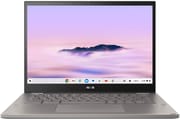 ASUS Chromebook Plus CM34 Flip (CM3401) | |
| Price | List Price: $499 Amazon Prices: |
| Model number | CM3401FFA-YZ388T-S |
| Performance Rating | 5.7 |
| Chromebook Plus | Yes |
| Processor | Quad-core 2.40 Ghz (max 4.10 Ghz) AMD Ryzen 3 7320C |
| RAM | 8 GB |
| Internal Storage | 128 GB NVMe SSD (upgradable) |
| Screen Size | 14" |
| Screen Resolution | 1920x1200 |
| Screen Type | IPS |
| Touch Screen | Yes |
| Stylus / Pen | Supported |
| Dimensions width x length x thickness | 12.58 x 9.26 x 0.81 inches (319.53 x 235.2 x 20.57 mm) |
| Weight | 4.08 lbs (1.85 kg) |
| Backlit Keyboard | Yes |
| Webcam | 1080p |
| WiFi | Wi-Fi 6 (802.11ax) |
| Bluetooth | Bluetooth 5.4 |
| Ethernet | No |
| Cellular Modem | No |
| HDMI | Full-Size HDMI |
| USB Ports | 1 USB 3, 2 USB-C 2x USB-C 3.2 Gen 2 with DisplayPort and Power Delivery, 1x USB-A 3.2 Gen 2, 1x HDMI 2.1 |
| Thunderbolt Ports | No |
| Card Reader | microSD Card Reader |
| Battery | 63Wh, Li-ion |
| Battery Life | 13 hours |
| Fanless | No |
| Auto Update Expiration Date | June, 2033 |
Related Chromebooks
-
 ASUS Chromebook Plus CX34 (CX3402CVA)The ASUS Chromebook Plus CX34 (CX3402CVA) is a 14-inch Chromebook Plus for browser, Google…
 -
 ASUS Chromebook Plus CX34 (CX3402)The ASUS Chromebook Plus CX34 balance power and affordability, featuring an Intel Core i3, 8GB RAM,…
 -
 Acer Chromebook Plus 514A 14-inch Chromebook Plus line sold in three board configurations: the AMD Ryzen 3 7320C CB514-3H,…
 -
 Acer Chromebook Spin 714The 2023 Acer Chromebook Plus Spin 714 (CP714-2WN) is a 14-inch convertible built on a 13th-gen…
 -
 HP Chromebook Plus x360 14cThe HP Chromebook Plus x360 14c is a Chromebook Plus convertible with a 12th Gen Intel Core…
 -
 Lenovo Chromebook Plus 2-in-1 14The Lenovo Chromebook Plus 2-in-1 14 is an aluminum 360-degree convertible with an Intel Core 3…
Enterprise-grade chassis with a swappable M.2 SSD

The CM34 Flip measures 12.58 x 9.26 x 0.81 inches and weighs 4.08 pounds. The keyboard deck is rigid and the display panel barely flexes when the hinge is worked. The left side houses one USB-C port, microSD card reader, and headphone jack, while the right side provides the second USB-C port, USB-A 3.2 Gen 2 port, and full-size HDMI 2.1 output. Active cooling keeps the system running well during demanding tasks, though the fan can become audible under sustained processor loads.
The AMD Ryzen 3 7320C brings 4 cores and 8 threads with boost speeds up to 4.1GHz. That Zen 2-based Mendocino chip pairs with DDR5 memory, scores approximately 8614 on PassMark, and carries Chrome tabs, Android apps, and Linux containers at that level. The internal M.2 SSD is user-replaceable, so a drive that fills up or fails does not end the machine’s useful life.
Wireless runs on WiFi 6 (802.11ax) with Bluetooth 5.4 for peripherals and accessories. The HDMI 2.1 port drives a monitor or a projector with no adapter in the bag. Both USB-C 3.2 Gen 2 ports support DisplayPort output and Power Delivery, and having one on each side means the charger can go wherever the outlet is. The microSD card slot adds storage alongside the 128GB SSD.
Reviewer Insights

Chrome Unboxed’s Perspective
Chrome Unboxed rated the value for the money highly, especially at its frequent sale price. They praised the build quality, noting that “it comes off a bit like a tank weighing in at just over four pounds making it heavier than something as big as the 16 inch Acer Chromebook 516 GE.”
The chip beat their expectations: “This Ryzen 3 has really impressed me and even with benchmarks it does far better than I was expecting.” Their battery test ran 10-11 hours with the screen at near-maximum brightness. They called out the speakers: “ASUS has been putting nice speakers in their Chromebooks for years and the CM34 Flip is no exception to that rule. The sound is loud, it’s clear, and it’s really full.” Their overall assessment strongly recommended the device, declaring “at a reduced price of three hundred dollars multiple times since its launch this device is wildly great and it really should be on your short list.”
Zafran’s One-Year Review
Zafran used the machine daily for a full year before reviewing it. His testing measured battery life of “15.8 hours with the display at 50% brightness during my time testing this running a standard benchmark test,” with real-world use yielding 13-15 hours. He praised the enterprise-grade construction: “The build I would say feels like something out of an Enterprise laptop and that’s a good thing like there’s good screen flag resistance and a strong keyboard deck.”
The weight remained his consistent concern throughout the year: “WTF this thing weighs like a ton of bricks. I mean it’s fantastic for like self-defense.” He also noted the 300-nit display brightness limitation, explaining “I would have liked to see a brighter display… 300 nits on this it’s good enough when sitting by a window on a sunny day I guess but definitely not for outdoors.”
DGTL David’s Perspective
DGTL David reviewed the machine after several months of regular use, praising ChromeOS efficiency and the device’s reliability. He pointed to the Chromebook Plus certification and the long software support life: “updates until 2033.” The convertible functionality worked well for his workflow, particularly the flip design enabling tablet and stand modes.
He noted the chunky form factor and the touchpad material that “could be smoother.” The downward-firing speakers can be muffled in certain positions, though sound quality remained acceptable for the price. He called it “a practical choice for users seeking a dependable secondary device or a student laptop that prioritizes utility over aesthetics.”
Worth buying on sale if the weight does not bother you
The 4.08-pound weight makes extended tablet-mode use fatiguing, so anyone who reads in tablet mode for hours should look at a lighter model. The 300-nit panel is the second limit, and working outdoors needs a brighter display than this one. Buyers who want more processing headroom can look for the Ryzen 5 7520C variant with 16GB RAM if it is available.
For a machine that lives on a desk and gets carried between rooms, those limits matter less. Students and commuters get a stylus that cannot be left behind and ChromeOS support running to June 2033.
For those comparing options, see our Chromebook Comparison Chart to find the best match for your needs.
Frequently Asked Questions
What processor does the ASUS Chromebook Plus CM34 Flip use?
The AMD Ryzen 3 7320C, a Zen 2-based chip from the Mendocino family with 4 cores and 8 threads. Base clock is 2.4GHz, boost reaches 4.1GHz, and it scores approximately 8614 on PassMark, which is enough for heavy Chrome tabs, Android apps, and Linux containers.
Can I upgrade the RAM or storage in the CM34 Flip?
The RAM is soldered, so the 8GB configuration is permanent. The internal M.2 SSD is user-replaceable, an increasingly rare feature in modern Chromebooks, so a larger NVMe drive goes in whenever 128GB runs short.
What ports does the CM34 Flip have?
Two USB-C 3.2 Gen 2 ports with DisplayPort and Power Delivery support (one on each side), one USB-A 3.2 Gen 2 port, a full-size HDMI 2.1 port, a microSD card slot, and a 3.5mm combo audio jack. Either USB-C port can charge the machine.
Does the CM34 Flip include a stylus?
A USI 1.0 stylus ships in the box and garages inside the chassis rather than clipping to the lid or riding loose in a bag. It charges while docked, so it is ready when the screen folds around for note-taking.
How long will the ASUS Chromebook Plus CM34 Flip receive ChromeOS updates?
The Auto Update Expiration (AUE) date is June 2033. ChromeOS updates and security patches keep arriving until then.
How heavy is the CM34 Flip?
It weighs 4.08 pounds (1.85 kg). Chrome Unboxed said it “comes off a bit like a tank.” Holding that weight in tablet mode gets tiring after a while, and the same chassis is what keeps the keyboard deck from flexing.
What is the battery life on the CM34 Flip?
The 63Wh battery delivers 10-15 hours depending on how the machine is used. Chrome Unboxed measured 10-11 hours with the screen near maximum brightness, and Zafran got 13-15 hours in regular use and over 15 hours in a battery benchmark. That covers a working day away from a charger.