
Samsung Galaxy Chromebook Plus 15.6"
Updated on

The Samsung Galaxy Chromebook Plus 15.6” pairs a big 15.6-inch screen with a thin and light chassis: it weighs 2.58 pounds and measures 11.8mm thick, which makes it the thinnest and lightest 15.6-inch Chromebook on the market. It runs the Intel Core 3 100U with 8GB of LPDDR5X RAM and 256GB of UFS storage, enough for everyday productivity, media, and light gaming. The headline feature is the AMOLED display, with vibrant colors and deep blacks that punch above the price. It is a strong fit for a student who wants a large screen without the backpack weight, or a professional who values screen space and portability together.
Pros and Cons of the Samsung Galaxy Chromebook Plus 15.6”
| Pros | Cons |
|---|---|
| Thin (11.8mm) and light (2.58 lbs) for a 15.6-inch laptop | No touchscreen despite premium positioning |
| AMOLED display with 400 nits brightness and 100% DCI-P3 coverage | Speakers are downward-firing and disappointingly quiet |
| Excellent port selection including full-size HDMI | Battery life drops to 5-6 hours at maximum display brightness |
| Large glass trackpad with smooth, precise tracking | Webcam quality is mediocre for video calling despite 1080p resolution |
| Includes 12-month Gemini Advanced subscription ($240 value) | Numeric keypad missing standard right-side function keys |
| Solid build quality with no chassis flex | No biometric authentication (fingerprint or face unlock) |
Related Videos
Samsung Galaxy Chromebook Plus 15.6" Comparison Chart
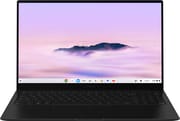 Samsung Galaxy Chromebook Plus 15.6" | |
| Price | List Price: $774.99 Amazon Prices: Best Buy: Loading price... |
| Model number | XE550XGA-KC1US |
| Performance Rating | 7.5 |
| Chromebook Plus | Yes |
| Processor | Hexa-core 1.20 Ghz (max 4.70 Ghz) Intel Core 3 100U |
| RAM | 8 GB |
| Internal Storage | 256 GB UFS |
| Screen Size | 15.6" |
| Screen Resolution | 1920x1080 |
| Screen Type | AMOLED |
| Touch Screen | No |
| Stylus / Pen | No Stylus Support |
| Dimensions width x length x thickness | 13.99 x 8.89 x 0.46 inches (355.35 x 225.81 x 11.68 mm) |
| Weight | 2.58 lbs (1.17 kg) |
| Backlit Keyboard | Yes |
| Webcam | 1080p |
| WiFi | Wi-Fi 6E (802.11ax) |
| Bluetooth | Bluetooth 5.3 |
| Ethernet | No |
| Cellular Modem | No |
| HDMI | Full-Size HDMI |
| USB Ports | 1 USB 3, 2 USB-C 2x USB-C 3.2 Gen 2 with DisplayPort and Power Delivery, 1x USB-A 3.2 Gen 1, full-size HDMI |
| Thunderbolt Ports | No |
| Card Reader | microSD Card Reader |
| Battery | 4 cell, 4405mAh, Li-ion |
| Battery Life | 13 hours |
| Fanless | No |
| Auto Update Expiration Date | June, 2032 |
Related Chromebooks
-
 ASUS Chromebook Plus CX15 (CX1505)The ASUS Chromebook Plus CX15 (CX1505) is a 15.6-inch 1920x1080 Chromebook Plus on an eight-core…
 -
 HP Chromebook Plus 15aThe HP Chromebook Plus 15a is a Chromebook Plus laptop with a 15.6-inch Full HD display, an Intel…
 -
 Acer Chromebook Plus 516 (CB516-1H)The Acer Chromebook Plus 516 (CB516-1H) is a 16-inch Chromebook Plus with an Intel Core i3-1315U, a…
 -
 Acer Chromebook Plus 516 GEThe Acer Chromebook Plus 516 GE is a cloud-gaming Chromebook with a 16-inch 2560x1600 120Hz…
 -
 Acer Chromebook Plus 515The Acer Chromebook Plus 515 is a 15.6-inch Chromebook Plus with a 1920x1080 touchscreen, an Intel…
 -
 Lenovo Chromebook Plus i 15A 15.3-inch Chromebook Plus with an eight-core Intel Core 3 N355, a numeric keypad, a fingerprint…
Detailed Insights into the Samsung Galaxy Chromebook Plus 15.6”

The Samsung Galaxy Chromebook Plus measures 13.99 x 8.89 x 0.46 inches and weighs just 2.58 pounds, making it the thinnest and lightest 15.6-inch Chromebook ever made. The all-metal construction feels premium and rigid, with no discernible flex in the keyboard deck during normal use. Samsung has managed to include a full-size HDMI port, two USB-C 3.2 Gen 2 ports with DisplayPort and Power Delivery, one USB-A 3.2 Gen 1 port, a microSD card reader, and a 3.5mm headphone jack despite the thin profile. The hinge is well-balanced, allowing single-handed lid opening while keeping the laptop stable during typing. The Neptune Blue colorway adds a distinctive touch that sets it apart from the sea of silver laptops.
Performance comes from the Intel Core 3 100U processor featuring 6 cores and 8 threads, with a base clock of 1.2 GHz that boosts up to 4.7 GHz. This chip scores approximately 13,118 on PassMark’s CPU benchmark and delivers Octane 2.0 scores above 90,000 according to Chrome Unboxed, placing it firmly in the upper tier of Chromebook performance. The 8GB of LPDDR5X RAM handles multitasking with numerous browser tabs, Android apps, and Linux applications without breaking a sweat. The 256GB UFS storage provides fast read and write speeds for app installations and file access, though the non-upgradeable nature means you’ll want to rely on cloud storage for large media libraries.
Connectivity options include WiFi 6E (802.11ax) wireless for the fastest available network speeds and Bluetooth 5.3 for peripheral connections. The USB-C ports support up to 4K 60Hz display output, and according to Lon Seidman, you can drive up to three external 4K monitors simultaneously for a total of four displays. Storage expansion is limited to the microSD card slot since the internal storage cannot be upgraded after purchase. The inclusion of WiFi 6E ensures compatibility with the latest router technology, though real-world performance will depend on your network infrastructure.
Reviewer Insights on the Samsung Galaxy Chromebook Plus 15.6”

Chrome Unboxed’s Perspective
Chrome Unboxed tested the Samsung Galaxy Chromebook Plus extensively over two weeks and came away impressed by the engineering achievement. They noted that “the 15.6 in size married up with a 2.58 lb weight and 11.8 mm thickness just kind of feels a bit impossible.” The AMOLED display earned particular praise for its 400-nit brightness and deep blacks.
However, the review did identify some compromises Samsung made to achieve this thin profile. “The downward facing speakers are mediocre at best and far too quiet to be coming from a 15.6 in laptop,” they observed. The numeric keypad was also criticized for “missing the all-important keys on the right,” making quick calculations without looking down “basically impossible.” Despite these issues, Chrome Unboxed felt the device succeeds at its core promise: “it really does marry up the big screen experience with a smaller device’s portability.”
Lon Seidman’s Perspective
Lon Seidman focused on the display quality and multimedia capabilities in his detailed review. He confirmed that “it is OLED so it’s got very nice deep blacks a really nice contrast ratio great color… it meets all of the standards for DCI P3.” The multi-monitor support impressed him, noting the ability to run four total displays with the included ports.
The review tested Steam gaming through the Linux layer, finding that “it is actually possible to load up some PC games on here and play them just not all that well but older games like halflife 2 and others should actually run quite well.” Lon also highlighted a shorter-than-expected 8-year update window compared to the 10 years most new Chromebooks receive, which matters for long-term ownership. He recommended the laptop for users who prioritize portability and display quality over raw gaming performance.
9to5Google’s Perspective
9to5Google framed it as a leading example of where the platform is headed, saying “the new era of chromebooks is upon us.” They praised the new Quick Insert key for rapid access to AI features and tools, calling it one of the things that “sets this Chromebook apart from the others out there.”
The reviewer did express disappointment about the lack of touchscreen: “I was really hoping for a touchscreen at this price point although considering how thin the lid of the laptop is it might have been better to exclude it.” They also noted the speakers “are barely loud enough to overpower a small window air conditioning unit.” The review concluded that while the hardware is premium, the value should be carefully considered: “At $700 you’re getting into used or refurbished MacBook Air territory which objectively will offer more versatility for intense tasks.”
Tech Spurt’s Perspective
Tech Spurt tested the Galaxy Chromebook Plus for real-world battery life and found it better than expected. “Main highlights here are certainly the battery life… the portability… and of course you got those excellent AI type Shenanigans,” they summarized.
The review called out the lack of biometric security: “The Galaxy Chromebook plus could really use a fingerprint sensor or at least support Face Unlock… having to type in your PIN or password every time… gets kind of tedious.” They also noted that the chassis “is prone to light scratching” and high-end Android games tend to crash or perform poorly. Still, for general productivity and web browsing, Tech Spurt found the 9-10 hours of real-world battery life to be excellent and the 45W fast charging convenient for topping up during breaks.
Tom’s Guide
Tom’s Guide reviewed it positively, summing up that the Galaxy Chromebook Plus “delivers great performance and extended battery life in a thin, lightweight and smooth-feeling design.” They liked the AMOLED display and the “premium-feeling keyboard and touchpad.”
Their main reservation was about that keyboard: despite Samsung making room for a numpad, the layout “can feel a tad on the wide side,” which can make the typing position less comfortable for some users.
NotebookCheck
According to NotebookCheck, the Samsung Galaxy Chromebook Plus “clearly positions itself as a ‘premium Chromebook’ and leaves a mixed, yet overall high-quality impression.” They scored it 81%, praising the “excellent AMOLED display, which impresses with brilliant colors and deep contrasts.”
The technical review identified power consumption as a concern: “The battery life can prove to be an Achilles heel, especially when the bright display and keyboard illumination require a significant amount of energy, causing the battery to drain faster than expected.” They also noted the display’s high reflectivity could be problematic in bright environments. Despite these issues, NotebookCheck concluded: “If you can live with the compromises in battery life under full load and the mediocre webcam, you will get a brilliant piece of technology.”
Reviewer Consensus
The reviewers line up on the same picture: the standout strengths are the portability and the AMOLED display, while the recurring criticisms are the lack of a touchscreen, the quiet downward-firing speakers, and the absence of biometric authentication. Battery life varies with display brightness, with the 13-hour claim achievable at moderate brightness but dropping under a bright AMOLED load. The full-size HDMI in such a thin chassis is a repeated highlight, and the 1080p webcam is a repeated letdown.
Customer Reviews of the Samsung Galaxy Chromebook Plus 15.6”
Across 9 ratings on Amazon, the Samsung Galaxy Chromebook Plus 15.6” averages 3.5 stars, and that middling score reflects a genuine split rather than broad agreement. Owners who liked it praised the build and screen: Thor’s Hammer called it a “Fast and elegant Chromebook” that is “Thin as 2 sheets of cardboard” with a “Great screen and battery life,” and verified buyer Jarian Sorrentini said it “Works great” while noting the unit “just did not include a charger.” The keyboard, though, draws repeated complaints. Verified buyer Karl gave it three stars and wrote that “The keyboard is so sensitive that I pretty much have to hover my hands above the keyboard and not touch anything or else the cursor jumps unbidden,” concluding “I would not buy this Chromebook again.” Verified buyer SwanReader hit a separate hardware fault, reporting that “The shift keys would add an extra X or E when I hit it” and that “the number 6 would not work.”
Several of the lowest reviews are about seller and condition problems rather than the laptop itself, so weigh them against the listing you actually buy from. Verified buyer Cassius Lange received a unit with “Seal broken, open box, charger missing, chromebook doesnt charge,” and another reviewer, Aros Bit, claimed the listing was “NOT from Samsung but a 3rd party.” With only 9 ratings on record, the sample is small and the experience appears inconsistent, so it is worth checking the seller and inspecting the keyboard within the return window.
Read more owner reviews on Amazon.
Conclusion
The Samsung Galaxy Chromebook Plus 15.6” has a large, vivid display in the lightest possible 15-inch package. The AMOLED panel and the thin, light chassis suit students, travelers, and anyone who wants screen size and portability at once, and the Core 3 100U is solid for productivity, web, and media. Worth weighing first: there is no touchscreen, the downward-firing speakers are quiet, and the AUE is June 2032 (an 8-year window rather than the 10 years most new Chromebooks get).
That said, users who need a touchscreen for note-taking or creative work should consider alternatives like the Acer Chromebook Plus 516 GE or the HP Dragonfly Pro Chromebook. Those who prioritize speakers for media consumption without headphones might also want to look at devices with better audio systems.
For those comparing options, see our Chromebook Comparison Chart to find the best match for your needs.
Frequently Asked Questions
What processor does the Samsung Galaxy Chromebook Plus 15.6” use?
The Samsung Galaxy Chromebook Plus 15.6” is powered by the Intel Core 3 100U processor, featuring 6 cores (2 Performance-cores + 4 Efficient-cores) and 8 threads with a base clock of 1.2 GHz that boosts up to 4.7 GHz. This processor handles everyday productivity tasks, web browsing, Android apps, and even light Linux applications efficiently, scoring approximately 13,118 on PassMark’s CPU benchmark.
Can I upgrade the RAM or storage in the Samsung Galaxy Chromebook Plus?
No, the Samsung Galaxy Chromebook Plus uses soldered LPDDR5X memory and UFS storage that cannot be upgraded after purchase. The 8GB RAM and 256GB storage are fixed configurations. If you need additional storage, you can use the microSD card slot for expansion or rely on cloud storage solutions.
What ports does the Samsung Galaxy Chromebook Plus 15.6” have?
The Samsung Galaxy Chromebook Plus includes two USB-C 3.2 Gen 2 ports with DisplayPort and Power Delivery support, one USB-A 3.2 Gen 1 port, a full-size HDMI port for easy monitor connections, a microSD card slot, and a 3.5mm headphone/microphone combo jack. The USB-C ports can drive up to three external 4K displays at 60Hz simultaneously.
Does the Samsung Galaxy Chromebook Plus have a touchscreen?
No, the Samsung Galaxy Chromebook Plus does not have a touchscreen. Samsung chose to omit touch functionality to maintain the ultra-thin 11.8mm profile and keep the weight down to 2.58 pounds. If you need touch support for note-taking or drawing, consider alternatives like the Acer Chromebook Plus 516 GE.
What is the battery life of the Samsung Galaxy Chromebook Plus?
Samsung rates the Galaxy Chromebook Plus at up to 13 hours of battery life. In real-world testing, reviewers found it achieves 9-10 hours of typical use with moderate brightness settings. However, using the AMOLED display at maximum brightness can reduce battery life to 5-6 hours. The included 45W charger provides fast charging when you need a quick top-up.
When does the Samsung Galaxy Chromebook Plus stop receiving updates?
The Samsung Galaxy Chromebook Plus (XE550XGA) has an Auto Update Expiration (AUE) date of June 2032. This means Google will provide ChromeOS updates, including security patches and new features, until that date. This provides approximately 8 years of software support from the device’s 2024 release, the shorter update window that reviewers like Lon Seidman flagged compared to the 10 years most new Chromebooks now receive.
Is the Samsung Galaxy Chromebook Plus good for gaming?
The Samsung Galaxy Chromebook Plus handles Android games from the Play Store well for casual gaming. For PC gaming through Steam via the Linux layer, reviewers found that older titles like Half-Life 2 run acceptably, but demanding modern games will struggle. Cloud gaming services like GeForce NOW work well thanks to the WiFi 6E connectivity and responsive display. It’s not a gaming-focused device, but it can handle light gaming duties adequately.