
ASUS Chromebook Plus CX15 (CX1505)
Published on

The ASUS Chromebook Plus CX15 (CX1505) is one of the first Chromebooks built on Intel’s Twin Lake Core 3 N355, a chip that brings a modest speed bump and a Chrome OS update window running through June 2035. That is close to a decade of supported use from a machine that starts as an entry-level 15.6-inch laptop. Chromebook Plus certification adds Google’s AI features, including “Help me read” and the upgraded video call tools, and the keyboard picks up the dedicated Quick Insert key for suggestions and clipboard history. A Full HD screen, a full-size layout with a number pad, and plastic construction throughout keep the price down.
Pros and cons
| Pros | Cons |
|---|---|
| AUE date extends to June 2035 | Full plastic construction feels budget-oriented |
| Intel Core 3 N355 processor with 8 cores | Touchpad feels hollow, per Chrome Unboxed |
| Chromebook Plus certification with AI features | eMMC storage instead of faster NVMe SSD |
| Full-size keyboard with backlit number pad | Non-touch display with no stylus support |
| 180-degree hinge allows screen to lay flat | Limited color gamut (45% NTSC) |
| WiFi 6E and Bluetooth 5.3 connectivity | No microSD card reader |
Related Videos
ASUS Chromebook Plus CX15 (CX1505) Comparison Chart
4 configurations
| Configuration | RAM | Storage | Performance | List price | Amazon price | Compare |
|---|---|---|---|---|---|---|
| CX1505CTA | 8 GB | 128 GB eMMC | 7.8 | --- | Details
| |
| CX1505CTA | 8 GB | 256 GB eMMC | 7.8 | --- | Details
| |
| CX1505CTA | 16 GB | 128 GB eMMC | 8.6 | --- | Details
| |
| CX1505CTA | 16 GB | 256 GB eMMC | 8.6 | --- | Details
|
Specs shared by every configuration
| Chromebook Plus | Yes |
|---|---|
| Processor | Octa-core 1.70 Ghz (max 3.90 Ghz) Intel Core 3 N355 |
| Screen Size | 15.6" |
| Screen Resolution | 1920x1080 |
| Screen Type | IPS |
| Touch Screen | No |
| Stylus / Pen | No Stylus Support |
| Dimensions width x length x thickness | 14.15 x 9.14 x 0.79 inches (359.41 x 232.16 x 20.07 mm) |
| Weight | 3.51 lbs (1.6 kg) |
| Backlit Keyboard | Yes |
| Webcam | FHD |
| WiFi | Wi-Fi 6E (802.11ax) |
| Bluetooth | Bluetooth 5.3 |
| Ethernet | No |
| Cellular Modem | No |
| HDMI | Full-Size HDMI |
| USB Ports | 1 USB 3, 2 USB-C 2x USB-C 3.2 Gen 1 with DisplayPort and Power Delivery, 1x USB-A 3.2 Gen 1, HDMI 1.4B |
| Thunderbolt Ports | No |
| Card Reader | No Card Reader |
| Battery | 50Wh |
| Battery Life | Unknown |
| Fanless | No |
| Auto Update Expiration Date | June, 2035 |
Related Chromebooks
-
 ASUS Chromebook Flip CX5 (CX5601)A large 16-inch 2-in-1 convertible Chromebook Plus with Thunderbolt 4 connectivity and a garaged…
 -
 HP Chromebook Plus 15aThe HP Chromebook Plus 15a is a Chromebook Plus laptop with a 15.6-inch Full HD display, an Intel…
 -
 Samsung Galaxy Chromebook Plus 15.6"The thinnest and lightest 15.6-inch Chromebook Plus with a stunning AMOLED display, delivering…
 -
 Acer Chromebook Plus 516 (CB516-1H)The Acer Chromebook Plus 516 (CB516-1H) is a 16-inch Chromebook Plus with an Intel Core i3-1315U, a…
 -
 Acer Chromebook Plus 516 GEThe Acer Chromebook Plus 516 GE is a cloud-gaming Chromebook with a 16-inch 2560x1600 120Hz…
 -
 Acer Chromebook Plus 515The Acer Chromebook Plus 515 is a 15.6-inch Chromebook Plus with a 1920x1080 touchscreen, an Intel…
Eight Twin Lake cores inside an all-plastic 15.6-inch shell

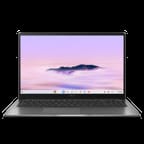
The CX1505 measures 14.15 x 9.14 x 0.79 inches and weighs 3.51 pounds, which is manageable for a 15.6-inch notebook but not light enough to forget in a bag. The chassis is plastic throughout, a choice that keeps the weight and the price down while leaving the lid and deck feeling hollow next to aluminum-bodied machines. ASUS calls the lid’s textured finish rock grey. A physical webcam privacy slider sits above the Full HD camera, and the 180-degree hinge lets the screen fold flat against the table.
The Intel Core 3 N355 is an 8-core part from Intel’s Twin Lake family, running a 1.7GHz base clock and boosting to 3.8GHz. Its PassMark score of roughly 10,476 covers the work Chrome OS is built around: browser tabs, documents, spreadsheets, and streaming video. Against the older Alder Lake-N chips the speed difference is small, so the platform’s 2035 update horizon is the more meaningful change. Storage is eMMC rather than an NVMe SSD, which holds the price down and shows up as slower file copies and app installs than a premium Chromebook manages. Buyers choose between 8GB and 16GB of memory and 128GB or 256GB of storage at purchase; neither is upgradeable later.
Wireless duties fall to WiFi 6E and Bluetooth 5.3. The port set runs to two USB-C 3.2 Gen 1 ports carrying DisplayPort output and power delivery, one USB-A 3.2 Gen 1 port, full-size HDMI 1.4B, and a 3.5mm combo jack. There is no microSD slot, so photographers and anyone moving files on cards will need a dongle, and wired networking calls for a USB ethernet adapter. The full-size HDMI port is the useful part of that set, since it drives a meeting-room projector or a TV with no adapter in the bag.
Reviewer Insights

Chrome Unboxed: a strong keyboard sitting above a cheap-feeling touchpad
Chrome Unboxed provided an early hands-on look at the 2025 ASUS Chromebook Plus CX15, focusing on the new Twin Lake processor and build quality observations. They noted that “This is one of the first new Chromebook Plus models to feature the Intel Twin Lake Core 3 N355 processor” and highlighted the software support timeline.
The reviewer was impressed by the redesigned keyboard layout featuring the new Quick Insert key, which provides quick access to AI-powered suggestions and clipboard history. The backlit keyboard offers adjustable brightness levels and the addition of a full number pad makes this a practical choice for data entry tasks. They were less taken with the touchpad, which “just feels a bit hollow, a little bit more on the cheap side.”
The 15.6-inch Full HD IPS panel carries an anti-glare coating and does the job for everyday work, though its 45% NTSC color coverage marks it as a budget screen. Chrome Unboxed noted the 180-degree hinge allows the screen to lay completely flat, useful for collaboration scenarios. Their assessment positioned this as a solid entry-to-mid-range Chromebook that prioritizes longevity and AI features over premium build materials.
The update runway is the reason to buy this one
Someone who keeps a laptop until it stops working gets the most out of this one. Chrome OS support runs to June 2035 on the Twin Lake platform, Chromebook Plus certification brings Google’s AI features along with it, and the full-size keyboard with a number pad makes long spreadsheet and data-entry sessions bearable.
Plastic panels, a hollow touchpad, eMMC storage, and a 45% NTSC screen keep this in the entry-to-mid-range segment whatever the Chromebook Plus badge suggests. If faster storage or better color accuracy matters more to you than the support window, look at the Acer Chromebook Plus 516 GE or the HP Chromebook Plus x360 14 instead.
Our Chromebook Comparison Chart lines these models up side by side on screen, chip, and update date.
Frequently Asked Questions
What processor does the ASUS Chromebook Plus CX15 use?
Every CX1505 build runs the Intel Core 3 N355, an 8-core chip from Intel’s Twin Lake family with a 1.7GHz base clock and a 3.8GHz boost. It scores roughly 10,476 on PassMark, which covers browsing, documents, and streaming without complaint.
Can I upgrade the RAM in the ASUS Chromebook Plus CX15?
No. The memory is soldered, so the 8GB or 16GB configuration you buy is the one you keep. Storage is the same story: 128GB or 256GB of eMMC, fixed at purchase.
What ports does the ASUS Chromebook Plus CX15 have?
Two USB-C 3.2 Gen 1 ports with DisplayPort output and power delivery, one USB-A 3.2 Gen 1 port, full-size HDMI 1.4B, and a 3.5mm combo audio jack. There is no SD card reader and no Ethernet port.
When does the ASUS Chromebook Plus CX15 stop receiving updates?
Chrome OS updates run through June 2035 on the CX1505, courtesy of the Twin Lake platform. Our explainer on Chromebook Auto Update Expiration (AUE) covers what happens when that date arrives.
Is the ASUS Chromebook Plus CX15 a touchscreen?
No. The CX1505CTA ships a non-touch 15.6-inch Full HD IPS display with an anti-glare coating, and there is no stylus support.
Does the ASUS Chromebook Plus CX15 support Android and Linux apps?
Yes. Android apps install from the Google Play Store, and Linux apps run in the built-in container. Chromebook Plus certification also brings Google’s AI features, including “Help me read” and the upgraded video call tools.