
Acer Chromebook Plus 516 (CB516-1H)
Updated on

The Acer Chromebook Plus 516 (CB516-1H) pairs a 16-inch display with the Intel Core i3-1315U and 8GB of RAM. Its 16:10 aspect ratio provides 11% more vertical workspace compared to traditional 16:9 screens, which shows up most in document editing and spreadsheet work. Chromebook Plus certification brings the enhanced Google AI tools with it, including Magic Editor in Photos, Help Me Write, and improved video call features. The chip and memory here cover web browsing, document work, and light media playback rather than anything heavier.
Screen space bought with plastic and weak speakers
| Pros | Cons |
|---|---|
| Large 16-inch 16:10 display with 300 nits brightness | No keyboard backlighting despite being a “Plus” model |
| Excellent 1080p webcam with physical privacy slider | Poor speaker quality with hollow, mid-heavy sound |
| Lightweight for a 16-inch laptop at 3.75 lbs | All-plastic construction feels less premium |
| OceanGlass touchpad made from recycled materials | Number pad has cramped, non-standard layout |
| Long AUE support until June 2033 | Both USB-C ports located on the same side |
| Chromebook Plus certification with Google AI features | Screen color reproduction is basic (45% NTSC) |
Related Videos
Acer Chromebook Plus 516 (CB516-1H) Comparison Chart
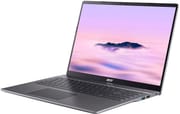 Acer Chromebook Plus 516 (CB516-1H) | |
| Price | List Price: $479 Amazon Prices: Best Buy: Loading price... |
| Model number | CB516-1H-31UE |
| Performance Rating | 7.4 |
| Chromebook Plus | Yes |
| Processor | Hexa-core 1.20 Ghz (max 4.50 Ghz) Intel Core i3-1315U |
| RAM | 8 GB |
| Internal Storage | 128 GB UFS |
| Screen Size | 16" |
| Screen Resolution | 1920x1200 |
| Screen Type | IPS |
| Touch Screen | No |
| Stylus / Pen | No Stylus Support |
| Dimensions width x length x thickness | 14.13 x 9.96 x 0.76 inches (358.9 x 252.98 x 19.3 mm) |
| Weight | 3.75 lbs (1.7 kg) |
| Backlit Keyboard | No |
| Webcam | 1080p |
| WiFi | Wi-Fi 6E (802.11ax) |
| Bluetooth | Bluetooth 5.3 |
| Ethernet | No |
| Cellular Modem | No |
| HDMI | Full-Size HDMI |
| USB Ports | 2 USB 3, 2 USB-C (USB-C up to 10 Gbps, DisplayPort, Power Delivery) |
| Thunderbolt Ports | No |
| Card Reader | No Card Reader |
| Battery | 53Wh, Li-ion |
| Battery Life | 12 hours |
| Fanless | No |
| Auto Update Expiration Date | June, 2033 |
Related Chromebooks
-
 Acer Chromebook Plus 516 GEThe Acer Chromebook Plus 516 GE is a cloud-gaming Chromebook with a 16-inch 2560x1600 120Hz…
 -
 Samsung Galaxy Chromebook Plus 15.6"The thinnest and lightest 15.6-inch Chromebook Plus with a stunning AMOLED display, delivering…
 -
 ASUS Chromebook Plus CX15 (CX1505)The ASUS Chromebook Plus CX15 (CX1505) is a 15.6-inch 1920x1080 Chromebook Plus on an eight-core…
 -
 HP Chromebook Plus 15aThe HP Chromebook Plus 15a is a Chromebook Plus laptop with a 15.6-inch Full HD display, an Intel…
 -
 ASUS Chromebook Flip CX5 (CX5601)A large 16-inch 2-in-1 convertible Chromebook Plus with Thunderbolt 4 connectivity and a garaged…
 -
 Lenovo Chromebook Plus i 15A 15.3-inch Chromebook Plus with an eight-core Intel Core 3 N355, a numeric keypad, a fingerprint…
Plastic build with a 180-degree hinge

The chassis measures 14.13 x 9.96 x 0.76 inches and weighs 3.75 pounds, which is manageable for a 16-inch laptop. All-plastic construction keeps that weight down but feels less premium than aluminum alternatives like the smaller Acer Chromebook Plus 514, and the shell flexes slightly under pressure. Acer says the build uses ocean-bound plastic materials. The 180-degree hinge lets the screen lay completely flat, useful for sharing content or presentations, and the port layout splits across both sides: both USB-C ports sit on the left with the HDMI and headphone jack, the USB-A ports on the right.
The Intel Core i3-1315U carries 6 cores (2 performance, 4 efficiency) and 8 threads. This 13th-generation Raptor Lake chip scores approximately 11,229 on PassMark’s CPU benchmark, which covers everyday productivity without trouble. The 8GB of RAM and 128GB UFS storage round out the configuration, and neither can be upgraded after purchase. Higher-tier models in the 516 line ship with Intel Core 5 or Core 7 processors instead.
Wireless covers WiFi 6E (802.11ax) and Bluetooth 5.3. The port lineup provides 2x USB Type-C 3.2 Gen 2 with DisplayPort and Power Delivery support, 2x USB 3.2 Gen 1 Type-A ports, and an HDMI 1.4 output for external displays. The HDMI 1.4 specification limits that output to 4K at 30Hz or 1080p at 60Hz, which may matter for users with high-refresh monitors. There is no card reader, a minor inconvenience for photographers, though the USB-A ports handle external storage easily. There is no built-in Ethernet either, so a wired connection needs a USB Ethernet adapter.
Reviewer Insights

Chrome Unboxed’s Perspective
Chrome Unboxed tested this model focusing on how it compares to the more expensive Gaming Edition model. They found the 16-inch display bright and clear with good anti-glare treatment, noting “the brightness is very good, the anti-glare looks really good, I think it’s a decent screen.” The 1080p webcam impressed them with excellent dynamic range and clarity.
They called the OceanGlass trackpad a standout, matching the quality found on higher-end Acer models. They were disappointed by the speaker quality, saying the speakers “sound like this as if I were talking kind of into some sort of can” and calling it “a bit unfortunate.” They suggested the device becomes compelling when on sale around $350, noting “if it goes on sale on a regular basis and it’s like 350, something like that… I think this becomes a pretty compelling option.”
MergeDroid’s Perspective
MergeDroid covered the 516 in both an unboxing and a 514-versus-516 comparison. He noted Acer rates the 16-inch model at 1.7 kg (3.75 lbs) and found that, despite the plastic lid, it “does feel pretty well put together for an all-plastic build.” He appreciated the physical privacy slider for the 1080p webcam, the versatile port selection, and the long software support window.
Comparing it directly to the 14-inch 514, he said the “larger 16-in option, the 516, does feel well put together, but it can’t feel quite as robust as the 514, because that offers an aluminum lid over the plastic found on the 516.” He flagged the number pad’s “odd layout” with the plus and minus keys, and concluded that “unless you need the extra real estate of the larger screen on the 516 and that number pad,” most people should “stick with the Acer Chromebook Plus 514.”
How-To Geek
According to How-To Geek, the 516 provides a large screen at a low price but suffers from significant design compromises. The expanded keyboard layout drew the sharpest complaint, noting “the utter frustration this caused overshadowed my entire experience with the Acer Chromebook Plus 516.” The speakers received harsh criticism as “one of the worst sets of laptop speakers I’ve encountered.” They ultimately rated it 6/10.
IT Pro
According to IT Pro, the 516 is “a rather solid but unexciting budget Chromebook with a larger-than-average display.” They found the plastic construction sturdy despite not being premium, and noted it works well as a desktop replacement for office environments. The review recommended it for organizations needing to stay below budget thresholds while still getting a usable large-screen device.
The big screen and the support window through 2033 carry it
Document and spreadsheet work is where the 16-inch 16:10 panel pays off, and Chromebook Plus certification puts Google’s AI tools on top of it. The 1080p webcam and the AUE support until 2033 are what make this a reasonable buy for remote workers and for organizations that keep hardware in service for years.
The plastic shell, the speakers, and the number pad layout are the reasons to look instead at the smaller Acer Chromebook Plus 514, which puts an aluminum lid over the same kind of plastic base. Anyone who needs keyboard backlighting for low-light typing has to shop a different Chromebook Plus model in this price range.
The Chromebook Comparison Chart puts these specs next to the rest of the catalog.
Frequently Asked Questions
What processor does the Acer Chromebook Plus 516 use?
The CB516-1H-31UE ships with the Intel Core i3-1315U: 6 cores (2 performance, 4 efficiency) and 8 threads, a base clock of 1.2 GHz, and boost up to 4.5 GHz. It scores approximately 11,229 on PassMark’s CPU benchmark, enough for everyday Chromebook tasks.
Can I upgrade the RAM in the Acer Chromebook Plus 516?
No. The memory is soldered and cannot be upgraded after purchase, and the CB516-1H-31UE model comes with 8GB of RAM. More memory means choosing a higher-spec model at purchase time.
What ports does the Acer Chromebook Plus 516 have?
On the left side: 2x USB Type-C 3.2 Gen 2 ports with DisplayPort and Power Delivery support, HDMI 1.4 output, and a 3.5mm combo audio jack. On the right side: 2x USB 3.2 Gen 1 Type-A ports. There is no card reader or Ethernet port.
When does the Acer Chromebook Plus 516 stop receiving updates?
The Auto Update Expiration (AUE) date for the CB516-1H is June 2033. Google provides Chrome OS updates and security patches until then.
Does the Acer Chromebook Plus 516 have a backlit keyboard?
No. The CB516-1H ships without keyboard backlighting, a notable omission for a Chromebook Plus device and a problem if you frequently work in low-light environments.
Is the Acer Chromebook Plus 516 a Chromebook Plus device?
Yes. It meets Google’s minimum hardware requirements for the Chromebook Plus badge, which brings enhanced Google AI features like Magic Editor in Google Photos, Help Me Write, generative AI wallpapers, and improved video calling with better noise cancellation and lighting effects.
Can I run Android apps on the Acer Chromebook Plus 516?
Yes, through the Google Play Store. As a Chromebook Plus device it meets the performance requirements for running Android applications smoothly, and it also supports Linux apps for development and power-user workflows.