
Lenovo Chromebook Plus i 15
Published on

The Lenovo Chromebook Plus i 15 is a 15.3-inch ChromeOS laptop for home, school, and small-office work, with a numeric keypad, a fingerprint reader, and enough processor for a full day of tabs and video calls. It runs an eight-core Intel Core 3 N355, which qualifies it for Chromebook Plus and its Google AI features, and Google supports it with ChromeOS updates until January 2036. Lenovo sells two screens on the same chassis. The base model has a 60Hz matte panel with narrow color coverage, and the touch model adds a 120Hz panel with full sRGB color, which is the version both reviewers tested.
Strengths and compromises
| Pros | Cons |
|---|---|
| Eight-core Core 3 N355 and Chromebook Plus certification | 60Hz base panel covers only 45% NTSC |
| ChromeOS updates through January 2036 | Keyboard is not backlit |
| Numeric keypad and a large Mylar touchpad | Bottom-firing speakers sound weak |
| Fingerprint reader and a 5MP webcam with a shutter | 8GB of memory and UFS storage are soldered |
| microSD slot, full-size HDMI, and two 10Gbps USB-C ports | Battery fell short of a full workday in testing |
| Optional 120Hz, 100% sRGB touchscreen | No NPU for on-device AI |
Related Videos
Lenovo Chromebook Plus i 15 Comparison Chart
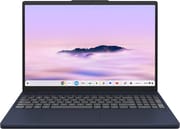 Lenovo Chromebook Plus i 15 | Lenovo Chromebook Plus i 15 | |
| Price | List Price: $450.00 Amazon Prices: Loading prices... | List Price: Amazon Prices: Best Buy: Loading price... |
| Model number | 83T10010US | 83T1000RUS |
| Performance Rating | 7.8 | 7.8 |
| Chromebook Plus | Yes | Yes |
| Processor | Octa-core 1.70 Ghz (max 3.90 Ghz) Intel Core 3 N355 | Octa-core 1.70 Ghz (max 3.90 Ghz) Intel Core 3 N355 |
| RAM | 8 GB | 8 GB |
| Internal Storage | 256 GB UFS | 128 GB UFS |
| Screen Size | 15.3" | 15.3" |
| Screen Resolution | 1920x1200 | 1920x1200 |
| Screen Type | IPS | IPS |
| Touch Screen | No | Yes |
| Stylus / Pen | No Stylus Support | No Stylus Support |
| Dimensions width x length x thickness | 13.54 x 9.52 x 0.75 inches (343.92 x 241.81 x 19.05 mm) | 13.54 x 9.52 x 0.75 inches (343.92 x 241.81 x 19.05 mm) |
| Weight | 3.44 lbs (1.56 kg) | 3.44 lbs (1.56 kg) |
| Backlit Keyboard | No | No |
| Webcam | 5MP | 5MP |
| WiFi | Wi-Fi 6E (802.11ax) | Wi-Fi 6E (802.11ax) |
| Bluetooth | Bluetooth 5.3 | Bluetooth 5.3 |
| Ethernet | No | No |
| Cellular Modem | No | No |
| HDMI | Full-Size HDMI | Full-Size HDMI |
| USB Ports | 2 USB 3, 2 USB-C 2x USB-C 10Gbps (DP 1.4, PD), 2x USB-A 5Gbps | 2 USB 3, 2 USB-C 2x USB-C 10Gbps (DP 1.4, PD), 2x USB-A 5Gbps |
| Thunderbolt Ports | No | No |
| Card Reader | microSD Card Reader | microSD Card Reader |
| Battery | 3 cell, 50Wh, Li-ion | 3 cell, 50Wh, Li-ion |
| Battery Life | 11 hours | 11 hours |
| Fanless | No | No |
| Auto Update Expiration Date | January, 2036 | January, 2036 |
Related Chromebooks
-
 HP Chromebook Plus 15aThe HP Chromebook Plus 15a is a Chromebook Plus laptop with a 15.6-inch Full HD display, an Intel…
 -
 Lenovo Chromebook Plus 2-in-1 14The Lenovo Chromebook Plus 2-in-1 14 is an aluminum 360-degree convertible with an Intel Core 3…
 -
 ASUS Chromebook Plus CX15 (CX1505)The ASUS Chromebook Plus CX15 (CX1505) is a 15.6-inch 1920x1080 Chromebook Plus on an eight-core…
 -
 Samsung Galaxy Chromebook Plus 15.6"The thinnest and lightest 15.6-inch Chromebook Plus with a stunning AMOLED display, delivering…
 -
 Lenovo IdeaPad Flex 5i Chromebook PlusThe Lenovo IdeaPad Flex 5i Chromebook Plus is a 14-inch convertible Chromebook Plus on Intel's Core…
 -
 Acer Chromebook Plus 516 (CB516-1H)The Acer Chromebook Plus 516 (CB516-1H) is a 16-inch Chromebook Plus with an Intel Core i3-1315U, a…
A 15-inch plastic clamshell with a numeric keypad

The Chromebook Plus i 15 measures about 13.5 x 9.5 x 0.75 inches and weighs about 3.4 pounds, according to Lenovo’s PSREF specifications. The chassis is talc-filled PC-ABS plastic in Cosmic Blue, painted on the lid and textured on the bottom, and Lenovo says it passed MIL-STD-810H testing. The hinge does not fold into tablet mode, and there is no pen support. The keyboard is a six-row Chrome layout with a numeric keypad and 1.3mm of key travel, with no backlight. Below it sits a buttonless 4.7 x 3 inch Mylar touchpad and a touch fingerprint reader on the palm rest.
The left edge carries a USB-C port, a USB-A port, the headphone and microphone jack, and a Kensington Nano slot. The right edge has the power button, the microSD reader, a second USB-A port, a full-size HDMI 1.4b port, and a second USB-C port. Both USB-C ports run at 10Gbps and carry DisplayPort 1.4 output and 45W to 65W charging, so the laptop charges from either side. Lenovo rates external display support at two monitors besides the built-in screen, with 4K at 60Hz over USB-C and 4K at 30Hz over HDMI. Wireless is Wi-Fi 6E (2x2) with Bluetooth 5.3, and there is no Ethernet port.
A 60Hz matte panel or a 120Hz touchscreen
Both panels are 15.3-inch IPS screens at 1920x1200 with a 16:10 ratio, an anti-glare surface, and a 400-nit rating. The non-touch panel on model 83T10010US runs at 60Hz and covers 45% of NTSC. The touch panel on model 83T1000RUS adds 10-point touch, a 120Hz refresh rate, and 100% sRGB coverage, with hardware low-blue-light certification. Chrome Unboxed found that the touch panel runs at 120Hz on the charger and drops to 60Hz on battery. The webcam is 5MP on both Plus models, with a physical privacy shutter.
Core 3 N355 performance and battery
The Intel Core 3 N355 has eight efficiency cores at up to 3.9GHz with Intel integrated graphics, and it scores about 10,500 on PassMark’s CPU benchmark. That is about twice the score of the MediaTek Kompanio 540 in the Lenovo Chromebook m 15, and it is the same chip Lenovo uses in the Chromebook Plus 2-in-1 14. The N355 has no NPU, so on-device AI work falls to the CPU and Google’s servers. It handles Google Workspace, many browser tabs, Android apps, and video calls. Heavy Linux development and video editing are beyond it.

Every Plus model has 8GB of LPDDR5X-4800 memory soldered to the board. Storage is soldered UFS 2.2 at 128GB or 256GB, and Lenovo notes that the platform limits it to speeds closer to UFS 2.1. The microSD slot is the only way to add local storage without a USB drive. The 256GB non-touch model is the better pick for offline files, while the touch model trades storage for the better screen.
Lenovo fits a 50Wh battery and rates it at up to 11 hours on Google’s power load test, a light workload. The included 65W USB-C charger supports Rapid Charge Pro, which Lenovo rates at 50% in 30 minutes.
Reviewer Insights
Both reviews below cover the 120Hz touch model with 128GB of storage.
Chrome Unboxed
Chrome Unboxed unboxed and set up the touch model and called the display the main reason to buy it: “the absolute star of the show here is the screen”. He praised the trackpad (“The click mechanism is really, really awesome.”) and the camera (“A+ on the camera here.”), and found the all-plastic build rigid. After typing on it during setup, he withdrew an early compliment and called the keyboard a little mushy and mediocre. His expectations for audio were low going in: “I’m not expecting much from these speakers.” After the test, he rated the bottom-firing speakers fine for a call but recommended headphones. The video also notes that the N355 has no NPU, which may keep this model off Google’s newer AI-focused operating system, and says ChromeOS support should run 8 to 10 years.
GEEKSPIN
GEEKSPIN’s hands-on review gave the Chromebook Plus i a 4.3 out of 5. Chance Kinney had 33 active Chrome tabs open before the laptop began to struggle, and found that some apps, such as Spotify, opened slowly. GEEKSPIN rated the keyboard higher than Chrome Unboxed did: “Lenovo always seems to get it right with keyboards and trackpads, and the Chromebook Plus i is no exception.” His battery verdict was “Battery life is neither a weakness nor a strength.” In 2.5 hours of work, browsing, and background music at under half brightness, the charge fell to 59%, and he did not expect it to last a full workday. Charging beat Lenovo’s claim, from 3% to 60% in 30 minutes and full in about an hour. He rated the 5MP webcam as adequate but dim on calls, and the downward-firing speakers as passable but not loud enough.
Who it’s for
The Chromebook Plus i 15 fits home, school, and small-office work where the numeric keypad and the large 16:10 screen matter. The Core 3 N355 handles Google Workspace, video calls, and long tab sessions (GEEKSPIN reached 33 tabs before it slowed), and updates run through January 2036. Choose the 120Hz touch model for the screen Chrome Unboxed called the star, or the 256GB non-touch model for offline files.
Skip it if you type in the dark, need a full workday on battery, or plan heavy Linux development or video editing. Lenovo’s Chromebook m 15 uses the same chassis with a MediaTek Kompanio 540 at about half the CPU score, no card or fingerprint reader, and no Chromebook Plus features. The non-Plus Chromebook i 15 drops to a four-core Intel N150, a 720p webcam, and 4GB or 8GB of memory. See also our list of Chromebooks with number pads or the Chromebook comparison chart.
Frequently Asked Questions
How long will the Chromebook Plus i 15 get ChromeOS updates?
Google lists the Chromebook Plus (15”, 10) with an Auto Update Expiration (AUE) date of January 2036. The model is still supported and gets ChromeOS security and feature updates until then. Lenovo’s own hardware end-of-support date for the 83T1 machine type is January 2032.
Which models have the 120Hz touchscreen?
In the US, model 83T1000RUS has the 120Hz, 100% sRGB touch panel with 128GB of storage, and Best Buy carries it. Model 83T10010US has the 60Hz non-touch panel with 256GB of storage. Some third-party sellers bundle the touch model with a 128GB microSD card and advertise 256GB of storage; the internal storage is still 128GB.
Can it drive external monitors?
Yes. Lenovo supports two external displays alongside the built-in screen. Each USB-C port carries DisplayPort 1.4 for up to 4K at 60Hz, and the HDMI 1.4b port tops out at 4K at 30Hz, so a 4K monitor is smoother on USB-C.
Can I upgrade the memory or storage?
No. The LPDDR5X memory and the UFS storage are soldered, and 8GB is the maximum. A microSD card is the simplest way to add space for downloads and offline files.
Does it come with a charger, and how fast does it charge?
US models ship with a 65W USB-C adapter. GEEKSPIN measured 3% to 60% in 30 minutes and a full charge in about an hour. Any USB-C Power Delivery charger from 45W to 65W works in either USB-C port.
Is the Core 3 N355 fast enough for Linux apps?
Chromebook Plus models support the ChromeOS Linux environment, and the N355 is an eight-core x86 chip, so editors, scripts, and light tools run. The 8GB of memory is shared by ChromeOS, Android apps, and the Linux container, and it cannot be upgraded.