
HP Chromebook Plus 15a
Updated on

The HP Chromebook Plus 15a pairs a 15.6-inch Full HD screen with a full numeric keypad, a combination aimed at people who want desk comfort more than a light bag. The Intel Core i3-N305 runs 8 cores alongside 8GB of LPDDR5 memory, which covers tab-heavy browsing, document work, and streaming. Chromebook Plus certification brings Google’s AI video call enhancements to the 1080p webcam, and the all-plastic shell holds together better than the material suggests. Auto update support runs through June 2033 and battery life came close to 11 hours in testing, which fits home users, students, and office workers shopping below premium prices.
Pros and Cons
| Pros | Cons |
|---|---|
| Spacious 15.6-inch Full HD display | Screen brightness limited to 250 nits |
| Excellent keyboard with full numeric keypad | No touchscreen or convertible design |
| Solid build quality at competitive price | Cramped character key layout due to numpad |
| 1080p webcam with privacy shutter | No HDMI port (requires USB-C adapter) |
| Good battery life (10+ hours) | Keyboard is not backlit |
| Smooth trackpad and responsive performance | All-plastic construction feels less premium |
Related Videos
HP Chromebook Plus 15a Comparison Chart
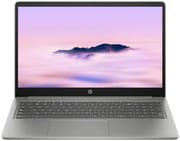 HP Chromebook Plus 15a | HP Chromebook Plus 15a | |
| Price | List Price: $549 Amazon Prices: Loading prices... Best Buy: Loading price... | List Price: $659 Amazon Prices: |
| Model number | 15a-nb0033dx | 15a-nb0097nr |
| Performance Rating | 5.9 | 5.9 |
| Chromebook Plus | Yes | Yes |
| Processor | Octa-core 1.80 Ghz (max 3.80 Ghz) Intel Core i3-N305 | Octa-core 1.80 Ghz (max 3.80 Ghz) Intel Core i3-N305 |
| RAM | 8 GB | 8 GB |
| Internal Storage | 128 GB UFS | 128 GB UFS |
| Screen Size | 15.6" | 15.6" |
| Screen Resolution | 1920x1080 | 1920x1080 |
| Screen Type | IPS | IPS |
| Touch Screen | No | No |
| Stylus / Pen | No Stylus Support | No Stylus Support |
| Dimensions width x length x thickness | 14.28 x 9.51 x 0.78 inches (362.71 x 241.55 x 19.81 mm) | 14.28 x 9.51 x 0.78 inches (362.71 x 241.55 x 19.81 mm) |
| Weight | 3.81 lbs (1.73 kg) | 3.81 lbs (1.73 kg) |
| Backlit Keyboard | No | No |
| Webcam | 1080p | 1080p |
| WiFi | Wi-Fi 6 (802.11ax) | Wi-Fi 6 (802.11ax) |
| Bluetooth | Bluetooth 5.3 | Bluetooth 5.3 |
| Ethernet | No | No |
| Cellular Modem | No | No |
| HDMI | No HDMI | No HDMI |
| USB Ports | 1 USB 3, 2 USB-C 2x USB-C with Power Delivery and DisplayPort 1.4, 1x USB-A with Sleep and Charge | 1 USB 3, 2 USB-C 2x USB-C with Power Delivery and DisplayPort 1.4, 1x USB-A with Sleep and Charge |
| Thunderbolt Ports | No | No |
| Card Reader | microSD Card Reader | microSD Card Reader |
| Battery | 3 cell, 54Wh, Li-polymer | 3 cell, 54Wh, Li-polymer |
| Battery Life | 10 hours | 10 hours |
| Fanless | No | No |
| Auto Update Expiration Date | June, 2033 | June, 2033 |
Related Chromebooks
-
 Acer Chromebook Plus 516 GEThe Acer Chromebook Plus 516 GE is a cloud-gaming Chromebook with a 16-inch 2560x1600 120Hz…
 -
 ASUS Chromebook Plus CX15 (CX1505)The ASUS Chromebook Plus CX15 (CX1505) is a 15.6-inch 1920x1080 Chromebook Plus on an eight-core…
 -
 Samsung Galaxy Chromebook Plus 15.6"The thinnest and lightest 15.6-inch Chromebook Plus with a stunning AMOLED display, delivering…
 -
 Acer Chromebook Plus 515The Acer Chromebook Plus 515 is a 15.6-inch Chromebook Plus with a 1920x1080 touchscreen, an Intel…
 -
 HP Chromebook Plus x360 14cThe HP Chromebook Plus x360 14c is a Chromebook Plus convertible with a 12th Gen Intel Core…
 -
 HP Elite c640 G3 ChromebookThe HP Elite c640 G3 Chromebook is a 14-inch business Chromebook with an Intel Core i5-1245U vPro,…
A Numpad, Two USB-C Ports, and No HDMI

At 14.28 x 9.51 x 0.78 inches and 3.81 pounds, it stays manageable for a 15.6-inch laptop. The all-plastic chassis uses recycled aluminum and ocean-bound plastics, though TechRadar notes that the construction “comes close to rivalling some of the best MacBook Pro devices in terms of its finely machined construction.” Grey and black keeps the look plain enough for an office or a classroom, and the hinge holds the display steady with minimal wobble, though it does not open as wide as some competitors.
The Intel Core i3-N305 carries 8 efficiency cores that boost to 3.8 GHz, which keeps ChromeOS quick under a heavy tab load. TechRadar’s testing showed surprisingly good gaming performance, noting they “managed to play Asphalt Legends Unite on high graphics settings at 60fps with hardly a hiccup.” The 8GB of LPDDR5 RAM handles multiple Chrome tabs and Android apps without stuttering, with headroom left for creative work such as music production on Chromebook through cloud-based DAWs. The 128GB UFS storage reads faster than eMMC.
WiFi 6 (802.11ax) and Bluetooth 5.3 cover networking and peripherals. The ports are two USB-C with Power Delivery and DisplayPort 1.4 support, one USB-A with Sleep and Charge, a microSD card reader, and a 3.5mm combo audio jack. Without an HDMI port, an external display needs a USB-C adapter or hub, and with no Ethernet port a wired connection needs a USB Ethernet adapter. Either USB-C port charges the machine, so the cable can run to whichever side the outlet is on.
Reviewer Insights

Chrome Unboxed
The keyboard and trackpad carried the review at Chrome Unboxed, which tested the 15.6-inch model with a focus on the larger form factor experience. The reviewer highlighted that “HP’s take on the larger form factor comes with some slight advantages” over competitors, and noted “the excellent keyboard and trackpad combo that comes with a full numeric keypad makes for a really productive experience.” The screen drew the complaint, with the reviewer saying “that screen comes with its aggravations however as HP stuck with the anti-glare non-touch screen that can only hit 250 nits of brightness.”
The Core i3-N305 is less powerful than the i3-1215U found in competing models such as the Acer Chromebook Plus 515, a gap Chrome Unboxed noted while still finding the machine capable for its intended purpose. The review points to frequent discounts in the $300-$400 range as what makes it worth the money, with the MSRP feeling “a little bit off” for an all-plastic construction.
TechRadar
TechRadar awarded the HP Chromebook Plus 15a 4 out of 5 stars across all categories. The review praises the build quality, noting “the whole body feels solid, yet it’s also quite light and thin for a device this size.” Battery testing showed endurance of 10 hours and 41 minutes during continuous video playback, though short of HP’s claimed 13 hours. “The display remains clearly visible across a wide range of view angles and lighting conditions” was highlighted as a key strength, despite the limited 250-nit maximum brightness.
The numeric keypad costs the character keys room. The keys themselves feel premium with minimal play, but “the layout of the character keys is somewhat squeezed” took time to adapt to and was never entirely comfortable for the reviewer. TechRadar concludes this Chromebook “doesn’t do a lot wrong” and is worth the money, especially at discounted prices.
ITPro
ITPro’s review by Stuart Andrews takes a more critical perspective, calling the HP Chromebook Plus 15a “about as basic as a Chromebook Plus can get.” The business-focused review notes the device meets minimum Chromebook Plus requirements without exceeding them. “It’s a functional productivity device you can pick up for peanuts,” Andrews writes, acknowledging its low price while questioning the display and performance for professional use.
The review criticizes the screen for struggling with “low brightness and color reproduction” and notes the webcam image appears “fuzzy even in daylight.” ITPro lists USB 3.2 Gen 1 speeds and the lack of HDMI as drawbacks for business users. However, ITPro acknowledges the solid build quality and practical keyboard layout as positives for those prioritizing reliability over premium features.
Customer Reviews
So far the HP Chromebook Plus 15a has a single rating on Amazon, and it sits at 3 stars. With only one review on record, there is not enough feedback to call out a trend; treat this as one owner’s early take rather than a consensus. That reviewer, a verified buyer posting as Travel Guy in February 2026, gave it 3 stars under the title “Fast processor” and wrote: “Fast processor and adequate memory and storage. Does not support an external hdmi monitor. No longer under HP warranty.”
Read more owner reviews on Amazon.
Best Suited to Desk Work on a Budget
Screen size and keyboard comfort are what this machine sells, and both hold up for home office work, student assignments, and everyday web browsing. The 250-nit panel caps how well it reads in a bright room, and the keyboard has no backlight for typing after dark.
The Acer Chromebook Plus 515 offers similar specifications with a slightly brighter display, while the HP Chromebook x360 14 provides touchscreen and tent mode flexibility in a more portable package.
Our Chromebook Comparison Chart lines it up against the other 15-inch models.
Frequently Asked Questions
What processor does the HP Chromebook Plus 15a use?
The Intel Core i3-N305 here has 8 efficiency cores and 8 threads, a 1.8 GHz base clock, and boost speeds up to 3.8 GHz. It scores approximately 9,577 on PassMark’s CPU benchmark, which covers everyday productivity and light multitasking.
Can I upgrade the RAM or storage in the HP Chromebook Plus 15a?
No. The memory is soldered and the UFS storage is not serviceable, so the 8GB LPDDR5 RAM and 128GB UFS storage stay as bought. The built-in microSD card reader and cloud storage services such as Google Drive are the ways to add space.
What ports does the HP Chromebook Plus 15a have?
The port list is 2x USB-C with Power Delivery charging and DisplayPort 1.4 video output, 1x USB-A with Sleep and Charge, a microSD card reader for expandable storage, and a 3.5mm combo headphone/microphone jack. There is no HDMI port, so an external display needs a USB-C adapter or hub.
How long will the HP Chromebook Plus 15a receive updates?
This model (15a-nb0 series) receives automatic updates through June 2033 under Google’s Auto Update Expiration policy.
Does the HP Chromebook Plus 15a have a touchscreen?
No. The 15.6-inch Full HD (1920x1080) IPS panel is non-touch, with an anti-glare coating that cuts fingerprints and reflections. For touch input, the HP Chromebook Plus x360 series offers convertible designs with touch displays.
What is the battery life of the HP Chromebook Plus 15a?
HP rates it at up to 13.25 hours, while independent testing by TechRadar reached 10 hours and 41 minutes of continuous video playback. Mixed use across web browsing, document editing, and video calls typically yields 9-11 hours depending on screen brightness and workload intensity.
Is the HP Chromebook Plus 15a good for students?
Yes. The 15.6-inch display leaves room for reading and research, the numeric keypad speeds up data entry and calculations, and battery life covers a day of classes. Android apps install from the Google Play Store, and Chromebook Plus certification means it meets Google’s standards for AI features and performance in educational settings.