
Lenovo Chromebook m 15
Published on

The Lenovo Chromebook m 15 is a big-screen ChromeOS laptop for home, school, and small-office work where screen space and a numeric keypad matter more than speed. It is the 15.3-inch sibling of the Lenovo Chromebook m 14, built on the same MediaTek Kompanio 540 but in a larger chassis with a full keyboard and number pad. Google lists its Auto Update Expiration date as June 2036, so it will keep getting ChromeOS updates for close to a decade. Buy the 8GB model: the 4GB configuration leaves little room for a modern browser with several tabs open.
Strengths and compromises
| Pros | Cons |
|---|---|
| ChromeOS updates through June 2036 | Not Chromebook Plus certified |
| Roomy 15.3-inch 16:10 WUXGA screen | Panel covers only 45% NTSC, so colors look muted |
| Numeric keypad and a large touchpad | Keyboard is not backlit |
| Full-size HDMI plus two USB-C and two USB-A ports | Memory and storage are soldered, and the base model has only 4GB of RAM |
| Wi-Fi 6E and Bluetooth 5.3 | No microSD card reader |
| MIL-STD-810H tested chassis | 720p webcam and a basic-tier chip |
Lenovo Chromebook m 15 Comparison Chart
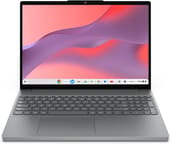 Lenovo Chromebook m 15 | Lenovo Chromebook m 15 | |
| Price | List Price: Amazon Prices: Loading prices... | List Price: Amazon Prices: Best Buy: Loading price... |
| Model number | 83W7000AUS | 83W70017US |
| Performance Rating | 3.0 | 1.9 |
| Chromebook Plus | No | No |
| Processor | Octa-core 2.00 Ghz (max 2.60 Ghz) MediaTek Kompanio 540 | Octa-core 2.00 Ghz (max 2.60 Ghz) MediaTek Kompanio 540 |
| RAM | 8 GB | 4 GB |
| Internal Storage | 128 GB UFS | 64 GB UFS |
| Screen Size | 15.3" | 15.3" |
| Screen Resolution | 1920x1200 | 1920x1200 |
| Screen Type | IPS | IPS |
| Touch Screen | No | No |
| Stylus / Pen | No Stylus Support | No Stylus Support |
| Dimensions width x length x thickness | 13.54 x 9.52 x 0.75 inches (343.92 x 241.81 x 19.05 mm) | 13.54 x 9.52 x 0.75 inches (343.92 x 241.81 x 19.05 mm) |
| Weight | 3.44 lbs (1.56 kg) | 3.44 lbs (1.56 kg) |
| Backlit Keyboard | No | No |
| Webcam | 720p | 720p |
| WiFi | Wi-Fi 6E (802.11ax) | Wi-Fi 6E (802.11ax) |
| Bluetooth | Bluetooth 5.3 | Bluetooth 5.3 |
| Ethernet | No | No |
| Cellular Modem | No | No |
| HDMI | Full-Size HDMI | Full-Size HDMI |
| USB Ports | 2 USB 3, 2 USB-C 2x USB-C 5Gbps (DP, PD), 2x USB-A 5Gbps | 2 USB 3, 2 USB-C 2x USB-C 5Gbps (DP, PD), 2x USB-A 5Gbps |
| Thunderbolt Ports | No | No |
| Card Reader | No Card Reader | No Card Reader |
| Battery | 50Wh, Li-ion | 50Wh, Li-ion |
| Battery Life | 16 hours | 16 hours |
| Fanless | No | No |
| Auto Update Expiration Date | June, 2036 | June, 2036 |
Related Chromebooks
-
 Lenovo IdeaPad 3i ChromebookThe Lenovo IdeaPad 3i Chromebook is a 15.6-inch Full HD Chromebook with an Intel Celeron N4500 and…
 -
 Lenovo 100e Chromebook Gen 4The Lenovo 100e Chromebook Gen 4 is a rugged, fanless 11.6 inch ARM Chromebook built for K-12…
 -
 ASUS Chromebook CM15 (CM1505)The ASUS Chromebook CM15 (CM1505) is a 15.6-inch MediaTek Kompanio 540 Chromebook with a full HD…
 -
 Acer Chromebook 15 315The Acer Chromebook 15 315 combines a comfortable 15.6'' ComfyView display and fanless design for…
 -
 Acer Chromebook 315The Acer Chromebook 315 (CB315-4H) is a fanless 15.6-inch FHD IPS Chromebook with an Intel Celeron…
 -
 ASUS Chromebook C523The ASUS Chromebook C523 is a fanless 15.6-inch Chromebook with an anti-glare display, an Intel…
A 15-inch plastic clamshell with a number pad

The Chromebook m 15 measures about 13.5 x 9.5 x 0.75 inches and weighs about 3.4 pounds, according to Lenovo’s PSREF specifications. The chassis is plastic in a Luna Grey finish, and Lenovo says it passed MIL-STD-810H military-standard testing. The larger footprint makes room for a six-row keyboard with a numeric keypad and a 4.7 x 3 inch buttonless touchpad. The keyboard has 1.3mm of key travel and no backlight. A physical shutter covers the 720p webcam, and the speakers are a pair of 2W drivers tuned with MaxxAudio.
The 15.3-inch IPS panel runs at 1920x1200 with a 16:10 aspect ratio, so it shows more lines of a document or spreadsheet than a 16:9 screen of the same width. Lenovo rates it at 400 nits with an anti-glare surface and a 1200:1 contrast ratio, but its color gamut is only 45% of NTSC. That is enough for documents, web pages, and video, but photos will look washed out next to a wide-gamut screen. The panel is non-touch and runs at 60Hz, and there is no pen support.
Ports are split across both sides. The left edge carries a USB-C port, a USB-A port, the headphone and microphone jack, and a Kensington Nano security slot. The right edge has the power button, a second USB-A port, a full-size HDMI 1.4b output, and a second USB-C port. All four USB ports run at 5Gbps, and both USB-C ports accept 45W to 65W USB Power Delivery and carry DisplayPort output, so you can charge from either side. Wireless is Wi-Fi 6E (2x2) with Bluetooth 5.3. There is no Ethernet port and no card reader.
Kompanio 540 performance and battery
The MediaTek Kompanio 540 is an eight-core Arm chip with two Cortex-A78 cores at 2.6GHz and six Cortex-A55 cores at 2.0GHz, paired with an Arm Mali-G57 MC2 GPU. It scores about 5,400 on PassMark’s CPU benchmark, which places it in the basic Chromebook tier, below the Intel Core and MediaTek Kompanio Ultra chips that Chromebook Plus models use. Lenovo claims 30 to 50% faster CPU and 75% better GPU performance than the older Kompanio 520, based on its own Geekbench 6 and GFXBench Manhattan 3.0 runs; those are vendor figures, not independent measurements. The chip suits web apps, Google Workspace, video calls, streaming, and Android apps. Large spreadsheets, many open tabs, and the Linux development environment push it hard.

Memory is LPDDR5X-6400, soldered to the board, and storage is UFS 2.2 flash, also soldered. UFS is faster than the eMMC storage that many budget Chromebooks still use. The 8GB model is the safer choice for a machine you plan to keep until 2036, because 4GB fills up quickly with a modern browser and Android apps running at the same time. With no card slot, extra storage comes from Google Drive or a USB drive.
Lenovo fits a 50Wh battery and rates it at up to 16 hours on Google’s power load test. That figure comes from a light, controlled workload, so expect less with the screen at full brightness or during long video calls. The included 65W USB-C adapter supports Lenovo’s Rapid Charge Pro, which Lenovo rates at 50% charge in 30 minutes.
Who should buy the Chromebook m 15
The Chromebook m 15 suits buyers who want a large ChromeOS laptop with a number pad for spreadsheets, budgets, or data entry, plus a long update window. The June 2036 AUE date means this model is still supported and will get security and feature updates for years. Full-size HDMI and four USB ports also make it easy to connect a monitor, mouse, and USB drive without a dock.
Skip it if you need a backlit keyboard, a touchscreen, or speed for heavy multitasking and Linux apps. For Chromebook Plus AI features and a faster chip at a similar screen size, compare the HP Chromebook Plus 15a or the Samsung Galaxy Chromebook Plus 15. For more keyboards with a keypad, see our list of Chromebooks with number pads, or browse the Chromebook comparison chart.
Frequently Asked Questions
What processor does the Lenovo Chromebook m 15 use?
It uses the MediaTek Kompanio 540, an eight-core Arm chip with two Cortex-A78 cores at 2.6GHz and six Cortex-A55 cores at 2.0GHz, plus Arm Mali-G57 MC2 graphics. It scores about 5,400 on PassMark’s CPU benchmark, which is basic-tier Chromebook performance. It handles browsing, Google Workspace, video calls, and Android apps, but not heavy multitasking.
How long will the Chromebook m 15 get ChromeOS updates?
Google lists its Auto Update Expiration (AUE) date as June 2036. The model is still supported and will get ChromeOS security and feature updates until then.
Does the Chromebook m 15 have a number pad?
Yes. The keyboard is a six-row Chrome layout with a numeric keypad on the right and 1.3mm of key travel. It is not backlit.
Can I upgrade the RAM or storage?
No. The LPDDR5X memory and the UFS 2.2 storage are both soldered to the board, and there is no microSD card reader. Pick the 8GB model if you plan to keep the laptop for several years, and use Google Drive or a USB drive for extra space.
Is the Chromebook m 15 a Chromebook Plus?
No. It is a standard Chromebook, so it does not meet Google’s Chromebook Plus hardware floor or get the Plus-only AI features. Its Kompanio 540 sits below the chips used in Chromebook Plus models.
What ports does it have?
Two USB-C ports (5Gbps, with DisplayPort output and 45W to 65W charging), two USB-A ports (5Gbps), a full-size HDMI 1.4b port, a 3.5mm headphone and microphone jack, and a Kensington Nano security slot. There is no Ethernet port and no card reader.
How long does the battery last?
Lenovo rates the 50Wh battery at up to 16 hours on Google’s power load test. Real use with a brighter screen or video calls will be shorter. The included 65W USB-C charger can reach 50% in about 30 minutes, per Lenovo.