
Lenovo Chromebook m 14
Updated on

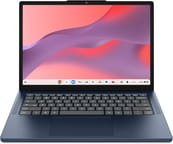
The Lenovo Chromebook m 14 is a quiet, fanless 14-inch clamshell built around MediaTek’s Kompanio 540 ARM processor, sold at the bottom of the Chromebook price range. Lenovo positions it as a Gemini-ready everyday laptop in a Cosmic Blue or Luna Grey plastic chassis, with 4GB or 8GB of LPDDR5X memory, 64GB of UFS storage, and a 14-inch WUXGA 16:10 panel that gives it more vertical room than the 16:9 screens still common in this price band. Some Luna Grey models add a touchscreen. Lenovo rates the panel at 400 nits. It is not Chromebook Plus certified, so it sits below devices like the Acer Chromebook Plus 514, but it does carry an Auto Update Expiration date of June 2036, which is unusually long for a budget-tier device released in early 2026. The box also ships with three months of Google AI Pro and 2TB of cloud storage, which softens the modest 64GB of local UFS.
Strengths and compromises
| Pros | Cons |
|---|---|
| Long ChromeOS update window through June 2036 | Only 64GB of local UFS storage |
| Roomy WUXGA (1920x1200) 16:10 display, taller than 16:9 panels | Not Chromebook Plus certified, so it misses Plus AI minimums |
| Fanless, silent operation | Keyboard is not backlit |
| The 8GB LPDDR5X models are generous for the price tier | LPDDR5X memory is soldered, no upgrade path |
| Comprehensive port mix: 2x USB-C, 2x USB-A, HDMI | No microSD card reader on this configuration |
| Three months of Google AI Pro and 2TB of cloud storage included | Heavier and thicker than the IdeaPad Slim 3 it replaces |
Related Videos
Lenovo Chromebook m 14 Comparison Chart
4 configurations
| Configuration | RAM | Screen | Performance | List price | Amazon price | Compare |
|---|---|---|---|---|---|---|
| 83SX000VUS | 8 GB | 1920x1200 | 3.0 | $399.99 | Loading... | Details
|
| 83SY0003US | 4 GB | 1920x1200 | 1.9 | $420.00 | Loading... | Details
|
| 83SY0004US | 4 GB | 1920x1200 touch | 1.9 | $350.00 | Loading... | Details
|
| 83SY0008US | 8 GB | 1920x1200 touch | 3.0 | $560.00 | Loading... | Details
|
Specs shared by every configuration
| Chromebook Plus | No |
|---|---|
| Processor | Octa-core 2.00 Ghz (max 2.60 Ghz) MediaTek Kompanio 540 |
| Internal Storage | 64 GB UFS |
| Screen Size | 14" |
| Screen Resolution | 1920x1200 |
| Screen Type | IPS |
| Stylus / Pen | No Stylus Support |
| Dimensions width x length x thickness | 12.57 x 8.79 x 0.78 inches (319.28 x 223.27 x 19.81 mm) |
| Weight | 2.99 lbs (1.36 kg) |
| Backlit Keyboard | No |
| Webcam | HD |
| WiFi | Wi-Fi 6E (802.11ax) |
| Bluetooth | Yes |
| Ethernet | No |
| Cellular Modem | No |
| HDMI | Full-Size HDMI |
| USB Ports | 2 USB 3, 2 USB-C 2x USB-C (5Gbps) with DisplayPort and Power Delivery, 2x USB-A (5Gbps), HDMI, Kensington security slot |
| Thunderbolt Ports | No |
| Card Reader | No Card Reader |
| Battery | 50Wh, Li-polymer |
| Battery Life | 14 hours |
| Fanless | Yes |
| Auto Update Expiration Date | June, 2036 |
Related Chromebooks
-
 Lenovo 14e Chromebook (Gen 3)The Lenovo 14e Chromebook Gen 3 is a 14-inch education laptop sold in Intel N100 and N200 builds…
 -
 Lenovo IdeaPad Slim 3 ChromebookThe Lenovo IdeaPad Slim 3 Chromebook 14 pairs a fanless MediaTek Kompanio 520 processor with a…
 -
 HP Chromebook 14 G6The HP Chromebook 14 G6 is an education and business model with a Celeron N4020, 4GB or 8GB of RAM,…
 -
 HP Chromebook 14aThe HP Chromebook 14a (na series) is a fanless 14-inch ChromeOS laptop on Intel Celeron N4000 and…
 -
 Acer Chromebook 314The Acer Chromebook 314 (CB314) is a fanless 14-inch laptop with an Intel Celeron N4000, sold in…
 -
 Acer Gateway Chromebook 314The Acer Gateway Chromebook 314 is a 14-inch ChromeOS laptop on Acer's Chromebook 314 chassis with…
A fanless plastic clamshell with HDMI and four USB ports
The Chromebook m 14 measures 12.57 x 8.79 x 0.78 inches and weighs 2.99 pounds (about 1.36 kg), per Lenovo’s own dimensions. The chassis is all plastic in a deep navy Cosmic Blue or a Luna Grey finish, with a small Lenovo wordmark on the lid and a webcam privacy shutter at the top of the display bezel. Lenovo claims military-grade durability testing, the standard MIL-STD-810H certification it applies to most of its budget Chromebooks. There is no fan vent on the bottom because the Kompanio 540 is passively cooled, which keeps the underside quiet and cool but also caps sustained performance under heavy load.
The sides carry two USB-C ports (rated at 5 Gbps, supporting DisplayPort Alt Mode and Power Delivery for charging), two USB-A ports (rated at 5 Gbps), a full-size HDMI output, a 3.5mm headphone/mic combo jack, and a Kensington security slot. The full-size HDMI output saves you from carrying a USB-C dongle for hotel-room TVs and conference-room projectors. There is no microSD card reader on this configuration despite Lenovo’s “Coming Soon” Gen 11 marketing page mentioning one, so plan for cloud storage or an external SSD if 64GB of UFS feels tight.
The MediaTek Kompanio 540 is an eight-core ARM SoC paired with an Arm Mali-G57 MC2 GPU, with a 2.0 GHz base clock and 2.6 GHz boost. It is a generation newer than the Kompanio 520 that powers most of the budget Lenovo and ASUS MediaTek Chromebooks already on the market, and it sits in the basic Chromebook tier below the Plus-class chips. Amazon’s listing incorrectly lists the GPU as “AMD Radeon 610M”; the correct integrated graphics are Arm Mali-G57 MC2, as confirmed by the Lenovo marketing materials and the chip’s spec sheet on MediaTek’s product page. Chrome with a reasonable tab load, Google Workspace, video conferencing, and Play Store apps are what this silicon is built to run.
Wireless is WiFi 6E and Bluetooth, with no ethernet port and no cellular option. Lenovo specifies a 50 Wh lithium-polymer battery rated for up to 14 hours of use on a charge, charged through either USB-C port via the included 65W adapter. That rating is plausible for ChromeOS on an efficient ARM SoC, though real-world use lands lower under brighter screen settings and active workloads. Audio is a pair of 2W stereo speakers tuned with Waves MaxxAudio, clear enough for video calls and casual YouTube but thin for music.
Reviewer Insights
MergeDroid
MergeDroid bought a lower-spec European configuration (4GB of RAM, the same 64GB of storage) and ran it through Geekbench 6, Speedometer 3.1, and a looped 1080p YouTube battery test with the screen at roughly 300 nits. That test returned eight hours and 20 minutes, and half an hour on a 65W charger with the machine powered off “took the battery up to over 54%.” He singled out the storage type as a break from budget-Chromebook norms: “this year it’s universal flash storage version 2.2, not the usual eMMC we’ve continued to see in budget Chromebooks up to now. I think Lenovo might be leading the way here.” On the panel he said “Lenovo claimed 400 nits. To my eye, I would have guessed a bit below that, but it’s still a very decent step up,” while noting it “covers just 45% of the NTSC color space” and is not suited to design work. He advises skipping the 4GB configuration he tested in favor of 8GB.
The m 14 is heavier and thicker than the IdeaPad Slim 3 it replaces: “in weight and thickness, it’s a slight step backwards from its predecessor.” He found “a little flex to the center of the keyboard deck,” described the speakers as “just passable, but it’s lacking in richness and bass,” and said the webcam’s manual privacy slider “really needs you to use your nail to be able to slide it.” He also notes the dropped card slot, calling it “the loss of the micro SD card reader that the Slim 3 gave us.” Option the M14 toward the top of its range and the price gap to a premium model narrows: he points to a lower-spec Lenovo Chromebook Plus 14 that has sold “for just under £400 in the recent past,” and says that machine is “night and day over this model in terms of its internals, its build materials, and its overall experience.”
Fanless quiet and a decade of updates at basic-tier speed
The June 2036 AUE date is the strongest argument for this machine over an older Chromebook on closeout. A 10-year update runway from an early-2026 launch means ChromeOS security patches and feature additions through 2036 on a device that never spins a fan. Add HDMI and four USB ports and it drives an external monitor plus peripherals without a dock.
It is the wrong machine for sustained performance work: video editing, frequent multi-monitor sessions, and heavy Linux container development all push past what a passively cooled basic-tier chip can hold. If you want Chromebook Plus AI features (background blur, generative AI assists, NotebookLM integration with higher minimum specs), look at the Acer Chromebook Plus 514 or other Plus-tier options instead. Storage-constrained buyers should weigh the 64GB UFS on this base SKU against larger-storage variants Lenovo ships in the same family, or against Chromebooks that still include microSD slots for cheap expansion.
For other long-AUE budget Chromebooks worth weighing against this one, see our roundup of the best Chromebooks for college students and the Chromebook comparison chart.
Frequently Asked Questions
What processor does the Lenovo Chromebook m 14 use?
The MediaTek Kompanio 540, an eight-core ARM SoC with a base clock of 2.0 GHz and boost up to 2.6 GHz, with Arm Mali-G57 MC2 integrated graphics. It is a step above the older Kompanio 520 used in earlier Lenovo MediaTek Chromebooks, but it is a basic-tier chip rather than a Chromebook Plus minimum-spec processor. Amazon’s listing for this SKU identifies the GPU as AMD Radeon 610M, which is an error.
Can I upgrade the RAM or storage?
No. The 4GB or 8GB of LPDDR5X memory and 64GB of UFS storage are both soldered to the board, so pick the configuration that meets your needs at purchase. This configuration does not include a microSD card reader, which leaves Google Drive (three months of the 2TB Google AI Pro tier are included) or an external USB drive for more space.
What ports does it have?
Two USB-C ports rated at 5 Gbps (both support DisplayPort Alt Mode and Power Delivery for charging), two USB-A ports rated at 5 Gbps, a full-size HDMI output, a 3.5mm headphone/microphone combo jack, and a Kensington security slot. There is no microSD card reader on this configuration and no ethernet port.
How long will it receive ChromeOS updates?
Google has set the Auto Update Expiration (AUE) date to June 2036. That gives the device roughly a decade of ChromeOS updates, security patches, and feature additions from its early-2026 launch.
Is this a Chromebook Plus device?
No. The Chromebook m 14 is not Chromebook Plus certified, so it does not carry Google’s guaranteed minimum-spec floor for Plus AI features (background blur and noise cancellation in calls, higher-end Gemini integrations, an 8MP webcam minimum). The 8GB models meet the Plus memory minimum (the 4GB models do not), and three months of Google AI Pro ship in the box for cloud-side AI access, but the hardware itself sits in the standard Chromebook tier.
How long does the battery last?
Lenovo rates the 50 Wh battery for up to 14 hours of typical use, charged through either USB-C port via the included 65W adapter. Expect lower numbers with the display at maximum brightness or with sustained video playback.
Does it run Android and Linux apps?
Yes. The m 14 runs Android apps from the Google Play Store and supports the Linux development environment built into ChromeOS. The Kompanio 540 is an ARM SoC, so Android apps run natively without translation overhead, but heavier Linux workloads will be limited by the 64GB UFS storage and the basic-tier CPU on this configuration.
Is there a backlit keyboard or touchscreen?
The keyboard is a standard non-backlit chiclet layout on the US models listed here, though Lenovo sells backlit configurations of the m 14 in some regions. The Cosmic Blue model has a non-touch WUXGA display; Lenovo also sells Luna Grey models with an in-cell touchscreen at the same resolution. If you regularly work in low light, look at our roundup of Chromebooks with backlit keyboards.