
Lenovo IdeaPad Slim 3 Chromebook
Updated on

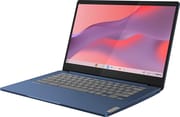
The Lenovo IdeaPad Slim 3 Chromebook (Gen 8, 14” MediaTek) is a budget ChromeOS laptop aimed at students, light home users, and anyone who needs a no-fuss web machine that does not heat up or fan up. Lenovo pairs a fanless MediaTek Kompanio 520 (MT8186) with a 14-inch Full HD IPS touchscreen, Wi-Fi 6, and a 47 Wh battery rated at 13.5 hours, then wraps it all in a 2.87-pound Abyss Blue chassis. Chrome will keep pushing automatic updates to this device through June 2033, which is unusually generous for a sub-$300 machine. It will not replace a Chromebook Plus for heavy multitasking, but for browsing, Google Docs, video, and casual Android games it punches well above its sticker. Buyers cross-shopping should also look at the Acer Chromebook Plus 514 and the smaller Lenovo Chromebook Duet (Gen 9) for comparison.
| Pros | Cons |
|---|---|
| 14-inch FHD IPS touchscreen punches above the price tier | Only 4GB of LPDDR4x RAM caps real multitasking |
| Fanless design runs silent and stays cool | 64GB of eMMC storage fills up quickly with Android apps |
| 13.5-hour battery life handles a full school or work day | No HDMI port; external displays require the single USB-C |
| Wi-Fi 6 and Bluetooth 5.1 in a budget Chromebook | Keyboard is not backlit |
| Physical webcam privacy shutter on a budget device | 720p webcam looks soft and struggles in low light |
| Auto Update Expiration runs through June 2033 | Plastic build flexes if you press the lid hard |
Related Videos
Lenovo IdeaPad Slim 3 Chromebook Comparison Chart
 Lenovo IdeaPad Slim 3 Chromebook | |
| Price | List Price: $319.00 Amazon Prices: Loading prices... Best Buy: Loading price... |
| Model number | 82XJ0000US |
| Performance Rating | 3.8 |
| Chromebook Plus | No |
| Processor | Octa-core 2.00 Ghz MediaTek Kompanio 520 |
| RAM | 4 GB |
| Internal Storage | 64 GB eMMC |
| Screen Size | 14" |
| Screen Resolution | 1920x1080 |
| Screen Type | IPS |
| Touch Screen | Yes |
| Stylus / Pen | No Stylus Support |
| Dimensions width x length x thickness | 12.83 x 8.7 x 0.73 inches (325.88 x 220.98 x 18.54 mm) |
| Weight | 2.87 lbs (1.3 kg) |
| Backlit Keyboard | No |
| Webcam | 720p HD |
| WiFi | Wi-Fi 6 (802.11ax) |
| Bluetooth | Bluetooth 5.1 |
| Ethernet | No |
| Cellular Modem | No |
| HDMI | No HDMI |
| USB Ports | 1 USB 3, 1 USB-C 1x USB-C 3.2 Gen 1 (PD, DisplayPort), 1x USB-A 3.2 Gen 1 |
| Thunderbolt Ports | No |
| Card Reader | microSD Card Reader |
| Battery | 47Wh, Li-ion |
| Battery Life | 13.5 hours |
| Fanless | Yes |
| Auto Update Expiration Date | June, 2033 |
Related Chromebooks
-
 Lenovo 14e Chromebook (Gen 3)Lightweight and versatile, the Lenovo 14e Chromebook features a 14-inch FHD IPS touch display,…
 -
 ASUS Chromebook CM14 FlipThe ASUS Chromebook CM14 Flip offers a versatile 360-degree convertible design with a 14-inch…
 -
 Lenovo Flex 3i Chromebook 12.2"The Lenovo Flex 3i Chromebook astounds with a 12.2" IPS touch screen, quad-core processing power,…
 -
 HP Chromebook 14a (2021)The HP Chromebook 14a combines a 14-inch BrightView touchscreen, HD webcam, and up to 14 hours of…
 -
 ASUS Chromebook Flip C434The 2019 ASUS Chromebook Flip C434 is a 14-inch convertible with a slim-bezel FHD touchscreen, an…
 -
 HP Chromebook 14 G6The HP Chromebook 14 G6 offers a 14-inch anti-glare TN display, Wi-Fi 5 connectivity, and up to…
Design and Build
The Slim 3 Chromebook 14 measures 12.83 x 8.70 x 0.73 inches and weighs 2.87 pounds, putting it on the lighter end of 14-inch laptops despite its all-plastic construction. The lid uses a two-tone Abyss Blue finish with a subtly textured panel that hides fingerprints better than the glossy plastics common at this price. XDA’s Arif Bacchus noted that it is “super lightweight” and called the color “beautiful,” though he flagged that the plastic “flexes under pressure” if you press hard on the lid or palm rest. Chrome Unboxed put it more plainly: “It’s all plastic, but it feels firm in your hands; I can’t wrench on it; it’s really well put together.”
A 180-degree hinge lets you flatten the laptop against a desk, which is useful for shared viewing and for handing the screen across a study table. A physical webcam privacy shutter sits above the display, a touch that is still rare on budget machines. There is no fingerprint reader on this configuration, and the speakers sit on the keyboard deck firing upward, which keeps the lap-side cooler since this is a fanless design.
Display and Touchscreen
The 14-inch 1920x1080 IPS panel is the headline feature for the price. HiTechKing’s review measured “100% sRGB” coverage and called it “a great-looking display that far exceeds expectations for its category.” Chrome Unboxed went further: “My favorite part of this thing is actually the screen, and I don’t think I’ve ever said that for a sub $200 Chromebook.” The panel pushes around 300 nits of brightness with a matte finish, which keeps glare manageable in a classroom or coffee shop.
One caveat: panel quality varies by region and SKU. MergeDroid tested a TN-panel variant sold outside the US and warned that “you really need to be careful with the spec of the 14-inch screen” because some markets ship a lower-grade panel. The US-market configurations sold under both ASINs here are the FHD IPS touchscreen, which is the one most US buyers will encounter on Amazon. The touchscreen registers Android-app taps cleanly and supports the standard ChromeOS gestures, though Lenovo does not bundle a stylus.
Performance and Everyday Use

The MediaTek Kompanio 520 (MT8186) inside the Slim 3 is an 8-core ARM SoC: 2 Cortex-A76 cores at 2.0 GHz for heavier work and 6 Cortex-A55 cores for background tasks, plus a Mali-G52 MC2 GPU. It is a step up from the older Kompanio 500 (MT8183) used in earlier sub-$200 Chromebooks, but it is still firmly in the entry-tier. Chrome Unboxed called the multitasking margin “better than the older MT8183” while still cautioning that the processor “lags significantly under heavy multitasking” once you push past ten or so tabs.
In practice, the Slim 3 handles the workloads ChromeOS is built around: a handful of Google Docs tabs, Gmail, YouTube, a Meet call, Spotify in the background, and one or two Android apps. HiTechKing summed it up as great for everyday Chromebook tasks like browsing, streaming, and basic productivity, then warned that “you will notice a big slowdown when heavily multitasking or running power-hungry apps.” Casual Android games like Roblox and Clash Royale run fine; HiTechKing’s COD Mobile test “failed to run well,” which is a fair line in the sand for this class of hardware.
The 4GB of soldered LPDDR4x RAM is the harder ceiling. ChromeOS has gotten better at swapping tabs to disk, but 4GB still fills up quickly once you stack web apps and Android apps together. The 64GB of eMMC is similarly tight; if you plan to install many Android apps or keep media offline, plan on adding a microSD card.
Connectivity and Ports

The port selection is the most obvious compromise at this price. You get one USB-C 3.2 Gen 1 port that handles charging, data, and DisplayPort output, one USB-A 3.2 Gen 1 port, a 3.5mm combo audio jack, and a microSD card reader. There is no HDMI port: external monitors hang off the single USB-C, which doubles as your charging port unless you carry a USB-C hub. MergeDroid pointed out a second caveat for multi-monitor users: only one external monitor is supported, which matches what the Kompanio 520’s display engine can drive.
Wireless is where Lenovo splurged. Wi-Fi 6 (802.11ax) is uncommon at this price and meaningfully improves throughput on a modern router, and Bluetooth 5.1 covers wireless mice, keyboards, and headphones without surprises. If you need wired networking, a USB-A Ethernet adapter works fine off the single USB-A port.
Keyboard, Trackpad, and Webcam
Reviewers were unusually warm on the keyboard for a budget Chromebook. MergeDroid said “Lenovo really nailed a reassuring typing experience on this keyboard, and it doesn’t scream entry-level to me at all.” HiTechKing agreed the keys feel “tactile” and quiet for the price, though both reviewers flagged the lack of backlighting as a real downside if you type in dim rooms. The trackpad is plastic rather than glass; Chrome Unboxed called tracking “smooth and reliable,” while HiTechKing noted the plastic surface “lacks the precision of glass models” you would find on Chromebook Plus machines.
The 720p webcam is functional for video calls in good light and not much more. PCWorld’s review called it “disappointing,” and HiTechKing rated it “only adequate.” All three reviewers liked that Lenovo included a physical privacy shutter, which is a quiet touch of class on a sub-$300 machine. The dual upward-firing speakers in the keyboard deck are a clear win over the bottom-firing tinny speakers common on cheap clamshells, though Chrome Unboxed still called them short on “quality and depth.” Plan on headphones for music.
Battery and Software Lifecycle
Lenovo rates the 47 Wh battery for 13.5 hours of mixed use, and both MergeDroid and HiTechKing landed close to that figure in real testing. MergeDroid called battery life “certainly one of the strongest points of this Slim 3 Chromebook,” and HiTechKing said it is “as good as the display, if that even makes sense.” Fanless ARM SoCs like the Kompanio 520 sip power, and the result is a Chromebook that genuinely makes it through a school day with a charger left at home.
Auto Update Expiration runs through June 2033, per Google’s official AUE schedule. That is roughly seven years of guaranteed ChromeOS updates from today, which is unusually long for a budget device. For more on what AUE means in practice, see What is the Chromebook Auto Update Expiration date?.
Reviewer Consensus
XDA Developers (Arif Bacchus) scored the Slim 3 Chromebook 8/10, calling it “a surprisingly good ChromeOS device for under $400” with a “bright 14-inch FHD touch display” and “long battery life.” His main reservations were the soldered 4GB of RAM, the slow eMMC, and the soft 720p webcam. He framed it as a first Chromebook for students or a parents-and-grandparents machine, not a workhorse for power users.
Android Central (Andrew Myrick) was kinder on the SoC, writing that the MediaTek processor is “surprisingly capable” for the price and that the device is one of those Chromebooks that “just works.” He flagged the same RAM and storage limits, but said the value proposition more than makes up for them at street prices.
PCWorld (Ashley Biancuzzo) was the most measured of the three, awarding 3.5 out of 5. She liked the build quality and battery life and called it “a solid, low-cost option for young professionals or college students,” but said it is “not the fastest Chromebook around” and singled out the 720p webcam as the most obvious shortcut.
Across the three written reviews and three verified video reviews, the consensus is consistent: standout battery and display for the price, real but predictable compromises on RAM, storage, the webcam, and the port count. Nobody recommended it for heavy creators or full-time professionals; everyone recommended it for students, casual users, and as a clean machine for grandparents or kids.
Customer Reviews of the Lenovo IdeaPad Slim 3 Chromebook
Across 1,350 ratings on Amazon, the Lenovo IdeaPad Slim 3 Chromebook averages 4.2 stars, with 68 percent of buyers leaving five stars and a smaller cluster (9 percent) leaving one. The praise leans heavily on value and the touchscreen, especially for casual users, kids, and older relatives. A verified buyer posting as “Amazon Customer” called it a “touchscreen computer for my older parent made it easier for her to use,” and verified buyer Kristi Collins said it was “Perfect for homeschooling my boys.” Verified buyer missadie wrote that “the touch screen is useful and a fair size,” and that it was “compatible with all of the programs that he had hoped to use it for” for a child’s machine.
The critical reviews are worth taking seriously and tend to agree on the same points: occasional sluggishness and a weak trackpad. Verified buyer Dylan, who rated it three stars, noted it “lags a bit when surfing the Internet” and was blunt that “The mousepad is absolute garbage and either is delayed or misses your finger movements entirely so I suggest a wireless mouse,” while still finding the screen quality “surprisingly good.” Verified buyer cbw (four stars) described a “hesitation or ‘glitch’ constantly, which I find irritating,” and verified UK buyer Graeme Syme warned it “struggles if you have a number of apps open at one time.” Several reviewers softened these complaints by pointing back to the low price; this is a budget Chromebook and owners who keep their expectations modest seem the most satisfied.
Read more owner reviews on Amazon.
Conclusion
The Lenovo IdeaPad Slim 3 Chromebook 14 (MediaTek) is one of the easiest budget Chromebook recommendations on the market right now. The fanless design, the 14-inch FHD IPS touchscreen, the 13.5-hour battery, and the genuinely long AUE through June 2033 give it more longevity than most laptops in its tier. For a student, a casual second machine in the house, or a clean ChromeOS device for parents or grandparents, this is a sensible choice.
It is not the right pick if you live in twenty browser tabs at once or if you need to drive multiple external monitors, do real video editing, or run heavy Android apps. Power users should step up to a Chromebook Plus machine with 8GB of RAM and a faster Intel or AMD chip. If you specifically want a smaller, more portable form factor, the Lenovo Chromebook Duet (Gen 9) trades the 14-inch screen for a detachable 11-inch tablet.
For broader cross-shopping, see our Chromebook comparison chart to line this device up against the rest of the budget and mid-range field.
Frequently Asked Questions
What processor does the Lenovo IdeaPad Slim 3 Chromebook (MediaTek) use?
The Slim 3 Chromebook 14 uses the MediaTek Kompanio 520 (model number MT8186), an 8-core ARM SoC with two Cortex-A76 cores at 2.0 GHz and six Cortex-A55 efficiency cores, paired with a Mali-G52 MC2 GPU. It is a fanless chip designed for entry-tier Chromebooks and runs ChromeOS, Android apps, and ARM-native Linux apps. It is not built for heavy multitasking or demanding games.
Can I upgrade the RAM or storage in the Lenovo IdeaPad Slim 3 Chromebook?
No. Both the 4GB of LPDDR4x RAM and the 64GB of eMMC storage are soldered to the mainboard and cannot be upgraded after purchase. The microSD card slot is the only realistic way to add storage; plan on a 64GB or 128GB card if you intend to install many Android apps or keep media offline.
What ports does the Lenovo IdeaPad Slim 3 Chromebook have?
The Slim 3 Chromebook 14 has one USB-C 3.2 Gen 1 port (which handles charging, data, and DisplayPort output), one USB-A 3.2 Gen 1 port, a 3.5mm combo audio jack, and a microSD card reader. There is no HDMI port; an external monitor connects through the single USB-C port, which is the same port you use to charge.
When does the Lenovo IdeaPad Slim 3 Chromebook stop getting updates?
Google’s Auto Update Expiration (AUE) date for the Slim 3 Chromebook 14 (MTK) is June 2033, per Google’s official AUE schedule. That gives the device roughly seven years of guaranteed ChromeOS feature and security updates from today. After AUE, the device still boots and runs, but Google no longer ships updates to it.
Does the Lenovo IdeaPad Slim 3 Chromebook run Android apps and Linux apps?
Yes. The Slim 3 Chromebook 14 runs Android apps from the Google Play Store natively on its ARM SoC and supports the ChromeOS Linux development environment for ARM-compatible Linux applications. Because the Kompanio 520 is an ARM chip, most Android apps run particularly smoothly, but x86-only Linux software will not run.
Is the Lenovo IdeaPad Slim 3 Chromebook a Chromebook Plus model?
No. The MediaTek Kompanio 520, 4GB of RAM, and 64GB of eMMC do not meet Google’s Chromebook Plus hardware requirements, which start at an Intel Core i3, AMD Ryzen 3, or higher with at least 8GB of RAM and 128GB of storage. If you specifically want Chromebook Plus features (advanced AI tools, the higher webcam tier, the premium spec floor), look at our Chromebook Plus guide instead.
How long does the battery last on the Lenovo IdeaPad Slim 3 Chromebook?
Lenovo rates the 47 Wh battery at up to 13.5 hours of mixed use, and reviewers including MergeDroid and HiTechKing landed close to that figure in real testing. Plan on roughly 9 to 12 hours for typical browsing, Docs, and video at moderate brightness; heavier Android apps and full-brightness HD video will pull that lower.