
Lenovo Chromebook Duet 11" (2024)
Updated on

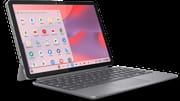
The Lenovo Chromebook Duet 11” (2024), also called the Duet Gen 9, is a detachable ChromeOS tablet that ships with its keyboard and kickstand case in the box. The 10.95-inch 1920x1200 IPS touchscreen runs around 400 nits, and the whole thing is powered by the ARM-based MediaTek Kompanio 838, sold in 4GB or 8GB RAM configurations with 64GB or 128GB of storage. It is fanless, weighs 1.12 pounds as a tablet, rates around 10 to 12 hours of battery, and supports a USI 2.0 stylus.
Over the older Duets it adds dual USB-C ports, better cameras, and a redesigned kickstand that works in both landscape and portrait. With ChromeOS updates promised into 2034, that makes it a sensible budget pick for students and casual users who want a tablet-or-laptop they can carry everywhere, as long as they keep expectations modest on heavy multitasking.
| Pros | Cons |
|---|---|
| Keyboard and kickstand case included in the box | Small keys, no backlight, and a folio Laptop Mag called mushy |
| Bright ~400-nit 1920x1200 IPS touchscreen | NotebookCheck found the tablet-keyboard attachment wobbly |
| Light (1.12 lb tablet) and fanless | No expandable storage; no microSD slot |
| 10 to 12 hours of battery in real use | Kompanio 838 lags x86 Chromebooks on heavy multitasking |
| Dual USB-C ports; USI 2.0 stylus support | Speakers are loud but light on bass |
| Redesigned kickstand works portrait and landscape | IPS, not OLED, and no high refresh rate |
| ChromeOS updates through June 2034 | 4GB model is memory-limited; 8GB is the better buy |
Related Videos
Lenovo Chromebook Duet 11" (2024) Comparison Chart
 Lenovo Chromebook Duet 11" (2024) | Lenovo Chromebook Duet 11" (2024) | Lenovo Chromebook Duet 11" (2024) | |
| Price | List Price: $359.99 Amazon Prices: Loading prices... | List Price: $399.99 Amazon Prices: | List Price: $379.99 Amazon Prices: Best Buy: Loading price... |
| Model number | 83HH0014US | 83HH0001US | 83HH0002US |
| Performance Rating | 4.0 | 5.1 | 4.0 |
| Chromebook Plus | No | No | No |
| Processor | Octa-core 2.60 Ghz MediaTek Kompanio 838 (8188) | Octa-core 2.60 Ghz MediaTek Kompanio 838 (8188) | Octa-core 2.60 Ghz MediaTek Kompanio 838 (8188) |
| RAM | 4 GB | 8 GB | 4 GB |
| Internal Storage | 64 GB emmc | 128 GB emmc | 128 GB emmc |
| Screen Size | 10.95" | 10.95" | 10.95" |
| Screen Resolution | 1920x1200 | 1920x1200 | 1920x1200 |
| Screen Type | IPS | IPS | IPS |
| Touch Screen | Yes | Yes | Yes |
| Stylus / Pen | Supported | Supported | Supported |
| Dimensions width x length x thickness | 10.05 x 6.57 x 0.29 inches (255.27 x 166.88 x 7.37 mm) | 10.05 x 6.57 x 0.29 inches (255.27 x 166.88 x 7.37 mm) | 10.05 x 6.57 x 0.29 inches (255.27 x 166.88 x 7.37 mm) |
| Weight | 1.12 lbs (0.51 kg) | 1.12 lbs (0.51 kg) | 1.12 lbs (0.51 kg) |
| Backlit Keyboard | No | No | No |
| Webcam | 5.0MP | 5.0MP | 5.0MP |
| WiFi | Wi-Fi 6 (802.11ax) | Wi-Fi 6 (802.11ax) | Wi-Fi 6 (802.11ax) |
| Bluetooth | Bluetooth 5.3 | Bluetooth 5.3 | Bluetooth 5.3 |
| Ethernet | No | No | No |
| Cellular Modem | No | No | No |
| HDMI | No HDMI | No HDMI | No HDMI |
| USB Ports | 2 USB-C | 2 USB-C | 2 USB-C |
| Thunderbolt Ports | No | No | No |
| Card Reader | No Card Reader | No Card Reader | No Card Reader |
| Battery | 29Wh, Li-ion | 29Wh, Li-ion | 29Wh, Li-ion |
| Battery Life | 12.0 hours | 12.0 hours | 12.0 hours |
| Fanless | Yes | Yes | Yes |
| Auto Update Expiration Date | June, 2034 | June, 2034 | June, 2034 |
Related Chromebooks
-
 Lenovo Chromebook Duet 5The Lenovo Chromebook Duet 5 features a vivid 13.3" OLED touchscreen, versatile notebook form…
 -
 ASUS Chromebook CM30 DetachableThe ASUS Chromebook CM30 Detachable bundles a 10.5-inch WUXGA touchscreen tablet, a keyboard folio,…
 -
 Lenovo Chromebook DuetLenovo Chromebook Duet offers a 10.1" touch IPS display, versatile tablet form factor, and 10-hour…
 -
 ASUS Chromebook CM32 DetachableThe ASUS Chromebook CM32 Detachable pairs a 12.1-inch 2.5K 120Hz touchscreen rated at 600 nits with…
 -
 Acer Chromebook 311An 11.6-inch Chromebook with an Intel Celeron N4000, 4GB of RAM, a fanless chassis, and up to 10…
 -
 Acer Chromebook Spin 311The Acer Chromebook Spin 311 (CP311-3H) is an 11.6-inch convertible on an eight-core MediaTek…
The kickstand now works in portrait, and the storage is fixed
The 10.95-inch 16:10 IPS touchscreen runs 1920x1200 at around 400 nits, bright enough for indoor and most outdoor use. The keyboard and kickstand case attach magnetically, so it switches between tablet and laptop modes quickly, and the redesigned kickstand now holds both landscape and portrait, which helps for video calls, reading, or stylus work. As a tablet it weighs 1.12 pounds and runs fanless.
The MediaTek Kompanio 838 is an ARM chip tuned for ChromeOS: smooth for browsing, streaming, and light productivity, but not a match for x86 silicon under load. It comes with up to 8GB of RAM and 128GB of eMMC storage, with no expandable storage, and supports a USI 2.0 stylus. The 29Wh battery is rated for roughly 10 to 12 hours, and connectivity is dual USB-C, Wi-Fi 6, and Bluetooth 5.3. Other touches include a 5MP front camera with a privacy shutter, an 8MP rear camera, and a spill-resistant keyboard, with ChromeOS updates promised into 2034.
Reviewer Insights
This is the Gen 9 model (2024, model family 83HH), the 11-inch detachable built on MediaTek’s Kompanio 838. It should not be confused with the original 2020 Duet, the Duet 3, or the larger Duet 5; the reviews below are all of the Gen 9 specifically. NotebookCheck and Laptop Mag ran instrumented lab tests, and the video reviewers worked from hands-on use.
NotebookCheck: 423 nits measured, with a blue cast
NotebookCheck’s review, subtitled “Mobile energy-saving champion,” gave the Duet 11 a score of 78%. Their X-Rite i1Pro 3 colorimeter measured the panel at 423.1 nits peak brightness with a 396.5-nit average, slightly above Lenovo’s 400-nit claim, alongside a strong 1487:1 contrast ratio and 98.3% sRGB coverage. On color accuracy they recorded a cool 8417K white point and a greyscale Delta-E of 11.7, which they summarized as “a clear blue cast and only moderate color reproduction.” On runtime they wrote, “With a battery life of ten to twelve hours, you can easily get through the day,” from the 29Wh cell.
On rigidity, “The tablet and keyboard unit feel a little wobbly,” the reviewers wrote. “In tests, both can be twisted quite easily. The magnetic connections between the three parts are also somewhat weak.” The keyboard drew a similar verdict: “The small keys with a short stroke and barely perceptible haptic feedback take some getting used to. The keyboard is sufficient for short texts and notes, but less suitable for longer writing tasks.” On performance, NotebookCheck framed the Kompanio 838 as adequate for Chrome OS but no match for x86 silicon, listing “limited performance (especially compared to x86 processors)” as the headline con.
Laptop Mag: 402 nits, a 0.33 Delta-E, and a mushy folio
Laptop Mag tested the 4GB review unit and landed in a similar place on the display while reaching a different conclusion on color. Their instruments measured 402 nits of brightness and 83% DCI-P3 coverage with an excellent 0.33 Delta-E, so the panel can be well calibrated even though NotebookCheck saw a blue cast out of the box. On the publication’s standardized battery test, which sets the screen to 150 nits and continuously loads web pages, the Duet “lasted 9 hours and 47 minutes.” Reviewer Madeline Ricchiuto typed at “88 words per minute” on the folio yet still called it a “Mushy keyboard on the attached folio” in the cons, and flagged that “having 4GB memory does limit some applications,” a useful steer toward the 8GB configuration.
PCWorld: sturdy magnets and a chug past six or seven tabs
PCWorld did not run display or battery instrumentation but ran a full browser benchmark suite and spent extended hands-on time with the keyboard. Michael Crider’s headline limitation was multitasking headroom: “When you load up Chrome with more than six or seven tabs, especially with something particularly heavy like Gmail,” he wrote, “it tends to chug a bit.” He was warmer on the build than NotebookCheck, describing the keyboard magnets as “nice and sturdy, far less likely to move around” and the redesigned keys as having “increased travel distance” that made “typing for extended periods surprisingly natural.” The touchpad, he noted, “is plastic instead of glass, but is more than serviceable.” PCWorld and NotebookCheck disagree on how solid the magnetic attachment feels, so expect some unit-to-unit or use-case variance there.
Chrome Unboxed: 10 plus hours and a 120 Hz external monitor
Chrome Unboxed called it “the best Chromebook tablet you can buy,” praising the thoughtful upgrades over its predecessors. The reviewer called the 1920x1200 IPS display “gorgeous,” liked the build, and rated the included keyboard and kickstand case as a real advantage. On performance, he found the Kompanio 838 capable enough for everyday work and was impressed that it could push his “QHD monitor to 120 Hz.” He liked the redesigned hinge, calling the angle “kind of genius,” and said the battery was “easily getting me 10 plus hours of use on a single charge.” His knocks were that the speakers are loud but light on bass, and the rear camera is “absolutely serviceable” but no match for a phone. Watch the full review here.
Lon.TV: bundled accessories offset the multitasking limits
Lon.TV framed it as “a very good value,” with the keyboard, kickstand, and stylus (on some models) bundled at no extra cost, and praised the versatility of running Android, Linux, and web apps on ChromeOS. He found the Kompanio 838 and up to 8GB of RAM fine for basic tasks, media, and light gaming, while noting that heavy multitasking slows it down. He liked the keyboard’s tactile feedback and deep travel, with the smaller size and lack of backlighting as minor drawbacks, rated battery life at “about 10 hours,” and welcomed the dual USB-C ports. His takeaway was that it suits budget-conscious buyers who want a flexible, portable device. Watch the full review here.
Android Digest: the kickstand and the magnetic stylus mount
Android Digest shared an enthusiastic first impression, focusing on the build and design. He liked the redesigned kickstand and called the overall design “unique,” with the leather-like case texture and the magnetic mount for the USI 2.0 stylus as premium touches. He rated the display “very, very good,” looking better than the price suggests. He found the Kompanio 838 smooth for everyday use while acknowledging heavy multitasking can challenge it, and said that against Lenovo’s promised 12 hours he was getting “really good battery life.” He also stressed the value of bundling the keyboard and kickstand that rivals often sell separately. Watch the full impressions here.
Shared verdicts and the runway to June 2034
The display measures right around its 400-nit rating and looks bright for the class, though NotebookCheck’s instruments caught a blue cast that Laptop Mag’s calibrated numbers did not. Battery life runs all day. The most comparable figure is Laptop Mag’s 9-hour-47-minute standardized result at 150 nits, while NotebookCheck and the video reviewers land in the 10-to-12-hour range under lighter loads. The included keyboard and kickstand draw consistent praise as value, and consistent caveats on typing feel, with “mushy” and “short stroke” recurring even from reviewers who liked the device overall. Heavy multitasking is the shared ceiling, and PCWorld’s “six or seven tabs” observation matches the limited-multitasking complaints owners raise below.
The Kompanio 838 (MediaTek part MT8188) is an ARM chip, not an x86 one, so it does not have a PassMark-style desktop benchmark that lines up against Intel or AMD parts. It pairs four Arm Cortex-A78 performance cores with four Cortex-A55 efficiency cores, a clear step up from the Cortex-A73-based Helio P60T in the original 2020 Duet, and it is the source of the fanless, all-day battery behavior the reviews keep noting. NotebookCheck put it as fine for Chrome OS browsing, media, and light productivity, but outpaced by x86 Chromebooks when you push it. Google’s Auto Update Expiration for the “Chromebook Duet (11”, 9)” is June 2034, so a Gen 9 bought in 2026 still has roughly eight years of Chrome OS updates and security patches ahead of it.
Customer Reviews
Across 155 ratings on Amazon, the Duet 11 averages 4.2 stars, with 68% of raters leaving 5 stars and 11% leaving a single star. The recurring praise centers on build quality, the screen, battery life, and the tablet-or-laptop flexibility. A verified buyer writing as GLaDOS summed up the upside this way: “The screen is nice and bright, battery life is good, the build quality is superb, the speakers are nice and loud (though the bass is lacking in my opinion).” That same reviewer set expectations on performance, comparing it to a mid-tier Android tablet that “can be bogged down if you push the limits with something demanding, but for day to day things it functions quite well,” and noted the tablet ships without a stylus. Verified buyer Sinny flagged some keyboard quirks for anyone coming from a standard laptop: no dedicated Caps Lock key, no Delete key, and no physical right-click button on the touchpad.
Verified buyer postwatch left a 1-star review after three months, writing “Freeze up after freeze up. This is worse than using AOL in 1996,” and reporting a laggy on-screen keyboard and apps that lacked full functionality. Even a 4-star verified review from devina, broadly positive, conceded “A few bugs and can be slow at times.” The slowdowns those owners describe show up under load; for lighter web browsing and media use, most reviewers here are satisfied. Read more owner reviews on Amazon.
The 8GB build is the one to buy
Laptop Mag’s 4GB review unit ran into applications the memory limited, and PCWorld hit slowdowns past six or seven tabs, so the extra RAM buys the headroom this chip needs most. Storage is fixed whichever build you pick, at 64GB or 128GB with no card slot, so take the 128GB configuration if much of your work lives offline.
For light web work and media the package holds up well. Look elsewhere if you want a backlit keyboard or speakers with more bass. To compare it with other models, use Starry Hope’s Chromebook Comparison Chart.
Frequently Asked Questions
Q: Does the Lenovo Chromebook Duet 11” (2024) come with a keyboard and kickstand?
A: Yes, both ship in the box. The keyboard folio and kickstand case attach magnetically, so you can switch between tablet and laptop modes in a second.
Q: Can I expand the storage on this Chromebook?
A: No. There is no microSD card slot and the eMMC storage is not upgradeable, so the 64GB or 128GB you buy is what you keep.
Q: Does the device support styluses?
A: USI 2.0 styluses work for note-taking, drawing, and annotating documents, and the tablet has a magnetic mount for one. Some retail bundles include a stylus and some do not.
Q: How long will this Chromebook receive updates?
A: Google lists Auto Update Expiration for this model as June 2034, so a unit bought today still has years of Chrome OS updates and security patches ahead of it.
Q: Is the keyboard backlit? A: No, the included keyboard has no backlight, which matters if you often type in a dark room. If backlighting is a requirement, see our list of Chromebooks with backlit keyboards.
Q: How good is the battery life?
A: Reviewers landed between 10 and 12 hours of everyday use. Laptop Mag’s standardized test, which holds the screen at 150 nits and loads web pages continuously, came in at 9 hours and 47 minutes.
Q: Can I connect external monitors or peripherals?
A: Yes. The two USB-C ports carry power, data, and video, and Chrome Unboxed drove a QHD monitor at 120 Hz.
Q: Is this Chromebook good for gaming?
A: Light and cloud gaming, yes. Lon.TV found the Kompanio 838 fine for light gaming alongside media and basic tasks, but the chip does not have the headroom for demanding titles.
Q: Does it have a headphone jack?
A: Yes, a combo headphone and microphone jack for wired audio.
Q: Is this a good device for students? A: Yes. Its light weight, long battery life, and included keyboard make it a practical pick for students who need a portable device for note-taking and research. Lean toward the 8GB model if you keep a lot of tabs open.