
ASUS Chromebook CM30 Detachable
Published on

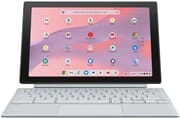
The ASUS Chromebook CM30 Detachable comes with a 10.5-inch WUXGA touchscreen tablet, a magnetic keyboard folio with a kickstand, and a garaged USI 2.0 stylus, all running on the fanless MediaTek Kompanio 520 platform. The chassis is metal, the display reaches 400 nits, and the ARM silicon gives roughly twelve hours of mixed use. Updates are guaranteed through June 2033. It is a budget detachable for anyone who wants a keyboard and a stylus without carrying a clamshell.
The keyboard folio uses magnets to align the kickstand and snaps the tablet into place far more confidently than older Duet covers. The stylus charges inside the body and stays out of your way until you need it, and the 5MP cameras front and back handle video calls and quick document scans. The Kompanio 520 sits below the Kompanio 1380 and Snapdragon ChromeOS silicon, so heavy multitasking surfaces its limits.
A full bundle on a chip with little headroom
| Pros | Cons |
|---|---|
| Keyboard folio, kickstand cover, and USI 2.0 stylus all included in the box | Modest performance from MediaTek Kompanio 520 |
| Aluminum chassis with magnetic keyboard alignment | Only one USB-C port for charging, data, and video |
| Bright 400-nit WUXGA touchscreen | Speakers are thin and easy to cover when held in tablet mode |
| Fanless operation with roughly 12 hours of battery life | Dated-looking bezels around the display |
| AUE support through June 2033 | External video output capped at 1080p, no 4K out |
| 5MP cameras front and rear plus a proper combo audio jack | No keyboard backlight and no fingerprint reader |
Related Videos
ASUS Chromebook CM30 Detachable Comparison Chart
 ASUS Chromebook CM30 Detachable | |
| Price | List Price: $179.99 Amazon Prices: Loading prices... |
| Model number | CM3001DM2A-WS88T-S |
| Performance Rating | 4.3 |
| Chromebook Plus | No |
| Processor | Octa-core 2.00 Ghz MediaTek Kompanio 520 |
| RAM | 8 GB |
| Internal Storage | 128 GB eMMC |
| Screen Size | 10.5" |
| Screen Resolution | 1920x1200 |
| Screen Type | IPS |
| Touch Screen | Yes |
| Stylus / Pen | Supported |
| Dimensions width x length x thickness | 10.22 x 6.66 x 0.35 inches (259.59 x 169.16 x 8.89 mm) |
| Weight | 1.34 lbs (0.61 kg) |
| Backlit Keyboard | No |
| Webcam | 5MP front and rear |
| WiFi | Wi-Fi 6 (802.11ax) |
| Bluetooth | Bluetooth 5.4 |
| Ethernet | No |
| Cellular Modem | No |
| HDMI | No HDMI |
| USB Ports | 1 USB-C 1x USB-C with PD and DisplayPort (1080p out max) |
| Thunderbolt Ports | No |
| Card Reader | No Card Reader |
| Battery | 38Wh, Li-ion |
| Battery Life | 12 hours |
| Fanless | Yes |
| Auto Update Expiration Date | June, 2033 |
Related Chromebooks
-
 ASUS Chromebook Detachable CM3 (CM3000)The ASUS Chromebook Detachable CM3 is a 10.5-inch tablet (1.12 pounds alone, about 2 pounds with…
 -
 Lenovo Chromebook Duet 11" (2024)
 -
 ASUS Chromebook CM32 DetachableThe ASUS Chromebook CM32 Detachable pairs a 12.1-inch 2.5K 120Hz touchscreen rated at 600 nits with…
 -
 Lenovo Chromebook Duet 5The Lenovo Chromebook Duet 5 features a vivid 13.3" OLED touchscreen, versatile notebook form…
 -
 Acer Chromebook Spin 513The Acer Chromebook Spin 513 is a fanless 13.3-inch convertible Chromebook with a Qualcomm…
 -
 HP Chromebook x360 14aThe HP Chromebook x360 14a is a 14-inch convertible Chromebook with an Intel Celeron N4020, a…
Enough hardware for tab-and-document work
The CM30 tablet measures 10.22 by 6.66 by 0.35 inches and weighs about 1.34 pounds on its own; clip the keyboard folio in and the bundle lands close to two pounds, which is still lighter than nearly any clamshell Chromebook. ASUS uses an aluminum back and a soft-touch folio. The only physical port is a single USB-C that handles power, data, and DisplayPort output, alongside the combo headphone jack on the tablet edge. There is no microSD slot on the US CM3001 SKU and no HDMI of any kind, so external displays require a USB-C hub.
The MediaTek Kompanio 520 is an eight-core ARM processor running at 2.0 GHz with an Octane score around 25,000. That is enough headroom for the productivity work ChromeOS is built around: a dozen Chrome tabs, Google Docs, Gmail, and a streaming video on the side. Push beyond that and the limits show, particularly when you try to play 4K@60fps YouTube content (where the CM30 drops frames) or run heavier Android games. The processor is fanless and stays cool under typical workloads, which is part of why battery life lands where it does.
Wireless covers WiFi 6 (802.11ax) and Bluetooth 5.4, one generation past WiFi 5, and there is no cellular option on this SKU. Both cameras are 5MP, with the world-facing sensor positioned for quick document capture and the front-facing camera intended primarily for video calls. ASUS includes a 45W charger in the box, which is overkill for this device but useful if you charge other USB-C accessories alongside it. Storage is 128GB of soldered eMMC with no upgrade path; if you need more capacity, you will be leaning on Google Drive or an external USB-C drive.
Reviewer Insights
Lon Seidman of Lon.TV said the CM30 bundle costs less than a base iPad. “The price that you’ll pay for this device with the keyboard the tablet and a garage pen here at the top is less than what you would spend on a new entry-level iPad on its own,” he said in his review. He noted accurate trackpad behavior and a keyboard with long 1.5mm key travel. He also called out the dated bezels and the keyboard folio’s tendency to slip around when closed (there are no magnets holding the closed state together), but his overall verdict was that the bundle adds up if you set your performance expectations correctly.
Android Digest covered the CM30 in a 15-minute hands-on. The reviewer emphasized the included accessories and the 400-nit display, observing that “the battery life is very very good on this tablet… easily last over 10 hours and you might even get 12 or more depending on what you’re doing.” They acknowledged that the Kompanio 520 is a step behind the silicon in the Lenovo Duet 3 and Duet 5, but argued that “if it does go on sale… it’s actually going to be a good buy.” Their critique focused on the tinny speakers, the lone USB-C port, and the base 4GB RAM SKU, which they considered too cramped for ChromeOS.
Chrome Unboxed’s CES 2024 hands-on zeroed in on the build quality, which represents a major step up from the original CM3. “The whole thing just it feels really really well made and premium which is kind of wild for these tablets,” the reviewer said, contrasting the new magnetic alignment system with the looser fit on older detachable Chromebooks. They praised the keyboard’s 1.5mm travel and the headphone jack, but warned about brightness shift at off-angles and “weak, tinny speakers with no bass” that are easy to cover when you hold the tablet by its long edge. They treated it as a pre-production budget unit, and they were clear that “this won’t be the fastest tablet out there the day it launches; it’s just not the market for this thing.”
Customer Reviews
Across 13 ratings on Amazon, the CM30 averages 4.5 stars, with about 80% of reviewers leaving five stars and a couple of lower marks. The recurring praise is for the keyboard and the portable detachable form factor. Katherine K., a verified buyer who wanted something between a phone and a full laptop, wrote “This little chromebook is PERFECT. The keyboard is solid and responsive,” and noted the integrated pen meant she did not need a mouse. Another verified buyer was happy with the build and value but flagged a limitation: “The processor speed is a little slow at times.” Katherine K. raised the other common gripe, the single port: “Because all it has is a charger port.”
A verified reviewer using the handle AutomaticFailure left three stars after sending it back, writing “Returned, overall the product was great, just not the right fit.” With only 13 ratings the sample is small. Read more owner reviews on Amazon.
A travel and note-taking tablet at a budget price
The CM30 fits buyers who want a tablet first and a keyboard second. Students get stylus note-taking and Google Docs typing in an under-two-pound package, and the same weight makes it easy to carry through an airport. Anyone weighing an entry-level iPad against a ChromeOS device gets a keyboard here without paying extra for it.
Heavy Android apps and a faster touchscreen Chromebook point toward a Kompanio 1380 or Snapdragon tablet instead. The folio also has no keyboard illumination, so backlit-keyboard Chromebooks are the better option for typing in the dark.
For broader comparisons across ChromeOS hardware, the Chromebook comparison chart sorts current models side by side.
Frequently Asked Questions
What processor does the ASUS Chromebook CM30 Detachable use?
The MediaTek Kompanio 520, an eight-core ARM chip running at up to 2.0 GHz with an Octane score around 25,000. Web browsing, Google Docs, streaming video, and light Android apps run comfortably; demanding multitasking and 4K@60fps video playback do not.
When does the ASUS Chromebook CM30 Detachable lose ChromeOS update support?
Google lists the Auto Update Expiration (AUE) date for the CM3001 generation as June 2033. After that date the device keeps working but stops receiving new ChromeOS versions and security patches.
Can I upgrade the RAM or storage in the ASUS Chromebook CM30 Detachable?
No. The 8GB of RAM and 128GB of eMMC storage are both soldered to the board. There is also no microSD slot on the US CM3001 SKU, so plan to use Google Drive or an external USB-C drive for additional capacity.
What ports does the ASUS Chromebook CM30 Detachable have?
One USB-C port that handles charging, data, and DisplayPort video output at up to 1080p, plus a combo headphone and microphone jack on the tablet edge. There is no HDMI, no microSD slot, and no second USB-C.
Does the ASUS Chromebook CM30 Detachable include a stylus?
Yes. ASUS ships the CM3001 with a USI 2.0 active stylus that is garaged inside the tablet body and charges while stored. The same slot keeps the pen tethered to the device so you do not lose it between sessions.
What is in the box with the CM30 Detachable?
The tablet, the magnetic keyboard folio with built-in kickstand cover, the garaged USI 2.0 stylus, a 45W USB-C power adapter, and ASUS documentation. The keyboard and stylus ship with every unit.
Can the ASUS Chromebook CM30 Detachable run Android and Linux apps?
ChromeOS on the CM30 runs both Google Play Android apps and the Linux development environment for Debian-based packages. Lighter Android apps and command-line Linux work suit it best; heavy IDEs and 3D Android games will run but feel sluggish on the Kompanio 520.
How long does the battery last on the CM30 Detachable?
ASUS rates the 38Wh battery for up to 12 hours of mixed use, and reviewers land in the 10 to 12 hour range in real-world testing of web browsing, video, and document work. The fanless ARM processor is the main reason runtime holds up so well at this price point.
Does the CM30 Detachable have a backlit keyboard?
No. The included keyboard folio does not have backlighting. If keyboard illumination matters to you, look at one of our backlit-keyboard Chromebook picks instead.