
Acer Chromebook 311
Updated on

The Acer Chromebook 311 is an ultraportable 11.6-inch laptop sold in two flavors: the touchscreen CB311-9HT and the matte non-touch CB311-9H. Both share an Intel Celeron N4000 dual-core processor, 4GB of LPDDR4 memory, and 32GB of eMMC storage, with a fanless chassis that runs silently and a battery rated at 8 to 10 hours of real-world use. The pitch is simple: an entry price for students, writers, and travelers who need a reliable second device, without the bulk of a 14 or 15 inch machine. At 2.43 pounds (roughly 1.1 kg) and 0.71 inches thick, it slips into any bag, and the two full-function USB-C ports give it more docking flexibility than its asking price suggests. Auto Update Expiration is set for June 2029, so Google still ships fresh ChromeOS updates to this model.
| Pros | Cons |
|---|---|
| Exceptional value at under $200 when on sale (Lon.TV) | 1366x768 HD display falls short of 1080p standards |
| Dual full-function USB-C ports drive two 4K monitors at 60Hz (Lon.TV) | 4GB RAM is soldered, no upgrade path |
| 8 to 10 hour battery life under real-world use (Lon.TV) | 32GB eMMC fills quickly without cloud sync |
| Keyboard has good tactile feedback, suits longer typing sessions (Lon.TV) | Tinny speakers not ideal for media (Lon.TV) |
| Fanless, completely silent operation | No backlit keyboard for low-light typing |
| Runs native Linux apps via ChromeOS Crostini (Lon.TV) | Display tops out near 300 nits, dim under bright light (Lon.TV) |
Related Videos
Acer Chromebook 311 Comparison Chart
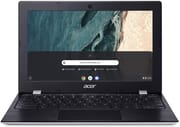 Acer Chromebook 311 | Acer Chromebook 311 | |
| Price | List Price: $259.99 Amazon Prices: | List Price: $279.99 Amazon Prices: Loading prices... |
| Model number | CB311-9HT-C4UM / NX.HKGAA.001 | CB311-9H-C12A / NX.HKFAA.001 |
| Performance Rating | 3.1 | 3.1 |
| Chromebook Plus | No | No |
| Processor | Dual-core 1.10 Ghz (max 2.60 Ghz) Intel Celeron N4000 Processor | Dual-core 1.10 Ghz (max 2.60 Ghz) Intel Celeron N4000 Processor |
| RAM | 4 GB | 4 GB |
| Internal Storage | 32 GB eMMC | 32 GB eMMC |
| Screen Size | 11.6" | 11.6" |
| Screen Resolution | 1366x768 | 1366x768 |
| Screen Type | IPS | IPS |
| Touch Screen | Yes | No |
| Stylus / Pen | No Stylus Support | No Stylus Support |
| Dimensions width x length x thickness | 11.7 x 7.8 x 0.71 inches (297.18 x 198.12 x 18.03 mm) | 11.7 x 7.8 x 0.71 inches (297.18 x 198.12 x 18.03 mm) |
| Weight | 2.43 lbs (1.1 kg) | 2.43 lbs (1.1 kg) |
| Backlit Keyboard | No | No |
| Webcam | 720p HD | 720p HD |
| WiFi | Intel Wireless-AC 802.11ac with 2x2 MU-MIMO | Intel Wireless-AC 802.11ac with 2x2 MU-MIMO |
| Bluetooth | Bluetooth 5.0 | Bluetooth 5.0 |
| Ethernet | No | No |
| Cellular Modem | No | No |
| HDMI | No HDMI | No HDMI |
| USB Ports | 2 USB 3, 2 USB-C (supports DisplayPort) | 2 USB 3, 2 USB-C (supports DisplayPort) |
| Thunderbolt Ports | No | No |
| Card Reader | microSD Card Reader | microSD Card Reader |
| Battery | 3 cell, Lithium-ion | 3 cell, Lithium-ion |
| Battery Life | 10.0 hours | 10.0 hours |
| Fanless | Yes | Yes |
| Auto Update Expiration Date | June, 2029 | June, 2029 |
Related Chromebooks
-
 Acer Chromebook Spin 311The Acer Chromebook Spin 311 offers an 11.6-inch HD touch display, versatile 360-degree hinge, and…
 -
 Acer Chromebook Spin 311The Acer Chromebook Spin 311 was a popular budget convertible that demonstrated how ARM-based…
 -
 ASUS Chromebook Flip C214The ASUS Chromebook Flip C214 combines versatility with a 360° hinge, 11.6-inch anti-glare…
 -
 HP Fortis Flip G1m 11 inch ChromebookThe HP Fortis Flip G1m 11 inch Chromebook is a rugged convertible 2-in-1 built for K-12 classrooms,…
 -
 Lenovo 300e Yoga Chromebook Gen 4The Lenovo 300e Yoga Chromebook Gen 4 is a rugged 11.6-inch education convertible with a MediaTek…
 -
 Dell Chromebook 3120A rugged and affordable 11.6-inch Chromebook with Intel N100 processor, available in clamshell and…
Detailed Insights into the Acer Chromebook 311
Build quality on this Chromebook punches above its price. The chassis is all plastic, but Lon Seidman described the keyboard as “really nice” with “nicely spaced keys that are very easy to type with good tactile feedback” and “decent key travel” for the class. The trackpad is a mechanical click pad that, in his testing, “tracks quite well” without feeling springy. The result is a 2.43-pound 11.6-inch laptop that feels like a working tool rather than a toy. Buyers shopping the CB311-9HT touchscreen variant get the same chassis with a glossy touch panel; the CB311-9H (model CB311-9H-C12A) uses a matte non-touch screen instead.
Performance from the Intel Celeron N4000 covers the basics. On browserbench.org’s Speedometer benchmark, Lon.TV measured a score of 51.3, which he said “puts this 11 inch chromebook right in line with its competitors in the marketplace” at this price. That maps to fluid web browsing, document editing, and video calls; it does not map to heavy Chrome tab loads, large spreadsheets, or pro creative work. The 4GB of RAM cannot be upgraded, so heavy multitaskers should look at a larger Chromebook with more memory instead. ChromeOS’s tight resource management helps, and the fanless design means the laptop will throttle before it ever gets loud (there are no fans to spin up).
Connectivity is the surprise upside on the spec sheet. Both USB-C ports are full-function, so each one handles power delivery, data, and video output, and Lon.TV connected the laptop to two external 4K displays and “was able to drive both of those displays independently at 4k at 60 frames per second and it was able to maintain its own internal display” at the same time. That is rare at this price. Two USB-A 3.0 ports round out the wired connections (handy for a USB ethernet adapter when WiFi is unreliable), and a microSD slot lets you offload some pressure from the 32GB internal drive. WiFi is 802.11ac with 2x2 MU-MIMO, Bluetooth is 5.0, and there is a 3.5mm headphone / microphone combo jack plus a Kensington lock slot.
Reviewer Insights on the Acer Chromebook 311
Lon Seidman’s Perspective
Lon Seidman from Lon.TV framed the Chromebook 311 as “basic transportation here, but it actually performs pretty well and I was impressed with the value proposition on this one.” His point was not that the hardware is exciting; it is that it costs little and still does the job. He flagged the keyboard as a stand-out feature for the segment and said directly, “if you’re doing a lot of writing I think this might be a really good laptop for writers looking for something simple to draft something on.” For people who already own a more capable laptop and want a light second machine, that framing lands.
The headline finding from his review was the dual 4K external display test. Despite the entry-level Celeron, Lon.TV ran two separate 4K monitors at 60Hz alongside the built-in panel and reported that the device “was able to drive both of those displays independently.” He also called out the security angle: “if you are somebody who’s concerned about an expensive laptop getting lost or stolen when you’re out and about this one I think will take a lot of that concern away.” That is the practical case for a $200-ish Chromebook over a $1,000 ultrabook for travel, coffee shop work, or field use. Readers who want to think through that case more fully may find our guide to budget Chromebooks for digital nomads useful.
Display, Linux Apps, and Speakers
The 1366x768 IPS panel is the weakest link, and Lon.TV did not soften it: he measured roughly 300 nits, calling it “not terribly bright but it’s a little brighter than some of the cheaper laptops I’ve looked at recently,” with “somewhat decent viewing angles” and a matte finish on the CB311-9H non-touch variant. For indoor desk use the panel is fine; for outdoor or bright window use, expect to squint. Sound is the other compromise: the bottom-firing grilles drive what he flatly called “very tinny speakers,” so plan on headphones or external speakers for any media that matters.
The upside that does not show up on most spec sheets is full Linux app support. ChromeOS Crostini works on this hardware, and Lon.TV showed himself installing and running Nano from a Linux terminal on the device. That puts real text editors, command-line tools, and even some lightweight development workflows in reach, which is more than most $200 laptops offer. If you are curious about that path, our guide to Linux on ChromeOS walks through what it can and cannot do.
Customer Reviews of the Acer Chromebook 311
Across 243 ratings on Amazon, the Acer Chromebook 311 averages 4.5 stars, with 75% of reviewers leaving five stars and a small minority (5%) leaving one. The recurring theme is a cheap, lightweight second machine that handles basic tasks well: browsing, email, video, meetings, and schoolwork. Several buyers picked it up as a travel or grab-and-go laptop, or for an older relative, child, or homeschooler. Frank, a verified buyer, wrote “I just needed an easy, lightweight extra computer to have with me, rather than taking my nicer laptop,” and reviewers repeatedly called out the long battery life, the 11.6-inch size, and the low price as the reasons they were satisfied.
The criticism that comes up is the speakers. In a verified four-star review, a buyer who goes by Protestor wrote “The screen is great—the speakers aren’t,” and suggested headphones or Bluetooth speakers for music. A couple of owners also noted practical limits worth knowing about: it takes micro SD cards rather than full-size ones. None of those points dragged the overall sentiment down much, but they are the consistent caveats among an otherwise positive set of reviews.
Read more owner reviews on Amazon.
Conclusion
The Acer Chromebook 311 earns its place as a capable entry-level device for students, writers, and budget-conscious buyers who understand the trade-offs. With ChromeOS updates guaranteed through June 2029, it has years of safe service left, and the combination of real 8 to 10 hour battery life, silent fanless operation, native Linux apps, and dual-4K USB-C connectivity delivers more than the price tag suggests. If you need a primary work laptop, more RAM, or a 1080p display, look at the under $300 tier instead. If you need a light, cheap, ChromeOS-on-the-go machine that can also dock to a real desk setup, the CB311 stands up.
To stack the CB311 against other budget Chromebooks side by side, visit the Chromebook Comparison Chart.
Frequently Asked Questions
How long will the Acer Chromebook 311 receive software updates?
The Acer Chromebook 311 (CB311-9H) will receive automatic software and security updates from Google through June 2029. This Auto Update Expiration (AUE) date means the device remains secure and functional for several more years.
Can I connect external monitors to the Acer Chromebook 311?
Yes, the Chromebook 311’s two USB-C ports support DisplayPort output. Lon.TV demonstrated successfully driving two separate 4K monitors at 60Hz simultaneously, making it a surprisingly capable workstation when docked at a desk. You’ll need USB-C to HDMI or USB-C to DisplayPort adapters.
Is the Acer Chromebook 311 good for students?
The Chromebook 311 works well for students handling basic schoolwork, web browsing, document editing, and video conferencing. The CB311-9HT variant adds a touchscreen for interactive learning apps, and the fanless plastic build withstands daily transport. However, students running demanding applications or needing to multitask heavily may find the 4GB of soldered RAM limiting.
Can I upgrade the RAM or storage on the Chromebook 311?
No, the 4GB RAM and 32GB eMMC storage are soldered to the motherboard and cannot be upgraded. However, you can expand storage using a microSD card up to 256GB, and Chrome OS works well with cloud storage services like Google Drive for document access.
How does the battery life compare to Acer’s claims?
Multiple reviewers confirmed 8-10 hours of real-world battery life, closely matching Acer’s 10-hour claim. Lon.TV observed consistent all-day performance, and Amazon customers report the battery holds up well even after extended ownership. Light usage can stretch beyond the rated capacity.
Is the Chromebook 311’s display quality acceptable?
The 11.6-inch IPS panel displays at 1366x768 (HD) resolution, which falls below modern 1080p standards. Lon.TV measured brightness at roughly 300 nits and called the viewing angles “somewhat decent” for this price tier. The CB311-9H ships with a matte non-touch panel; the CB311-9HT adds a glossy touchscreen. For document work, browsing, and video calls it’s adequate; photo or video editing benefits from an external display via USB-C.
Can the Acer Chromebook 311 run Linux apps?
Yes. The Chromebook 311 supports the ChromeOS Linux development environment (Crostini), and Lon.TV demonstrated installing and running Nano from a Linux terminal on this exact hardware. See our Linux on ChromeOS guide for the trade-offs of running Linux on an entry-level Celeron with 4GB of RAM.