
Dell Chromebook 3120
Updated on

The Dell Chromebook 3120 is an 11.6-inch education laptop built for students and the districts that buy them by the cart. The Intel N100 inside covers web browsing, document editing, and video calls. Dell sells two configurations, a clamshell and a convertible 2-in-1 with a touchscreen, so a buyer can match the hardware to how the machine gets used. ChromeOS updates run until the Auto Update Expiration (AUE) date of June 2033. The fanless chassis makes no noise, which matters in a room full of them.
Long support life against 4GB of soldered memory
| Pros | Cons |
|---|---|
| Long AUE date until June 2033 | Only 4GB RAM with no upgrade option |
| Fanless design for silent operation | 64GB eMMC storage is limited |
| Dual USB-C ports with DisplayPort and Power Delivery | TN display on clamshell has poor viewing angles |
| WiFi 6 and Bluetooth 5.2 connectivity | No backlit keyboard |
| Rugged construction for educational use | 720p webcam is basic |
| 2-in-1 variant offers IPS touchscreen | No HDMI port or card reader |
Related Videos
Dell Chromebook 3120 Comparison Chart
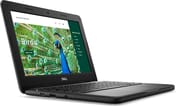 Dell Chromebook 3120 | Dell Chromebook 3120 | |
| Price | List Price: $339 Amazon Prices: | List Price: $459 Amazon Prices: |
| Model number | 51R7C | J78DN |
| Performance Rating | 2.9 | 2.9 |
| Chromebook Plus | No | No |
| Processor | Quad-core 3.40 Ghz (max 3.40 Ghz) Intel Processor N100 | Quad-core 3.40 Ghz (max 3.40 Ghz) Intel Processor N100 |
| RAM | 4 GB | 4 GB |
| Internal Storage | 64 GB eMMC | 64 GB eMMC |
| Screen Size | 11.6" | 11.6" |
| Screen Resolution | 1366x768 | 1366x768 |
| Screen Type | TN | IPS |
| Touch Screen | No | Yes |
| Stylus / Pen | No Stylus Support | No Stylus Support |
| Dimensions width x length x thickness | 12 x 8.2 x 0.82 inches (304.8 x 208.28 x 20.83 mm) | 12 x 8.2 x 0.85 inches (304.8 x 208.28 x 21.59 mm) |
| Weight | 2.82 lbs (1.28 kg) | 3.17 lbs (1.44 kg) |
| Backlit Keyboard | No | No |
| Webcam | 720p | 720p |
| WiFi | Wi-Fi 6 (802.11ax) | Wi-Fi 6 (802.11ax) |
| Bluetooth | Bluetooth 5.2 | Bluetooth 5.2 |
| Ethernet | No | No |
| Cellular Modem | No | No |
| HDMI | No HDMI | No HDMI |
| USB Ports | 1 USB 3, 2 USB-C 2x USB-C 3.2 with DisplayPort Alt Mode and Power Delivery, 1x USB-A | 1 USB 3, 2 USB-C 2x USB-C 3.2 with DisplayPort Alt Mode and Power Delivery, 1x USB-A |
| Thunderbolt Ports | No | No |
| Card Reader | No Card Reader | No Card Reader |
| Battery | 3 cell, 42Wh, Li-ion | 3 cell, 42Wh, Li-ion |
| Battery Life | 10 hours | 10 hours |
| Fanless | Yes | Yes |
| Auto Update Expiration Date | June, 2033 | June, 2033 |
Related Chromebooks
-
 Dell Chromebook 11 (3100)The Dell Chromebook 11 (3100) is a ruggedized 11.6-inch education Chromebook with rubber bumpers, a…
 -
 Lenovo Chromebook 3 11"The Lenovo Chromebook 3 11 is a fanless 11.6-inch Chromebook with an Intel Celeron N4020, 4GB of…
 -
 Acer Gateway Chromebook 311The Acer Gateway Chromebook 311 is an 11.6-inch 1366x768 ChromeOS laptop on an Intel Celeron N4500…
 -
 Acer Chromebook 311 C723The Acer Chromebook 311 C723 is an 11.6-inch education Chromebook built to MIL-STD-810H durability,…
 -
 ASUS Chromebook CR11 (CR1104C)The ASUS Chromebook CR11 (CR1104C) is a ruggedized 11.6-inch Chromebook built for students and…
 -
 HP Chromebook 11a (ARM)The HP Chromebook 11a offers an 11.6-inch anti-glare display, 720p HD webcam, and up to 15 hours 45…
A silent N100 with two USB-C ports and no HDMI

The clamshell measures 12 x 8.2 x 0.82 inches and weighs 2.82 pounds, small enough to carry between classes all day. The 2-in-1 runs thicker at 0.85 inches and heavier at 3.17 pounds because of the touchscreen hardware. Dell reinforces the corners and fits a spill-resistant keyboard, both aimed at daily student handling. Ports are two USB-C 3.2 with DisplayPort Alt Mode and Power Delivery plus a single USB-A for legacy peripherals, alongside a combo headphone and microphone jack. Nothing here is HDMI, so an external display needs a USB-C adapter.
The Intel N100 is a 4-core chip that boosts up to 3.4 GHz and scores approximately 5,305 on PassMark. That covers a stack of browser tabs, streaming video, and Android apps from the Play Store. Cooling is passive, with no fan to spin up during a test or a library study session. The 4GB of RAM sets the limit on how far that goes. Light multitasking is fine, and a heavy tab habit brings slowdown.
WiFi 6 (802.11ax) and Bluetooth 5.2 handle wireless networking and peripherals. A school that needs wired networking can add it with a USB Ethernet adapter on one of the USB ports. Both USB-C ports carry video and charging. Storage stops at 64GB of eMMC, typical for an education Chromebook and small enough that larger files belong in cloud storage. Dell rates the 42Wh battery at approximately 10 hours, which covers a school day.
The 2-in-1 trades the TN panel for IPS touch

The clamshell uses a TN (Twisted Nematic) panel. Brightness is adequate indoors, viewing angles are narrow, and colors shift noticeably once you move off-center. The matte finish does cut glare under classroom lighting.
The convertible model moves to an IPS panel with touch, which holds color and viewing angles far better. Its 360-degree hinge allows tent, stand, and tablet modes for interactive learning applications. It also adds a world-facing 5MP camera capable of 1080p video, useful for capturing whiteboard content or documenting a science project.
Reviewer Insights
ChromebookParts.com Teardown
ChromebookParts.com opened the 3120 up to judge how it holds up to fleet life and came away impressed with its repairability. The reviewer liked the “beefy” hinges with screws set deep into the palmrest, a bottom cover that “comes off really easy,” and a removable keyboard that means you “don’t have to replace the whole palmrest” if a key fails, which matters when a school is fixing dozens of these a semester. The gripes were minor: the protective rubber edging wraps the bottom half but not the lid, the keys sound a little tinny, and there is no physical webcam slider (so expect tape over the camera in a classroom).
Best fit is a school fleet or an inexpensive second laptop
A district gets reinforced construction and updates through 2033 at a price that scales across a fleet order. For one person, the same machine works as a cheap secondary device for basic web tasks.
Anyone who keeps a lot of tabs open will hit the 4GB ceiling quickly, and anyone who wants a larger or sharper screen will not find one at 11.6 inches. The clamshell’s TN panel is the biggest compromise, and the 2-in-1’s IPS screen fixes it for more money. Local storage is the other limit, since 64GB fills up fast once files stay on the device.
A durable classroom machine, with the touchscreen as the upgrade
The N100 is quick enough for the coursework that runs on ChromeOS, and the durable build is meant for classroom use. The fanless chassis keeps testing rooms quiet. Choosing between the two configurations comes down to whether an IPS touchscreen and the 360-degree hinge are worth the higher price.
The 4GB of RAM and the TN panel on the entry model are the trade for that price. Buyers who want more headroom should look at Chromebook Plus models or anything shipping with 8GB.
The Chromebook Comparison Chart lines this up against other models.
Frequently Asked Questions
What processor does the Dell Chromebook 3120 use?
The Intel N100, a 4-core chip with 4 threads and a boost clock up to 3.4 GHz. It scores approximately 5,305 on PassMark’s CPU benchmark, which places it in the capable entry-level category for Chromebooks and covers everyday ChromeOS tasks.
Can I upgrade the RAM in the Dell Chromebook 3120?
No. The memory is soldered and cannot be changed after purchase, and both configurations ship with 4GB. Buy a Chromebook with 8GB or more from the outset if you expect heavy multitasking.
What ports does the Dell Chromebook 3120 have?
2x USB-C 3.2 ports with DisplayPort Alt Mode and Power Delivery support, 1x USB-A port for legacy devices, and a combo headphone/microphone jack. There is no HDMI port, so connecting to an external display requires a USB-C to HDMI adapter.
When does the Dell Chromebook 3120 stop receiving updates?
June 2033 is the Auto Update Expiration (AUE) date. Google delivers ChromeOS updates, security patches, new features, and performance improvements until then.
What is the difference between the Dell Chromebook 3120 clamshell and 2-in-1?
The clamshell model has a TN display without touch capability, weighs 2.82 pounds, and is the more affordable option. The 2-in-1 model features an IPS touchscreen display with better viewing angles, a 360-degree hinge for tablet mode, a world-facing 5MP camera, and weighs 3.17 pounds. Interactive learning and note-taking are easier on the 2-in-1.
Does the Dell Chromebook 3120 support Android apps?
Yes, Android apps from the Google Play Store are fully supported. So are Linux apps, which gives users access to desktop Linux applications for development or specialized tasks.
Is the Dell Chromebook 3120 fanless?
Yes. There is no fan and no moving parts for cooling, so it operates completely silently in classrooms, libraries, and testing centers where fan noise could be disruptive.