
ASUS Chromebook CR11 (CR1104C)
Updated on

The ASUS Chromebook CR11 (CR1104C) is a ruggedized 11.6-inch Chromebook built for classrooms and students who need a machine that survives daily school use. The Intel Processor N100 inside runs four cores at up to 3.4 GHz, which covers web browsing, Google Workspace applications, and light multitasking. It carries MIL-STD 810H military-grade durability certification, ASUS Antimicrobial Guard coating on high-touch surfaces, and a spill-resistant keyboard designed to withstand up to 66cc of liquid. The fanless design keeps it silent during class time, and WiFi 6E keeps wireless usable on crowded school networks. ChromeOS updates are guaranteed through June 2033, which matters for a district buying a fleet it plans to keep.
Pros and cons
| Pros | Cons |
|---|---|
| MIL-STD 810H durability with antimicrobial guard for classroom environments | 1366x768 TN display with poor viewing angles and limited color |
| Fanless design for completely silent operation during class | No backlit keyboard makes typing difficult in dim environments |
| WiFi 6E and Bluetooth 5.4 for modern wireless connectivity | Only 4GB RAM in the base variant limits multitasking |
| Comprehensive port selection with 2x USB-C, 2x USB-A, and HDMI | 720p webcam rather than a 1080p one |
| Large 50Wh battery for all-day classroom use | eMMC storage is slower than an NVMe SSD |
| Lightweight at 2.89 lbs for easy carrying in backpacks | 11.6-inch screen feels cramped for extended productivity work |
ASUS Chromebook CR11 (CR1104C) Comparison Chart
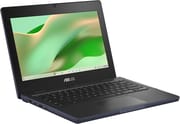 ASUS Chromebook CR11 (CR1104C) | |
| Price | List Price: Amazon Prices: Loading prices... |
| Model number | CR1104CGA-AS44 |
| Performance Rating | 2.9 |
| Chromebook Plus | No |
| Processor | Quad-core 3.40 Ghz (max 3.40 Ghz) Intel Processor N100 |
| RAM | 4 GB |
| Internal Storage | 64 GB eMMC |
| Screen Size | 11.6" |
| Screen Resolution | 1366x768 |
| Screen Type | TN |
| Touch Screen | No |
| Stylus / Pen | No Stylus Support |
| Dimensions width x length x thickness | 11.69 x 8.39 x 0.83 inches (296.93 x 213.11 x 21.08 mm) |
| Weight | 2.89 lbs (1.31 kg) |
| Backlit Keyboard | No |
| Webcam | 720p |
| WiFi | Wi-Fi 6E (802.11ax) |
| Bluetooth | Bluetooth 5.4 |
| Ethernet | No |
| Cellular Modem | No |
| HDMI | Full-Size HDMI |
| USB Ports | 2 USB 3, 2 USB-C 2x USB 3.2 Gen 1 Type-C (DisplayPort, Power Delivery), 2x USB 3.2 Gen 1 Type-A, HDMI 1.4b |
| Thunderbolt Ports | No |
| Card Reader | No Card Reader |
| Battery | 50Wh |
| Battery Life | Unknown |
| Fanless | Yes |
| Auto Update Expiration Date | June, 2033 |
Related Chromebooks
-
 ASUS Chromebook CX1 (CX1101)The ASUS Chromebook CX1 (CX1101) is an 11.6-inch budget Chromebook with an Intel Celeron N4020, an…
 -
 ASUS Chromebook Flip C214The ASUS Chromebook Flip C214 is a rugged 11.6-inch education convertible with an Intel Celeron…
 -
 Acer Chromebook 311 C723The Acer Chromebook 311 C723 is an 11.6-inch education Chromebook built to MIL-STD-810H durability,…
 -
 Acer Chromebook 311 (CO731)The Acer Chromebook 311 (CO731) is a fanless 11.6-inch Chromebook with an Intel Celeron N4500, 4GB…
 -
 Dell Chromebook 11 (3100)The Dell Chromebook 11 (3100) is a ruggedized 11.6-inch education Chromebook with rubber bumpers, a…
 -
 Dell Chromebook 3120The Dell Chromebook 3120 is a fanless 11.6-inch education Chromebook with an Intel N100, sold in…
A tough 11.6-inch shell around a fanless N100

The chassis measures 11.69 x 8.39 x 0.83 inches and weighs 2.89 pounds, and it has passed MIL-STD 810H testing for drops, vibration, and extreme temperatures. ASUS applies its Antimicrobial Guard treatment to the keyboard and palm rest areas, which helps inhibit bacterial growth on the surfaces students touch most frequently throughout the day. The spill-resistant keyboard can handle up to 66cc of liquid. A 180-degree lay-flat hinge lets students fold the display flat on a desk to share what is on screen with the person across from them.
The Intel Processor N100 scores approximately 5,305 on PassMark’s CPU benchmark. Four efficiency cores running at up to 3.4 GHz, paired with LPDDR5 memory, handle Chrome tabs, Google Docs, and educational web applications smoothly for typical single-user workflows. The fanless thermal design means zero noise during quiet study periods or testing, and it also means the processor may throttle slightly under sustained heavy loads. For K-12 students working mostly in the browser, that is enough headroom for comfortable day-to-day use.
The port layout includes two USB 3.2 Gen 1 Type-C ports supporting both DisplayPort output and Power Delivery charging, two USB 3.2 Gen 1 Type-A ports for connecting mice, flash drives, or other peripherals, a full-sized HDMI 1.4b port for presenting to classroom projectors, and a 3.5mm combo audio jack for headphones. WiFi 6E (802.11ax) support paired with Bluetooth 5.4 takes advantage of modern tri-band wireless networks, reducing congestion in schools where dozens of devices share the same access points. There is no microSD card reader, so the 64GB eMMC storage cannot be topped up with a cheap card. Users needing wired networking can connect a USB Ethernet adapter through one of the USB-A ports.
Customer Reviews
Across 82 ratings on Amazon, the ASUS Chromebook CR11 (CR1104C) averages 4.1 stars, with about two-thirds of reviewers leaving five stars and 9 percent leaving one. The praise centers on build quality and durability for school and family use. A verified buyer named J. & P. Kelley wrote that it is “Built like Fort Knox,” and Ryan, a verified buyer who bought it for his daughter, called it “Nice quality and very durable.”
The recurring complaint is the screen, raised by buyers on both ends of the rating scale. Dylan rated it three stars and wrote that “The screen, though, is among the worst I’ve ever seen. Viewing angles are extremely poor, colors are washed, and brightness is bad.” The lone detailed one-star review, from verified buyer vt, reports a unit that failed outright: “it bricked,” alongside complaints about poor viewing angles and a non-backlit keyboard. Read more owner reviews on Amazon.
A classroom workhorse held back by its screen
The MIL-STD 810H certification, antimicrobial surfaces, and spill-resistant keyboard cover the ways a school laptop usually dies, and the HDMI port plus four USB ports reach the projectors and peripherals a classroom already owns. The Intel N100 and WiFi 6E carry web-based learning platforms, Google Workspace, and educational Android apps with no fan noise to distract classmates during quiet work periods.
Anyone shopping for content consumption, creative work, or long productivity sessions should look at machines with better displays and more RAM. The 1366x768 TN panel and 4GB RAM configuration are sized for functional classroom tasks rather than media enjoyment or heavy multitasking. High school and college students who keep many browser tabs open, write lengthy documents, or use Linux development tools would be better served by a Chromebook better suited for college with more RAM and a 1080p IPS display.
The Chromebook Comparison Chart lines up the alternatives side by side.
Frequently Asked Questions
What processor does the CR11 use?
The Intel Processor N100, with 4 cores and 4 threads and a boost clock up to 3.4 GHz. It scores approximately 5,305 on PassMark’s CPU benchmark, which covers web browsing, Google Workspace applications, and educational software. The design is fanless, so it operates completely silently during use.
Can I upgrade the RAM or storage on the CR11?
No. The LPDDR5 memory and eMMC storage are soldered and cannot be upgraded after purchase, and the base configuration ships with 4GB RAM and 64GB eMMC storage. If you anticipate needing more memory for multitasking, consider one of the 8GB RAM variants in the CR1104C series, which pair the additional memory with a touchscreen display.
What ports does the CR11 have?
Two USB 3.2 Gen 1 Type-C ports (both supporting DisplayPort output and Power Delivery charging), two USB 3.2 Gen 1 Type-A ports, one full-sized HDMI 1.4b port for connecting to monitors or projectors, a 3.5mm combo headphone and microphone jack, and a Kensington lock slot for physical security.
How long will the ASUS Chromebook CR11 receive software updates?
The CR1104CGA receives ChromeOS updates through June 2033, according to Google’s official Auto Update Expiration schedule. This provides approximately seven to eight years of security patches, feature updates, and compatibility with new web standards from its release date.
Is the CR11 good for students?
Yes, it is designed for students and classroom environments: MIL-STD 810H durability testing for drop and vibration resistance, a spill-resistant keyboard that handles up to 66cc of liquid, and ASUS Antimicrobial Guard on high-touch surfaces to reduce bacterial growth. The 2.89-pound weight, fanless silent operation, and all-day battery capacity suit carrying between classes and using during lessons.
Does the CR11 support Android apps?
Yes, through the Google Play Store. It also runs Linux applications in the built-in Linux container, so students get educational Android apps alongside standard web applications and optional Linux development tools. The 4GB RAM configuration may limit how many apps you can run simultaneously.
Does the CR11 have a touchscreen?
The base CR1104CGA model with 4GB RAM and 64GB storage (including the variant sold on Amazon as CR1104CGA-AS44) does not have a touchscreen. ASUS offers touchscreen versions in the CR1104C series with 8GB RAM configurations, which feature a Wide View panel with Corning Gorilla Glass instead of the standard TN display. If touch input matters for your use case, look for the 8GB touchscreen variants.