
HP Chromebook 14a (14a-nf series)
Updated on

The HP Chromebook 14a (14a-nf series) is one chassis sold in two tiers. The Amazon-exclusive Intel N100 models cost $174.50 for the 4GB configuration and $228.99 for the 8GB variant, and they spend the budget on a standout keyboard and trackpad, up to 12 hours of battery, and a basic 1366x768 HD display. The Intel Core i3-N305 Chromebook Plus model (around $359.95) uses the same body with a 14-inch Full HD IPS panel, a 1080p webcam, faster performance, and the Chromebook Plus certification that brings Google’s AI features. Both configurations run automatic updates through June 2033.
Strong keyboard, dim 1366x768 panel
| Pros | Cons |
|---|---|
| Excellent keyboard with satisfying clickiness | 1366x768 TN panel with limited viewing angles |
| High-quality trackpad with smooth surface | Low brightness at 250 nits |
| Upward-firing speakers suited to video calls | Colors appear washed out on display |
| Up to 12 hours of battery life | Base model limited to 4GB RAM and 64GB storage |
| Fast charging: 0-50% in 45 minutes | No keyboard backlighting |
| Intel N100 is faster than the Celerons common at this price | No HDMI port |
Related Videos
HP Chromebook 14a (14a-nf series) Comparison Chart
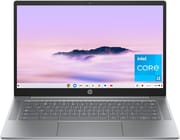 HP Chromebook 14a (14a-nf series) | HP Chromebook 14a (14a-nf series) | HP Chromebook 14a (14a-nf series) | |
| Price | List Price: $174.50 Amazon Prices: Loading prices... | List Price: $228.99 Amazon Prices: Loading prices... | List Price: $359.95 Amazon Prices: Loading prices... |
| Model number | 14a-nf0019nr | 14a-nf0099nr | 14a-nf0050nr |
| Performance Rating | 2.9 | 4.0 | 5.9 |
| Chromebook Plus | No | No | Yes |
| Processor | Quad-core 3.40 Ghz (max 3.40 Ghz) Intel Processor N100 | Quad-core 3.40 Ghz (max 3.40 Ghz) Intel Processor N100 | Octa-core 1.80 Ghz (max 3.80 Ghz) Intel Core i3-N305 |
| RAM | 4 GB | 8 GB | 8 GB |
| Internal Storage | 64 GB eMMC | 128 GB UFS | 128 GB UFS |
| Screen Size | 14" | 14" | 14" |
| Screen Resolution | 1366x768 | 1366x768 | 1920x1080 |
| Screen Type | TN | TN | IPS |
| Touch Screen | No | No | No |
| Stylus / Pen | No Stylus Support | No Stylus Support | No Stylus Support |
| Dimensions width x length x thickness | 12.82 x 8.48 x 0.72 inches (325.63 x 215.39 x 18.29 mm) | 12.82 x 8.48 x 0.72 inches (325.63 x 215.39 x 18.29 mm) | 12.82 x 8.48 x 0.72 inches (325.63 x 215.39 x 18.29 mm) |
| Weight | 3.2 lbs (1.45 kg) | 3.2 lbs (1.45 kg) | 3.2 lbs (1.45 kg) |
| Backlit Keyboard | No | No | No |
| Webcam | 720p HD | 720p HD | 1080p |
| WiFi | Wi-Fi 6E (802.11ax) | Wi-Fi 6E (802.11ax) | Wi-Fi 6 (802.11ax) |
| Bluetooth | Bluetooth 5.3 | Bluetooth 5.3 | Bluetooth 5.3 |
| Ethernet | No | No | No |
| Cellular Modem | No | No | No |
| HDMI | No HDMI | No HDMI | No HDMI |
| USB Ports | 1 USB 3, 1 USB-C USB-C supports Power Delivery and DisplayPort | 1 USB 3, 1 USB-C USB-C supports Power Delivery and DisplayPort | 1 USB 3, 2 USB-C 2x USB-C with Power Delivery and display out, 1x USB-A 3.2 Gen 1 |
| Thunderbolt Ports | No | No | No |
| Card Reader | No Card Reader | No Card Reader | No Card Reader |
| Battery | No Battery | No Battery | No Battery |
| Battery Life | 12 hours | 12 hours | 9 hours |
| Fanless | No | No | No |
| Auto Update Expiration Date | June, 2033 | June, 2033 | June, 2033 |
Related Chromebooks
-
 HP Chromebook 14 G7The HP Chromebook 14 G7 packs a 14-inch anti-glare WLED screen, Wi-Fi 6, a 720p HD webcam, and…
 -
 HP Chromebook 14a (ne Series)The HP Chromebook 14a (ne series) is a 14-inch ChromeOS laptop on an Intel Celeron N4500 with 4GB…
 -
 Samsung Galaxy Chromebook Go 14"The Samsung Galaxy Chromebook Go 14 is a budget 14-inch Chromebook with an Intel Celeron N4500, a…
 -
 Acer Chromebook 314The Acer Chromebook 314 is a 14-inch budget Chromebook with a 1920x1080 IPS display, an Intel…
 -
 Acer Chromebook 314 (CB314-4H/4HT)A budget-friendly 14-inch Chromebook with Intel Alder Lake-N processors, WiFi 6E, and software…
 -
 ASUS Chromebook C424The ASUS Chromebook C424 boasts a crisp 14-inch FHD anti-glare display, durable spill-resistant…
Two chip tiers in one textured plastic body
The shell comes in Chalkboard Gray and Glacier Silver, both with a grippy, fingerprint-resistant finish. The laptop weighs 3.2 pounds and measures 12.82 x 8.48 x 0.72 inches. HP builds it with ocean-bound plastic and post-consumer recycled materials, and the machine carries EPEAT Gold certification and ENERGY STAR compliance.
The Intel Processor N100 is a 4-core chip that scores 5305 on PassMark’s CPU Mark, and it handles Chrome OS web browsing, document editing, and video streaming. The Intel UHD Graphics can drive 4K video streaming, though gaming stays limited to casual titles. The 8GB LPDDR5 RAM variant multitasks more smoothly across browser tabs and Android apps, and its 128GB UFS storage reads and writes faster than the base model’s eMMC. The i3-N305 Chromebook Plus configuration of the same chassis pairs an 8-core Intel Core i3-N305 (around 9,577 on PassMark) with a sharper Full HD IPS display and a 1080p webcam.
The Intel N100 models are described first; the i3-N305 Chromebook Plus configuration shares the body and footprint but changes several details, noted where they differ.
Wireless on the N100 models is Wi-Fi 6E. The single USB-C port handles charging, display output, and data transfer, and a USB-A 3.0 port covers older peripherals. There is no HDMI, so an external display needs a USB-C to HDMI adapter or a monitor that accepts DisplayPort alternate mode. There is also no built-in Ethernet, but a USB Ethernet adapter can provide wired connectivity through the USB-A port. The i3-N305 Chromebook Plus configuration adds a second USB-C port (one on each side, both handling charging and DisplayPort out), pairs it with a 1080p webcam, and uses Wi-Fi 6 instead of Wi-Fi 6E.
Reviewer Insights
Chrome Unboxed reviewed the Intel N100 value model. MergeDroid, Lon.TV, and Laptop Mag reviewed the Intel Core i3-N305 Chromebook Plus model.
Chrome Unboxed: a great keyboard bolted to a compromised screen
Robby Payne from Chrome Unboxed spent his 2025 review on the Intel N100 model. He praised the keyboard as enjoyable to type on, noting that HP has maintained their reputation for quality input devices even at this budget price point. The trackpad earned similar praise for its size, responsiveness, and satisfying click mechanism. Payne was critical of the display, calling it “a major compromise” that pairs excellent input devices with a screen that simply cannot keep up.
Payne found the upward-firing speakers to be a pleasant surprise, delivering audio quality suitable for video calls, casual media consumption, and even browser-based music production. The 720p webcam impressed with its dynamic range and sharpness, performing better than expected for a budget device. On price he said, “At its $389.99 retail price, it’s difficult to recommend, but if this device drops by $50 or even $100, the value proposition changes dramatically. For under $300, a Chromebook with this great of a keyboard, trackpad, and speaker setup becomes a very compelling option, even with that screen.”
MergeDroid: excellent i3-N305 speed on a cheap-feeling chassis
MergeDroid framed the i3-N305 config as HP putting “a Chromebook plus model” worth of internals into “their most basic range.” On speed, the reviewer said “performance as we’ve come to expect with the core i3 n305 processor and 8 gig of low power ddr5 ram was excellent.” The reviewer also singled out the screen as a highlight, calling “the full HD IPS non-touch display” a “nice surprise” and “one of the strong points of this Chromebook.” The complaints land on the budget chassis. The touchpad “is basic and whilst a reasonable size feels and sounds a little cheap,” the keyboard keys carry printed-on text you can feel, and the slim design means the fans kick in more often than on some competitors.
Lon Seidman found the performance convincing and the display limited
Lon Seidman valued the software bundle, which includes a year of Gemini Advanced and 2TB of cloud storage, along with the 1080p webcam and its physical privacy shutter. He praised how well the i3-N305 handles the workloads the device is built for: “I was surprised that it doesn’t feel like a low-end chip at all.” His criticisms cover the keyboard, which is not backlit, the absence of fingerprint or face unlock, and a display that reaches only about 62.5% of the sRGB color gamut, so “it’s not great for creative work.” He also flagged the unusual raised lettering on the keys. Seidman read the device’s update window as running through June 2033, which lines up with the support timeline for HP’s other i3-N305 Chromebooks.
Laptop Mag judged the display dim and the battery just adequate
Laptop Mag’s Rami Tabari concluded that the i3-N305 Plus “is a decent laptop for the price, but it lands in more gray areas than ‘pluses.’” He liked the sturdy-feeling design and was pleasantly surprised by the keyboard, writing that he “found it to be surprisingly comfortable” during extended typing. His reservations focused on a dim, dull display, performance that trailed some rivals, and battery life that, in his testing, just barely covered a standard workday at about 8 hours and 50 minutes.
The keyboard drew praise from all four reviews
On build feel, Laptop Mag found the design sturdy, while MergeDroid and Lon Seidman noted plastic flex and a standard-feeling chassis. On the display, the split tracks the hardware tier. The i3-N305 model’s Full HD IPS panel was a high point for MergeDroid (though Laptop Mag still judged it dim and dull), whereas Chrome Unboxed considered the N100 model’s 1366x768 panel the device’s biggest compromise. The keyboard and trackpad draw praise on the N100 and the i3-N305 alike, and on the i3-N305 Plus config the reviews converge on good performance for a budget Chromebook Plus and a capable 1080p webcam, with shared complaints about the lack of a backlit keyboard, the unusual raised key texture, modest color accuracy, and middling battery life.
Customer Reviews
Across 39 ratings on Amazon, the HP Chromebook 14a (14a-nf series) averages 4.5 stars, with 69% of reviewers leaving five stars and another 19% at four. The recurring praise is for fast, simple setup and portability: J.Dean.M, a verified buyer, wrote “Ease of setup was a breeze,” and several owners new to Chrome OS describe it behaving like an Android phone in laptop form. Owners also like the matte screen; one wrote that “No distracting glare or reflection means I don’t have to stare into my own eyes while typing this.” The use cases they describe are basic web browsing, schoolwork, and streaming.
Two separate reviewers flagged that the laptop runs warm. Priya Randhir (four stars) said “the computer does heat up quickly,” explaining that this was “The ONLY reason why I’m not giving this 5 stars,” and another titled their five-star review “Great but gets hot fast.” Owners also call out the constrained 4GB of RAM and 64GB of storage (one notes “an external SSD is a must if you’re saving large files”), the low 1366x768 display, and speakers that “aren’t anything to write home over.” None reported the heat hurting day-to-day performance.
Read more owner reviews on Amazon.
The 8GB N100 build is the one to buy
The keyboard, trackpad, and speakers are the reason to pick this chassis, and the Intel N100 keeps Chrome OS responsive under a normal pile of tabs. At $228.99 the 8GB/128GB variant carries the RAM and storage headroom the 4GB base model lacks, which matters on a machine whose storage cannot be upgraded later. Update support runs through June 2033, so a machine bought today stays patched.
The 1366x768 TN panel sets the ceiling on the N100 models. Anyone who watches a lot of video, edits photos, or works from a bright room should put the money toward the Full HD IPS panel in the i3-N305 Plus config or look at another model. Starry Hope’s Chromebook Comparison Chart lines this chassis up against other Chromebooks on price, panel, and chip.
Frequently Asked Questions
How long will the HP Chromebook 14a receive Chrome OS updates?
Chrome OS updates run through June 2033 on both tiers of the 14a-nf chassis. That Auto Update Expiration (AUE) date is when security patches, bug fixes, and new features stop arriving.
What’s the difference between the 4GB and 8GB RAM versions?
The 4GB model ($174.50) covers basic web browsing and light tasks with a few tabs open. The 8GB model ($228.99) stays smoother with multiple browser tabs, Android apps, and Linux applications running at once, and it swaps the 64GB eMMC for 128GB of UFS storage, which is both larger and faster.
Does the HP Chromebook 14a have a touchscreen?
No. Every 14a-nf configuration ships a non-touch 14-inch display, at 1366x768 on the N100 models and Full HD on the i3-N305 Plus model. HP’s Chromebook x360 lineup covers the convertible, touch-enabled side.
Can I connect the HP Chromebook 14a to an external monitor?
Yes, through USB-C DisplayPort output: one port on the N100 models, two on the i3-N305 Plus model. Neither tier has HDMI, so plan on a USB-C to HDMI adapter or a monitor that takes USB-C directly. The same port also handles charging and data.
Is the HP Chromebook 14a good for students?
The keyboard is the strongest argument for it, and at 3.2 pounds with up to 12 hours of battery on the N100 models it covers a full day of classes, with fast charging (0-50% in 45 minutes) between them. Students who keep many browser tabs, Google Workspace apps, and educational software open should take the 8GB model.
Does the HP Chromebook 14a support Android and Linux apps?
Both work. Android apps come from the Google Play Store, and Linux is built into Chrome OS, which adds productivity tools, media applications, and development environments to the web apps.
How does the Intel N100 processor compare to Celeron chips?
It is a large step up from the Celeron N4000 and N4020 chips common in budget Chromebooks. The N100 scores 5305 on CPU Mark against roughly 1500-2000 for those older Celerons, which shows up as snappier web browsing, video playback, and multitasking at similar power draw.