
Dell Chromebook 11 (3100)
Published on

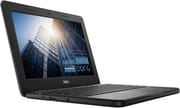
The Dell Chromebook 11 (3100) is a ruggedized 11.6-inch education laptop built around the entry-level Intel Celeron N4020. Rubber bumpers wrap every edge and the keyboard is spill-resistant, so the clamshell trades performance for durability and battery life. The 1366x768 TN display has narrow viewing angles and washed-out colors. School districts bought the 3100 because it is cheap to replace and simple to manage. Its Auto Update Expiration date is June 2029, so refurbished and surplus units still receive ChromeOS updates. That keeps them a defensible budget pick for parents and libraries.
Pros and Cons
| Pros | Cons |
|---|---|
| Rugged construction survives drops and rough handling | TN display has narrow viewing angles and washed-out colors |
| Spill-resistant keyboard built for classroom abuse | 1366x768 resolution feels dated on an 11.6-inch screen |
| 14-hour rated battery easily lasts a full school day | Celeron N4020 struggles with more than a few browser tabs |
| Serviceable design lets school IT swap a battery or keyboard | Heavy at 2.85 pounds for an 11-inch laptop |
| Fanless design runs silently and has no fan to clog with dust | Bottom-firing speakers project sound away from the user |
| AUE date of June 2029 still leaves meaningful ChromeOS support | Weak WiFi reception in Chrome Ready’s testing |
Related Videos
Dell Chromebook 11 (3100) Comparison Chart
 Dell Chromebook 11 (3100) | Dell Chromebook 11 (3100) | Dell Chromebook 11 (3100) | Dell Chromebook 11 (3100) | |
| Price | List Price: Amazon Prices: | List Price: Amazon Prices: | List Price: Amazon Prices: | List Price: Amazon Prices: |
| Model number | 3100 | 3100-Touch | G4YY1 | 3100 |
| Performance Rating | 2.6 | 2.6 | 2.6 | 2.6 |
| Chromebook Plus | No | No | No | No |
| Processor | Dual-core 1.10 Ghz (max 2.80 Ghz) Intel Celeron Processor N4020 | Dual-core 1.10 Ghz (max 2.80 Ghz) Intel Celeron Processor N4020 | Dual-core 1.10 Ghz (max 2.80 Ghz) Intel Celeron Processor N4020 | Dual-core 1.10 Ghz (max 2.80 Ghz) Intel Celeron Processor N4020 |
| RAM | 4 GB | 4 GB | 4 GB | 4 GB |
| Internal Storage | 16 GB eMMC | 32 GB eMMC | 32 GB eMMC | 64 GB eMMC |
| Screen Size | 11.6" | 11.6" | 11.6" | 11.6" |
| Screen Resolution | 1366x768 | 1366x768 | 1366x768 | 1366x768 |
| Screen Type | TN | TN | TN | TN |
| Touch Screen | Yes | Yes | No | Yes |
| Stylus / Pen | No Stylus Support | No Stylus Support | No Stylus Support | No Stylus Support |
| Dimensions width x length x thickness | 11.96 x 8.19 x 0.82 inches (303.78 x 208.03 x 20.83 mm) | 11.96 x 8.19 x 0.82 inches (303.78 x 208.03 x 20.83 mm) | 11.96 x 8.19 x 0.82 inches (303.78 x 208.03 x 20.83 mm) | 11.96 x 8.19 x 0.82 inches (303.78 x 208.03 x 20.83 mm) |
| Weight | 2.85 lbs (1.3 kg) | 2.85 lbs (1.3 kg) | 2.85 lbs (1.3 kg) | 2.85 lbs (1.3 kg) |
| Backlit Keyboard | No | No | No | No |
| Webcam | 720p | 720p | 720p | 720p |
| WiFi | Wi-Fi 5 (802.11ac) | Wi-Fi 5 (802.11ac) | Wi-Fi 5 (802.11ac) | Wi-Fi 5 (802.11ac) |
| Bluetooth | Bluetooth 4.2 | Bluetooth 4.2 | Bluetooth 4.2 | Bluetooth 4.2 |
| Ethernet | No | No | No | No |
| Cellular Modem | No | No | No | No |
| HDMI | Full-Size HDMI | Full-Size HDMI | Full-Size HDMI | Full-Size HDMI |
| USB Ports | 2 USB 3, 1 USB-C 1x USB-C with charging and DisplayPort, 2x USB-A 3.0 | 2 USB 3, 1 USB-C 1x USB-C with charging and DisplayPort, 2x USB-A 3.0 | 2 USB 3, 1 USB-C 1x USB-C with charging and DisplayPort, 2x USB-A 3.0 | 2 USB 3, 1 USB-C 1x USB-C with charging and DisplayPort, 2x USB-A 3.0 |
| Thunderbolt Ports | No | No | No | No |
| Card Reader | No Card Reader | No Card Reader | No Card Reader | No Card Reader |
| Battery | 42Wh, Li-ion | 42Wh, Li-ion | 42Wh, Li-ion | 42Wh, Li-ion |
| Battery Life | 14 hours | 14 hours | 14 hours | 14 hours |
| Fanless | Yes | Yes | Yes | Yes |
| Auto Update Expiration Date | June, 2029 | June, 2029 | June, 2029 | June, 2029 |
Related Chromebooks
-
 Dell Chromebook 3120The Dell Chromebook 3120 is a fanless 11.6-inch education Chromebook with an Intel N100, sold in…
 -
 Acer Chromebook 311 C723The Acer Chromebook 311 C723 is an 11.6-inch education Chromebook built to MIL-STD-810H durability,…
 -
 Samsung Chromebook 4The Samsung Chromebook 4 is an 11.6-inch Celeron N4000 or N4020 Chromebook with 4GB of RAM, a…
 -
 HP Chromebook 11a (ARM)The HP Chromebook 11a offers an 11.6-inch anti-glare display, 720p HD webcam, and up to 15 hours 45…
 -
 Acer Chromebook 311 (CO731)The Acer Chromebook 311 (CO731) is a fanless 11.6-inch Chromebook with an Intel Celeron N4500, 4GB…
 -
 ASUS Chromebook CR11 (CR1104C)The ASUS Chromebook CR11 (CR1104C) is a ruggedized 11.6-inch Chromebook built for students and…
A Reinforced Chassis Around an Entry-Level Celeron
Dell’s 3100 measures 11.96 x 8.19 x 0.82 inches and weighs 2.85 pounds, noticeably chunkier than consumer 11-inch Chromebooks. The extra heft pays for the ruggedization. Reinforced rubber bumpers wrap each corner, the lid uses a textured plastic that resists scratches, and the chassis is built around an internal frame meant to absorb short-distance drops. The 11.6-inch panel is a 1366x768 TN screen, and some configurations of the line add touch. The Dell-published Chromebook 11 3100 product page lists the device as discontinued for new purchases, but it remains widely available refurbished and through education-channel surplus.
The Intel Celeron N4020 is a dual-core Gemini Lake Refresh chip with a 1.1 GHz base clock that boosts to 2.8 GHz. Earlier batches shipped with the N4000 (same architecture, slightly lower boost), and many listings still call the processor generically “Intel Dual Core.” Both chips score around 885 on PassMark and are clearly entry-level, which covers Chrome OS browsing, Google Docs, light Android apps, and educational web platforms, but not serious multitasking. The unit ships with 4GB of LPDDR4 RAM (soldered, non-upgradeable) and eMMC storage ranging from 16GB to 64GB depending on the configuration. The fanless thermal design keeps things silent and avoids the dust-related fan failures that plague school deployments.
Wireless runs on WiFi 5 (802.11ac) and Bluetooth 4.2. Most configurations offer one USB-C port (which doubles for charging and DisplayPort output), two USB-A 3.0 ports, an HDMI port, and a 3.5mm combo headphone jack. Some 2-in-1 variants of the 3100 line add a second USB-C for either-side charging and a microSD slot, while the standard clamshell keeps the port layout simple and leaves out the card reader, one of the more pointed criticisms in Matt Dalton’s Chrome Ready review of the device.
What Professional Reviewers Found
Brian Nadel’s Tech & Learning evaluation of the closely related 3100 2-in-1 gave the device a B+ and described it as “inexpensive, rugged and adaptable to different teaching and learning situations.” His testing emphasized the device’s repairability: in an era when laptops are increasingly glued shut, the 3100 is built so school IT staff can crack it open with a screwdriver, swap a battery, or replace a keyboard without sending the unit back to Dell. The trade-off he flagged was the low-resolution screen, which limits how much content fits on the display at once.
Matt Dalton’s Chrome Ready review of the clamshell 3100 settled on a 7.8 out of 10, praising the compact build, port selection, and minimalistic design while calling out the weight, the substandard touchpad, and the missing microSD slot. His most pointed critique was about WiFi reception: “the Chromebook 11’s most noteworthy downside in terms of performance is its lack of a strong Wi-Fi signal reception.” Plan around that if you use the device far from the router. Dalton praised the battery in the same review: “another factor that makes this Chromebook purchase-worthy is its stellar battery life that only a handful of competitors can dare stand up to.”
Roblox ran at low settings on the N4020 variant in MergeDroid’s hands-on review, and he confirmed the battery comfortably gets through a full day of light use. The construction held up in his hands: the device “took a few of these knocks and a bit of abuse” during his testing without complaint. His critique of the screen was blunt: “the screen is the weakest point, it’s an HDTN screen rather than IPS, so it’s a bit washed out and doesn’t have the best viewing angles.” He also flagged the bottom-firing speakers as poorly positioned and noted that the 3100 is heavier than non-rugged 11.6-inch competitors at 2.89 pounds.
The chassis impressed the reviewer in Mobile Tech Podcast’s unboxing, which covers the 2-in-1 sibling and most of the same components. The reviewer said, “this thing feels like it can take a beating and that’s the whole point, cuz it’s for education.” He singled out the keyboard (“no flex whatsoever”) and the included 65W USB-C power adapter as notable for the price tier, while flagging the same low-resolution display and the heft as the obvious compromises.
Ruben Aparicio’s review is shot on a phone but offers useful real-user perspective on the 2-in-1 variant. He praised the dual USB-C charging ports and called the device “pretty much the latest Chromebook you would expect.” His one strong complaint was about an unusual design choice on the 2-in-1: a second “world-facing” camera on the palm rest, which he found impractical for how the device gets used. That second camera is specific to the 2-in-1 and is not present on the clamshell version covered by this page.
Tech & Learning and Mobile Tech Podcast accept the weight as the cost of toughness, while Chrome Ready calls the device “a bit too heavy” outright.
What Amazon Customers Are Saying
Across Amazon listings, the Dell Chromebook 11 (3100) averages between 4.1 and 4.3 stars depending on the specific variant, with the standalone clamshell variant pulling roughly 4.2 stars from around 1,500 reviews. Parents buying it for their children appreciate that it works “just like new” out of the box and that the touchscreen variants are kid-friendly. One parent wrote that it works “flawlessly compared to a problematic school-issued alternative.”
Negative reviews concentrate on speed and on quality control. One reviewer was direct about performance: the device is “alarmingly slow” when pushed past basic web browsing, with web pages occasionally timing out and needing reloads. That matches reviewer testing of the N4020, which behaves this way under modern web load. The quality-control complaints are more concerning, with a handful of buyers reporting dead-on-arrival units or stuck keys on replacement devices. Most of these are tied to refurbished or secondary-market listings rather than direct-from-Dell sales, so checking the seller carefully matters more than usual for this product.
A Starter Laptop With ChromeOS Updates Until June 2029
The 3100 makes the most sense as a parent’s pick for an elementary or middle school kid, or as a travel laptop where ruggedness matters more than power. Its serviceable rugged chassis, all-day battery life, and AUE date of June 2029 mean a refurbished unit bought now keeps getting security updates, browser updates, and Play Store access until mid-2029. That is the difference between this and a 5-year-old laptop on eBay. After that date the device still functions in a much more limited state.
The 3100 is the wrong choice for almost anyone who is not specifically buying a low-end education device. Anyone who plans to keep more than a handful of browser tabs open, edit photos, run Android games beyond casual titles, or do real work in a Linux container should look at something with at least 8GB of RAM and a current-generation processor. Writers and anyone who will spend hours looking at the screen will be much happier on a higher-resolution IPS panel, which means stepping up to a more recent Dell Chromebook or one of our recommended Chromebooks for writers.
For comparison shoppers, see our Chromebook comparison chart to weigh the 3100 against current models with longer support windows and better displays.
Frequently Asked Questions
What processor does the Dell Chromebook 11 (3100) use?
The 3100 uses the Intel Celeron N4020, or the older N4000 on earlier batches. Both are dual-core Gemini Lake Refresh chips with two cores, two threads, a 1.1 GHz base clock, and a 2.8 GHz burst clock, and both score around 885 on PassMark’s CPU benchmark. Expect them to feel sluggish past a handful of browser tabs.
Can I upgrade the RAM or storage in the Dell Chromebook 11 (3100)?
No. Both the 4GB of LPDDR4 RAM and the eMMC storage are soldered to the motherboard and cannot be upgraded after purchase. Pick the storage configuration that matches your needs at purchase time (16GB, 32GB, or 64GB), and remember that ChromeOS itself takes up a meaningful chunk of the lower-tier configurations.
What ports does the Dell Chromebook 11 (3100) have?
The standard clamshell has one USB-C port (charging and DisplayPort output), two USB-A 3.0 ports, one HDMI port, and a 3.5mm combo headphone jack, with no card reader. The 2-in-1 variants of the line add a second USB-C port for either-side charging and a microSD card slot.
When does the Dell Chromebook 11 (3100) lose ChromeOS support?
Google has assigned the Dell Chromebook 3100 an Auto Update Expiration (AUE) date of June 2029. Until that date the device will continue to receive ChromeOS updates, security patches, and access to current Android apps via the Play Store. After June 2029 the device will still function but will stop receiving updates, at which point we recommend treating it as an offline or low-trust device.
Is the Dell Chromebook 11 (3100) good for kids?
Yes, the 3100 is one of the better Chromebook picks for an elementary or middle school child. Dell designed it for K-12 deployments, with rubber bumpers around every corner, a spill-resistant keyboard, and a reinforced chassis built to survive drops. Combined with managed ChromeOS family controls and update support through June 2029, it is a sensible “first laptop” that you will not feel terrible about replacing.
Does the Dell Chromebook 11 (3100) run Android apps from the Play Store?
Yes, the 3100 supports the Google Play Store and runs Android apps natively. Performance for graphics-heavy Android games will be limited by the Celeron N4020, but casual games, educational apps, and the standard Google apps run without issue. It also supports Linux container apps for users who want to do light development work or run Linux desktop applications on ChromeOS.
How long does the battery last?
Dell’s official spec rates the 42Wh battery at up to 14 hours, and that claim is close to reality for light usage. Tech & Learning’s testing of the 2-in-1 measured 12 hours and 40 minutes of continuous use, and YouTube reviewers consistently report comfortable full-school-day endurance. With heavier use such as video calls or running multiple Android apps, expect closer to 8 hours of real-world life.