
Lenovo 100e Chromebook Gen 4
Updated on

The Lenovo 100e Chromebook Gen 4 sits at the entry rung of Lenovo’s education Chromebook ladder, a non-convertible 11.6 inch clamshell that prioritizes survival over style. Powered by the MediaTek Kompanio 520 (an octa-core ARM chip with Cortex-A76 performance cores and A55 efficiency cores) and paired with 4GB of LPDDR4X memory plus 32GB of eMMC storage, this 2023 release targets schools that need to deploy thousands of devices without worrying about every dropped backpack or spilled water bottle. Lenovo built it around the new DuraSpec testing standard, including drop resistance onto concrete and a 360 ml spill-resistant keyboard, and rounded the package out with 16-hour battery life, Wi-Fi 6, and an Auto Update Expiration date all the way out to June 2033.
A 25,000 Octane score sits firmly in basic-tier territory, so ruggedization and serviceability are what this generation is built around. The chassis uses an anti-pick full-skirt keyboard, rubberized bumper edges, and a textured ABS plastic lid that resists scratches and hides fingerprints. Internally, Lenovo committed to a Customer Replaceable Unit design that lets school IT staff swap the keyboard, battery, USB-C port, and LCD without specialized tooling, addressing the long-running e-waste critique of locked-down education hardware. Pair that with the seven-plus years of remaining ChromeOS updates and the 100e Gen 4 becomes a credible all-the-way-through-elementary deployment for districts willing to live with a low-end TN panel and basic specs.
| Pros | Cons |
|---|---|
| Auto Update support through June 2033 gives roughly seven years of remaining ChromeOS updates | TN display is washed out and has narrow viewing angles, even by budget Chromebook standards |
| DuraSpec-tested chassis with rubberized bumpers and reinforced ports takes desk drops and yanked cables | Soldered 4GB RAM caps the device for any real multitasking and is the 4GB Chromebook trap in action |
| Spill-resistant, anti-pick keyboard with serviceable top-load design simplifies in-house repairs | Single USB-C port handles both charging and external display, which is restrictive |
| Wi-Fi 6 and Bluetooth 5.1 keep wireless performance current despite the entry-level positioning | 32GB eMMC fills up fast once Linux apps, Android apps, and offline files start accumulating |
| 16-hour rated battery (47 Wh) covers a full school day away from an outlet | Non-touch, non-convertible form factor lacks the flexibility of higher-tier education models |
| Customer Replaceable Unit design extends fleet life and addresses the e-waste critique | No SD card slot for cheap, swappable storage expansion |
Related Videos
Lenovo 100e Chromebook Gen 4 Comparison Chart
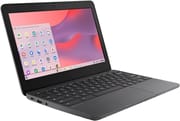 Lenovo 100e Chromebook Gen 4 | Lenovo 100e Chromebook Gen 4 | |
| Price | List Price: Amazon Prices: | List Price: Amazon Prices: |
| Model number | 82W0001EUS | 82W00000US |
| Performance Rating | 3.3 | 3.2 |
| Chromebook Plus | No | No |
| Processor | Octa-core 2.00 Ghz (max 2.20 Ghz) MediaTek Kompanio 528 | Octa-core 2.00 Ghz MediaTek Kompanio 520 |
| RAM | 4 GB | 4 GB |
| Internal Storage | 32 GB eMMC | 32 GB eMMC |
| Screen Size | 11.6" | 11.6" |
| Screen Resolution | 1366x768 | 1366x768 |
| Screen Type | TN | TN |
| Touch Screen | No | No |
| Stylus / Pen | No Stylus Support | No Stylus Support |
| Dimensions width x length x thickness | 11.3 x 7.9 x 0.73 inches (287.02 x 200.66 x 18.54 mm) | 11.3 x 7.9 x 0.73 inches (287.02 x 200.66 x 18.54 mm) |
| Weight | 2.71 lbs (1.23 kg) | 2.71 lbs (1.23 kg) |
| Backlit Keyboard | No | No |
| Webcam | 720p HD | 720p HD |
| WiFi | Wi-Fi 6 (802.11ax) | Wi-Fi 6 (802.11ax) |
| Bluetooth | Bluetooth 5.1 | Bluetooth 5.1 |
| Ethernet | No | No |
| Cellular Modem | No | 4G LTE (Fibocom FM101-GL, embedded eSIM) |
| HDMI | Full-Size HDMI | Full-Size HDMI |
| USB Ports | 2 USB 3, 1 USB-C USB-C 3.2 Gen 1 with Power Delivery and DisplayPort; 2x USB-A 3.2 Gen 1 | 2 USB 3, 1 USB-C USB-C 3.2 Gen 1 with Power Delivery and DisplayPort; 2x USB-A 3.2 Gen 1 |
| Thunderbolt Ports | No | No |
| Card Reader | No Card Reader | No Card Reader |
| Battery | 47Wh, Li-Polymer | 47Wh, Li-Polymer |
| Battery Life | 16 hours | 16 hours |
| Fanless | Yes | Yes |
| Auto Update Expiration Date | June, 2033 | June, 2033 |
Related Chromebooks
-
 Lenovo Chromebook 3 11"The Lenovo Chromebook 3 11 is a fanless 11.6-inch Chromebook with an Intel Celeron N4020, 4GB of…
 -
 Lenovo 300e Yoga Chromebook Gen 4The Lenovo 300e Yoga Chromebook Gen 4 is a rugged 11.6-inch education convertible with a MediaTek…
 -
 HP Chromebook 11a (ARM)The HP Chromebook 11a offers an 11.6-inch anti-glare display, 720p HD webcam, and up to 15 hours 45…
 -
 Acer Chromebook 311 C723The Acer Chromebook 311 C723 is an 11.6-inch education Chromebook built to MIL-STD-810H durability,…
 -
 Acer Chromebook 311 (CO731)The Acer Chromebook 311 (CO731) is a fanless 11.6-inch Chromebook with an Intel Celeron N4500, 4GB…
 -
 ASUS Chromebook CR11 (CR1104C)The ASUS Chromebook CR11 (CR1104C) is a ruggedized 11.6-inch Chromebook built for students and…
A textured shell that unbolts for in-house repair
The 100e Gen 4 measures 11.3 x 7.9 x 0.73 inches and tips the scale at 2.71 pounds, which keeps it firmly in young-student backpack territory. The dark gray ABS chassis uses a textured top cover that hides smudges, fingerprints, and the worst of the scratches that inevitably accumulate during a school year. Rubberized bumper edges wrap around the chassis to absorb desk-drop impacts, and the ports are reinforced so a yanked USB cable doesn’t tear the daughterboard loose. Lenovo calls this DuraSpec, and the marketing says the device is rated to survive both a drop onto concrete and a 360 ml liquid spill across the keyboard.
The MergeDroid hands-on review captured the build experience well: “the real strength quite literally from this model comes from the rugged build quality”. The reviewer did note one minor quirk, namely that “you can click the trackpad through the lid when it’s closed”, which is a side effect of the soft-touch lid that lets students accidentally register input on a closed laptop in a backpack. It’s a small thing, but worth knowing if your students leave Chromebooks suspended rather than fully shutting them down.
The ChromebookParts.com teardown video walks through the Customer Replaceable Unit design that Lenovo introduced with this generation. The bottom cover uses captive screws so they can’t be lost mid-repair, and the reviewer specifically called out that “I like that you don’t have to remove the hinges to replace the board that’s big for me”. The LCD bezel is tool-less, the keyboard is top-load rather than buried under the motherboard, and the keyboard shielding blocks debris from getting under keys. For schools running repair-friendly education Chromebook programs, the 100e Gen 4 is one of the easier devices to keep in service.
The 4GB memory ceiling arrives long before the chip does
The MediaTek Kompanio 520 is a 6nm ARM SoC with two Cortex-A76 performance cores at up to 2.05 GHz and six Cortex-A55 efficiency cores at 2.0 GHz, paired with an ARM Mali-G52 MC2 GPU. In Chromebook terms, this is meaningfully faster than the old MediaTek M8173C chips found in the Lenovo Chromebook 100e (2nd Gen) and a step up from the Kompanio 500 family, but it sits well below modern Intel Core or Snapdragon options. The MergeDroid review noted that the chip “provides a significant performance and battery life boost over older mid-range ARM chips,” which matches what the ARM processor wars of the last few years have delivered in shipping hardware.
In real-world classroom use, the 100e Gen 4 handles Google Docs, Slides, Classroom, and a half-dozen Chrome tabs without obvious stutter. ChromeOS itself is well-optimized for ARM at this point, so basic Workspace use feels snappier than the spec sheet would suggest. The trouble starts as soon as a student opens Zoom alongside more than a few tabs, or tries to run Android apps from Play Store that weren’t designed for low-RAM ARM devices. The 4GB of memory is the binding constraint here, not the processor; this is exactly the kind of device the 4GB Chromebook trap was written about. For early elementary students using one app at a time, it’s fine. For middle and high school workloads, the device will feel cramped.
The 32GB eMMC has enough room for ChromeOS, the user account, and some offline files, but it fills up the moment a student installs a few Linux dev tools, downloads a video for offline class, or caches a couple of large Android apps. There is no SD card slot for the EUS model, so expansion has to happen through a USB-A flash drive or Google Drive. Schools deploying this device should plan around cloud-first workflows and treat the local storage as scratch space rather than primary storage.
The port count is tight and the wireless is current
A single USB-C 3.2 Gen 1 port on the left side handles power delivery, data, and DisplayPort output. Two USB-A 3.2 Gen 1 ports sit one on each side of the chassis, next to a full-size HDMI 1.4b port for classroom projectors, a 3.5 mm combo audio jack, and a Kensington lock slot. The MergeDroid teardown confirmed that “USB-C supports power, data, and display out” through that single port, which means students plugging in a charger lose their option for an external display unless the school provides a USB-C hub with passthrough.
Wi-Fi 6 (802.11ax) and Bluetooth 5.1 put this Chromebook ahead of older education models still on Wi-Fi 5 and Bluetooth 4.2, which is more than the price tier usually buys. On crowded school networks running modern access points, Wi-Fi 6 handles dense client populations far better than Wi-Fi 5, which matters during testing windows when every student device in the building hits the network at once. The Cellular configuration with 4G LTE is available on other 100e Gen 4 SKUs in the lineup, though the 82W0001EUS model covered here is Wi-Fi only.
The 720p HD webcam includes a physical privacy slider. Microphones are integrated into the bezel for video calls, and the speakers carry Waves audio tuning that the Lenovo datasheet describes as “brighter, louder sound” than prior generations. None of this is going to delight a media student, but it’s perfectly adequate for the Google Meet calls and instructional videos that make up most classroom audio.
Reviewer Insights
MergeDroid’s Take
MergeDroid’s hands-on review framed the 100e Gen 4 as the absolute base of Lenovo’s education stack: “if your school likes to punish you or has just overspent elsewhere perhaps this is what they’re handing out to you to get you through your education.” The review was unsparing about the TN panel (“washed out and has poor viewing angles”) and the limitations of having only one USB-C port, but praised the long software runway with the explicit note that the device will see “Chrome OS updates all the way through to June 2033.” Battery life impressed in early testing, with the reviewer commenting on “the slow drain of the battery so far” during typical browsing.
The reviewer also highlighted the physical webcam privacy slider, the spill-resistant keyboard with anti-pry keys, and the surprisingly good port distribution (USB-A on both sides) as wins. The summary verdict positioned the 100e Gen 4 as a competent device for its tier and target audience, not something to be enthusiastic about but a reasonable tool for the job it was designed for.
ChromebookParts.com Teardown
The ChromebookParts.com unboxing and disassembly video is more useful for a school IT lens than a student-experience lens. The reviewer is explicit that the device earned a four-out-of-five rating specifically because of its repairability story: “Overall I’m going to give this device a four out of five… would highly recommend for any self-repair school.” Key wins included the scratch-resistant textured chassis (“the texture on it it’s not going to scratch as easily and if it does it’s not going to show”), the removable keyboard for easy replacement, and the tool-less screen bezel that makes LCD swaps fast.
Routing the motherboard-to-daughterboard cable requires removing the battery first, which adds a step to certain repairs. The single USB-C port doubling as the charging port is the other limitation the video flags for fleet managers.
Customer Reviews
Across 7 ratings on Amazon, this Chromebook averages 3.6 stars. 67 percent of those ratings are five-star and 33 percent are one-star, with nothing in between. The positive feedback is brief and logistics-focused. A verified buyer named Mercedes Neese wrote “Arrived on time and was as described, thank you Amazon,” which speaks more to the ordering experience than to the hardware itself.
The most substantive review is a one-star warning about a listing mismatch. A verified buyer named SM reported that the device shipped did not match the advertised Gen 4 specs, writing that “the actual physical device provided under this listing is an older generation model with entirely different internal hardware.” SM states the unit arrived with an AMD A6-9220C processor and an 11.6-inch TN display (older Gen 2 specs) rather than the advertised MediaTek processor, and recommends verifying the internal hardware on arrival. With so few ratings, treat this listing carefully and confirm the device you receive matches the Gen 4 specs before keeping it.
Read more owner reviews on Amazon.
A K-5 fleet machine with a repair path
The 100e Gen 4 is built to spend seven years in a classroom, absorb the drops that come with that, and open up for a parts swap when something breaks. On those terms it succeeds. The MediaTek Kompanio 520 is a clear upgrade over the ancient ARM chips in the original 100e, Wi-Fi 6 keeps the wireless side modern, and the Customer Replaceable Unit design saves school IT staff hours per repair.
The device makes the most sense for K-5 deployments where students use a small number of apps simultaneously and where the long Auto Update Expiration horizon lets a district amortize the purchase over an entire elementary career. For middle and high school students juggling several apps at once, the 4GB RAM is a hard ceiling, and an 8GB Chromebook (or a Chromebook Plus model) is the better long-term value despite the higher upfront cost. Parents shopping for a basic family device should read what an education Chromebook actually means first, since the design targets a fleet rather than a household.
For schools weighing this against the rest of Lenovo’s education stack or comparable HP, Acer, and Dell models, the Chromebook comparison chart is the fastest way to line up specs side by side. It wins few individual spec comparisons, but it holds up on the durability, battery, and repair criteria that decide whether a thousand devices survive a school year.
Frequently Asked Questions
What processor does the Lenovo 100e Chromebook Gen 4 use?
The 82W00000US model, which adds built-in 4G LTE, runs the MediaTek Kompanio 520 (MT8186), an octa-core ARM processor with two Cortex-A76 performance cores at up to 2.05 GHz and six Cortex-A55 efficiency cores at 2.0 GHz. The later 82W0001EUS model uses the closely related Kompanio 528, which raises the A76 cores to 2.2 GHz. Both carry 4GB of RAM and 32GB of eMMC. If you are buying a used unit, verify the chip via chrome://system before assuming.
When does the Lenovo 100e Chromebook Gen 4 reach its Auto Update Expiration?
The 100e Chromebook Gen 4 reaches its Auto Update Expiration (AUE) in June 2033. That’s roughly seven years of remaining ChromeOS feature and security updates as of 2026, covering elementary school deployments over the long term and older grades over the medium term.
Can I upgrade the RAM or storage on the Lenovo 100e Chromebook Gen 4?
No. Both the 4GB of LPDDR4X RAM and the 32GB of eMMC storage are soldered to the motherboard and cannot be upgraded after purchase. The device also lacks a microSD slot on the 82W0001EUS configuration, so storage expansion has to happen through USB-A flash drives or cloud storage like Google Drive.
What ports does the Lenovo 100e Chromebook Gen 4 have?
The 100e Gen 4 includes one USB-C 3.2 Gen 1 port with Power Delivery and DisplayPort output, two USB-A 3.2 Gen 1 ports (one on each side), a full-size HDMI 1.4b port for projectors, a 3.5 mm combo headphone and microphone jack, and a Kensington lock slot. The single USB-C port handles both charging and external display, so a USB-C hub is required if you want to charge and drive a second display at the same time.
How long does the battery last on the Lenovo 100e Chromebook Gen 4?
Lenovo rates the 100e Gen 4 at up to 16 hours of battery life on the 47 Wh cell, based on the Google Power Load Test for Wi-Fi configurations. Real-world classroom use will typically deliver eight to twelve hours depending on screen brightness, wireless load, and which apps are running. Either figure covers a full school day without finding a power outlet.
Is the Lenovo 100e Chromebook Gen 4 a Chromebook Plus?
It is not. Chromebook Plus requires at least 8GB of RAM, 128GB of storage, an Intel Core or AMD Ryzen processor (or equivalent), and a 1080p IPS display with 1080p webcam. The 100e Gen 4 hits none of those bars, because it is aimed at a lower price and a higher durability bar instead.
Was the Lenovo 100e Chromebook Gen 4 designed for schools?
Yes. The 100e Chromebook Gen 4 is part of Lenovo’s education Chromebook lineup and is sold primarily through Lenovo’s education channel and authorized education resellers. The DuraSpec drop and spill testing, the anti-pry keyboard, the Customer Replaceable Unit design, and the long Auto Update window are all explicitly designed for K-12 fleet deployments rather than consumer retail.