
Acer Chromebook 311 (CO731)
Updated on

The Acer Chromebook 311 (CO731) is a plain Chrome OS laptop built for students and families. An Intel Celeron N4500 dual-core chip runs it, and the 11.6-inch chassis has no fan, so the machine makes no noise at any workload. Chrome OS updates continue through its Auto Update Expiration date of June 2031. The HD display and the two-port layout mark it as a budget machine, and the work it suits is web browsing, Google Workspace, video streaming, and educational apps.
Pros and Cons
| Pros | Cons |
|---|---|
| Runs silent at any workload, since there is no fan | The 1366x768 TN panel washes out as soon as you look at it off-angle |
| Chrome OS features and security patches keep arriving until June 2031 | Two ports total, so a hub is needed for anything past a mouse and a charger |
| At 2.65 lbs it can live in a backpack without being noticed | No touchscreen on this model, so tablet-style apps are awkward |
| The Celeron N4500 keeps up with documents, calls, and a working set of tabs | The 4GB of memory is soldered to the board and cannot be raised later |
| Roughly 8 hours per charge covers a school or work day | No HDMI or SD card slot, so an external display ties up the USB-C port |
| The USB-C port charges the laptop and drives a monitor | An unlit keyboard is hard to read in a dim room |
Related Videos
Acer Chromebook 311 (CO731) Comparison Chart
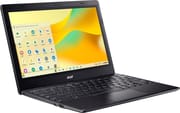 Acer Chromebook 311 (CO731) | |
| Price | List Price: $229 Amazon Prices: Loading prices... Best Buy: Loading price... |
| Model number | CBOA311-1H-C90F |
| Performance Rating | 3.0 |
| Chromebook Plus | No |
| Processor | Dual-core 1.10 Ghz (max 2.80 Ghz) Intel Celeron N4500 |
| RAM | 4 GB |
| Internal Storage | 64 GB eMMC |
| Screen Size | 11.6" |
| Screen Resolution | 1366x768 |
| Screen Type | TN |
| Touch Screen | No |
| Stylus / Pen | No Stylus Support |
| Dimensions width x length x thickness | 11.6 x 8.1 x 0.83 inches (294.64 x 205.74 x 21.08 mm) |
| Weight | 2.65 lbs (1.2 kg) |
| Backlit Keyboard | No |
| Webcam | 720p |
| WiFi | Wi-Fi 5 (802.11ac) |
| Bluetooth | Bluetooth 5.0 |
| Ethernet | No |
| Cellular Modem | No |
| HDMI | No HDMI |
| USB Ports | 1 USB 3, 1 USB-C 1x USB Type-C 3.2 Gen 1 (with DC-in and DisplayPort), 1x USB Type-A 3.2 Gen 1 |
| Thunderbolt Ports | No |
| Card Reader | No Card Reader |
| Battery | 2 cell, 33Wh, Li-ion |
| Battery Life | 8 hours |
| Fanless | Yes |
| Auto Update Expiration Date | June, 2031 |
Related Chromebooks
-
 Acer Chromebook 311 C723The Acer Chromebook 311 C723 is an 11.6-inch education Chromebook built to MIL-STD-810H durability,…
 -
 Acer Gateway Chromebook 311The Acer Gateway Chromebook 311 is an 11.6-inch 1366x768 ChromeOS laptop on an Intel Celeron N4500…
 -
 ASUS Chromebook CR11 (CR1104C)The ASUS Chromebook CR11 (CR1104C) is a ruggedized 11.6-inch Chromebook built for students and…
 -
 Dell Chromebook 11 (3100)The Dell Chromebook 11 (3100) is a ruggedized 11.6-inch education Chromebook with rubber bumpers, a…
 -
 Dell Chromebook 3120The Dell Chromebook 3120 is a fanless 11.6-inch education Chromebook with an Intel N100, sold in…
 -
 HP Chromebook 11a (ARM)The HP Chromebook 11a offers an 11.6-inch anti-glare display, 720p HD webcam, and up to 15 hours 45…
A passively cooled school laptop with a Jasper Lake dual-core
The chassis measures 11.6 x 8.1 x 0.83 inches and weighs 2.65 pounds, which is small enough to slide into a backpack next to a binder. Acer aims the model at the education market and gives it a build meant for daily handling by students, in a black finish that suits a desk at home or a classroom cart.
The Intel Celeron N4500 is a Jasper Lake dual-core with 2 cores and 2 threads, a base clock of 1.10 GHz, and boost to 2.80 GHz. Its CPU Mark score of roughly 1805 is enough for a document and a video call open at the same time. The 4GB of LPDDR4 memory is soldered, so browsing, streaming, and Google Workspace are the workloads to plan around, and a buyer who keeps many tabs open at once should look at an 8GB machine instead.
The single USB Type-C 3.2 Gen 1 port carries charging, data, and DisplayPort video, and the single USB Type-A 3.2 Gen 1 port takes a mouse or a flash drive. Wireless is WiFi 5 (802.11ac) and Bluetooth 5.0, enough for headphones, a mouse, and a home network. With no HDMI, no SD card reader, and no spare USB, anyone who docks several peripherals at once will need a hub; a USB Ethernet adapter can take either port when a wired connection matters. The 33Wh 2-cell Li-ion battery is rated for about 8 hours, and screen brightness and workload move that figure in either direction.
Reviewer Insights
ChromebookParts.com
ChromebookParts.com unboxed the CBOA311-1H-C90F, booted it, and then took it apart to judge how easy it is to repair. On first use the reviewer said it “booted up faster than I thought it would” and that “The screen, it looks crisp and clear to me.” USB-C charging, an audio jack, and one USB-A port sit on one side with nothing on the other, which the reviewer called “a little lacking on the connectivity here.” The bundled 36 watt adapter was called “relatively low power for Chromebooks,” and with no fan and no vents near the heat sink, the reviewer said “this might get warm with a lot of use.” The keyboard cannot be removed from the palmrest, and the final scores were three out of five for usability and four out of five for repairability.
Customer Reviews
Across 8 ratings on Amazon, the Acer Chromebook 311 (CO731) averages 3.3 stars. About 31% of ratings are 5-star and roughly 26% sit at 1-star. Only a couple of written reviews are posted so far, and both flag concerns rather than praise. A verified buyer who gave it 3 stars reported that it “Gets hot fast.” and that “Battery drains quickly,” adding that they were still inside the return window and wanted to see how it held up over the next couple of weeks.
The other written review is more negative. A verified buyer named jverdi gave the Chromebook 1 star and described a visibility problem, writing that it is “very hard to see the keyboard screen the unit is too black.” Heat, battery drain, and a dim display are the issues these two owners raised. The sample is too small to say how common any of them is.
Read more owner reviews on Amazon.
A quiet second machine with a low ceiling
It makes no noise, disappears into a bag, runs a normal Chrome OS day on one charge, and keeps taking updates until June 2031.
Two ports, a TN panel, and memory that cannot be raised are the limits a buyer runs into, and the two Amazon buyers who wrote in flagged heat and battery drain on top of that. Anyone who needs heavier multitasking should price an 8GB model, and anyone who wants touch or a folding hinge should look at the Acer Chromebook Spin 311.
The Chromebook Comparison Chart lists the alternatives side by side.
Frequently Asked Questions
What processor does the Acer Chromebook 311 (CO731) use?
An Intel Celeron N4500, with 2 cores and 2 threads, a base clock of 1.10 GHz, and boost to 2.80 GHz. The Jasper Lake part scores approximately 1805 on PassMark’s CPU benchmark, which is the level Chrome OS web browsing, document editing, and video streaming ask for.
Can I upgrade the RAM in the Acer Chromebook 311 (CO731)?
No. The 4GB of LPDDR4 memory is soldered to the motherboard, so it cannot be changed after purchase. Buyers who expect heavy multitasking should shop for a Chromebook with 8GB of RAM instead.
What ports does the Acer Chromebook 311 (CO731) have?
The full list is 1x USB Type-C 3.2 Gen 1 port (charging and DisplayPort video output), 1x USB Type-A 3.2 Gen 1 port, and a 3.5mm headphone/microphone combo jack. There is no HDMI port, SD card reader, or Ethernet port, so an external display needs a USB-C adapter.
How long will the Acer Chromebook 311 (CO731) receive software updates?
Its Auto Update Expiration (AUE) date is June 2031. Chrome OS features and security patches arrive until then. After that the updates stop, and the Chromebook keeps working on whatever version it last received.
Is the Acer Chromebook 311 (CO731) fanless?
Yes. Heat from the Intel Celeron N4500 is shed passively, and the machine has no moving parts at all, so it stays silent whatever it is doing.
Does the Acer Chromebook 311 (CO731) have a touchscreen?
No. The 11.6-inch HD (1366x768) TN display does not take touch input, and the lid does not fold back. The Acer Chromebook Spin 311 is the model to look at for a touchscreen and a 360-degree hinge.
How much battery life does the Acer Chromebook 311 (CO731) provide?
Acer rates the 33Wh 2-cell Li-ion battery at approximately 8 hours on a charge, which covers a school or work day of web browsing, document editing, and video streaming. Screen brightness and workload move that figure in either direction, and one Amazon buyer reported faster drain than the rating suggests.