
Acer Chromebook Spin 311
Updated on

The Acer Chromebook Spin 311 (model CP311-2H) is a versatile, budget-friendly Chromebook that doubles as an 11.6-inch Android tablet. The HD IPS touch panel is paired with a fanless dual-core Intel Celeron N4000 or N4020, 4GB of LPDDR4 RAM, and either 32GB or 64GB of eMMC storage, which is enough headroom for browsing, Google Docs, Android apps, and light media. Acer rounds the design out with two USB-C ports (both support charging and DisplayPort output), two full-size USB-A 3 ports, a microSD reader, and a 360-degree hinge that flips the screen flat against the back of the keyboard. The plastic chassis weighs 2.65 lb, stays cool without a fan, and feels noticeably more rigid than the cheapest plastic Chromebooks in its price band.
| Pros | Cons |
|---|---|
| 360-degree convertible hinge for tablet, tent, and stand modes | 1366x768 HD display at roughly 70% sRGB and only about 205 nits |
| Comfortable keyboard with deep key travel for the price | Thick screen bezels look dated |
| Two USB-C ports with charging and DisplayPort out | No backlit keyboard |
| Fanless, silent operation | 4GB RAM ceiling on every variant; storage soldered to the board |
| Real-world battery life of 10+ hours | 720p webcam is noisy in low light |
| Long Auto Update support through June 2029 | Speakers are thin on bass for movie watching |
Related Videos
Acer Chromebook Spin 311 Comparison Chart
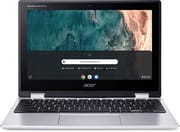 Acer Chromebook Spin 311 | Acer Chromebook Spin 311 | Acer Chromebook Spin 311 | |
| Price | List Price: $499.99 Amazon Prices: Loading prices... | List Price: $349.99 Amazon Prices: Loading prices... | List Price: $249.99 Amazon Prices: Loading prices... |
| Model number | CP311-2H-C679 / NX.HKKAA.005 | CP311-2H-C3KA / NX.HKKAA.001 | CP311-2H-C7QD / NX.HKKAA.006 |
| Performance Rating | 3.1 | 3.1 | 3.1 |
| Chromebook Plus | No | No | No |
| Processor | Dual-core 1.10 Ghz (max 2.80 Ghz) Intel Celeron Processor N4020 | Dual-core 1.10 Ghz (max 2.60 Ghz) Intel Celeron N4000 Processor | Dual-core 1.10 Ghz (max 2.60 Ghz) Intel Celeron N4000 Processor |
| RAM | 4 GB | 4 GB | 4 GB |
| Internal Storage | 32 GB eMMC | 64 GB eMMC | 64 GB eMMC |
| Screen Size | 11.6" | 11.6" | 11.6" |
| Screen Resolution | 1366x768 | 1366x768 | 1366x768 |
| Screen Type | IPS | IPS | IPS |
| Touch Screen | Yes | Yes | Yes |
| Stylus / Pen | No Stylus Support | No Stylus Support | No Stylus Support |
| Dimensions width x length x thickness | 11.7 x 8.1 x 0.79 inches (297.18 x 205.74 x 20.07 mm) | 11.7 x 8.1 x 0.79 inches (297.18 x 205.74 x 20.07 mm) | 11.7 x 8.1 x 0.79 inches (297.18 x 205.74 x 20.07 mm) |
| Weight | 2.65 lbs (1.2 kg) | 2.65 lbs (1.2 kg) | 2.65 lbs (1.2 kg) |
| Backlit Keyboard | No | No | No |
| Webcam | HD | HD | HD |
| WiFi | IEEE 802.11a/b/g/n/ac | IEEE 802.11a/b/g/n/ac | IEEE 802.11a/b/g/n/ac |
| Bluetooth | Bluetooth 5.0 | Bluetooth 5.0 | Bluetooth 5.0 |
| Ethernet | No | No | No |
| Cellular Modem | No | No | No |
| HDMI | No HDMI | No HDMI | No HDMI |
| USB Ports | 2 USB 3, 2 USB-C (with DisplayPort) | 2 USB 3, 2 USB-C (with DisplayPort) | 2 USB 3, 2 USB-C (with DisplayPort) |
| Thunderbolt Ports | No | No | No |
| Card Reader | microSD Card Reader | microSD Card Reader | microSD Card Reader |
| Battery | 3 cell, Lithium-ion | 3 cell, Lithium-ion | 3 cell, Lithium-ion |
| Battery Life | 10.0 hours | 10.0 hours | 10.0 hours |
| Fanless | Yes | Yes | Yes |
| Auto Update Expiration Date | June, 2029 | June, 2029 | June, 2029 |
Related Chromebooks
-
 Acer Chromebook 311Dive into productivity with the Acer Chromebook 311: an 11.6-inch HD touchscreen laptop packing an…
 -
 Acer Chromebook Spin 311The Acer Chromebook Spin 311 was a popular budget convertible that demonstrated how ARM-based…
 -
 ASUS Chromebook Flip C214The ASUS Chromebook Flip C214 combines versatility with a 360° hinge, 11.6-inch anti-glare…
 -
 HP Fortis Flip G1m 11 inch ChromebookThe HP Fortis Flip G1m 11 inch Chromebook is a rugged convertible 2-in-1 built for K-12 classrooms,…
 -
 Lenovo 300e Yoga Chromebook Gen 4The Lenovo 300e Yoga Chromebook Gen 4 is a rugged 11.6-inch education convertible with a MediaTek…
 -
 Dell Chromebook 3120A rugged and affordable 11.6-inch Chromebook with Intel N100 processor, available in clamshell and…
The Spin 311’s standout feature is the 360-degree hinge, which lets the display fold all the way around for tablet, tent, and stand orientations. The keyboard is not backlit but offers a tactile experience with decent-sized keycaps and deep key travel; the trackpad has good tracking and palm rejection that is rare on entry-level Chromebooks. ChromeOS handles browsing, Docs, and most Android apps without complaint, though anything CPU-heavy (long video calls with effects, large spreadsheets, dozens of open tabs) will expose the limits of the 2-core, 4GB platform.
There are three variants on this product page, and they are easy to mix up because the model numbers differ by one letter. The CP311-2H-C679 (B086MBQKH2) uses the slightly faster Celeron N4020 with a 32GB SSD; the CP311-2H-C3KA (B07XMJ65B5) and CP311-2H-C7QD (B08NTP5RTN) both use the N4000 with 64GB of eMMC. In practice the N4000 and N4020 are within a few percent of each other for ChromeOS workloads; the more important spec to watch is the storage, since 32GB fills up faster than people expect once Android apps and a few offline videos are on board.
Reviewers’ Take on the Acer Chromebook Spin 311
In a video review, KLGadgetTV calls the Spin 311 “the nicest budget Chromebook” they had come across at the time, praising the build quality, solid display hinges, and comfortable keyboard and trackpad. They flagged the speakers as the main weak point, since they produce very little bass and undermine the otherwise capable media experience. KLGadgetTV’s real-world battery test came in close to Acer’s claim: “In my experience, I got up to an impressive 8 hours with a mixture of video streaming and web browsing activities.”
Tom’s Guide gave the Spin 311 a 3.5 out of 5 (70%), with the summary line “Good battery life and a great keyboard help the Acer Chromebook Spin 311 stand out.” Their lab benchmarks paint the clearest picture available for this model: the screen tops out at 204.2 nits peak brightness and covers only 70.4% of the sRGB color spectrum, which the reviewer notes is “disappointing when you consider that a similarly-priced competitor like the Acer Chromebook R 11 is able to deliver a 73.2% sRGB spectrum rating.” Their web-surfing battery test ran 11 hours and 41 minutes before the battery died, comfortably above the 10-hour mark Acer advertises but more than three hours short of the optimistic 15-hour claim. Their verdict on the display: “In short, it’s not a great screen for watching movies or TV shows.”
Matthew Elliott from PCMag frames the Spin 311 as an affordable, versatile pick for grade-school students and adds that its 2-in-1 form factor is the real differentiator at this price: “Finding this 2-in-1 versatility in a Chromebook at this price is rare and is the Spin 311’s chief attraction.” He echoes Tom’s Guide on the small, low-resolution screen, and his testing put the battery life on the shorter side of Acer’s claim, which he flags as a potential deal-breaker for users planning all-day untethered use.
In a 2025 revisit at PCVarge, Allan Smith looks specifically at the CP311-2H-C7QD (the 64GB N4000 variant). He singles out the keyboard as the standout feature, claiming the 1.6 mm key travel “rivals the typing experience on the Dell XPS 15”; that is a bold comparison for a sub-$300 Chromebook, but the underlying observation (deep, snappy travel for a budget keyboard) matches what KLGadgetTV and Tom’s Guide also report. His display measurements (205.3 nits brightness and 70.6% sRGB) come in within a hair of Tom’s Guide’s numbers, which means anyone buying this Chromebook five years after launch should expect the same dim, low-gamut screen. Video playback battery in his test ran above 10 hours, in line with the original reviews.
Customer Reviews of the Acer Chromebook Spin 311
Across 10,293 ratings on Amazon, the Acer Chromebook Spin 311 averages 4.5 stars, with 76 percent of reviewers leaving five stars and 6 percent leaving one or two. Most of the positive reviews come from parents buying it for kids or students, who praise the light weight, the responsive touchscreen, and the value of a convertible 2-in-1 at this price. Melrel05, a verified buyer who bought it for a 9-year-old, wrote “It really is amazing that you can get a touchscreen 2-in-1 laptop for $200-$300”, and Tobias Fairman, also a verified purchaser, summed it up as “Versatile little laptop that works everywhere I need it to.”
The lower ratings point at consistent complaints worth weighing. A verified buyer posting as AmazonCustomer reported a recurring video playback bug: “The Chromebook picture will start to jump/wiggle a bit and then get stuck”, requiring a reboot almost daily, and Ms. Buie, who otherwise gave it five stars, noted her son “has been having issues with it freezing up or connecting to the internet” at some locations. A verified reviewer named Tracker flagged the hardware ceiling, calling it “a crime that they’re still releasing models in 2020-2021 with only 32gb of storage” and adding the 4GB of RAM is “a little lackluster too.” Several owners also note that app expectations should be managed: Craig Olsen, who still rated it four stars, found some ChromeOS apps did not match their desktop counterparts. Read more owner reviews on Amazon.
Conclusion
The Acer Chromebook Spin 311 is a good choice for users who mostly live in the browser and Google’s suite of apps, and the convertible hinge adds real value at this price. Tom’s Guide and PCVarge agree on its strengths (battery, keyboard, build) and on its weaknesses (small, dim, low-gamut display), and the 4GB RAM ceiling makes it a poor fit for anyone who keeps 20+ tabs open or runs demanding Android apps. The good news, five years after launch, is that Google’s Auto Update Expiration for the Spin 311 (CP311-2H) now runs through June 2029, so a unit bought today still has several years of ChromeOS security updates ahead of it. For broader options, see Starry Hope’s Chromebook Comparison Tool.
Frequently Asked Questions
Q: What is the screen size of the Acer Chromebook Spin 311? A: The Acer Chromebook Spin 311 features an 11.6-inch IPS touchscreen with a resolution of 1366x768 pixels. This makes it compact and portable yet large enough for most daily tasks.
Q: How much storage and RAM does the Acer Chromebook Spin 311 have? A: The Acer Chromebook Spin 311 comes with 4GB of RAM across all variants. Storage options include 32GB or 64GB of eMMC storage depending on the model.
Q: Does the Acer Chromebook Spin 311 have a backlit keyboard? A: No, the Acer Chromebook Spin 311 does not have a backlit keyboard. However, users have said the keyboard is comfortable and responsive.
Q: Can the Acer Chromebook Spin 311 be used as a tablet? A: Yes, the Acer Chromebook Spin 311 has a 360-degree hinge that allows it to be used in tablet mode. This makes it a versatile device that can be used for various tasks.
Q: What is the battery life of the Acer Chromebook Spin 311? A: The Acer Chromebook Spin 311 has a quoted battery life of up to 10 hours. This may vary depending on the specific tasks being performed, but it should be sufficient for a full day of work or study.
Q: Is the Acer Chromebook Spin 311 suitable for gaming? A: The Acer Chromebook Spin 311 is not designed for high-end gaming. However, it can handle casual Android games from the Google Play Store.
Q: Does the Acer Chromebook Spin 311 have a webcam? A: Yes, the Acer Chromebook Spin 311 features an HD webcam.
Q: What kind of ports does the Acer Chromebook Spin 311 have? A: The Acer Chromebook Spin 311 has a good selection of ports, including two USB-C ports that support USB PD charging and display output, two full-size USB-A (USB 3.0) ports, and a microSD card slot for additional storage.
Q: When will the Acer Chromebook Spin 311 reach its end of life? A: According to Google’s official Chrome Enterprise Auto Update Policy database, the Acer Chromebook Spin 311 (CP311-2H and CP311-2HN) is scheduled to receive automatic ChromeOS updates through June 2029. After that date Google no longer guarantees new ChromeOS feature or security updates for the device.
Q: Can the Acer Chromebook Spin 311 connect to Wi-Fi and Bluetooth? A: Yes, the Acer Chromebook Spin 311 supports Wi-Fi (IEEE 802.11a/b/g/n/ac) and Bluetooth 5.0, allowing it to connect to various devices and networks.