
Lenovo 300e Yoga Chromebook Gen 4
Updated on

The Lenovo 300e Yoga Chromebook Gen 4 is a rugged 11.6-inch convertible built for education and everyday use. It runs on the MediaTek Kompanio 520, an 8-core ARM chip that covers web browsing, document work, and streaming, and pairs it with a battery rated up to 16 hours. The 360-degree hinge flips the device into tablet, tent, or presentation modes, which suits a classroom where the same machine is a notebook one period and a reading tablet the next.
Weighing just under 3 pounds, the 300e Yoga Chromebook Gen 4 strikes an excellent balance between portability and durability. Lenovo engineered this device to withstand the rigors of daily use with a semi-rugged design that includes reinforced corners, a spill-resistant keyboard with internal drainage channels, and construction that meets MIL-STD-810G military standards for shock resistance. The 10-point multitouch IPS display supports USI pen input for natural note-taking and document annotation, making it particularly well-suited for students and anyone who prefers a more hands-on interaction with their content.
| Pros | Cons |
|---|---|
| Exceptional 16-hour battery life for all-day use without charging | Limited 32GB eMMC storage requires cloud storage reliance |
| Rugged MIL-STD-810G construction withstands drops and bumps | HD resolution (1366x768) adequate but not sharp for media |
| Versatile 360-degree hinge with four usage modes | 4GB RAM may limit heavy multitasking performance |
| Spill-resistant keyboard with drainage channels | No backlit keyboard for low-light typing |
| Wi-Fi 6 and Bluetooth 5.1 for modern connectivity | Webcam limited to 720p resolution |
| Chrome OS support through June 2033 (10+ years of updates) | No SD card reader for expandable storage |
Lenovo 300e Yoga Chromebook Gen 4 Comparison Chart
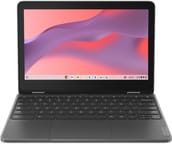 Lenovo 300e Yoga Chromebook Gen 4 | Lenovo 300e Yoga Chromebook Gen 4 | |
| Price | List Price: $329.00 Amazon Prices: Loading prices... | List Price: $364.00 Amazon Prices: Loading prices... |
| Model number | 82W20003US | 82W20002US |
| Performance Rating | 3.8 | 3.8 |
| Chromebook Plus | No | No |
| Processor | Octa-core 2.00 Ghz MediaTek Kompanio 520 | Octa-core 2.00 Ghz MediaTek Kompanio 520 |
| RAM | 4 GB | 4 GB |
| Internal Storage | 32 GB eMMC | 32 GB eMMC |
| Screen Size | 11.6" | 11.6" |
| Screen Resolution | 1366x768 | 1366x768 |
| Screen Type | IPS | IPS |
| Touch Screen | Yes | Yes |
| Stylus / Pen | Supported | Supported |
| Dimensions width x length x thickness | 11.3 x 7.9 x 0.73 inches (287.02 x 200.66 x 18.54 mm) | 11.3 x 7.9 x 0.73 inches (287.02 x 200.66 x 18.54 mm) |
| Weight | 2.93 lbs (1.33 kg) | 2.93 lbs (1.33 kg) |
| Backlit Keyboard | No | No |
| Webcam | 720p HD | 720p HD |
| WiFi | Wi-Fi 6 (802.11ax) | Wi-Fi 6 (802.11ax) |
| Bluetooth | Bluetooth 5.1 | Bluetooth 5.1 |
| Ethernet | No | No |
| Cellular Modem | No | No |
| HDMI | Full-Size HDMI | Full-Size HDMI |
| USB Ports | 2 USB 3, 1 USB-C (USB-C port supports data transfer, Power Delivery and DisplayPort) | 2 USB 3, 1 USB-C (USB-C port supports data transfer, Power Delivery and DisplayPort) |
| Thunderbolt Ports | No | No |
| Card Reader | No Card Reader | No Card Reader |
| Battery | 47Wh, Li-Polymer | 47Wh, Li-Polymer |
| Battery Life | 16.0 hours | 16.0 hours |
| Fanless | Yes | Yes |
| Auto Update Expiration Date | June, 2033 | June, 2033 |
Related Chromebooks
-
 Lenovo 100e Chromebook Gen 4The Lenovo 100e Chromebook Gen 4 is a rugged, fanless 11.6 inch ARM Chromebook built for K-12…
 -
 Acer Chromebook Spin 311The Acer Chromebook Spin 311 was a popular budget convertible that demonstrated how ARM-based…
 -
 Lenovo Chromebook 3 11"The Lenovo Chromebook 3 is a sub-$220 11.6-inch ChromeOS laptop with a Celeron N4020, 4GB of RAM,…
 -
 Acer Chromebook 311Dive into productivity with the Acer Chromebook 311: an 11.6-inch HD touchscreen laptop packing an…
 -
 ASUS Chromebook Flip C214The ASUS Chromebook Flip C214 combines versatility with a 360° hinge, 11.6-inch anti-glare…
 -
 HP Fortis Flip G1m 11 inch ChromebookThe HP Fortis Flip G1m 11 inch Chromebook is a rugged convertible 2-in-1 built for K-12 classrooms,…
Detailed Insights into the Lenovo 300e Yoga Chromebook Gen 4

The build quality of the Lenovo 300e Yoga Chromebook Gen 4 reflects its education-focused heritage in the best possible way. The reinforced plastic chassis feels sturdy without adding excessive weight, and the textured finish provides good grip while resisting fingerprints better than glossy alternatives. The keyboard deck remains firm under pressure, and the keys themselves offer a surprisingly satisfying typing experience with adequate travel for a device in this class. While the keyboard lacks backlighting, the chiclet-style keys are well-spaced and comfortable for extended typing sessions, though the compact 11.6-inch form factor does mean slightly narrower key spacing than full-size keyboards.
Performance from the MediaTek Kompanio 520 processor proves adequate for the Chrome OS workloads this device targets. The octa-core ARM processor pairs two high-performance Cortex-A76 cores running at 2.05 GHz with six efficiency-focused Cortex-A55 cores, delivering responsive performance for web browsing, document editing, video streaming, and educational applications. The integrated Mali-G52 GPU handles graphics duties competently, enabling smooth 1080p video playback and basic casual gaming. With 4GB of LPDDR4X memory, the system handles typical workloads well with multiple browser tabs and Google Workspace applications running simultaneously, though power users pushing beyond a dozen tabs may notice occasional slowdowns.
The connectivity options strike a practical balance for education and home use scenarios. Two USB 3.2 Gen 1 Type-A ports accommodate traditional peripherals like mice, keyboards, and flash drives, while the single USB-C 3.2 Gen 1 port handles charging, data transfer, and DisplayPort video output for connecting external monitors. The full-size HDMI 1.4b port enables direct connection to classroom projectors and external displays without requiring adapters, a thoughtful inclusion that many competing Chromebooks omit. Wi-Fi 6 (802.11ax) provides fast, reliable wireless connectivity with improved performance in congested network environments, and Bluetooth 5.1 enables connection to wireless peripherals and audio devices. There is no built-in Ethernet port, but a USB Ethernet adapter can be connected through the USB-A ports for wired networking in lab environments.
Customer Reviews of the Lenovo 300e Yoga Chromebook Gen 4

Across 18 ratings on Amazon, the Lenovo 300e Yoga Chromebook Gen 4 averages 4.1 stars, and the spread is wide: about 70 percent of raters left five stars while roughly 20 percent left one. The positive reviews come mostly from buyers picking it up for older relatives or kids. Mingo, a verified buyer who described himself as a senior citizen replacing a nine-year-old machine, called it an “Amazing little dude” and wrote that it was “so easy to use and syncing was flawless and fast.” Another verified buyer, just1opinion, bought three for grandkids and said they “are perfect with a flip keyboard and lots of gb for school work. I would buy these again in a heartbeat.”
The low ratings cluster around one specific, recurring complaint: a listing that some buyers read as offering far more storage than the unit actually has. Verified buyer Alison Harrington wrote, “This is advertised to have 512GB of storage but only actually has 32GB. Very misleading,” and another verified buyer, Jenn, returned hers over the same issue, saying her two students “can not use a computer with 4gb and 32gb.” A later reviewer, ChadWiccc, pushed back, arguing the device “CAN STORE as much as advertised, with portable storage tools, i.e usb thumbdrives.” If you are considering this Chromebook, treat the base 4GB RAM and 32GB storage as the real spec and confirm the configuration before buying. Read more owner reviews on Amazon.
Conclusion
The Lenovo 300e Yoga Chromebook Gen 4 is a sensible pick for students, schools, and anyone wanting a durable, low-cost convertible. The long battery life, MIL-STD-810G rugged build, and 360-degree hinge are a good match for daily classroom use, where a device has to survive drops and switch between laptop and tablet roles. The MediaTek Kompanio 520 is adequate for ChromeOS workloads, and the Wi-Fi 6, full-size HDMI port, and USI pen support are practical inclusions for that setting.
While the 32GB storage and 4GB RAM represent compromises necessary to hit the price point, these limitations align with Chrome OS’s cloud-centric design philosophy. The HD resolution display handles everyday tasks acceptably, and the touchscreen’s responsiveness enhances the convertible experience. For buyers who understand that this device targets education and basic productivity rather than demanding applications, the 300e Yoga Chromebook Gen 4 delivers reliable value backed by Chrome OS updates through June 2033. To see how it stacks up against other models side by side, visit our Chromebook Comparison Chart.
Frequently Asked Questions
How long does the Lenovo 300e Yoga Chromebook Gen 4 battery last?
Lenovo rates the 300e Yoga Chromebook Gen 4 at up to 16 hours of battery life, and real-world user reports confirm that the 47Wh battery typically delivers 10-14 hours of actual use for web browsing, document editing, and video streaming. This makes it one of the longest-lasting Chromebooks in its class, easily covering a full school or work day without needing to charge.
Can I upgrade the RAM or storage on the Lenovo 300e Yoga Chromebook Gen 4?
No, the 4GB of LPDDR4X RAM is soldered to the motherboard and cannot be upgraded. The 32GB eMMC storage is also not user-replaceable. If you need more storage, you’ll need to rely on cloud storage services like Google Drive, or use USB drives and external storage devices connected to the USB-A or USB-C ports.
Does the Lenovo 300e Yoga Chromebook Gen 4 include a stylus?
The 300e Yoga Chromebook Gen 4 supports USI (Universal Stylus Initiative) pens but does not include one in the box for all configurations. Some education-focused SKUs may include a garaged stylus, but consumer retail versions typically require purchasing a compatible USI pen separately. The touchscreen works with any USI-certified stylus for note-taking and drawing.
How long will the Lenovo 300e Yoga Chromebook Gen 4 receive Chrome OS updates?
Google’s Auto Update Expiration (AUE) date for the Lenovo 300e Yoga Chromebook Gen 4 is June 2033, providing approximately 10 years of automatic Chrome OS and security updates from its release. This extended support period makes it an excellent long-term investment for educational institutions and individual buyers who want to maximize the usable lifespan of their device.
Can the Lenovo 300e Yoga Chromebook Gen 4 connect to an external monitor?
Yes, the 300e Yoga Chromebook Gen 4 offers two ways to connect external displays. The built-in HDMI 1.4b port allows direct connection to monitors, TVs, and projectors without adapters, supporting resolutions up to 4K at 30Hz. Additionally, the USB-C port supports DisplayPort output for connecting USB-C monitors or using USB-C to HDMI/DisplayPort adapters for additional flexibility.
Is the Lenovo 300e Yoga Chromebook Gen 4 good for students?
The 300e Yoga Chromebook Gen 4 is specifically designed for students and education environments. Its MIL-STD-810G rugged construction survives drops and daily wear, the spill-resistant keyboard prevents liquid damage, and the all-day battery eliminates charging anxiety during classes. The 360-degree convertible design supports different learning styles, and Chrome OS provides a secure, easy-to-manage platform for schools and families.