
When we wrote about the Chromebook e-waste crisis last month, the picture was bleak. Millions of pandemic-era Chromebooks hitting their Auto Update Expiration dates, only a third of the resulting e-waste properly recycled, and a system where perfectly functional hardware gets discarded because a software company decided to stop supporting it. We acknowledged that Google’s 10-year update policy was a step forward but questioned whether longer software support alone could solve a problem that was also rooted in hardware fragility. A Chromebook that gets ten years of updates but breaks irreparably in year two hasn’t solved anything.
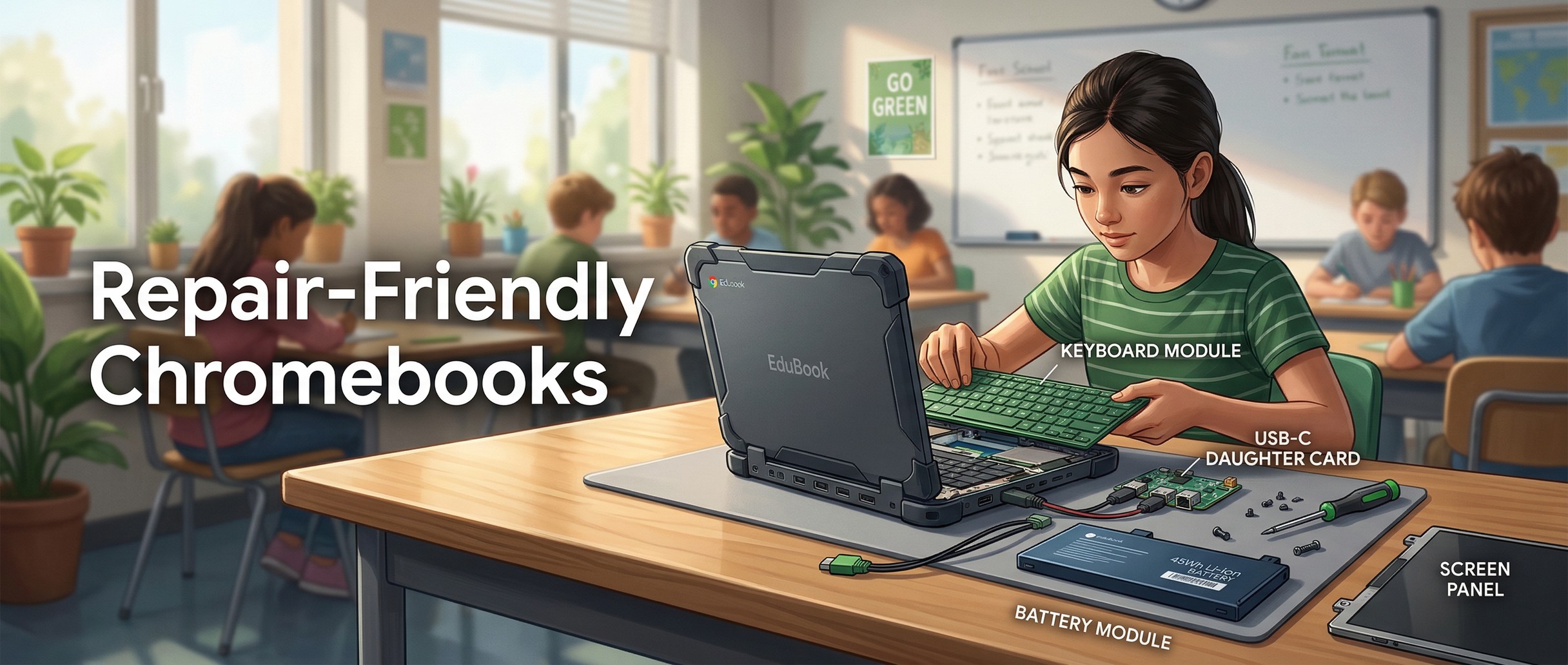
At FETC 2026, Lenovo unveiled the Chromebook 100e Gen 5 and 500e 2-in-1 Gen 5 with what the company calls a “Customer Replaceable Unit” design philosophy. Instead of requiring schools to send broken devices to depot repair or replace entire motherboards when a single port breaks, CRU-designated components can be swapped out by school IT staff on-site, without voiding warranties, without specialized tools, and without weeks of downtime. It’s the kind of thing that should have been standard years ago, and the fact that it’s being treated as a breakthrough tells you a lot about how education Chromebooks have been designed until now.
Soldered Ports and Buried Batteries Pushed Chromebook Repair Costs Up
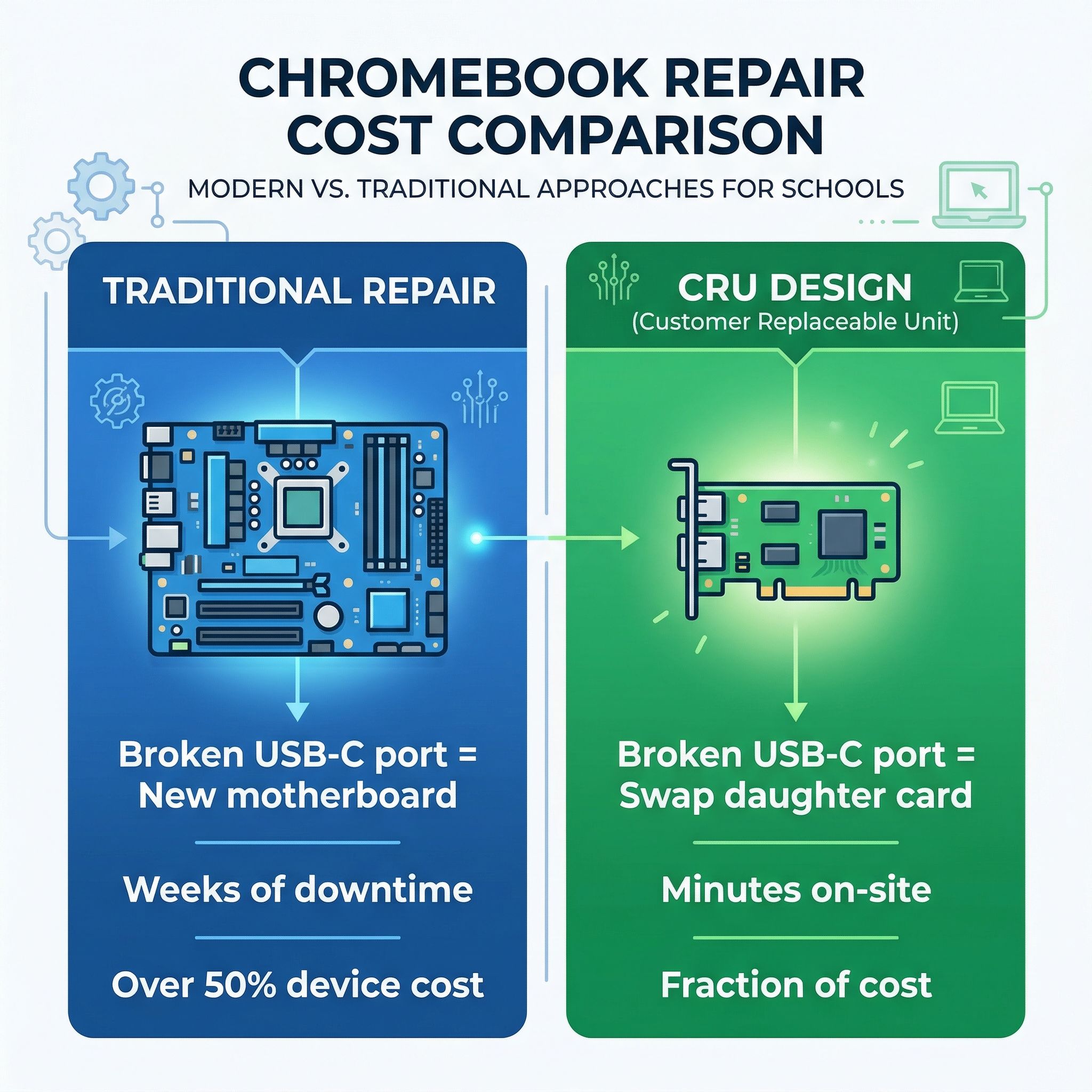
On the previous generation of Lenovo education Chromebooks, the USB-C charging port failed more often than anything else. Students are not gentle with cables, and after a year or two of being yanked at angles, the port loosens or fails entirely. On the Chromebook 100e Gen 4 with its MediaTek processor, that single USB-C port was soldered directly to the motherboard. A broken charging port meant replacing the entire logic board, a repair that typically cost more than half the price of a new device and required sending the unit out to an authorized service center for weeks.
Keyboards break next most often. Spilled drinks, pried-off keycaps, and the general entropy of a device that gets passed between dozens of students every year all take their toll. On previous generations, replacing a keyboard meant removing multiple layers of screws, disconnecting ribbon cables, and carefully extracting a component that was never really designed to come out. Many school IT departments didn’t bother, tossing the device in a pile of “broken” machines that sat in closets until someone got around to e-cycling them.
Battery degradation is the slow killer. A Chromebook that made it through the full school day in year one might only last until lunch by year three. Replacing batteries on most education Chromebooks requires opening the device, disconnecting the old battery, and navigating adhesive and cable routing that varies between models. For a school managing thousands of devices, the labor cost of a battery swap can exceed the cost of the battery itself, making a new device seem more economical than repair. This is exactly the calculus that the PIRG Chromebook Churn report warned about: when repair is harder and more expensive than replacement, devices become disposable by design. With Chromebook fleet prices climbing across education budgets, that disposable math is getting harder for districts to swallow.
CRU Parts Cover the Ports, Keyboard, and Battery on Gen 5
Lenovo’s Gen 5 education Chromebooks address each of those failure points with specific design changes, catalogued in TechToSchool’s analysis of the Gen 5 hardware.
The USB-C ports are the headline improvement. The 100e Gen 5 now has two USB-C ports instead of one, and both ports sit on a replaceable daughter card rather than being soldered to the motherboard. When a charging port breaks, and it will break eventually, the IT technician replaces a small, inexpensive board instead of the entire logic board. This single design change probably eliminates the most costly common repair in education Chromebooks.
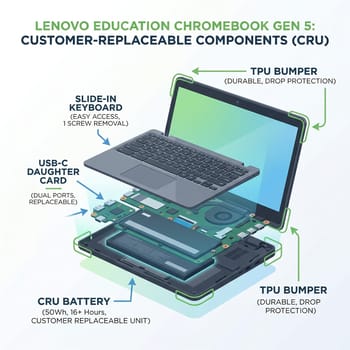
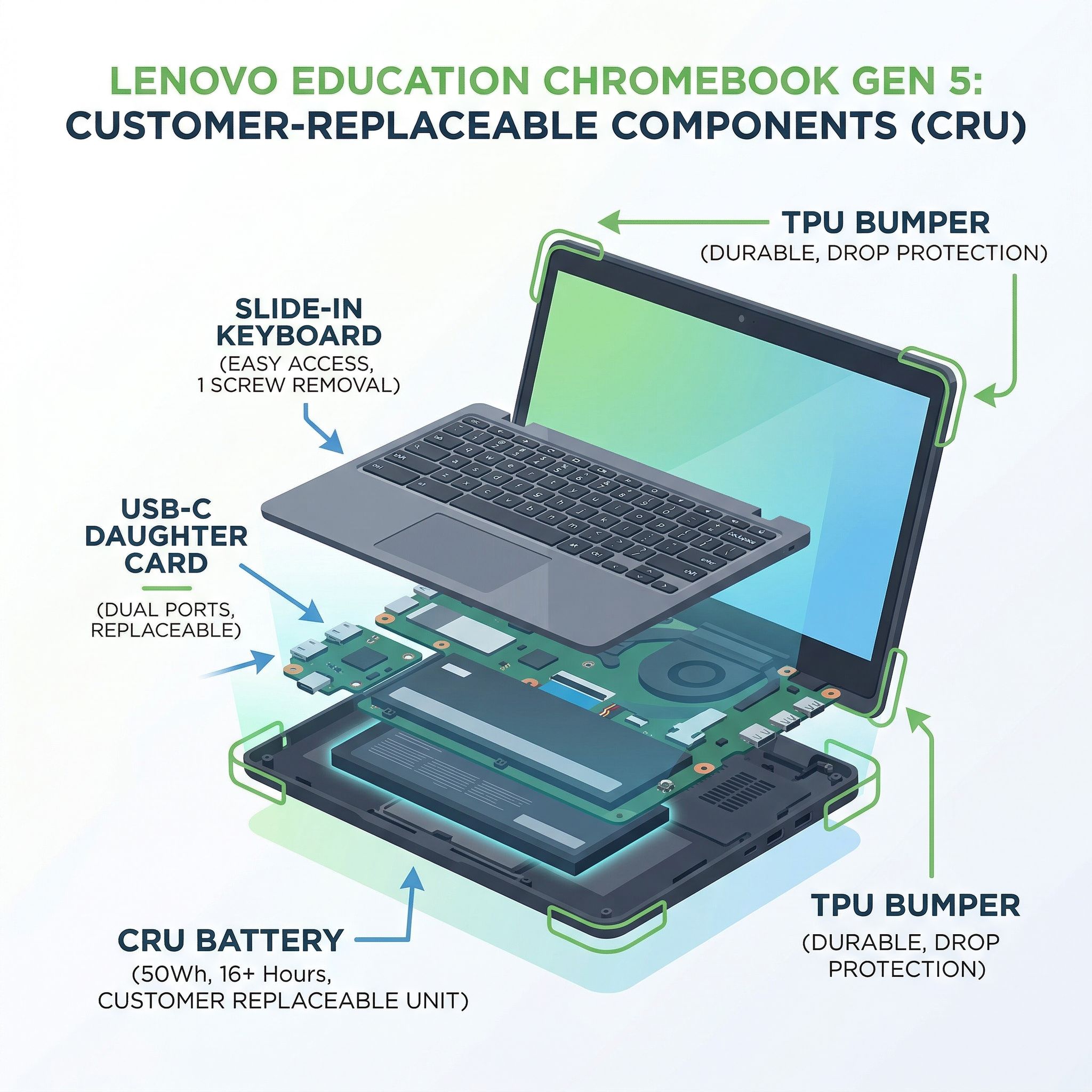
The keyboard uses what Lenovo calls a “slide-in topload” design. In some configurations, it’s secured with a single screw. Previous generations required removing multiple screws and navigating ribbon cables that could easily be damaged during the repair process. Multiplied across the hundreds of repairs a large district handles per year, Lenovo says the reduced fastener count cuts technician time per swap, though it has not published figures.
The battery is a 50Wh CRU unit rated for over 16 hours of runtime, a meaningful bump from the Gen 4’s 47Wh cell. It’s explicitly designated as a customer-replaceable component, meaning school technicians can swap it without voiding the warranty.
Lenovo is also moving to a “One Chassis / One Design” philosophy, where the 11.6-inch and 12.2-inch models share the same chassis architecture. For IT departments, this means a smaller parts inventory: fewer model-specific screws, bezels, and brackets cluttering the repair closet. A thicker TPU bumper provides improved drop protection, and both models retain MIL-STD durability ratings for drops and spills.
Both models run on either the MediaTek Kompanio 540 or Intel N-series processors, support Wi-Fi 7, and carry an AUE date of June 2036. A CRU design only matters if the software support window is long enough to justify multiple repairs over a device’s lifetime. With a 10-year update window, a Gen 5 Chromebook purchased this year could realistically survive two or three battery swaps, a keyboard replacement, and a port repair while still receiving security updates. That’s a different economic proposition than a device that expires in four years regardless of its physical condition.
Google, CTL, and Student Teams Are Building Repair Capacity in Schools
Google launched its Chromebook Self-Repair Program to help schools build in-house repair capabilities. The program provides Chromebook repair guides for supported models from Acer, Lenovo, and CTL, and positions device repair as a learning opportunity rather than a burden. Google encourages schools to fold repair into Career and Technical Education curricula.
That framing is already producing results. In December 2025, education Chromebook manufacturer CTL launched a free Chromebook Care Course for students in grades 8 through 12, training them to become certified repair technicians for their school’s fleet. The program covers hardware diagnosis, component replacement, help desk ticketing, and data privacy, skills that transfer directly to IT careers. In the Bowling Green, Kentucky school district, a student-run Chromebook repair team has been operating for over ten years. Students diagnose problems, order parts, perform repairs, and earn $10 an hour while doing it. The district saves on third-party repair costs, the students pick up skills that transfer to IT work, and the devices stay out of landfills.
Lenovo’s CRU Approach Sits Between Framework’s Modularity and Conventional Designs
Schools in 2026 can choose among several approaches to Chromebook repairability, and they’re not all solving the same problem.
The Framework Laptop Chromebook Edition sits at one end of that spectrum, built around modular, user-repairable design. Every component, including the ports themselves, can be swapped by the end user with Framework’s modular expansion card system. RAM, storage, display, speakers, battery, even the camera module are all individually replaceable with guided video instructions. But at its $999 launch price, the Framework Chromebook cost three to four times what schools pay for education-tier devices, and it wasn’t ruggedized for the particular violence that a K-12 backpack inflicts on electronics. Framework discontinued it in August 2024, so it survives only on the secondary market. It’s a proof of concept that repairability is possible, not a practical solution for fleet deployment.
In the middle is Lenovo’s CRU approach: targeted repairability for the components that break most often, at price points that make sense for education procurement. It’s not as comprehensive as Framework’s design, but it doesn’t need to be. Schools need to replace broken charging ports, dead batteries, and damaged keyboards quickly and cheaply. The CRU design addresses those specific needs without the premium pricing of a fully modular system.
Traditional education Chromebooks from HP, ASUS, Acer, and others sit at the far end, still using conventional designs where most repairs require significant disassembly. Some of these manufacturers are also improving repairability through Google’s Self-Repair Program. Whether competitors follow Lenovo’s lead will depend on how strongly school districts prioritize repairability in their procurement criteria, and that signal is getting louder partly because the NYT Chromebook investigation into “Chromebook remorse” has pushed durability and waste into the political conversation around school technology.
Four Questions to Ask About School Chromebook Repair Before You Buy
If you’re an IT administrator evaluating education Chromebooks for your next procurement cycle, repairability should be near the top of your criteria list.
- Which components are CRU-designated? There’s a difference between “repairable” and “customer-replaceable.” A device might be repairable by an authorized service center, but CRU designation means your own technicians can do the work without voiding the warranty. Ask specifically about the charging ports, keyboard, and battery, the three most common failure points.
- Does a broken USB-C port require motherboard replacement? This is the single most expensive common repair in education Chromebooks, and it’s the repair that the Gen 5’s daughter card design eliminates. If the answer is yes, factor the cost of motherboard replacements into your total cost of ownership calculation.
- What is the AUE date relative to your procurement cycle? A device with excellent repairability but a short software support window still becomes e-waste prematurely. Look for AUE dates that extend at least eight years from your purchase date. The Gen 5’s June 2036 date sets a strong benchmark.
- Are replacement parts available and affordably priced? PIRG scored Chromebook parts availability at 3.3 out of 20 compared to 9 out of 20 for non-Chromebook laptops. Lenovo’s CRU designation is a promising design choice, but it only matters if replacement daughter cards, batteries, and keyboards are readily available through education resellers at reasonable prices. The devices haven’t shipped yet, so independent verification of parts availability will have to wait.
The Design Has Changed Faster Than the Parts Supply
Lenovo’s CRU design, Google’s Self-Repair Program, and student repair initiatives are progress on the education e-waste problem. A Chromebook with swappable charging ports, a 10-year software support window, and a student repair team maintaining it is a more sustainable device than what schools were buying three years ago.
All the CRU claims come from press materials at FETC 2026 rather than real-world verification. We don’t yet know what replacement parts will cost, how quickly they’ll be available, or whether the CRU design performs as smoothly in practice as it does in Lenovo’s marketing videos. The PIRG report’s finding that Chromebook parts availability scored dramatically lower than other laptops should temper expectations until proven otherwise.
Three years ago, the Chromebook industry’s response to e-waste criticism was essentially “we’ll update the software longer.” Now Lenovo is redesigning chassis and students are training as certified repair technicians. The Chromebook e-waste crisis we wrote about hasn’t been solved, but the industry is now building hardware that takes the criticism seriously.
Frequently Asked Questions
Are Chromebooks repairable?
PIRG scored Chromebook parts availability at 3.3 out of 20, against 9 out of 20 for non-Chromebook laptops, and most education models still need significant disassembly for a common repair. Lenovo’s Gen 5 education Chromebooks break that pattern: the USB-C daughter card, keyboard, and battery are designated customer-replaceable, and Google’s Self-Repair Program publishes guides for supported Acer, Lenovo, and CTL models.
What are the common problems with school Chromebooks?
Three parts account for most of them. The USB-C charging port fails most often, loosened by cables yanked at angles; keyboards lose keycaps and take spills; and a battery that covered a full school day in year one may only reach lunch by year three.
How much does it cost to fix a school Chromebook?
On the previous generation, a broken charging port meant a new logic board, more than half the price of a new device plus weeks at an authorized service center. The Gen 5 swaps a small daughter card instead, though Lenovo has not published part prices.
What happens if your school Chromebook breaks?
Without in-house repair, it goes to depot repair for weeks or into the pile of broken machines waiting for e-cycling; districts trained through Google’s Self-Repair Program, CTL’s Chromebook Care Course, or a student team like Bowling Green’s fix it on site instead.


