
Acer Gateway Chromebook 314
Published on

The Acer Gateway Chromebook 314 is the Gateway-branded version of Acer’s long-running 14-inch Chromebook 314 line, an entry-level machine for browsing, schoolwork, and everyday Google apps. It pairs the dual-core Intel Celeron N4500 with 4GB of LPDDR4X memory and 64GB of eMMC storage, a hardware recipe built for light, single-task ChromeOS use. The 14-inch Full HD (1920x1080) panel uses an anti-glare ComfyView coating, a step up in sharpness from the 1366x768 screens common at this price even if its color and contrast stay modest. Acer rates the battery at up to 10.5 hours, and the device carries Chrome updates through June 2031, giving it roughly five years of support life from today. The body and most of the hardware come from the Acer Chromebook 314; the Gateway badge puts the most affordable configuration of that design on shelves under a familiar budget name.
Pros and cons
| Pros | Cons |
|---|---|
| Full HD 1920x1080 display, sharper than the 1366x768 budget norm | Only 4GB of RAM limits heavy multitasking and tab-heavy browsing |
| Rated up to 10.5 hours of battery | Anti-glare panel has narrow viewing angles and modest color (45% NTSC) |
| ChromeOS updates through June 2031 | Soldered RAM and non-upgradeable eMMC storage |
| 3.31 lb chassis that fits in a backpack | Sparse port selection: one USB-C and one USB-A |
| Silent fanless operation | No HDMI port for external displays |
| microSD card reader for cheap storage expansion | 720p HD webcam and tinny speakers |
Related Videos
Acer Gateway Chromebook 314 Comparison Chart
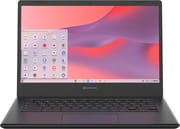 Acer Gateway Chromebook 314 | |
| Price | List Price: $229.00 Amazon Prices: |
| Model number | CBO314-1H-C476 |
| Performance Rating | 2.6 |
| Chromebook Plus | No |
| Processor | Dual-core 1.10 Ghz (max 2.80 Ghz) Intel Celeron Processor N4500 |
| RAM | 4 GB |
| Internal Storage | 64 GB eMMC |
| Screen Size | 14" |
| Screen Resolution | 1920x1080 |
| Screen Type | ComfyView |
| Touch Screen | No |
| Stylus / Pen | No Stylus Support |
| Dimensions width x length x thickness | 12.9 x 9 x 0.74 inches (327.66 x 228.6 x 18.8 mm) |
| Weight | 3.31 lbs (1.5 kg) |
| Backlit Keyboard | No |
| Webcam | 720p HD |
| WiFi | Wi-Fi 5 (802.11ac) |
| Bluetooth | Bluetooth 5.0 |
| Ethernet | No |
| Cellular Modem | No |
| HDMI | No HDMI |
| USB Ports | 1 USB 3, 1 USB-C USB-C handles charging, data, and display out |
| Thunderbolt Ports | No |
| Card Reader | microSD Card Reader |
| Battery | Li-ion |
| Battery Life | 10.5 hours |
| Fanless | Yes |
| Auto Update Expiration Date | June, 2031 |
Related Chromebooks
-
 Acer Chromebook 314 (CB314-4H/4HT)A budget-friendly 14-inch Chromebook with Intel Alder Lake-N processors, WiFi 6E, and software…
 -
 Acer Chromebook 314The Acer Chromebook 314 (CB314) is a fanless 14-inch laptop with an Intel Celeron N4000, sold in…
 -
 ASUS Chromebook C425The ASUS Chromebook C425 is a fanless 14-inch ChromeOS laptop on an Intel Core m3 with a 1920x1080…
 -
 ASUS Chromebook C424The ASUS Chromebook C424 boasts a crisp 14-inch FHD anti-glare display, durable spill-resistant…
 -
 HP Chromebook 14a (ne Series)The HP Chromebook 14a (ne series) is a 14-inch ChromeOS laptop on an Intel Celeron N4500 with 4GB…
 -
 HP Chromebook 14 G6The HP Chromebook 14 G6 is an education and business model with a Celeron N4020, 4GB or 8GB of RAM,…
Full HD screen on top of entry-level internals

The chassis measures about 12.9 x 9 x 0.74 inches and weighs roughly 3.31 pounds, which keeps it easy to slip into a backpack despite the 14-inch footprint. The shell is all plastic with a matte black finish and a small Gateway logo on the lid alongside the standard ChromeOS branding, a clean look that hides fingerprints reasonably well. Build quality shows the price, with some flex in the chassis and a light keyboard deck, though it holds together for the casual use this machine targets. The Full HD ComfyView display beats the 1366x768 panels on cheaper Chromebooks, yet its 220-nit brightness and roughly 45% NTSC color gamut mean it looks fine for documents and web pages while falling short for color-critical work or bright outdoor use. There is no touchscreen on this configuration, which helps keep both the weight and the price down.
At the core sits the Intel Celeron N4500, a 2-core, 2-threaded Jasper Lake chip that runs from a 1.1GHz base to a 2.8GHz boost and scores around 1,807 on PassMark’s multi-thread test. That is enough horsepower for a handful of Chrome tabs, Google Docs, email, and 1080p streaming, but the 4GB of memory is the ceiling. Open a dozen tabs or layer several Android apps on top and the system starts swapping and stuttering. MergeDroid found the chassis “pretty light for a 14 inch chromebook” and praised its battery, while still calling out the budget keyboard and weak speakers that carry over to this Gateway model. The N4500 covers a single browser-and-documents workload and has little headroom past that.
Wireless duties fall to dual-band WiFi 5 (802.11ac) and Bluetooth 5.0, both a generation behind the WiFi 6E found on pricier 314 variants and serviceable on most home networks. The physical ports amount to a single USB-A 3.2 Gen 1 connector and a single USB-C 3.2 Gen 1 port, the latter handling charging, data, and external display output through the 45W bundled adapter. Because charging occupies that lone USB-C port, you cannot drive a USB-C monitor and top up the battery at the same time without a hub. A microSD card reader offers a cheap way to expand the 64GB of eMMC storage, and a 3.5mm combo jack covers wired headsets. Anyone who needs wired networking can add a USB Ethernet adapter, and external monitors require a USB-C connection or adapter since there is no HDMI port.
Reviewer Insights

GenuineCritics: no load testing in the walkthrough
GenuineCritics walks through this exact SKU and confirms its headline numbers: the Intel Celeron N4500, 4GB of RAM, the Full HD anti-glare screen, WiFi 5, Bluetooth 5.0, and the rated 10.5-hour battery. The reviewer frames it as a device built for “web browsing, document editing, email, and streaming with ease” and highlights ChromeOS staples like fast startup and built-in security. The script recites specifications and never pushes the machine, so it confirms what ships in the box without showing how the hardware behaves under load.
MergeDroid: tinny speakers and two ports after a month of use
MergeDroid spent over a month with a Chromebook 314 and came away viewing it as “the ideal low-cost second machine.” He confirmed the strong battery life, noting he was “getting close to” the long runtime Acer advertises, and appreciated the fanless, silent design. His criticisms map onto the Gateway model’s limitations, starting with speakers that are “a bit tinny with no richness or bass,” a low-resolution webcam, and a minimalist port layout of one USB-A and one USB-C. He also pointed out that the USB-C port doubles for power, data, and display output, the same arrangement Gateway uses here.
Faster 314 configurations sit above this one
MergeDroid’s review of the 2023 CB314-4H covers an Intel Core i3-N305 model with 8GB of RAM, WiFi 6E, a 1080p webcam with a privacy slider, and AUE support into 2033, hardware he felt “would even qualify this as a Chromebook Plus.” The Gateway build gives up that processor, the extra memory, and the newer wireless in exchange for a lower entry price. Anyone weighing a convertible can watch True Choice’s Acer Spin 314 versus HP Chromebook 14 comparison, which shows how much screen quality and battery vary across budget 14-inch Chromebooks.
NotebookCheck and Consumer Reports both fault the display
NotebookCheck’s series overview scores the family around 78% and praises its compact size, light weight, and value while flagging an “underwhelming screen,” the absence of backlit keys, and performance that “keeps reminding you that this is still a low-end laptop.” Consumer Reports, testing a related N4020 314 variant, rated it an “excellent choice for traveling” with class-leading battery life but graded its display only “Fair,” citing a “narrow viewing angle” and weaker contrast than most rival Chromebooks.
Fine as a light-duty second laptop, held back by 4GB of RAM
The Gateway 314 makes the most sense as an affordable, low-stakes ChromeOS laptop for students and anyone who wants a simple machine for browsing, email, streaming, and Google Docs. As a second laptop or a first Chromebook, it covers the basics without fuss.
The 4GB of RAM is the limit in 2026, and anyone who keeps many tabs open, leans on Android or Linux apps, or wants a sharper, more colorful screen should step up. The non-touch panel, single USB-A and USB-C ports, and lack of HDMI or a backlit keyboard are the trade-offs that come with the price. Buyers who want more headroom should look at the Core i3-N305 versions of the Acer Chromebook 314 or a Chromebook Plus model, while those who liked the older 11-inch Gateway can compare it against the Acer Gateway Chromebook 311.
The Chromebook Comparison Chart lines these specs up against the rest of the catalog if you are still deciding.
Frequently Asked Questions
What processor does the Gateway Chromebook 314 use?
The Gateway Chromebook 314 runs the Intel Celeron N4500, a Jasper Lake chip with 2 cores and 2 threads running from a 1.1GHz base clock to a 2.8GHz boost. It scores approximately 1,807 on PassMark’s multi-thread benchmark, which is enough for web browsing, documents, email, and 1080p streaming but not for heavy multitasking or demanding apps.
Can I upgrade the RAM or storage in the Gateway Chromebook 314?
No. The Gateway Chromebook 314 ships with 4GB of soldered LPDDR4X memory and 64GB of eMMC storage, neither of which can be upgraded after purchase. You can expand usable storage with a microSD card or cloud storage, but the memory is fixed, so plan around the 4GB configuration when deciding whether it fits your needs.
What ports does the Gateway Chromebook 314 have?
The Gateway Chromebook 314 includes one USB-C 3.2 Gen 1 port, one USB-A 3.2 Gen 1 port, a microSD card reader, and a 3.5mm headphone and microphone combo jack. The USB-C port handles charging, data, and external display output, but there is no HDMI port, so connecting a monitor requires a USB-C connection or adapter.
How long will the Gateway Chromebook 314 receive updates?
Its Auto Update Expiration (AUE) date is June 2031. Until then, Google delivers ChromeOS updates that include new features, security patches, and bug fixes. From today that is roughly five years of guaranteed software support.
Is the Gateway Chromebook 314 the same as the Acer Chromebook 314?
Yes, in hardware terms. Gateway is a brand owned by Acer, and the Gateway Chromebook 314 (model CBO314-1H-C476) uses the same 14-inch chassis as the Acer Chromebook 314 line. It represents one of the most affordable configurations of that design, built around the Intel Celeron N4500 with 4GB of RAM.
Does the Gateway Chromebook 314 run Android and Linux apps?
Android apps from the Google Play Store run, and the optional ChromeOS Linux development environment is available. The 4GB of RAM and the entry-level Celeron N4500 mean you should keep those workloads light; running several at once will quickly use up available memory.